General
Scope of supply
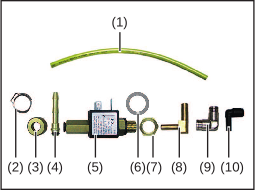 |
|
|
Scope of supply
|
|
|
Compressed air supply specifications
To ensure that it functions correctly, the following compressed air supply specifications must be met:
- Constant compressed air supply of at least 5 bar
- Compressed air is free of oil
- Compressed air is free of water
- Compressed air is free of dust – no dirt particles larger than 5 µm
Installation position
- all variants of the WF 15i/25i/30i R and R PAP
- all variants of the SB 500i R and R PAP
The installation of the OPT/i WF 7 bar gas purging option is illustrated using the WF 30i R robot wirefeeder. Installation on other devices is carried out in the same way.
Regardless of the type of device (PAP or conventional), an installation on the front or the back is possible.
Recommendation:- PAP: installation on the front (FSC side)
- Standard: installation on the back
If OPT/i WF gas nozzle touch sensing is already installed in the device, the OPT/i WF 7 bar gas purging option must be installed on the opposite side from the OPT/i WF gas nozzle touch sensing. The installation must be carried out as described, irrespective of the installation side.
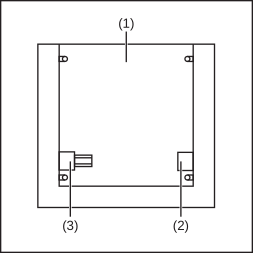
View of the rear of the device with housing cover removed
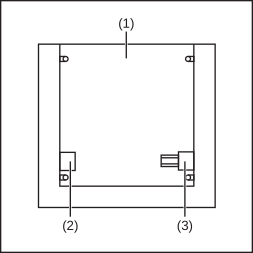
View of the rear of the device with housing cover removed
| (1) | Wirefeeder / SplitBox |
| (2) | OPT/i WF 7 bar gas purging |
| (3) | OPT/i WF gas nozzle touch sensing |
Tools required
- TX 20 TORX® screwdriver
- TX 25 TORX® screwdriver
- 17 mm flat spanner
- Knife
- Thread sealant (e.g. Teflon tape, Loctite, etc.)
Installing OPT/i WF 7 bar gas purging
Safety
WARNING!
Danger from incorrect operation and work that is not carried out properly.
This can result in serious personal injury and damage to property.
All the work and functions described in this document must only be carried out by technically trained and qualified personnel.
Read and understand this document in full.
Read and understand all safety rules and user documentation for this device and all system components.
WARNING!
Danger from electric current.
This can result in serious personal injury and damage to property.
Before starting work, switch off all the devices and components involved and disconnect them from the grid.
Secure all the devices and components involved to prevent unintentional restarting.
After opening the device, use a suitable measuring instrument to check that electrically charged components (such as capacitors) have been discharged.
WARNING!
Danger due to hot system components and/or equipment.
Can result in serious burns or scalding.
Before starting work, allow all hot system components and/or equipment to cool to +25°C/+77°F (e.g., coolant, water-cooled system components, wirefeeder drive motor, etc.)
Wear suitable protective equipment (e.g., heat-resistant gloves, safety goggles, etc.) if cooling down is not possible.
Safety
WARNING!
Danger from incorrect operation and work that is not carried out properly.
This can result in serious personal injury and damage to property.
All the work and functions described in this document must only be carried out by technically trained and qualified personnel.
Read and understand this document in full.
Read and understand all safety rules and user documentation for this device and all system components.
WARNING!
Danger from electric current.
This can result in serious personal injury and damage to property.
Before starting work, switch off all the devices and components involved and disconnect them from the grid.
Secure all the devices and components involved to prevent unintentional restarting.
After opening the device, use a suitable measuring instrument to check that electrically charged components (such as capacitors) have been discharged.
WARNING!
Danger due to hot system components and/or equipment.
Can result in serious burns or scalding.
Before starting work, allow all hot system components and/or equipment to cool to +25°C/+77°F (e.g., coolant, water-cooled system components, wirefeeder drive motor, etc.)
Wear suitable protective equipment (e.g., heat-resistant gloves, safety goggles, etc.) if cooling down is not possible.
Preparations
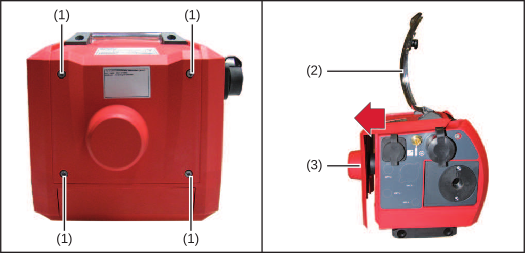
1Disconnect all connections on the device from all other system components
2Place the device on a suitable base
3Undo four TX 20 screws (1)
4Open cover (2)
5Pull the housing cover (3) off the device as shown
Installing OPT/i WF 7 bar gas purging
1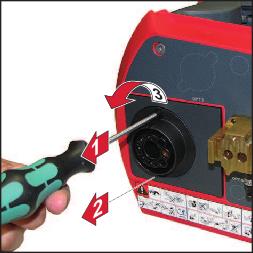
2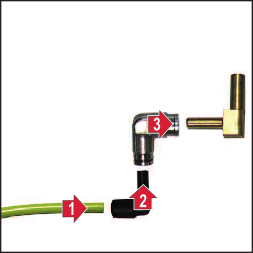
3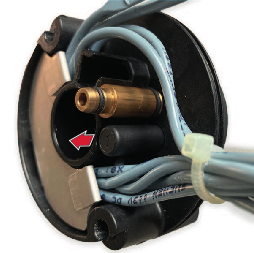
Remove blind plug
4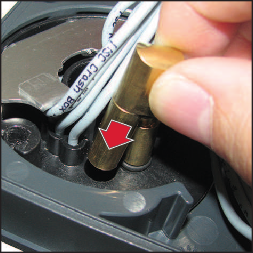
5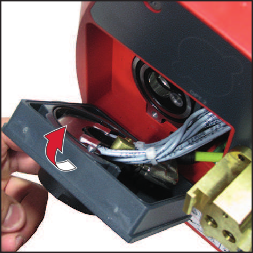
Do not trap the cables!
6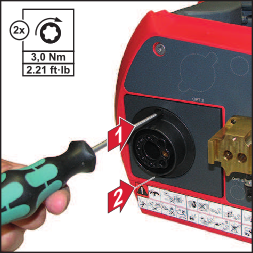
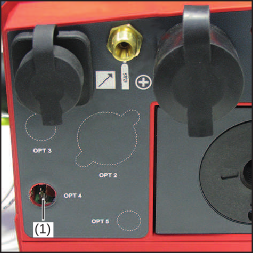
7Break off the OPT 4 bushing (1) or remove it using the knife
8Cut away any protruding flash with the knife
9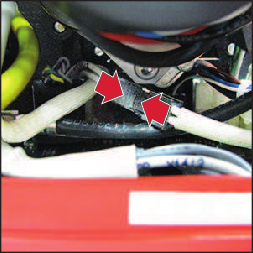
Connect the cable harness of the OPT/i WF 7 bar gas purging option to the cable harness in the device
10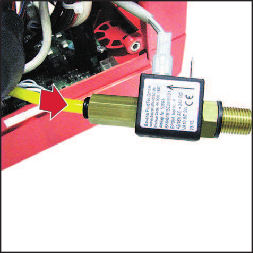
11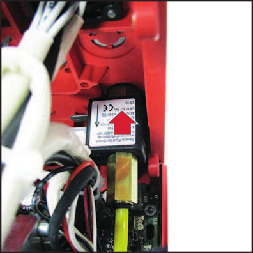
12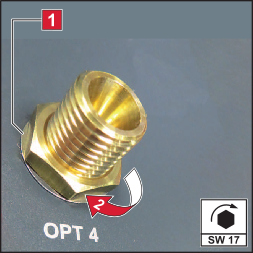
Matching disc has to cover the recess completely
13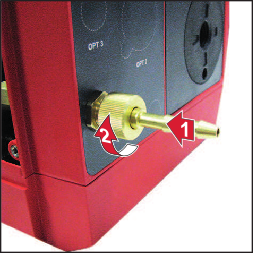
14Push the hose clamp supplied onto the hose connection
15Push the compressed air hose onto the hose connection and secure it using the hose clamp
And finally...
NOTE!
When fitting the housing cover, ensure that the cables and hoses are not kinked, trapped, sheared or damaged in any way.
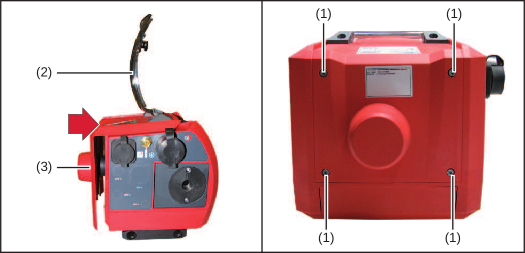
1Push housing cover (3) as far as it will go onto the device as shown
2Tighten the four TX 20 screws (1)
3Close the cover (2)
4Return the device to its original position
5Establish connections to other system components