General
Device concept
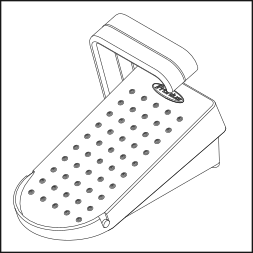
The RC Pedal TIG /TMC and RC Pedal TIG /BT remote controls allow the welding current to be easily adjusted with the aid of a foot pedal.
The welder's hands remain free, meaning that in addition to constant welding current correction, uninterrupted torch guidance is guaranteed.
When a remote control is connected or a Bluetooth connection established, the welding current set on the power source is deemed the maximum current. The total pedal travel corresponds to the range from the minimum welding current to the maximum welding current.
At low welding currents, the remote control allows for especially sensitive adjustment.
Device concept
The RC Pedal TIG /TMC and RC Pedal TIG /BT remote controls allow the welding current to be easily adjusted with the aid of a foot pedal.
The welder's hands remain free, meaning that in addition to constant welding current correction, uninterrupted torch guidance is guaranteed.
When a remote control is connected or a Bluetooth connection established, the welding current set on the power source is deemed the maximum current. The total pedal travel corresponds to the range from the minimum welding current to the maximum welding current.
At low welding currents, the remote control allows for especially sensitive adjustment.
Requirements
The remote controls can be operated with the following power sources:
RC Pedal TIG /TMC:
- iWave 190i, iWave 230i
- TransTig 170, TransTig 210
RC Pedal TIG /BT:
- iWave 230i
- TransTig 170, TransTig 210
- Only in certified countries
Options
Available option | Item number |
|---|---|
TMC extension 5 m | 43,0004,5979 |
Bluetooth trademarks
The Bluetooth® word mark and logos are registered trademarks owned by Bluetooth SIG, Inc. and any use of such marks by Fronius International GmbH is under license. Other trademarks and trade names are those of their respective owners.
Information on radio certification
The RC Pedal TIG /BT remote control is fitted with a wireless module.
In the USA, wireless modules are subject to FCC certification:
FCC
This wireless module is subject to Part 15 of the FCC Code of Federal Regulations. Its use is subject to the following conditions:
(1) This device must not cause any interferences and
(2) The device must be able to cope with any interference, including that which could adversely affect the operation of the module.
FCC ID: QOQBLE121LR
Industry Canada RSS
This device complies with the Industry Canada licence-exempt RSS standards. Its use is subject to the following conditions:
(1) This device must not cause any interferences and
(2) The device must be able to cope with any interference, including that which could adversely affect the operation of the module.
IC: 5123A-BGTBLE121LR
Unless expressly stated by the manufacturer, changes or modifications to the wireless module are not permitted and will invalidate the user's operating license for the device.
NOTE!
This equipment has been tested and found to comply with the limits for a Class A digital device, pursuant to Part 15 of the FCC Rules.
These limit values are intended to provide an adequate level of protection against harmful emissions when the device is used in an industrial environment. This device generates and uses high-frequency energy and may also radiate this energy. If the device is not installed and used according to the Operating Instructions, this could potentially lead to dangerous interference of the wireless communication system. Operation of this equipment in a residential area is likely to cause harmful interference, in which case users will be required to correct the interference at their own expense.
How it works
Depressing the pedal equates to continually increasing the welding current.
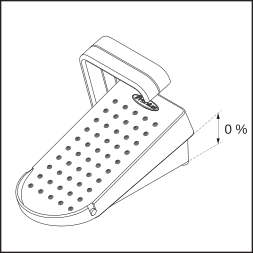
Pedal not actuated (0%)
... corresponds to the minimum current of the power source
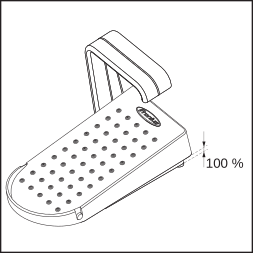
Pedal fully depressed (100%)
... corresponds to the welding current set on the power source
Depending on the starting current time setup parameter, the remote control may be operated in the following ways:
Starting current time = off
Starting current, main current, reduced current and final current as well as the duration of the currents are controlled solely by the welder actuating the pedal.
The further the pedal is depressed, the more current is available.
Starting current time = 0.01 - 30.0 s
- Starting current, UpSlope and starting current time are set on the power source.
- When the pedal is actuated, the welding process begins with the set starting current and UpSlope.
- The main current is reached at the end of the set UpSlope. The main current can be changed using the pedal.
The remote control specifies a percentage value of the set welding current according to the pedal position.
Manual metal arc welding
The welding current is controlled solely by the welder actuating the pedal.
The further the pedal is depressed, the more current is available.
Technical data
| RC Pedal TIG /TMC | RC Pedal TIG /BT |
Supply voltage | + 24 V DC | 3.0 V DC |
Connection to power source | TMC cable | Bluetooth |
Bluetooth range | - | Up to 10 m |
Bluetooth version | - | BLE 4.0 |
Frequency range | - | 2402 - 2480 MHz |
Transmission power | - | 8.32 dBm EIRP |
Channels | - | 40 (0 - 39) |
Modulation | - | GFSK |
Battery life | - | 3100 h |
Listing | - | BT SIG No. D041023 |
Protection class | IP 23 | IP 23 |
Temperature range | -10 - +40 °C | -10 - +40 °C |
Mark of conformity | CE, CSA | CE, FCC, IC |
Dimensions (l x w x h) | 276 x 138 x 190 mm | 260 x 140 x 175 mm |
Weight | 1.81 kg | 1.55 kg |
Control elements and connections
RC Pedal TIG/TMC: Control elements and connections
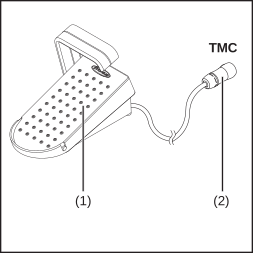
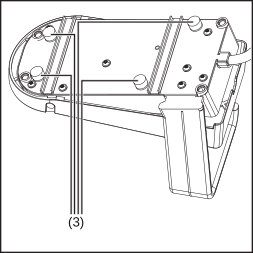
| (1) | Pedal |
| (2) | TMC cable |
| (3) | Screw-on rubber feet The rubber feet can be removed or replaced if necessary. |
RC Pedal TIG/TMC: Control elements and connections
| (1) | Pedal |
| (2) | TMC cable |
| (3) | Screw-on rubber feet The rubber feet can be removed or replaced if necessary. |
RC Pedal TIG/BT: Control elements and connections
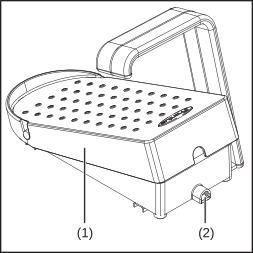
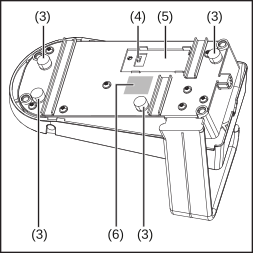
| (1) | Pedal |
| (2) | Status LED Lights up after switching on for 3 seconds. Flashes four times, if the remote control is connected to a receiver. The flashing stops if the connection is interrupted. Does not light up if the battery is weak or flat. |
| (3) | Screw-on rubber feet The rubber feet can be removed or replaced if necessary. |
| (4) | On/Off switch |
| (5) | Battery compartment Batteries are included in the scope of supply for the remote control. |
| (6) | Sticker with QR code and MAC address |
Start-up
RC Pedal TIG /TMC: connecting the remote control
1For TIG applications only:
Disconnect the TIG welding torch plug from the TMC connection on the power source
Disconnect the TIG welding torch plug from the TMC connection on the power source
2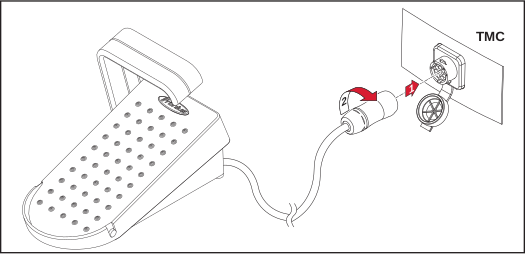
When the remote control is connected, the remote control symbol is displayed in the status bar on the power source.
The 2-step, 4-step and spot welding modes can no longer be selected.
RC Pedal TIG /TMC: connecting the remote control
1For TIG applications only:
Disconnect the TIG welding torch plug from the TMC connection on the power source
Disconnect the TIG welding torch plug from the TMC connection on the power source
2
When the remote control is connected, the remote control symbol is displayed in the status bar on the power source.
The 2-step, 4-step and spot welding modes can no longer be selected.
RC Pedal TIG /BT: connecting the remote control to the power source via Bluetooth
1Switch on remote control at the bottom
2Switch on power source and activate Bluetooth function
The remote control is ready to use when this is detected and displayed by the power source.
The remote control is ready to use when this is detected and displayed by the power source.
3Confirm Bluetooth settings on the power source if necessary
CAUTION!
Risk of injury and damage from unexpected arc ignition!
Unexpected ignition can be triggered by another pedal remote control connected to the power source.
Make sure that the correct pedal remote control is connected to the power source!
Check MAC address!
Beware when switching the remote control on/off:
Leave the remote control for at least 3 seconds after switching off, otherwise the switch off will not be detected.
If the device is switched on again too quickly after it has been switched off, the status LED illuminates for less than 3 seconds.
Setting the welding current and welding
WARNING!
Danger due to incorrect operation and incorrectly performed work.
This can result in serious injury and damage to property.
Do not use the functions described until you have thoroughly read and understood the Operating Instructions of the remote control, the power source and all other system components.
IMPORTANT! When the remote control is connected or the Bluetooth connection is established, the welding current set on the power source is only available when the pedal is fully depressed.
NOTE!
Parameters which can be adjusted on the remote control cannot be altered on the power source.
1Set the welding current on the power source
2Actuate the pedal
The ignition process is initiated (value change 5%).
The ignition process is initiated (value change 5%).
If the remote control's pedal is released, the welding process comes to an end in a controlled manner (gas post-flow, end of welding).
RC Pedal TIG /BT: changing the battery
Indication of empty batteries
The status LED does not light up after the device is switched on or does so for less than 3 seconds.
Alongside the Bluetooth user, a battery symbol showing the current state of discharge for the batteries is displayed on the power source.
Indication of empty batteries
The status LED does not light up after the device is switched on or does so for less than 3 seconds.
Alongside the Bluetooth user, a battery symbol showing the current state of discharge for the batteries is displayed on the power source.
RC Pedal TIG /BT: changing the battery
1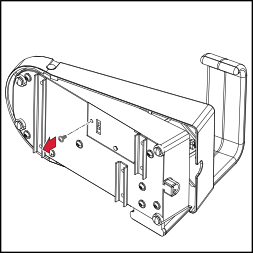
2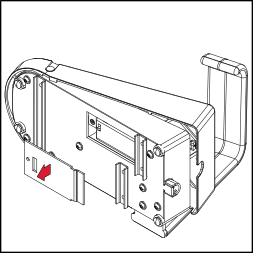
3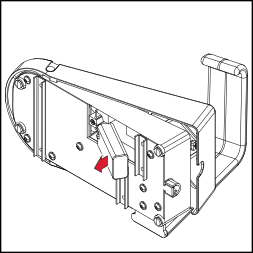
4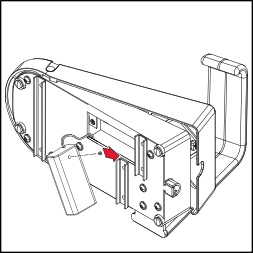
5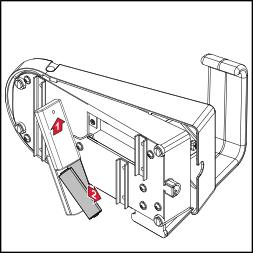
6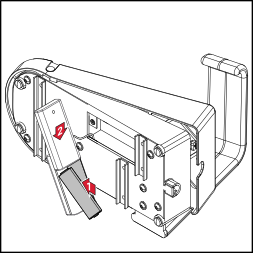
7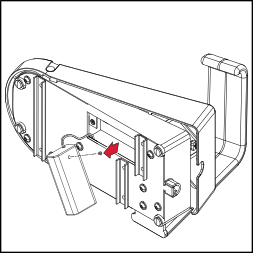
8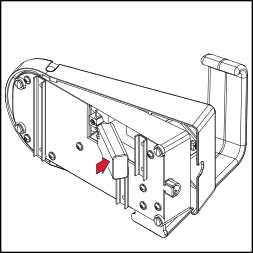
9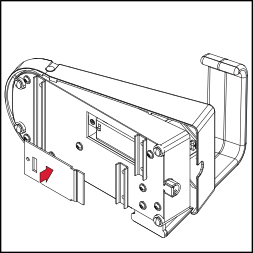
10