The warnings and safety instructions in these instructions are intended to protect people from possible injury and the product from damage.
DANGER!
Indicates an immediately dangerous situation
Serious injury or death will result if appropriate precautions are not taken.
Action step to escape the situation
WARNING!
Indicates a potentially dangerous situation
Death or serious injury may result if appropriate precautions are not taken.
Action step to escape the situation
CAUTION!
Indicates a potentially dangerous situation
Minor or moderate injury may result if appropriate precautions are not taken.
Action step to escape the situation
NOTE!
Indicates impaired work results and/or damage to the device and components
The warnings and safety instructions are an integral part of these instructions and must always be observed to ensure the safe and proper use of the product.
The warnings and safety instructions in these instructions are intended to protect people from possible injury and the product from damage.
DANGER!
Indicates an immediately dangerous situation
Serious injury or death will result if appropriate precautions are not taken.
Action step to escape the situation
WARNING!
Indicates a potentially dangerous situation
Death or serious injury may result if appropriate precautions are not taken.
Action step to escape the situation
CAUTION!
Indicates a potentially dangerous situation
Minor or moderate injury may result if appropriate precautions are not taken.
Action step to escape the situation
NOTE!
Indicates impaired work results and/or damage to the device and components
The warnings and safety instructions are an integral part of these instructions and must always be observed to ensure the safe and proper use of the product.
The device is manufactured using state-of-the-art technology and according to recognised safety standards. If used incorrectly or misused, however, it can cause:- injury or death to the operator or a third party,
- damage to the device and other material assets belonging to the operating company,
- inefficient operation of the device.
- be suitably qualified,
- have sufficient knowledge of welding and
- read and follow these operating instructions carefully.
The operating instructions must always be at hand wherever the device is being used. In addition to the operating instructions, attention must also be paid to any generally applicable and local regulations regarding accident prevention and environmental protection.
All safety and danger notices on the device - must be in a legible state,
- must not be damaged,
- must not be removed,
- must not be covered, pasted or painted over.
For the location of the safety and danger notices on the device, refer to the section headed "General" in the operating instructions for the device.
Before switching on the device, rectify any faults that could compromise safety.
The device is to be used exclusively for its intended purpose.
The device is intended solely for the welding processes specified on the rating plate.
Any use above and beyond this purpose is deemed improper.
Proper use includes:- carefully reading and following all the instructions given in the operating instructions
- studying and obeying all safety and danger notices carefully
- performing all stipulated inspection and maintenance work.
- Thawing out pipes
- Charging batteries
- Starting engines
The device is designed for use in industry and the workshop. The manufacturer accepts no responsibility for any damage caused through use in a domestic setting.
The manufacturer likewise accepts no liability for inadequate or incorrect results.
Operation or storage of the device outside the stipulated area will be deemed as not in accordance with the intended purpose.
Ambient temperature range:- during operation: -10 °C to + 40 °C (14 °F to 104 °F)
- during transport and storage: -20 °C to +55 °C (-4 °F to 131 °F)
- up to 50% at 40 °C (104 °F)
- up to 90% at 20 °C (68 °F)
The surrounding air must be free from dust, acids, corrosive gases or substances, etc.
Can be used at altitudes of up to 2000 m (6561 ft. 8.16 in.)
The operator must only allow persons to work with the device who: - are familiar with the fundamental instructions regarding safety at work and accident prevention and have been instructed in how to use the device
- have read and understood these operating instructions, especially the section "safety rules", and have confirmed as much with their signatures
- are trained to produce the required results.
Checks must be carried out at regular intervals to ensure that operators are working in a safety-conscious manner.
Before using the device, all persons instructed to do so undertake:- to observe the basic instructions regarding safety at work and accident prevention,
- to read these operating instructions, especially the "Safety rules" section and sign to confirm that they have understood them and will follow them.
Before leaving the workplace, ensure that people or property cannot come to any harm in your absence.
Devices with a higher rating may affect the energy quality of the mains due to their current consumption.
This may affect a number device types in terms of:- Connection restrictions
- Criteria with regard to the maximum permissible mains impedance *)
- Criteria with regard to the minimum short-circuit power requirement *)
*) at the interface with the public grid
see "Technical data"
In this case, the plant operator or the person using the device should check whether the device may be connected, where appropriate by discussing the matter with the power supply company.
IMPORTANT! Ensure that the mains connection is earthed properly
Anyone working with the device exposes themselves to numerous risks, e.g.- flying sparks and hot pieces of metal
- Arc radiation, which can damage eyes and skin
- Hazardous electromagnetic fields, which can endanger the lives of those using cardiac pacemakers
- Risk of electrocution from mains current and welding current
- Harmful welding fumes and gases
- Flame-resistant
- Insulating and dry
- Covers the whole body, is undamaged and in good condition
- Safety helmet
- Trousers with no turn-ups
- Protect eyes and face from UV rays, heat and sparks using a protective visor and regulation filter
- Wear regulation protective goggles with side protection behind the protective visor
- Wear stout footwear that provides insulation even in wet conditions
- Protect the hands with suitable gloves (electrically insulated and providing protection against heat)
- Wear ear protection to reduce the harmful effects of noise and to prevent injury
- Make them aware of all the dangers (risk of dazzling by the arc, injury from flying sparks, harmful welding fumes, noise, possible risks from mains current and welding current, etc.)
- Provide suitable protective equipment
- Alternatively, erect suitable safety screens/curtains.
The device generates a maximum sound power level of <80 dB(A) (ref. 1pW) when idling and in the cooling phase following operation at the maximum permissible operating point under maximum rated load conditions according to EN 60974-1.
It is not possible to provide a workplace-related emission value during welding (or cutting) as this is influenced by both the process and the environment. All manner of different welding parameters come into play, including the welding process (MIG/MAG, TIG welding), the type of power selected (DC or AC), the power range, the type of weld metal, the resonance characteristics of the workpiece, the workplace environment, etc.
The fumes produced during welding contain harmful gases and vapours.
Welding fumes contain substances that cause cancer, as stated in Monograph 118 of the International Agency for Research on Cancer.
Use at-source extraction and a room extraction system.
If necessary, use a welding torch with an integrated extraction device.
Keep your face away from welding fumes and gases.
Fumes and hazardous gases- must not be breathed in
- must be extracted from the working area using appropriate methods.
Ensure an adequate supply of fresh air. Ensure that there is a ventilation rate of at least 20 m³ per hour at all times.
Otherwise, a welding helmet with an air supply must be worn.
If there is any doubt about whether the extraction capacity is sufficient, the measured toxic emission values should be compared with the permissible limit values.
The following components are responsible, amongst other things, for the degree of toxicity of welding fumes:- Metals used for the workpiece
- Electrodes
- Coatings
- Cleaners, degreasers, etc.
- Welding process used
The relevant material safety data sheets and manufacturer's specifications for the listed components should therefore be studied carefully.
Recommendations for trade fair scenarios, risk management measures and for identifying working conditions can be found on the European Welding Association website under Health & Safety (https://european-welding.org).
Flammable vapours (e.g. solvent fumes) should be kept away from the arc's radiation area.
Close the shielding gas cylinder valve or main gas supply if no welding is taking place.
Flying sparks may cause fires or explosions.
Never weld close to flammable materials.
Flammable materials must be at least 11 metres (36 ft. 1.07 in.) away from the arc, or alternatively covered with an approved cover.
A suitable, tested fire extinguisher must be available and ready for use.
Sparks and pieces of hot metal may also get into adjacent areas through small gaps or openings. Take appropriate precautions to prevent any danger of injury or fire.
Welding must not be performed in areas that are subject to fire or explosion or near sealed tanks, vessels or pipes unless these have been prepared in accordance with the relevant national and international standards.
Do not carry out welding on containers that are being or have been used to store gases, propellants, mineral oils or similar products. Residues pose an explosive hazard.
An electric shock is potentially life threatening and can be fatal.
Do not touch live parts either inside or outside the device.
During MIG/MAG welding and TIG welding, the welding wire, the wire spool, the feed rollers and all pieces of metal that are in contact with the welding wire are live.
Always set the wirefeeder up on a sufficiently insulated surface or use a suitable, insulated wirefeeder holder.
Make sure that you and others are protected with an adequately insulated, dry base or cover for the earth or ground potential. This base or cover must extend over the entire area between the body and the earth or ground potential.
All cables and leads must be secured, undamaged, insulated and adequately dimensioned. Replace loose connections and scorched, damaged, or inadequately dimensioned cables and leads immediately.
Use the handle to ensure the power connections are tight before every use.
In the case of power cables with a bayonet connector, rotate the power cable around the longitudinal axis by at least 180° and pretension.
Do not wrap cables or leads around the body or parts of the body.
The electrode (rod electrode, tungsten electrode, welding wire, etc.) must- never be immersed in liquid for cooling
- never be touched when the welding system is switched on.
Double the open circuit voltage of a welding system can occur between the welding electrodes of two welding systems. Touching the potentials of both electrodes at the same time may be fatal under certain circumstances.
Arrange for the mains cable to be checked regularly by a qualified electrician to ensure the ground conductor is functioning properly.
Protection class I devices require a mains supply with ground conductor and a connector system with ground conductor contact for proper operation.
Operation of the device on a mains supply without ground conductor and on a socket without ground conductor contact is only permitted if all national regulations for protective separation are observed.
Otherwise, this is considered gross negligence.
If necessary, provide adequate earthing for the workpiece.
Switch off unused devices.
Wear a safety harness if working at height.
Before working on the device, switch it off and pull out the mains plug.
Attach a clearly legible and easy-to-understand warning sign to the device to prevent anyone from plugging the mains plug back in and switching it on again.
After opening the device:- Discharge all live components
- Ensure that all components in the device are de-energised.
If work on live parts is required, have a second person switch off the main switch at the right moment.
If the following instructions are ignored, meandering welding currents can develop with the following consequences:- Fire hazard
- Overheating of parts connected to the workpiece
- Damage to ground conductors
- Damage to device and other electrical equipment
Ensure that the workpiece is held securely by the workpiece clamp.
Attach the workpiece clamp as close as possible to the area that is to be welded.
Position the device with sufficient insulation against electrically conductive environments, such as insulation against conductive floor or insulation to conductive racks.
If power distribution boards, twin-head mounts, etc., are being used, note the following: The electrode of the welding torch / electrode holder that is not used is also live. Make sure that the welding torch / electrode holder that is not used is kept sufficiently insulated.
In the case of automated MIG/MAG applications, ensure that only an insulated wire electrode is routed from the welding wire drum, large wirefeeder spool or wirespool to the wirefeeder.
Devices in emission class A:- Are only designed for use in industrial settings
- Can cause line-bound and radiated interference in other areas
- Satisfy the emissions criteria for residential and industrial areas. This is also true for residential areas in which the energy is supplied from the public low-voltage mains.
EMC device classification as per the rating plate or technical data.
In certain cases, even though a device complies with the standard limit values for emissions, it may affect the application area for which it was designed (e.g. when there is sensitive equipment at the same location, or if the site where the device is installed is close to either radio or television receivers).
If this is the case, then the operator is obliged to take appropriate action to rectify the situation.
Check and evaluate the immunity to interference of nearby devices according to national and international regulations. Examples of equipment that may be susceptible to interference from the device include:- Safety devices
- Network, signal and data transfer lines
- IT and telecommunications devices
- Measuring and calibrating devices
- Mains supply
- If electromagnetic interference arises despite the correct mains connection, additional measures are necessary (e.g. use of a suitable line filter)
- Welding power-leads
- must be kept as short as possible
- must be laid close together (to avoid EMF problems)
- must be kept well apart from other leads
- Equipotential bonding
- Earthing of the workpiece
- If necessary, establish an earth connection using suitable capacitors.
- Shield, if necessary
- Shield other devices nearby
- Shield the entire welding installation
- Effects on the health of persons in the vicinity, e.g. those with pacemakers and hearing aids
- Individuals with pacemakers must seek advice from their doctor before approaching the device or any welding that is in progress
- For safety reasons, maintain as large a distance as possible between the welding power-leads and the head/torso of the welder
- Do not carry welding power-leads and hosepacks over the shoulders or wind them around any part of the body
- Fans
- Cogs
- Rollers
- Shafts
- Wire spools and welding wires
Do not reach into the rotating cogs of the wire drive or into rotating drive components.
Covers and side panels may only be opened/removed while maintenance or repair work is being carried out.
During operation- Ensure that all covers are closed and all side panels are fitted properly.
- Keep all covers and side panels closed.
The welding wire emerging from the welding torch poses a high risk of injury (piercing of the hand, injuries to the face and eyes, etc.).
Therefore, always keep the welding torch facing away from the body (devices with wirefeeder) and wear suitable protective goggles.
Never touch the workpiece during or after welding - risk of burns.
Slag can jump off cooling workpieces. The specified protective equipment must therefore also be worn when reworking workpieces, and steps must be taken to ensure that other people are also adequately protected.
Welding torches and other parts with a high operating temperature must be allowed to cool down before handling.
Special provisions apply in areas at risk of fire or explosion
- observe relevant national and international regulations.
Welding machines for work in areas with increased electrical risk (e.g. near boilers) must carry the 'Safety' sign. However, the welding machine must not be located in such areas.
Risk of scalding from escaping coolant. Switch off cooling unit before disconnecting coolant flow or return lines.
Observe the information on the coolant safety data sheet when handling coolant. The coolant safety data sheet may be obtained from your service centre or downloaded from the manufacturer's website.
Use only suitable load-carrying equipment supplied by the manufacturer when transporting devices by crane.
- Hook chains or ropes onto all suspension points provided on the suitable load-carrying equipment.
- Chains or ropes must be at the smallest angle possible to the vertical.
- Remove gas cylinder and wirefeeder (MIG/MAG and TIG devices).
If the wirefeeder is attached to a crane holder during welding, always use a suitable, insulated wirefeeder hoisting attachment (MIG/MAG and TIG devices).
Welding with the device during crane transport is only permitted if this is clearly stated in the intended use of the device.
If the device has a carrying strap or handle, this is intended solely for carrying by hand. The carrying strap is not to be used if transporting with a crane, counterbalanced lift truck or other mechanical hoist.
All lifting tackle (straps, handles, chains, etc.) used in connection with the device or its components must be tested regularly (e.g. for mechanical damage, corrosion or changes caused by other environmental factors).
The testing interval and scope of testing must comply with applicable national standards and directives as a minimum.
Odourless and colourless shielding gas may escape unnoticed if an adapter is used for the shielding gas connection. Prior to assembly, seal the device-side thread of the adapter for the shielding gas connection using suitable Teflon tape.
Especially with ring lines, contaminated shielding gas can cause damage to equipment and reduce welding quality.
Meet the following requirements regarding shielding gas quality:- Solid particle size < 40 µm
- Pressure condensation point < -20 °C
- Max. oil content < 25 mg/m³
Use filters if necessary.
Shielding gas cylinders contain gas under pressure and can explode if damaged. As the shielding gas cylinders are part of the welding equipment, they must be handled with the greatest of care.
Protect shielding gas cylinders containing compressed gas from excessive heat, mechanical impact, slag, naked flames, sparks and arcs.
Mount the shielding gas cylinders vertically and secure according to instructions to prevent them falling over.
Keep the shielding gas cylinders well away from any welding or other electrical circuits.
Never hang a welding torch on a shielding gas cylinder.
Never touch a shielding gas cylinder with an electrode.
Risk of explosion - never attempt to weld a pressurised shielding gas cylinder.
Only use shielding gas cylinders suitable for the application in hand, along with the correct and appropriate accessories (regulator, hoses and fittings). Only use shielding gas cylinders and accessories that are in good condition.
Turn your face to one side when opening the valve of a shielding gas cylinder.
Close the shielding gas cylinder valve if no welding is taking place.
If the shielding gas cylinder is not connected, leave the valve cap in place on the cylinder.
The manufacturer's instructions must be observed as well as applicable national and international regulations for shielding gas cylinders and accessories.
Risk of suffocation from the uncontrolled escape of shielding gas
Shielding gas is colourless and odourless and, in the event of a leak, can displace the oxygen in the ambient air.
- Ensure an adequate supply of fresh air with a ventilation rate of at least 20 m³/hour.
- Observe safety and maintenance instructions on the shielding gas cylinder or the main gas supply.
- Close the shielding gas cylinder valve or main gas supply if no welding is taking place.
- Check the shielding gas cylinder or main gas supply for uncontrolled gas leakage before every start-up.
- The maximum permissible tilt angle is 10°.
- Observe relevant national and international regulations.
Use internal directives and checks to ensure that the workplace environment is always clean and clearly laid out.
Only set up and operate the device in accordance with the degree of protection shown on the rating plate.
When setting up the device, ensure there is an all-round clearance of 0.5 m (1 ft. 7.69 in.) to ensure that cooling air can flow in and out freely.
When transporting the device, observe the relevant national and local guidelines and accident prevention regulations. This applies especially to guidelines regarding the risks arising during transport.
Do not lift or transport operational devices. Switch off and disconnect devices from the grid before transport or lifting.
Before transporting the device, allow coolant to drain completely and detach the following components:- Wirefeeder
- Wirespool
- Shielding gas cylinder
After transporting the device, the device must be visually inspected for damage before commissioning. Any damage must be repaired by trained service technicians before commissioning the device.
Only operate the device when all safety devices are fully functional. If the safety devices are not fully functional, there is a risk of- injury or death to the operator or a third party
- damage to the device and other material assets belonging to the operator
- inefficient operation of the device
Any safety devices that are not functioning properly must be repaired before switching on the device.
Never bypass or disable safety devices.
Before switching on the device, ensure that no one is likely to be endangered.
Check the device at least once a week for obvious damage and proper functioning of safety devices.
Always fasten the shielding gas cylinder securely and remove it beforehand if the device is to be transported by crane.
Only the manufacturer's original coolant is suitable for use with our devices due to its properties (electrical conductibility, anti-freeze agent, material compatibility, flammability, etc.).
Only use suitable original coolant from the manufacturer.
Do not mix the manufacturer's original coolant with other coolants.
Only connect the manufacturer's system components to the cooling circuit.
Cooling Liquid FCL 10/20 does not ignite. The ethanol-based coolant can ignite under certain conditions. Transport the coolant only in its original, sealed containers and keep well away from any sources of ignition.
Used coolant must be disposed of properly in accordance with the relevant national and international regulations. The coolant safety data sheet may be obtained from your service centre or downloaded from the manufacturer's website.
Check the coolant level before starting to weld, while the system is still cool.
It is impossible to guarantee that bought-in parts are designed and manufactured to meet the demands made of them, or that they satisfy safety requirements.
- Use only original spare and wearing parts (also applies to standard parts).
- Do not carry out any modifications, alterations, etc. to the device without the manufacturer's consent.
- Components that are not in perfect condition must be replaced immediately.
- When ordering, please give the exact designation and part number as shown in the spare parts list, as well as the serial number of your device.
The housing screws provide the ground conductor connection for earthing the housing parts.
Only use original housing screws in the correct number and tightened to the specified torque.
The manufacturer recommends that a safety inspection of the device be performed at least once every 12 months.
The manufacturer recommends that the welding machines be calibrated at the same 12-monthly interval.
A safety inspection should be carried out by a qualified electrician- after any additional parts are installed, or after any conversions
- after repair, care and maintenance are carried out
For safety inspections, follow the appropriate national and international standards and directives.
Further details on the safety inspection and calibration can be obtained from your Fronius branch or your Fronius partner. They will provide you with any documents you may require, on request.
Waste electrical and electronic equipment must be collected separately and recycled in an environmentally responsible manner in accordance with the EU Directive and national law. Used equipment must be returned to the distributor or through a local, authorised collection and disposal system. Correct disposal of the used device promotes sustainable recycling of resources and prevents negative effects on health and the environment.
Packaging materials- Collect separately
- Observe locally valid regulations
- Compress the cardboard box to reduce volume
- Directive 2014/30/EU on Electromagnetic Compatibility
- Directive 2014/35/EU Low Voltage Directive
- Directive 2014/53/EU Radio Equipment Directive
- EN IEC 60974 Arc welding equipment
- And so on
The full text of the EU Declaration of Conformity can be found at
https://www.fronius.com .
Devices with the CSA mark satisfy the requirements of the relevant standards in Canada and the USA.
With regard to data security, the user is responsible for:- backing up any changes made to the factory settings
- saving and retaining personal settings
Copyright of these operating instructions remains with the manufacturer.
Text and illustrations were accurate at the time of printing, subject to change.
We are grateful for suggestions for improvement and information regarding any discrepancies in the operating instructions.
Five cooling units are available for cooling the power sources listed below:- FK 4000 with oscillating armature pump and auto-transformer
- FK 4000 R with centrifugal pump
- FK 4000 R FC with centrifugal pump and flow sensor with coolant filter
- FK 4000 R US with centrifugal pump, auto-transformer and flow sensor with coolant filter
- FK 4000 Rob with magnetically-coupled centrifugal pump, flow sensor with coolant filter and thermostat
The cooling units described in these instructions can be operated with all power sources in the: - TransSynergic 4000 / 5000 series
- TransPuls Synergic 2700 series
- TransPuls Synergic 3200 / 4000 / 5000 series
- TransTig 2200 / 4000 / 5000 series
- MagicWave 1700 / 2200 / 4000 / 5000 series
Five cooling units are available for cooling the power sources listed below:- FK 4000 with oscillating armature pump and auto-transformer
- FK 4000 R with centrifugal pump
- FK 4000 R FC with centrifugal pump and flow sensor with coolant filter
- FK 4000 R US with centrifugal pump, auto-transformer and flow sensor with coolant filter
- FK 4000 Rob with magnetically-coupled centrifugal pump, flow sensor with coolant filter and thermostat
The cooling units described in these instructions can be operated with all power sources in the: - TransSynergic 4000 / 5000 series
- TransPuls Synergic 2700 series
- TransPuls Synergic 3200 / 4000 / 5000 series
- TransTig 2200 / 4000 / 5000 series
- MagicWave 1700 / 2200 / 4000 / 5000 series
- Cooling unit
- 5 l coolant in a canister
- Four Allen screws (for securing the power source on the cooling unit)
- Four M5 nuts (for securing the power source on the cooling unit)
- One 2 A fuse (spare)
- Operating instructions
- Max. 8 hrs/day operation (single-shift operation) / FK 4000 Rob: 24 hrs/day operation (three-shift operation)
- Only original coolant from the manufacturer is used
- Regular maintenance and regular change of coolant
CAUTION!
Danger from using non-permitted coolant.
This can result in serious damage to property.
Only use coolant available from the manufacturer.
Do not mix different coolants.
When changing the coolant, make sure all the coolant is replaced.
When switching from ethanol-based coolant to FCL 10 coolant, Change Kit FCL10 must be used and the instructions provided must be followed.
The following information on leaks does not apply to the FK 4000 Rob.
The shaft sealing surfaces inside the coolant pump are lubricated by the coolant, meaning that a certain leakage flow should always be expected. A low leakage flow is permitted.
The coolant pump requires a certain warm-up time after being started for the first time or upon restarting after a long period of downtime. An increased leakage flow can occur during this warm-up phase. The leakage flow will normally sink back down to a low level after the warm-up phase. If this is not the case then contact After-Sales Service.
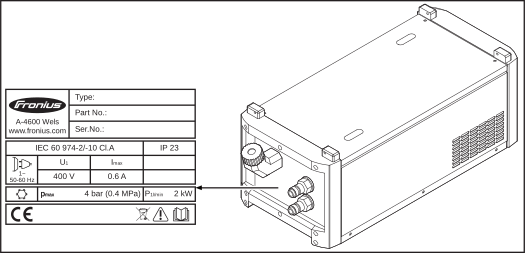
The cooling unit is fitted with safety symbols and a rating plate. The rating plate and safety symbols must not be removed or painted over. The symbols warn against operating the equipment incorrectly, as this may result in serious injury and damage.
| Welding is dangerous. The following basic requirements must be met to ensure the equipment is used properly: - Welders must be sufficiently qualified
- Suitable protective equipment must be used
- All persons not involved must be kept at a safe distance from the cooling unit and the welding process
|
| Do not use the functions described here until you have thoroughly read and understood the following documents: - these operating instructions
- all the operating instructions for the system components, especially the safety rules
|
| Do not dispose of used devices with domestic waste. Dispose of them according to the safety rules. |
- TransPuls Synergic 2700
- TransSynergic 4000 and TransPuls Synergic 4000, max. length of the interconnecting hosepack 5 m (16 ft. 5 in.)
- TransSynergic 5000 and TransPuls Synergic 5000, max. length of the interconnecting hosepack 1.2 m (4 ft.)
NOTE!
The cooling unit is supplied with the auto-transformer FK 4000 option as standard.
- TransPuls Synergic 2700
- TransSynergic 4000 and TransPuls Synergic 4000, max. length of the interconnecting hosepack 5 m (16 ft. 5 in.)
- TransSynergic 5000 and TransPuls Synergic 5000, max. length of the interconnecting hosepack 1.2 m (4 ft.)
NOTE!
The cooling unit is supplied with the auto-transformer FK 4000 option as standard.
- TransSynergic 4000 and TransPuls Synergic 4000, length of the interconnecting hosepack over 5 m (16 ft. 5 in.)
- TransSynergic 5000 and TransPuls Synergic 5000, length of the interconnecting hosepack over 1.2 m (4 ft.)
- PullMig or PushPull hosepacks
- Multilock hosepacks
- Robacta machine hosepacks
- Robacta or Robacta Drive robot hosepacks
- TIME and JobMaster welding torches
- MIG/MAG pulsed arc welding
- Welding in a higher power range
- Robot welding
- The flow sensor with coolant filter option is fitted as standard in the cooling unit
- The flow sensor with coolant filter option is fitted as standard in the cooling unit
- The thermostat option is fitted as standard in the cooling unit
- The flow sensor with coolant filter option is fitted as standard in the cooling unit
- The FK 4000 auto-transformer option is fitted as standard in the cooling unit
- The cooling unit is intended for the American market. The other cooling units are not available on the American market
- FK 4000 R
- FK 4000 Rob
- FK 4000 R FC
The FK 4000 and FK 4000 R US cooling units are equipped with the FK 4000 auto-transformer option as standard.
- The FK 4000 auto-transformer is required if the cooling unit must be operated using a multivoltage power source (MV). The multivoltage power source has an input voltage of 3 x 200 - 240 V / 3 x 380 - 460 V (+/- 10%)
- The FK 4000 auto-transformer converts this voltage from the power source into what the cooling unit needs
- FK 4000 R
- FK 4000 Rob
- FK 4000 R FC
The FK 4000 and FK 4000 R US cooling units are equipped with the FK 4000 auto-transformer option as standard.
- The FK 4000 auto-transformer is required if the cooling unit must be operated using a multivoltage power source (MV). The multivoltage power source has an input voltage of 3 x 200 - 240 V / 3 x 380 - 460 V (+/- 10%)
- The FK 4000 auto-transformer converts this voltage from the power source into what the cooling unit needs
- FK 4000 - only if the interconnecting hosepack does not exceed a length of 5 m (16 ft. 5 in.)
- FK 4000 R
The FK 4000 R US, FK 4000 R FC and FK 4000 Rob cooling units are fitted with the flow sensor with coolant filter option as standard.
How it works:- The option monitors the coolant flow during welding
- If the coolant flow falls below 0.7l/min (0.18 gal./min [US]), "no | H2" is automatically displayed, the welding current is interrupted and the cooling unit switches off
- If the welding system has a Comfort or WeldProcessData (OPC Fronius LocalNet server) control panel, the coolant flow can be shown on it
- To display the coolant flow value, press the F3 parameter selection / indicator key on the Comfort control panel
- Insufficient coolant
- Contaminated coolant
- Leaks in the cooling circuit
- Faulty coolant pump
- Frozen coolant (welding at too low a temperature)
- FK 4000
- FK 4000 R
- FK 4000 R FC
- FK 4000 R US
The FK 4000 Rob cooling unit has a thermostat option as standard.
- The thermostat option monitors the coolant temperature
- If the coolant temperature rises to above 70°C (185°F), the "hot | H2" indicator is automatically displayed and the welding current is interrupted. The cooling unit remains operational
- The thermostat restores the welding current when the temperature falls to 65°C (149°F).
The coolant filter is equipped with a CrNi screen; its function is to filter dirt particles above 100 micrometres in size from the coolant. This ensures that no coarse dirt particles can pass into the coolant circuit. The coolant filter is fitted to the coolant return connection on the cooling unit.
WARNING!
Operating the equipment incorrectly can cause serious injury and damage.
All functions described in this document must only be used by trained and qualified personnel. Do not use any of the functions described until you have thoroughly read and understood the following documents:
this document
all the operating instructions for the system components, especially the safety rules
WARNING!
Operating the equipment incorrectly can cause serious injury and damage.
All functions described in this document must only be used by trained and qualified personnel. Do not use any of the functions described until you have thoroughly read and understood the following documents:
this document
all the operating instructions for the system components, especially the safety rules
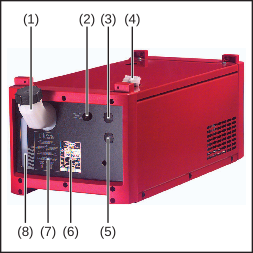
| (1) | Fill nozzle with screw cap |
| (2) | Fuse for coolant pump |
| (3) | Blanking cover or coolant return connection (red) |
| (4) | Connector |
| (5) | Blanking cover or coolant flow connection (blue) |
| (6) | Rating plate |
| (7) | Operating and maintenance instructions |
| (8) | Viewing window for coolant level |
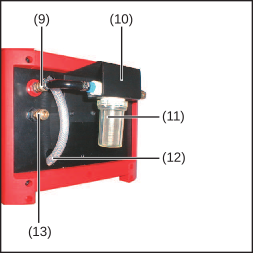
| (9) | Blanking cover or coolant return connection (red) |
| (10) | Mounting plate for coolant filter (included in scope of supply of flow sensor with coolant filter option) |
| (11) | Coolant filter (included in scope of supply of flow sensor with coolant filter option) |
| (12) | Drain hose |
| (13) | Blanking cover or coolant flow connection (blue) |
WARNING!
Danger from incorrect operation and work that is not carried out properly.
This can result in serious personal injury and damage to property.
All the work and functions described in this document must only be carried out by technically trained and qualified personnel.
Read and understand this document in full.
Read and understand all safety rules and user documentation for this device and all system components.
WARNING!
Danger from incorrect operation and work that is not carried out properly.
This can result in serious personal injury and damage to property.
All the work and functions described in this document must only be carried out by technically trained and qualified personnel.
Read and understand this document in full.
Read and understand all safety rules and user documentation for this device and all system components.
WARNING!
Danger from machines falling or toppling over.
This can result in serious injury and damage to property.
Place all system components on a solid, level surface in such a way that they remain stable.
WARNING!
Danger from electric current.
An electric shock can be fatal.
Ensure the cooling unit is properly insulated.
Always ensure that there is no electrically conductive connection between the base plate of the cooling unit and the surface.
Before installing the cooling unit, remove all electrically conductive parts between the base plate of the cooling unit and the surface.
- Protection against penetration by solid foreign bodies with diameters > 12.5 mm (0.49 in.)
- Protection against spraywater at any angle up to 60° to the vertical
Cooling air
The system must be set up in such a way that the cooling air can flow unimpeded through the slots in the side panels. Ensure that there is always an all-round clearance of 0.5 m (1 ft 7.69 in.) around the device.
CAUTION!
Risk from insufficient cooling air supply.
This can result in serious damage to property.
Air inlets and outlets must never be covered, not even partially.
Dust
Ensure that any metallic dust, for example from grinding work, is not sucked into the system by the fan.
Outdoor operation
The device can be set up and operated outdoors in accordance with degree of protection IP23. Avoid direct wetting (e.g. from rain).
The cooling unit is delivered empty.
Use only original Fronius coolant (Cooling Liquid FCL 10/20 or torch coolant) when filling the cooling unit. Other coolants are not recommended for electrical conductivity and material compatibility reasons.
The coolant pump may only be used with original coolant supplied by the manufacturer. Do not allow the coolant pump to run dry (even for a very short time), as this will destroy the coolant pump. The manufacturer accepts no liability for damage caused in such cases.
The device is intended solely for use in conjunction with Fronius system components.
The device is to be used exclusively for its intended purpose.
Any use above and beyond this purpose is deemed improper.
Proper use also includes:- Fully reading and understanding these Operating Instructions
- Following all the instructions and safety rules in these Operating Instructions
- Performing all stipulated inspection and servicing work
The device is designed for use in industry and the workshop. The manufacturer accepts no responsibility for any damage caused through use in a domestic setting.
WARNING!
An electric shock can be fatal.
Before starting work:
turn the power source mains switch to the "O" position
disconnect the power source from the mains
ensure that the power source remains disconnected from the mains until all work has been completed
After opening the device, use a suitable measuring instrument to check that electrically charged components (e.g. capacitors) have been discharged.
WARNING!
An inadequate ground conductor connection can cause serious injury or damage.
The housing screws provide a suitable ground conductor connection for earthing the housing and must NOT be replaced by any other screws that do not provide a reliable ground conductor connection.
WARNING!
An electric shock can be fatal.
Before starting work:
turn the power source mains switch to the "O" position
disconnect the power source from the mains
ensure that the power source remains disconnected from the mains until all work has been completed
After opening the device, use a suitable measuring instrument to check that electrically charged components (e.g. capacitors) have been discharged.
WARNING!
An inadequate ground conductor connection can cause serious injury or damage.
The housing screws provide a suitable ground conductor connection for earthing the housing and must NOT be replaced by any other screws that do not provide a reliable ground conductor connection.
The coolant connections can be installed either at the front of the cooling unit or at the rear, thanks to the different central connectors.
When using the cooling unit with a TPS 2700, the coolant connections are to be moved from the rear to the front of the cooling unit.
NOTE!
Make sure that no coolant enters the device.
If there is any coolant on the exterior of the device, remove it immediately.
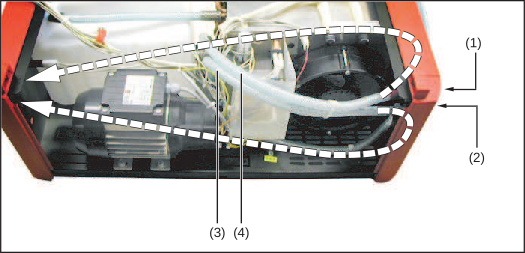
1Disconnect the cooling unit from all system components and ensure that it remains so for the duration of all work
2Unscrew the three screws from the right side panel (as seen from the front) of the cooling unit and remove the side panel
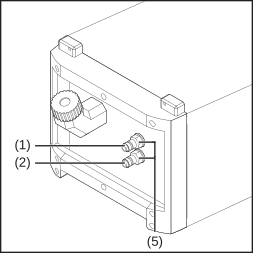
3Unscrew the plastic nuts from the coolant connections (1) and (2)
4Route hoses for coolant return (3) and coolant flow (4) to the front panel
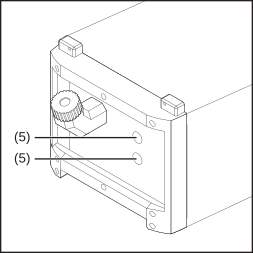
5Remove blanking covers (5) from the front and attach to the rear
NOTE!
Fit the coolant return connection (1) at the top and secure using the red plastic nut (coolant return is indicated by red insulating tape).
6Feed the coolant connection (1) and (2) from the inside outwards through the housing and secure to the front of the unit using the previously unscrewed plastic nuts
7Fit the side panel to the cooling unit and secure using three screws
WARNING!
An electric shock can be fatal.
Before starting work:
turn the power source mains switch to the "O" position
disconnect the power source from the mains
ensure that the power source remains disconnected from the mains until all work has been completed
After opening the device, use a suitable measuring instrument to check that electrically charged components (e.g. capacitors) have been discharged.
WARNING!
An inadequate ground conductor connection can cause serious injury or damage.
The housing screws provide a suitable ground conductor connection for earthing the housing and must NOT be replaced by any other screws that do not provide a reliable ground conductor connection.
WARNING!
An electric shock can be fatal.
Before starting work:
turn the power source mains switch to the "O" position
disconnect the power source from the mains
ensure that the power source remains disconnected from the mains until all work has been completed
After opening the device, use a suitable measuring instrument to check that electrically charged components (e.g. capacitors) have been discharged.
WARNING!
An inadequate ground conductor connection can cause serious injury or damage.
The housing screws provide a suitable ground conductor connection for earthing the housing and must NOT be replaced by any other screws that do not provide a reliable ground conductor connection.
The TS 4000 MV / 5000 MV and TPS 2700 MV / 4000 MV / 5000 MV power sources can be operated as standard at a mains voltage of 3 x 200-240V / 3 x 380-460V (+/-10%). The mains voltage switching in the power source takes place automatically.
The cooling units are factory-configured for the following mains voltages: |
FK 4000 | = | 3 x 230 / 400 V, 50 / 60 Hz, +/-10% |
FK 4000 R | = | 3 x 400 V, 50 / 60 Hz, +/-10% |
FK 4000 Rob | = | 3 x 400 V, 50 / 60 Hz, +/-10% |
FK 4000 R FC | = | 3 x 400 V, 50 / 60 Hz, +/-10% |
FK 4000 R US | = | 3 x 230 / 460 V, 50 / 60 Hz, +/- 10% |
| | |
The cooling units are adapted accordingly for other mains voltages with the help of an auto-transformer. |
NOTE!
The auto-transformer is available as an option for the FK 4000 R, FK 4000 Rob and FK 4000 R FC cooling units.
For the FK 4000 and FK 4000 R US cooling units, the auto-transformer is fitted as standard.
The auto-transformer in the FK 4000, FK 4000 R and FK 4000 Rob cooling units can be configured for the following mains voltages:- 3 x 200 / 400 V
- 3 x 200 / 440 V
- 3 x 200 / 460 V
- 3 x 230 / 400 V (= factory configuration)
- 3 x 230 / 440 V
- 3 x 230 / 460 V
Mains frequency in each case 50 / 60 Hz, mains voltage tolerance +/- 10%. |
The auto-transformer in the FK 4000 R US cooling unit can be configured for the following mains voltages:- 3 x 200 / 400 V
- 3 x 200 / 440 V
- 3 x 200 / 460 V
- 3 x 230 / 400 V
- 3 x 230 / 440 V
- 3 x 230 / 460 V (= factory configuration)
Mains frequency in each case 50 / 60 Hz, mains voltage tolerance +/- 10%. |
NOTE!
To adapt the FK 4000 R, FK 4000 Rob and FK 4000 R FC cooling units for the respective mains voltage, the optional auto-transformer must be installed on the cooling unit.
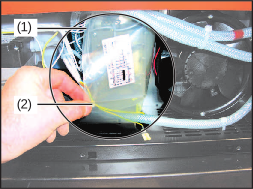
Remove plastic film
1Ensure that the cooling unit is disconnected from all system components and remains so for the duration of all work
2Unscrew the three screws from the right side panel (as seen from the front) of the cooling unit and remove the side panel
3Loosen and remove the plastic film (1) on the clip (2)
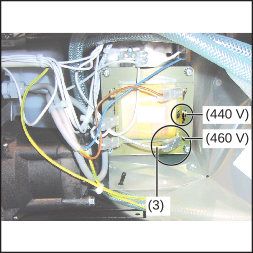
Change the auto-transformer connections (example shows FK 4000 R US)
4Change the auto-transformer connections according to the circuit diagram: connect the white cable (3) to the required mains voltage (the image to the left shows the reconnection of the auto-transformer using the FK 4000 R US as an example. The reconnection is carried out in the same way for other units; only the possible voltages differ.- In the circuit diagram for the unit, the factory configuration is shown by a solid line and the other options by a dashed line.
The circuit diagram can be found on the inside of the side panel.
The welding system can be fitted to a trolley to make the entire system more mobile.
NOTE!
If the welding system is not equipped with an auto-transformer, the cooling unit must be installed right at the bottom.
The welding system can be fitted to a trolley to make the entire system more mobile.
NOTE!
If the welding system is not equipped with an auto-transformer, the cooling unit must be installed right at the bottom.
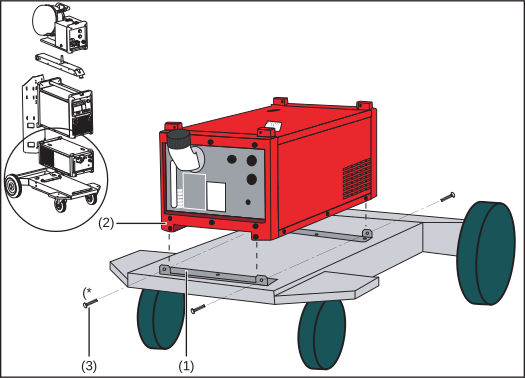
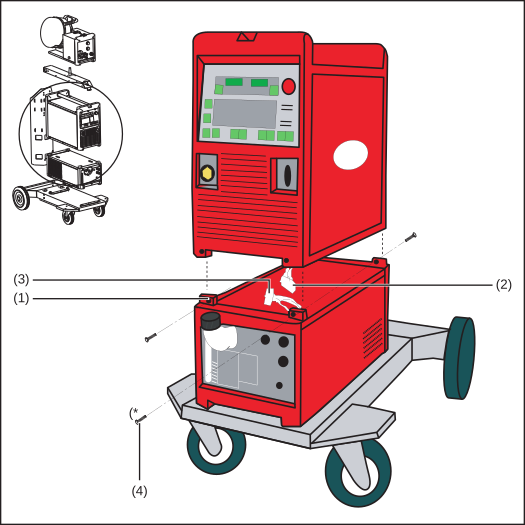
1Place the cooling unit on the trolley base and fixing bracket (1)
NOTE!
The fixing brackets must be placed within the plastic feet (2) of the cooling unit.
2Secure the cooling unit to the fixing brackets using the four TX 25 screws provided (3), two at the front and two at the back
(* | Trolley scope of supply |
WARNING!
Danger from electrical current.
This can result in serious personal injury and damage to property.
Before starting work, switch off all devices and components involved and disconnect them from the grid.
Secure all devices and components involved so they cannot be switched back on.
WARNING!
Danger from electrical current.
This can result in serious personal injury and damage to property.
Before starting work, switch off all devices and components involved and disconnect them from the grid.
Secure all devices and components involved so they cannot be switched back on.
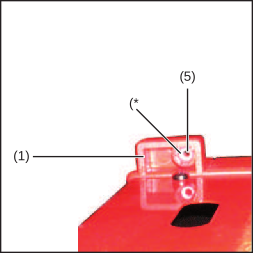
1Insert the M5 nuts provided (5) into the hexagon-shaped openings on the fixing bars (1) from the inside
2Unscrew the TX 25 screws from the protective cover on the underside of the power source and remove the protective cover (if present)
| (* | Cooling unit scope of supply |
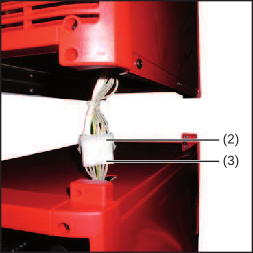
3Pull the power source connector (2) as far out of the power source as possible
4Position the power source above the cooling unit
5Connect the power source connector (2) to the cooling unit connector (3)
CAUTION!
Risk of short circuit from kinked or damaged cables.
When positioning the power source, ensure that the cable is not kinked.
NOTE!
When positioning the power source, the cooling unit fixing bars must be placed within the plastic feet of the power source.
6Placing the power source on the cooling unit
7Secure the power source to the cooling unit fixing bars using the Allen screws provided (4), two at the front and two at the back
WARNING!
Danger from electrical current.
This can result in serious personal injury and damage to property.
Before starting work, switch off all devices and components involved and disconnect them from the grid.
Secure all devices and components involved so they cannot be switched back on.
WARNING!
Danger from electrical current.
This can result in serious personal injury and damage to property.
Before starting work, switch off all devices and components involved and disconnect them from the grid.
Secure all devices and components involved so they cannot be switched back on.
NOTE!
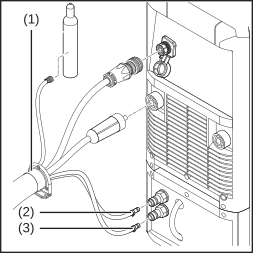
For TS 4000 / 5000, TPS 3200 / 4000 / 5000 power sources, the power source (1) must be connected to the cooling unit using an interconnecting hosepack.
1Plug in and secure the interconnecting hosepack strain-relief device (1) in the opening provided on the base of the trolley (see trolley operating instructions)
2Connect the red hose from the interconnecting hosepack (2) to the coolant return connection on the cooling unit
3Connect the blue hose from the interconnecting hosepack (3) to the coolant flow connection on the cooling unit
NOTE!
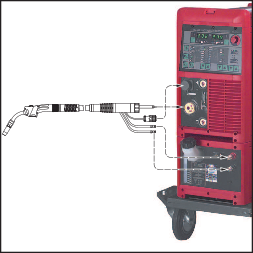
A water-cooled welding torch with an external coolant connection is required for welding with a TPS 2700 power source and cooling unit.
The coolant flow and return connections must be moved to the front of the cooling unit (see "Fitting coolant connections to the front of the unit").
1Connect the red welding torch hose (2) to the coolant return connection on the cooling unit
2Connect the blue welding torch hose (3) to the coolant flow connection on the cooling unit
WARNING!
Danger from electrical current.
This can result in serious personal injury and damage to property.
Before starting work, switch off all devices and components involved and disconnect them from the grid.
Secure all devices and components involved so they cannot be switched back on.
WARNING!
Danger from electrical current.
This can result in serious personal injury and damage to property.
Before starting work, switch off all devices and components involved and disconnect them from the grid.
Secure all devices and components involved so they cannot be switched back on.
NOTE!
The cooling unit is delivered without any coolant.
The coolant is supplied separately in a canister. Fill and bleed the cooling unit before start-up.
NOTE!
Make sure that no coolant enters the device.
If there is any coolant on the exterior of the device, remove it immediately.
1Undo the screw cap on the fill nozzle
Locking ring on coolant flow connection, sealing cone inside coolant flow connection
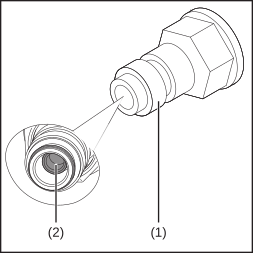
2Pull back the locking ring (1) on the coolant flow connection, disconnect the coolant hose and let go of the locking ring (1)
3Carefully push back the sealing cone (2) in the centre of the coolant flow connection using a wooden or plastic pin (Ø = max. 6 mm / 0.236 in.), until it audibly engages
4Fill with fresh coolant
5Pull back the locking ring (1) on the coolant flow connection to release the sealing cone (2) and then let go of the locking ring (1)
6Connect the coolant flow connection hose to the coolant flow connection
7Screw the screw cap onto the fill nozzle
NOTE!
The coolant level and cleanliness of the coolant must always be checked before commissioning the cooling unit.
1Connect the power source to the mains
2Turn the power source mains switch to the "I" position- The coolant pump starts up
3Check the coolant flow until you can see a steady return flow of coolant through the fill nozzle
NOTE!
During welding, check at regular intervals that the coolant is flowing properly.
You should be able to see a steady return flow of coolant through the fill nozzle.
WARNING!
Danger from incorrect operation and work that is not carried out properly.
This can result in serious personal injury and damage to property.
All the work and functions described in this document must only be carried out by technically trained and qualified personnel.
Read and understand this document in full.
Read and understand all safety rules and user documentation for this device and all system components.
WARNING!
Danger from electrical current.
This can result in serious personal injury and damage to property.
Before starting work, switch off all devices and components involved and disconnect them from the grid.
Secure all devices and components involved so they cannot be switched back on.
After opening the device, use a suitable measuring instrument to check that electrically charged components (such as capacitors) have been discharged.
WARNING!
Danger due to insufficient ground conductor connection.
This can result in serious personal injury and damage to property.
The housing screws provide a suitable ground conductor connection for grounding the housing.
The housing screws must not under any circumstances be replaced by other screws without a reliable ground conductor connection.
WARNING!
Danger from coolant leakage.
This can result in serious personal injury and damage to property.
Immediately remove any coolant that enters the device or spills onto its exterior during the work described in the following.
WARNING!
This can result in serious burns or scalding.
Before carrying out any work, allow the coolant to cool to +25 °C / +77 °F.
WARNING!
Danger from incorrect operation and work that is not carried out properly.
This can result in serious personal injury and damage to property.
All the work and functions described in this document must only be carried out by technically trained and qualified personnel.
Read and understand this document in full.
Read and understand all safety rules and user documentation for this device and all system components.
WARNING!
Danger from electrical current.
This can result in serious personal injury and damage to property.
Before starting work, switch off all devices and components involved and disconnect them from the grid.
Secure all devices and components involved so they cannot be switched back on.
After opening the device, use a suitable measuring instrument to check that electrically charged components (such as capacitors) have been discharged.
WARNING!
Danger due to insufficient ground conductor connection.
This can result in serious personal injury and damage to property.
The housing screws provide a suitable ground conductor connection for grounding the housing.
The housing screws must not under any circumstances be replaced by other screws without a reliable ground conductor connection.
WARNING!
Danger from coolant leakage.
This can result in serious personal injury and damage to property.
Immediately remove any coolant that enters the device or spills onto its exterior during the work described in the following.
WARNING!
This can result in serious burns or scalding.
Before carrying out any work, allow the coolant to cool to +25 °C / +77 °F.
Under normal operating conditions, the device requires only a minimum of care and maintenance. However, it is vital to observe some important points to ensure the welding system remains in a usable condition for many years.
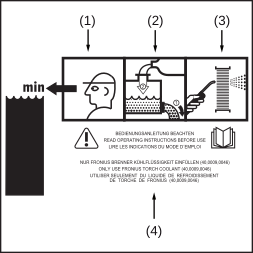
| (1) | Check coolant level |
| (2) | Change the coolant |
| (3) | Gas purge the cooler |
| (4) | Read operating instructions |
The relevant maintenance intervals and work are described in detail in the following pages.
At every start-up
CAUTION!
Risk due to start-up without coolant.
This can result in serious damage to property.
If water-cooled system components are operated without coolant, this will normally result in the failure of the system components.
Fronius shall not be liable for any damage resulting from such action. In addition, no warranty claims will be entertained.
- Ensure that all the hosepacks, the welding torch and the ground earth connection are undamaged
- Check that there is an all-round clearance of 0.5 m (1 ft 7.69 in.) to ensure that cooling air can flow in and out freely
- Check the screw connections between all system components for tightness
- Check all the coolant connections of the welding system for tightness
- Monitor the coolant return flow in the coolant container
- If no coolant is returning to the container, identify and remedy the cause
Once a week
- Check coolant level. If the coolant level is below the "min" mark, top up with coolant
- Check the purity of the coolant. Change the coolant if necessary
CAUTION!
Risk from non-permitted coolant.
This can result in serious damage to property.
Use only original Fronius coolant (Cooling Liquid FCL 10/20 or torch coolant) when filling the cooling unit.
Other coolants are not recommended for electrical conductivity and material compatibility reasons.
- If present: Check the coolant filter for dirt and clean if necessary
- Gas purge the cooler
- Change the coolant
Every 12 months in single-shift operation with ethanol-based coolant
- Change the ethanol-based coolant
Every 12 months in 3-shift operation with FCL 10/20 coolant
Every 24 months in single-shift operation with FCL 10/20 coolant
NOTE!
For the sake of clarity, the cooling unit is shown in the following figures without the power source.
However, the power source can remain on the cooling unit when gas purging the cooler.
Always follow the instructions in the "Safety" section at the start of the "Care, maintenance and disposal" chapter.
NOTE!
Risk of damage to electronic components.
Do not bring air nozzle too close to electronic components.
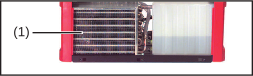
- Remove the unit side panels and clean the cooler (1)
- Remove device side panels and clean inside of device with dry reduced compressed air
NOTE!
The coolant must not be disposed of in the public sewage system.
Dispose of coolant in accordance with the applicable local and national regulations.
NOTE!
Use only original Fronius coolant when refilling the cooling unit.
1Undo the screw cap on the fill nozzle
2Place a suitable container underneath the cooling unit drain hose to catch the coolant
3Pull the drain hose out of the upper recess of the cooling unit and hold it in the container
4Remove the drain hose cap
5Allow the coolant to flow into the container
6Dispose of used coolant properly
7Place the cap on the drain hose
8Return the drain hose to its original position
Locking ring on coolant flow connection, sealing cone inside coolant flow connection
9Pull back the locking ring (1) on the coolant flow connection, disconnect the coolant hose and let go of the locking ring (1)
10Carefully push back the sealing cone (2) in the centre of the coolant flow connection using a wooden or plastic pin (Ø = max. 6 mm / 0.236 in.), until it audibly engages
11Fill to the "max" mark with fresh coolant
12Pull back the locking ring (1) on the coolant flow connection to release the sealing cone again (2) and then let go of the locking ring (1)
13Connect the coolant flow connection hose to the coolant flow connection
14Screw the screw cap onto the fill nozzle
CAUTION!
Excess pressure will damage the cooling unit.
Before gas purging the welding torch with compressed air, undo the screw cap on the fill nozzle.
Dispose of in accordance with the applicable national and local regulations.
WARNING!
Danger due to work that has been carried out incorrectly.
This can result in serious injury and damage to property.
All the work described below must only be carried out by trained and qualified personnel.
Fully read and understand this document.
Fully read and understand all the Operating Instructions for the system components, especially the safety rules.
WARNING!
Danger from electric current.
An electric shock can be fatal.
Turn the power source mains switch to the "O" position.
Disconnect the power source from the mains.
Ensure that the power source remains disconnected from the mains until all work has been completed.
After opening the device, use a suitable measuring instrument to check that electrically charged components (e.g. capacitors) have been discharged.
WARNING!
Danger from inadequate ground conductor connections.
This can result in serious injury and damage to property.
The housing screws provide a suitable ground conductor connection for earthing the housing and must NOT be replaced by any other screws that do not provide a reliable ground conductor connection.
CAUTION!
This can result in severe scalds.
Wait until the coolant has cooled down before carrying out any of the activities described below.
CAUTION!
Risk from coolant leakage.
This can result in serious damage to property.
Make sure that no coolant gets into the device.
If there is any coolant on the exterior of the cooling unit, remove it immediately.
WARNING!
Danger due to work that has been carried out incorrectly.
This can result in serious injury and damage to property.
All the work described below must only be carried out by trained and qualified personnel.
Fully read and understand this document.
Fully read and understand all the Operating Instructions for the system components, especially the safety rules.
WARNING!
Danger from electric current.
An electric shock can be fatal.
Turn the power source mains switch to the "O" position.
Disconnect the power source from the mains.
Ensure that the power source remains disconnected from the mains until all work has been completed.
After opening the device, use a suitable measuring instrument to check that electrically charged components (e.g. capacitors) have been discharged.
WARNING!
Danger from inadequate ground conductor connections.
This can result in serious injury and damage to property.
The housing screws provide a suitable ground conductor connection for earthing the housing and must NOT be replaced by any other screws that do not provide a reliable ground conductor connection.
CAUTION!
This can result in severe scalds.
Wait until the coolant has cooled down before carrying out any of the activities described below.
CAUTION!
Risk from coolant leakage.
This can result in serious damage to property.
Make sure that no coolant gets into the device.
If there is any coolant on the exterior of the cooling unit, remove it immediately.
WARNING!
Danger due to work that has been carried out incorrectly.
This can result in serious injury and damage to property.
All the work described below must only be carried out by trained and qualified personnel.
Fully read and understand this document.
Fully read and understand all the Operating Instructions for the system components, especially the safety rules.
WARNING!
Danger from electric current.
An electric shock can be fatal.
Turn the power source mains switch to the "O" position.
Disconnect the power source from the mains.
Ensure that the power source remains disconnected from the mains until all work has been completed.
After opening the device, use a suitable measuring instrument to check that electrically charged components (e.g. capacitors) have been discharged.
WARNING!
Danger from inadequate ground conductor connections.
This can result in serious injury and damage to property.
The housing screws provide a suitable ground conductor connection for earthing the housing and must NOT be replaced by any other screws that do not provide a reliable ground conductor connection.
CAUTION!
This can result in severe scalds.
Wait until the coolant has cooled down before carrying out any of the activities described below.
CAUTION!
Risk from coolant leakage.
This can result in serious damage to property.
Make sure that no coolant gets into the device.
If there is any coolant on the exterior of the cooling unit, remove it immediately.
- Flow watchdog with coolant filter ... no | H2O (coolant flow error)
- Thermostat ... hot | H2O (coolant temperature too high)
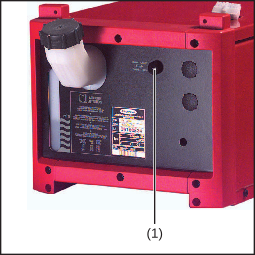
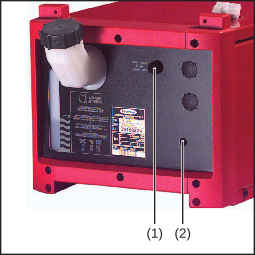
- Coolant pump fuse (1) on the front of cooling unit (fuse blows if the coolant pump becomes overloaded or blocked)
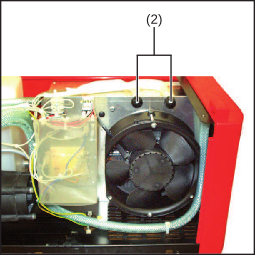
- Two fuses (2) inside the unit, above the fan (fuses blow if there is a short circuit to earth)
Fuse on front of the unit
Fuses above the fan
Make a note of the serial number and configuration of the device and contact our After-Sales Service team with a detailed description of the error, if
- errors occur that are not listed below
- the troubleshooting measures listed are unsuccessful
Insufficient or no coolant flow| Cause: | Coolant level too low |
| Remedy: | Top up coolant |
| Cause: | Constriction or foreign body in cooling circuit |
| Remedy: | Remove constriction or foreign body |
| Cause: | Coolant pump fuse defective |
| Remedy: | Replace coolant pump fuse |
| Cause: | Coolant contaminated |
| Remedy: | Change the coolant |
| Cause: | Coolant filter displaced when connecting coolant return |
| Remedy: | Clean coolant filter using clean tap water or change filter element |
| Cause: | Coolant pump is jammed (FK 4000 R, FK 4000 R US and FK 4000 Rob only) |
| Remedy: | Turn coolant pump shaft (see operating instructions, "Turning coolant pump shaft" section). Contact after-sales service if the coolant pump shaft proves impossible to turn |
| Cause: | Coolant pump defective |
| Remedy: | Contact after-sales service |
| Cause: | Permitted duty cycle exceeded |
| Remedy: | Wait until the end of the coolant pump cooling phase |
| Cause: | Flow sensor has tripped, requesting parameter F3 from the welding system shows that there is nothing flowing through: Coolant pump defective |
| Remedy: | Contact after-sales service |
| Cause: | Flow sensor has tripped, requesting parameter F3 on the power source shows that there is still a small amount flowing through: coolant hoses kinked or coolant filter displaced when connecting coolant return |
| Remedy: | Repair coolant hoses, clean coolant filter using clean tap water or change filter element |
Insufficient cooling power| Cause: | Faulty fan |
| Remedy: | Contact after-sales service |
| Cause: | Coolant pump defective |
| Remedy: | Contact after-sales service |
| Cause: | Cooler contaminated |
| Remedy: | Gas purge cooler with dry compressed air |
| Cause: | Cooling capacity of connected cooling unit not high enough |
| Remedy: | Use a cooling unit with a greater cooling power |
High operating noise level| Cause: | Coolant level too low |
| Remedy: | Top up coolant |
| Cause: | Coolant pump defective |
| Remedy: | Contact After-Sales Service |
no l H2OThe cooling unit flow sensor has tripped. The error message appears on the power source control panel.
| Cause: | Coolant flow problem |
| Remedy: | Check coolant level, cleanliness and proper return;
change coolant if necessary |
| Cause: | Coolant filter displaced when connecting coolant return |
| Remedy: | Clean coolant filter using clean tap water or change filter element |
hot l H2OThe cooling unit thermostat has tripped. The error message appears on the power source control panel.
| Cause: | The coolant temperature is too high |
| Remedy: | Wait until the end of the cooling phase, i.e. until "hot | H2O" is no longer displayed.
If using a ROB 5000 or field bus coupler for robot control: Before resuming welding, set the "Source error reset" signal. |
WARNING!
Danger due to work that has been carried out incorrectly.
This can result in severe personal injury and damage to property
All the work described below must only be carried out by trained and qualified personnel.
Fully read and understand this document.
Fully read and understand all the Operating Instructions for the system components, especially the safety rules.
WARNING!
Danger from electric current.
An electric shock can be fatal.
Turn the power source mains switch to the "O" position.
Disconnect the power source from the mains.
Ensure that the power source remains disconnected from the mains until all work has been completed.
WARNING!
Danger due to work that has been carried out incorrectly.
This can result in severe personal injury and damage to property
All the work described below must only be carried out by trained and qualified personnel.
Fully read and understand this document.
Fully read and understand all the Operating Instructions for the system components, especially the safety rules.
WARNING!
Danger from electric current.
An electric shock can be fatal.
Turn the power source mains switch to the "O" position.
Disconnect the power source from the mains.
Ensure that the power source remains disconnected from the mains until all work has been completed.
1Remove the coolant pump fuse (1)
2Insert a suitable slotted screwdriver from the outside through the coolant pump shaft bushing (2) and turn the coolant pump shaft
3Contact after-sales service if the coolant pump shaft proves impossible to turn
4Remove the slotted screwdriver
5Replace the coolant pump fuse (1)
- Ambient temperature
- Delivery head
- Flow rate Q (l/min) - The flow rate Q depends on the length of the interconnecting hosepack and the diameter of the hose.
- Ambient temperature
- Delivery head
- Flow rate Q (l/min) - The flow rate Q depends on the length of the interconnecting hosepack and the diameter of the hose.
Mains voltage | 3 x 230 / 400 V AC |
Mains voltage tolerance | -10% / +10% |
Mains frequency | 50 / 60 Hz |
Current consumption | 0.9 A / 0.6 A |
Cooling power at
Q = 1 l/min + 25°C (77°F)
Q = 1 l/ min + 40°C (104°F) |
1120 W
700 W
|
Max. delivery head | 5 m
16 ft. 5 in. |
Max. delivery rate | 1.6 l/min
0.42 gal./min [US] |
Max. pump pressure | 4 bar
58 psi |
Pump | Oscillating armature pump |
Pump service life | approx. 3,000 hrs |
Coolant quantity | 5.5 l
1.45 gal. [US] |
Protection class | IP 23 |
Dimensions l/w/h | 725/290/230 mm
28.54/11.42/9.06 in. |
Weight (without coolant) | 14.1 kg
31.09 Ib. |
Mark of conformity | CE |
Mains voltage | 3 x 400 V AC |
Mains voltage tolerance | -10% / +10% |
Mains frequency | 50 / 60 Hz |
Current consumption | 0.6 A |
Cooling power at
Q = 1 l/min + 25°C (77°F)
Q = 1 l/ min + 40°C (104°F) |
1360 W
870 W
|
Max. delivery head | 33 m
108 ft. 3.24 in. |
Max. delivery rate | 3.5 l/min
0.92 gal./min [US] |
Max. pump pressure | 4 bar
58 psi |
Pump | Centrifugal pump |
Pump service life | approx. 10,000 hrs |
Coolant quantity | 5.5 l
1.45 gal. [US] |
Protection class | IP 23 |
Dimensions l/w/h | 725/290/230 mm
28.54/11.42/9.06 in. |
Weight (without coolant) | 13.3 kg
29.32 Ib. |
Mark of conformity | CE |
Mains voltage | 3 x 400 V AC |
Mains voltage tolerance | -10% / +10% |
Mains frequency | 50 / 60 Hz |
Current consumption | 0.6 A |
Cooling power at
Q = 1 l/min + 25°C (77°F)
Q = 1 l/ min + 40°C (104°F) |
1360 W
870 W
|
Max. delivery head | 33 m
108 ft. 3.24 in. |
Max. delivery rate | 3.5 l/min
0.92 gal./min [US] |
Max. pump pressure | 4 bar
58 psi |
Pump | Centrifugal pump |
Pump service life | approx. 15,000 hrs |
Coolant quantity | 5.5 l
1.45 gal. [US] |
Protection class | IP 23 |
Dimensions l/w/h | 725/290/230 mm
28.54/11.42/9.06 in. |
Weight (without coolant) | 13.3 kg
29.32 Ib. |
Mark of conformity | CE |
Mains voltage | 200 - 230 / 400 - 460 V AC |
Mains voltage tolerance | -10% / +10% |
Mains frequency | 50 / 60 Hz |
Current consumption | 1.3 A / 0.5 A |
Cooling power at
Q = 1 l/min + 25°C (77°F)
Q = 1 l/ min + 40°C (104°F) |
1360 W
870 W
|
Max. delivery head | 33 m
108 ft. 3.24 in. |
Max. delivery rate | 3.5 l/min
0.92 gal./min [US] |
Max. pump pressure | 4 bar
58 psi |
Pump | Centrifugal pump |
Pump service life | approx. 10,000 hrs |
Coolant quantity | 5.5 l
1.45 gal. [US] |
Protection class | IP 23 |
Dimensions l/w/h | 725/290/230 mm
28.54/11.42/9.06 in. |
Weight (without coolant) | 13.3 kg
29.32 Ib. |
Mark of conformity | CSA |