

- Operating instructionsGEN24, Tauro and Verto Country Setup Menu
- General
- Country setup
017-10072026
General
How information is presented in the document
The conventions regarding how information is presented in the document, which are set out below, have been defined in order to increase the readability and comprehensibility of the document.
Application notes
IMPORTANT! Indicates application notes and other useful information. It does not indicate a harmful or dangerous situation.
Software
Software functions and elements of a graphical user interface (e.g., buttons, menu items) are highlighted in the text with this mark up.
Example: Click Save.
Instructions for action
1Action steps are displayed with consecutive numbering.
✓This symbol indicates the result of the action step or the entire instruction.
How information is presented in the document
The conventions regarding how information is presented in the document, which are set out below, have been defined in order to increase the readability and comprehensibility of the document.
Application notes
IMPORTANT! Indicates application notes and other useful information. It does not indicate a harmful or dangerous situation.
Software
Software functions and elements of a graphical user interface (e.g., buttons, menu items) are highlighted in the text with this mark up.
Example: Click Save.
Instructions for action
1Action steps are displayed with consecutive numbering.
✓This symbol indicates the result of the action step or the entire instruction.
Country setup
WARNING!
Danger from unauthorized fault analyses and repair work.
This can result in serious injury and damage to property.
Fault analyses and repair work on the PV system may only be carried out by installers/service technicians from authorized specialist companies in accordance with national standards and regulations.
NOTE!
Risk due to unauthorized access.
Incorrectly set parameters can have a negative effect on the public grid and/or the grid power feed operation of the inverter and result in the loss of standard conformity.
Parameters may only be adjusted by installers/service technicians from authorized specialist companies.
Do not give the access code to third parties and/or unauthorized persons.
NOTE!
Risk due to incorrectly set parameters.
Incorrectly set parameters can have a negative effect on the public grid and/or cause inverter malfunctions and failures and result in the loss of standard conformity.
Parameters may only be adjusted by installers/service technicians from authorized specialist companies.
Parameters may only be adjusted if this has been approved or requested by the utility.
Any parameter adjustments must be made in compliance with nationally applicable standards and/or directives as well as the specifications of the utility.
The Country Setup menu area is intended exclusively for installers/service technicians from authorized specialist companies. To apply for the access code required for this menu area, see chapter Requesting inverter codes in Solar.SOS.
The selected country setup for the country in question contains preset parameters in accordance with nationally applicable standards and requirements. Changes may need to be made to the selected country setup depending on local grid conditions and the specifications of the utility.
Territorial Limitations
This product is intended for use and sale outside the Province of Québec. It does not meet the French language documentation and labeling requirements of Québec's Charter of the French Language. Accordingly, Fronius International GmbH does not offer this product for sale to, or for delivery to, any address within the Province of Québec.
By placing an order, the customer represents and warrants that they are not purchasing the product for use or resale within Québec. Fronius International GmbH disclaims all liability and warranty obligations for any products operated in Québec in violation of these restrictions.
Requesting inverter codes in Solar.SOS
The Country Setup menu area is intended exclusively for installers/service technicians from authorized specialist companies. The inverter access code required for this menu area can be requested in the Fronius Solar.SOS portal.
Requesting inverter codes in Fronius Solar.SOS:
1.
Open solar-sos.fronius.com in the browser
2.
Log in with your Fronius account
3.
At the top right, click on the drop-down menu 
4.
Select the Show inverter codes menu item
5.
A contract page appears on which the request for the access code to change the grid parameters for Fronius inverters is located
6.
Accept the terms and conditions of use by checking Yes, I have read and agree to the terms of use and click Confirm & Save
7.
After that, the codes can be retrieved in the drop-down menu at the top right under Show inverter codes
1Open solar-sos.fronius.com in the browser
2Log in with your Fronius account
3At the top right, click on the drop-down menu
4Select the Show inverter codes menu item
✓A contract page appears on which the request for the access code to change the grid parameters for Fronius inverters is located
5Accept the terms and conditions of use by checking Yes, I have read and agree to the terms of use and click Confirm & Save
6After that, the codes can be retrieved in the drop-down menu at the top right under Show inverter codes
CAUTION!
Risk due to unauthorized access.
Incorrectly set parameters can have a negative effect on the public grid and/or the grid power feed operation of the inverter and result in the loss of standard conformity.
Parameters may only be adjusted by installers/service technicians from authorized specialist companies.
Do not give the access code to third parties and/or unauthorized persons.
Adjusting parameters with the Fronius Solar.start app
The "Fronius Solar.start" app is needed for registration. Depending on the end device, the app is available on the respective platform.
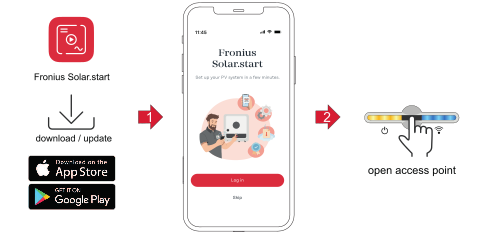
1Start the installation in the app.
2Select the product to which the connection should be established.
3Open the access point by touching the sensor once  .
.
.✓Communication LED: flashes blue.
4Select the Technician user in the User menu and enter and confirm the password for the Technician user.
5Call up the Safety and grid regulations → Country setup menu area.
6Enter the requested access code (see chapter Requesting inverter codes in Solar.SOS on page (→)) in the input field Access code country setup and click the button Activate.
7Adjust the parameters in the individual menu areas taking into account the nationally applicable standards and/or the specifications of the utility.
Adjusting parameters with the browser
WLAN:
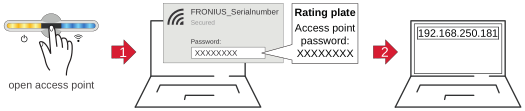
1Open the access point by touching the sensor once .
. ✓Communication LED: flashes blue.
2Establish the connection to the inverter in the network settings.
✓The inverter is displayed with the name "FRONIUS_PILOT" and the serial number of the device
3Password: enter 12345678 and confirm.
IMPORTANT!
To enter the password on a Windows 10 operating system, the link "Connect using a security key instead" must first be activated to establish a connection with the password: 12345678.
IMPORTANT!
To enter the password on a Windows 10 operating system, the link "Connect using a security key instead" must first be activated to establish a connection with the password: 12345678.
4In the browser address bar, enter and confirm the IP address 192.168.250.181.
5Select the Technician user in the User menu and enter and confirm the password for the Technician user.
6Call up the Safety and grid regulations → Country setup menu area.
7Enter the requested access code (see chapter Requesting inverter codes in Solar.SOS on page (→)) in the input field Access code country setup and click the button Activate.
8Adjust the parameters in the individual menu areas taking into account the nationally applicable standards and/or the specifications of the utility.
Ethernet:
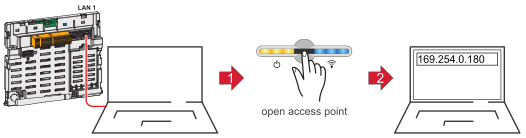
1Establish a connection to the inverter (LAN1) with a network cable (CAT5 STP or higher).
2Open the access point by touching the sensor once .
. ✓Communication LED: flashes blue.
3In the browser address bar, enter and confirm IP address 169.254.0.180.
4Select the Technician user in the User menu and enter and confirm the password for the Technician user.
5Call up the Safety and grid regulations → Country setup menu area.
6Enter the requested access code (see chapter Requesting inverter codes in Solar.SOS on page (→)) in the input field Access code country setup and click the button Activate.
7Adjust the parameters in the individual menu areas taking into account the nationally applicable standards and/or the specifications of the utility.
Country setup
Country setup selection
Country setup selection
Predefined setups can be selected in the Country setup selection menu. The selected country setup for the respective country contains preset parameters according to the nationally applicable standards and requirements. Depending on local grid conditions and the specifications of the utility, adjustments to the selected country setup may be necessary.
Parameter | Description |
|---|---|
Country / Region | Selecting the respective country or region limits/displays the available country setups for the inverter. |
Country setup | Displays the available setups per country/region. |
Rated Frequency (Hz) | The rated frequency is predetermined by the country setup selection. Changing this parameter affects the stable operation of the inverter and is therefore only permitted in consultation with Fronius. |
Rated Voltage (V) | The rated voltage is predetermined by the choice of the country setup. Changing this parameter affects the stable operation of the inverter and is therefore only permitted in consultation with Fronius. |
Country setup selection
Country setup selection
Predefined setups can be selected in the Country setup selection menu. The selected country setup for the respective country contains preset parameters according to the nationally applicable standards and requirements. Depending on local grid conditions and the specifications of the utility, adjustments to the selected country setup may be necessary.
Parameter | Description |
|---|---|
Country / Region | Selecting the respective country or region limits/displays the available country setups for the inverter. |
Country setup | Displays the available setups per country/region. |
Rated Frequency (Hz) | The rated frequency is predetermined by the country setup selection. Changing this parameter affects the stable operation of the inverter and is therefore only permitted in consultation with Fronius. |
Rated Voltage (V) | The rated voltage is predetermined by the choice of the country setup. Changing this parameter affects the stable operation of the inverter and is therefore only permitted in consultation with Fronius. |
Country setup selection
Predefined setups can be selected in the Country setup selection menu. The selected country setup for the respective country contains preset parameters according to the nationally applicable standards and requirements. Depending on local grid conditions and the specifications of the utility, adjustments to the selected country setup may be necessary.
Parameter | Description |
|---|---|
Country / Region | Selecting the respective country or region limits/displays the available country setups for the inverter. |
Country setup | Displays the available setups per country/region. |
Rated Frequency (Hz) | The rated frequency is predetermined by the country setup selection. Changing this parameter affects the stable operation of the inverter and is therefore only permitted in consultation with Fronius. |
Rated Voltage (V) | The rated voltage is predetermined by the choice of the country setup. Changing this parameter affects the stable operation of the inverter and is therefore only permitted in consultation with Fronius. |
General
Startup and Reconnection
These parameters can be used to set the grid monitoring times before the inverter is switched on.
For the set time, both the mains voltage and the mains frequency must be within the permissible range before connection is allowed.- The permissible range for the mains voltage is defined in the menu area Grid and system protection → Voltage → Startup and reconnection (see chapter Voltage).
- The permissible range for the mains frequency is defined in the menu area Grid and system protection → Frequency → Startup and reconnection (see chapter Frequency).
Parameter | Range of values | Description |
|---|---|---|
Grid Monitoring Time Startup | 1 - 900 [s] | Grid monitoring time before the inverter is switched on during a normal start-up process in seconds (e.g., at sunrise). |
Parameter | Range of values | Description |
|---|---|---|
Grid Monitoring Time Reconnection | 1 - 900 [s] | Grid monitoring time before the inverter is switched back on after a grid fault (see table Grid faults) in seconds (e.g., if a fault occurs in the AC grid during the day which causes the inverter to shut down). |
The following errors are defined by the inverter as grid errors for this functionality: | ||
Name | Description | StateCode name | StateCode number |
|---|---|---|---|
Overvoltage | Mains voltage exceeds an overvoltage limit (Inner, Middle, or Outer Limit Overvoltage). | AC voltage too high | 1114 |
Undervoltage | Mains voltage falls below an undervoltage limit (Inner, Middle or Outer Limit Undervoltage). | AC voltage too low | 1119 |
Overfrequency | Mains frequency exceeds an overfrequency limit (Inner, Outer or Alternative Limit Overfrequency). | AC frequency too high | 1035 |
Underfrequency | Mains frequency falls below an underfrequency limit (Inner, Outer or Alternative Limit Underfrequency). | AC frequency too low | 1037 |
Fast Overvoltage Disconnect | Triggering of the fast surge protection (> 135%). | Grid voltage too high (fast overvoltage cut-out) | 1115, 1116 |
Long Time Average Overvoltage Limit | Mains voltage exceeds the long-term overvoltage limit (Long Time Average Limit). | Long-term mains voltage limit exceeded | 1117 |
Unintentional Islanding Detection. | Unintentional islanding was detected. | Islanding detected | 1004 |
Startup and Reconnection
These parameters can be used to set the grid monitoring times before the inverter is switched on.
For the set time, both the mains voltage and the mains frequency must be within the permissible range before connection is allowed.- The permissible range for the mains voltage is defined in the menu area Grid and system protection → Voltage → Startup and reconnection (see chapter Voltage).
- The permissible range for the mains frequency is defined in the menu area Grid and system protection → Frequency → Startup and reconnection (see chapter Frequency).
Parameter | Range of values | Description |
|---|---|---|
Grid Monitoring Time Startup | 1 - 900 [s] | Grid monitoring time before the inverter is switched on during a normal start-up process in seconds (e.g., at sunrise). |
Parameter | Range of values | Description |
|---|---|---|
Grid Monitoring Time Reconnection | 1 - 900 [s] | Grid monitoring time before the inverter is switched back on after a grid fault (see table Grid faults) in seconds (e.g., if a fault occurs in the AC grid during the day which causes the inverter to shut down). |
The following errors are defined by the inverter as grid errors for this functionality: | ||
Name | Description | StateCode name | StateCode number |
|---|---|---|---|
Overvoltage | Mains voltage exceeds an overvoltage limit (Inner, Middle, or Outer Limit Overvoltage). | AC voltage too high | 1114 |
Undervoltage | Mains voltage falls below an undervoltage limit (Inner, Middle or Outer Limit Undervoltage). | AC voltage too low | 1119 |
Overfrequency | Mains frequency exceeds an overfrequency limit (Inner, Outer or Alternative Limit Overfrequency). | AC frequency too high | 1035 |
Underfrequency | Mains frequency falls below an underfrequency limit (Inner, Outer or Alternative Limit Underfrequency). | AC frequency too low | 1037 |
Fast Overvoltage Disconnect | Triggering of the fast surge protection (> 135%). | Grid voltage too high (fast overvoltage cut-out) | 1115, 1116 |
Long Time Average Overvoltage Limit | Mains voltage exceeds the long-term overvoltage limit (Long Time Average Limit). | Long-term mains voltage limit exceeded | 1117 |
Unintentional Islanding Detection. | Unintentional islanding was detected. | Islanding detected | 1004 |
Ramp rates
Ramp rates limit the maximum rate of change of effective power in special situations. Rising ramps (Ramp-Up) limit the increase in effective power at the inverter AC output. Falling ramps (Ramp-Down) limit the reduction of effective power at the AC output of the inverter.
Note that the lowest rate of change is applied if multiple rates of change have been entered. An Irradiation Ramp can thus be rendered ineffective by, for example, a lower Startup Ramp or another function affecting the rate of change (e.g., P(U) or P(F)).
Ramp-Up at Startup and Reconnection
When connecting the inverter, the maximum rate of change of the effective power can be limited by a rising ramp with a defined gradient. As soon as the effective power increase is influenced due to the available PV power or another control, the ramp is terminated.
Parameter | Range of values | Description |
|---|---|---|
Ramp-Up at Startup and Reconnection | On | The effective power is limited at the Startup or a Reconnection with a rate of change of Ramp-Up at Startup and Reconnection Rate. |
Off | The function is deactivated. | |
Ramp-Up at Startup and Reconnection Rate. | 0.001 ‑ 100 [%/s] | Permitted rate of change of the effective power at Startup or Reconnection. |
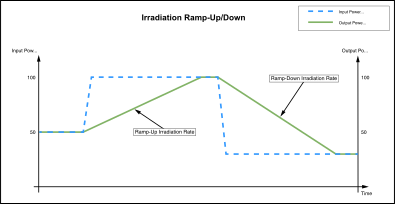
Ramp-Up/Down Irradiation
The Irradiation Ramp is a permanent limitation of the rate of change for the effective power. If the PV power changes rapidly due to passing clouds, the rate of change of the inverter output power is limited with the Ramp-Up Irradiation Rate or the Ramp-Down Irradiation Rate.
Parameter | Range of values | Description |
|---|---|---|
Ramp-Up Irradiation | On | The effective power increase is limited with a rate of change of Ramp-Up Irradiation Rate. |
Off | The function is deactivated. | |
Ramp-Up Irradiation Rate | 0.001 - 200 [%/s] | Permitted rate of change during power increase. |
Ramp-Down Irradiation | On | The effective power reduction is limited with a rate of change of Ramp-Down Irradiation Rate. |
Off | The function is deactivated. | |
Ramp-Down Irradiation Rate | 0.001 - 200 [%/s] | Permitted rate of change of effective power. |
Example: Effective power limitation by Irradiation-Ramp-Up/Down, which was caused by a change in the available PV power.
Ramp-Up/Down Communication
This is a limitation of the effective power rate of change when changing external specifications for effective power. These can be, for example, power limitations via I/Os or Modbus commands. If smaller rates of change are specified via Modbus command, these are applied. Larger rates are limited by the parameter Ramp-Up Communication Rate or Ramp-Down Communication Rate.
Parameter | Range of values | Description |
|---|---|---|
Ramp-Up Communication | On | The limitation of the rate of change (corresponding to Ramp-Up Communication Rate) in case of effective power increase due to an external specification is activated. |
Off | The function is deactivated. | |
Ramp-Up Communication Rate | 0.001 ‑ 100 [%/s] | Permitted rate of change during power increase. |
Ramp-Down Communication | On | The limitation of the rate of change (corresponding to Ramp-Down Communication Rate) in the event of effective power reduction due to an external specification is activated. |
Off | The function is deactivated. | |
Ramp-Down Communication Rate | 0.001 ‑ 100 [%/s] | Permitted rate of change for power reduction. |
Unintentional islanding detection
Unintentional islanding
In the event of a grid failure or disconnection of a small part of the grid from the higher-level utility grid, it is possible under special conditions for local loads and inverters to establish unintentional islanding (stand-alone operation). If the generation and load (of both active and reactive power) are balanced, the AC voltage and frequency can remain within the allowable limits. In this case, the inverter (without additional islanding detection) will continue grid power feed operation, will not automatically shut down, and will supply power to the local loads. This is an unwanted condition. To prevent these situations, active or passive islanding detection methods can be used.
Active islanding detection
The inverter's active islanding detection function detects unwanted islanding situations, the inverter stops grid power feed operation, and disconnects from the AC grid at all poles.
The detection process is carried out using a mains frequency shift method (Active Frequency Drift): In the event of short-term mains frequency changes, the inverter feeds in an alternating current with a changed frequency (frequency shift). In the event of an interruption to the grid, the AC voltage will also change its frequency. There is a co-feedback effect, whereby the frequency is shifted so much that it exceeds or falls below the permissible limits. This causes the inverter to stop grid power feed operation.
In the case of three-phase inverters, the method is also able to detect islanding on any individual phases. This function is an active islanding detection method, since the inverter specifically changes its feed-in behavior during the detection process.
Parameter | Range of values | Standard value | Description |
|---|---|---|---|
Unintentional Islanding Detection. | On |
| Active islanding detection is activated. |
Off | Off | Active islanding detection is deactivated. | |
Quality Factor | 0.1 ‑ 10.0 | 1.0 | The higher this value, the stronger/more aggressive the frequency shift of the islanding detection. |
In contrast, there are passive methods that detect islanding based only on the measurement of AC network variables. This group includes, for example, Rate of Change of Frequency (RoCoF) Protection.
Unintentional islanding detection
Unintentional islanding
In the event of a grid failure or disconnection of a small part of the grid from the higher-level utility grid, it is possible under special conditions for local loads and inverters to establish unintentional islanding (stand-alone operation). If the generation and load (of both active and reactive power) are balanced, the AC voltage and frequency can remain within the allowable limits. In this case, the inverter (without additional islanding detection) will continue grid power feed operation, will not automatically shut down, and will supply power to the local loads. This is an unwanted condition. To prevent these situations, active or passive islanding detection methods can be used.
Active islanding detection
The inverter's active islanding detection function detects unwanted islanding situations, the inverter stops grid power feed operation, and disconnects from the AC grid at all poles.
The detection process is carried out using a mains frequency shift method (Active Frequency Drift): In the event of short-term mains frequency changes, the inverter feeds in an alternating current with a changed frequency (frequency shift). In the event of an interruption to the grid, the AC voltage will also change its frequency. There is a co-feedback effect, whereby the frequency is shifted so much that it exceeds or falls below the permissible limits. This causes the inverter to stop grid power feed operation.
In the case of three-phase inverters, the method is also able to detect islanding on any individual phases. This function is an active islanding detection method, since the inverter specifically changes its feed-in behavior during the detection process.
Parameter | Range of values | Standard value | Description |
|---|---|---|---|
Unintentional Islanding Detection. | On |
| Active islanding detection is activated. |
Off | Off | Active islanding detection is deactivated. | |
Quality Factor | 0.1 ‑ 10.0 | 1.0 | The higher this value, the stronger/more aggressive the frequency shift of the islanding detection. |
In contrast, there are passive methods that detect islanding based only on the measurement of AC network variables. This group includes, for example, Rate of Change of Frequency (RoCoF) Protection.
Isolation monitoring
Isolation monitoring (Iso Monitoring)
The inverter performs an isolation measurement at the DC terminals of the PV generator before each connection (at least once a day). Isolation monitoring must be activated for both the isolation warning and the isolation error.
Isolation Warning
The measured value of the isolation monitoring is used for an isolation warning. Status code 1083 is displayed if the measured value falls below an adjustable limit value.
Isolation Error
The measured value of the isolation monitoring is also used for isolation error monitoring. If the measured isolation value is below the limit value Isolation Error Threshold, grid power feed operation is prevented and status code 1082 is displayed.
IMPORTANT!
For the Isolation Monitoring function, the parameters in the two menu sections described must be configured accordingly.
For the Isolation Monitoring function, the parameters in the two menu sections described must be configured accordingly.
1The parameters below in the menu item Safety and grid regulations → Country setup → Safety → Isolation monitoring are used to configure the parameters for the isolation measurement:
Parameter | Range of values | Description |
|---|---|---|
Iso Monitoring Mode
| On | The function is activated. |
Off | The function is deactivated. | |
Off (with Warning) | Isolation monitoring is deactivated and status code 1189 is permanently displayed on the user interface of the inverter. | |
Isolation Error Threshold
| 0.1 ‑ 10 MOhm | If the measured isolation value is lower than this value, grid power feed operation is prevented (if isolation monitoring is activated) and status code 1182 is displayed on the user interface of the inverter. |
2The parameters below in the menu item Device configuration → Inverter → Iso warning are used to configure the parameters for the isolation warning:
Parameter | Range of values | Description |
|---|---|---|
Iso Warning
| On | The isolation warning is activated. |
Off | The function is deactivated. | |
Isolation measurement mode
| Precise | Isolation monitoring is performed with the highest accuracy and the measured insulation resistance is displayed on the user interface of the inverter. |
Quick | Isolation monitoring is performed with lower accuracy, which shortens the duration of the isolation measurement and the isolation value is not displayed. | |
Isolation Warning Threshold | 0.1 ‑ 10 MOhm | If this value is undershot, status code 1183 is displayed on the user interface of the inverter. |
DC arc fault protection
These parameters can be used to set the behavior of the arc detection at the DC terminals of the inverter. The DC arc fault protection function protects against arc faults and contact faults. Any faults that occur in the current and voltage curve are constantly evaluated and the current circuit is switched off if a contact fault is detected. This prevents overheating on defective contacts and possible fires.
Parameter | Range of values | Description |
|---|---|---|
Arc Fault Detection (AFD)
|
| For activating and deactivating the arc fault detection. The parameters Arc logging and Automatic reconnects are only considered with activated Arc Fault Detection (AFD). |
Off | Arcs are not detected. | |
Off (with Warning) | Arcs are not detected and status code 1184 is permanently displayed on the user interface of the inverter. | |
On | The Arc Fault Detection (AFD) is enabled for diagnostic purposes. No status codes are displayed. | |
Arc Fault Circuit Interrupter (CI) |
| Describes the behavior in the event of a detected arc and simultaneously activates/deactivates the integrated self-test. |
Off | The detection of an arc does not cause the inverter to shut down and is not displayed on the user interface of the inverter. | |
Off (with Warning) | The detection of an arc does not cause the inverter to shut down. The status code 1185 is permanently displayed on the user interface of the inverter. | |
On | If an arc is detected, the inverter interrupts grid power feed operation and the status code 1006 is displayed on the user interface of the inverter. | |
Automatic Reconnects |
| If more arcs have been detected within 24 hours than are defined in Automatic Reconnects, the inverter will not make any further attempt to start grid power feed operation. The status code 1006 is displayed on the user interface of the inverter after each detection and must be acknowledged manually. |
Unlimited | The 24 hour counter is deactivated. The inverter restarts grid power feed operation 5 minutes after each arc detected. | |
0 - No Reconnection | After an arc has been detected, no further attempt is made to start grid power feed operation and status code 1173 is displayed on the user interface of the inverter. | |
1 ‑ 4 | After a shutdown by an arc, 1, 2, 3, or 4 attempts are made within 24 hours to restart grid power feed operation. After this number of attempts, no further attempt is made to start grid power feed operation and status code 1173 is displayed on the user interface of the inverter. | |
Arc Logging |
| Enables or disables the recording of arc signatures. The data is uploaded to the cloud and used to continuously improve the interference immunity and fault tolerance of arc detection. |
Off | Arc signatures are not recorded. | |
On | Arc signatures are recorded, uploaded to the cloud, and used to continuously improve the interference immunity and fault tolerance of arc detection. | |
Automatic Signal Recording |
| Activates or deactivates recording of the inverter's signal characteristics to continuously improve arc detection. |
Off | Recording is deactivated. | |
On | Recording is activated. With a probability in accordance with the Recording Probability parameter, data is recorded and uploaded to the cloud every 10 minutes. | |
Recording Probability
|
| If Automatic Signal Recording (ASR) is activated, the frequency for a recording can be set here. |
0 | No signal characteristics are recorded. | |
0.0 ‑ 1.0 | Every 10 minutes, data is uploaded to the cloud with a frequency in accordance with the Recording Probability. | |
1 | Data is recorded every 10 minutes. |
The inverter is equipped with a universal current-sensitive residual current monitoring unit (RCMU) in accordance with IEC 62109-2. This unit monitors residual currents from the PV module to the AC output of the inverter and disconnects the inverter from the grid in the event of unauthorized residual current.
Parameter | Range of values | Description |
|---|---|---|
RCMU | Off | The protective function is deactivated. |
Off (with Warning) | The protective function is deactivated. The status code 1188 is permanently displayed on the user interface of the inverter. | |
On | The protective function is activated. | |
Automatic Reconnects | If more fault currents have been detected within 24 hours than are defined in "Automatic Reconnects", the inverter will not make any further attempt to start grid power feed operation. The status code 1076 is displayed on the user interface of the inverter and must be acknowledged manually. | |
0 | No fault current above 300 mA is tolerated. After each detected fault current, grid power feed operation is interrupted and the status code must be acknowledged manually on the user interface of the inverter. | |
1 ‑ 4 | After a shutdown due to a fault current exceeding 300 mA, 1, 2, 3, or 4 attempts are made within 24 hours to restart grid power feed operation. After this number of attempts, no further attempt is made to start grid power feed operation and the status code must be acknowledged manually on the user interface of the inverter. | |
Unlimited | The 24 hour counter is deactivated. The inverter restarts grid power feed operation after each detected fault current above 300 mA. |
DC shutdown communication
Devices for shutdown within the DC generator (e.g., in or on the module or within a string) can be controlled by the inverter. The condition for this is compatibility, especially with the communication of the inverter.
Parameter | Range of values | Description |
|---|---|---|
Powerline Communication |
| Activates and deactivates DC powerline communication (PLC) on the inverter. |
PLC Off | DC powerline communication is deactivated on the inverter. There are no shutdown devices installed in the PV system, or if shutdown devices are installed in the PV system that are waiting for an enable signal, then this signal must come from another device (transmitter) (otherwise the system will not function). | |
SunSpec PLC | The inverter communicates with DC powerline communication according to the SunSpec Rapid Shutdown Standard. Compatible shutdown devices must be used for the correct functioning of the PV system. |
Interface protection
Voltage
This chapter deals with the protection settings for overvoltage and undervoltage. Mains voltage limits are defined for this purpose. These depend on the country setup and can be adjusted as described below.
Each mains voltage limit is defined by:- an undervoltage with associated protection time, or
- an overvoltage with associated protection time.
The protection time describes the duration for which the voltage may be outside the respective voltage limit value before the inverter switches off with an error message.
Three overvoltage and three undervoltage limit values can be used. The Inner Limits (U< for undervoltage; U>for overvoltage) refer to those limit values which are closer to the nominal voltage. The Middle Limits (U< for undervoltage; U>for overvoltage) have a greater distance to the nominal voltage. The greatest distance between the nominal voltage and the limit value is for the Outer Limits (U<< for undervoltage; U>> for overvoltage).
For expedient use of the Inner Limits and Outer Limits, the respective Inner Limit must be linked to a greater time than the Outer Limit. If the Middle Limits are also used, their time must be set between Inner Limit and Outer Limit; see example in the diagram.
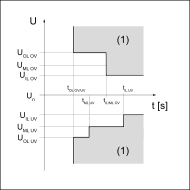
Graphic illustrating the limits
| IL | Inner limit - inner limit value |
| ML | Middle Limit - middle limit value |
| OL | Outer limit - outer limit value |
| (1) | Trip range |
| OV | Overvoltage |
| UV | Undervoltage |
| tx | Protection time |
These voltage limit values are not active in backup power mode. Under Device configuration → Inverter → Backup power, the voltage limits that apply in backup power mode can be configured.
Inner Limits
Parameter | Description |
|---|---|
Undervoltage U< | Setting value for undervoltage protection U< in [V] |
Undervoltage Time U< | Setting value of time for undervoltage protection U< in [s] |
Overvoltage U> | Setting value for surge protection U> in [V] |
Overvoltage Time U> | Setting value of time for surge protection U> in [s] |
Middle Limits
Parameter | Description |
|---|---|
Voltage Middle Limits | Activate/deactivate the middle voltage limit values On / Off |
Undervoltage U< | Setting value for undervoltage protection U< in [V] |
Undervoltage Time U< | Setting value of time for undervoltage protection U< in [s] |
Overvoltage U> | Setting value for surge protection U> in [V] |
Overvoltage Time U> | Setting value of time for surge protection U> in [s] |
Outer Limits
Parameter | Description |
|---|---|
Voltage Outer Limits | Activate/deactivate the outer voltage limit values On / Off |
Undervoltage U<< | Setting value for undervoltage protection U<< in [V] |
Undervoltage Time U<< | Setting value of time for undervoltage protection U<< in [s] |
Overvoltage U>> | Setting value for surge protection U>> in [V] |
Overvoltage Time U>> | Setting value of time for surge protection U>> in [s] |
Long Time Average Limit
This function calculates a moving average voltage value over the set time and compares it with the set overvoltage protection value. If the overvoltage protection value is exceeded, a disconnect occurs.
Parameter | Description |
|---|---|
Long Time Average Limit | Activate/deactivate the voltage average limit value On / Off / On at Smart Meter |
Overvoltage U> | Setting value of the surge protection with average value formation U> in [V] ( Measurement at the feed-in point) |
Overvoltage U> internal during „On at Smart Meter“ mode | Setting value of the surge protection with average value formation U> in [V] (Measurement on the Fronius Smart Meter) |
Overvoltage Averaging Time U> | Time period over which the average value is calculated in [s]. (If 0 s is set, the check is not active) |
Fast Overvoltage Disconnect
Fast overvoltage disconnect for voltage spikes that can respond within one period.
Parameter | Description |
|---|---|
Fast Overvoltage Disconnect | Activate/deactivate fast RMS overvoltage disconnect (exceeding 135 % of rated voltage) On / Off |
Fast Overvoltage Disconnect Time | Setting value of time for fast surge protection (peak value exceeded by 35 %) in [s]. This disconnect can be configured in the time range of microseconds. |
Startup and Reconnection
Before the inverter is allowed to connect, the connection conditions for voltage and frequency must be fulfilled for a certain time.
A distinction is made between:
- Startup: switching on the inverter during a normal startup process (e.g., at sunrise) and
- Reconnection: the reconnection of the inverter after a grid fault (see table Grid faults) (e.g., if a fault occurs in the AC grid during the day which causes the inverter to disconnect).
Which limit values are used when checking the connection conditions depends on whether a grid fault has occurred and which Mode is defined. The Mode only influences the limit values and not the monitoring time. The monitoring time is determined by the parameters described in General / Startup and Reconnection. The monitoring time used depends on whether a Startup or Reconnection is taking place, and applies equally to frequency and voltage limits. After the grid monitoring has expired, the previously mentioned Interface Protection values are active. In backup power mode these Startup and Reconnection parameters are not active.
Parameter | Description |
|---|---|
Mode | The following modes are available:
|
Reconnection Minimum Voltage | Lower value of the voltage for reconnection in [V] |
Reconnection Maximum Voltage | Upper value of the voltage for reconnection in [V] |
Startup Minimum Voltage | Lower value of the voltage for the normal start process in [V] |
Startup Maximum Voltage | Upper value of the voltage for the normal start process in [V] |
The following errors are defined by the inverter as grid errors for this functionality: | |
Name | Description | StateCode name | StateCode number |
|---|---|---|---|
Overvoltage | Mains voltage exceeds an overvoltage limit (Inner, Middle, or Outer Limit Overvoltage). | AC voltage too high | 1114 |
Undervoltage | Mains voltage falls below an undervoltage limit (Inner, Middle or Outer Limit Undervoltage). | AC voltage too low | 1119 |
Overfrequency | Mains frequency exceeds an overfrequency limit (Inner, Outer or Alternative Limit Overfrequency). | AC frequency too high | 1035 |
Underfrequency | Mains frequency falls below an underfrequency limit (Inner, Outer or Alternative Limit Underfrequency). | AC frequency too low | 1037 |
Fast Overvoltage Disconnect | Triggering of the fast surge protection (> 135%). | Grid voltage too high (fast overvoltage cut-out) | 1115, 1116 |
Long Time Average Overvoltage Limit | Mains voltage exceeds the long-term overvoltage limit (Long Time Average Limit). | Long-term mains voltage limit exceeded | 1117 |
Unintentional Islanding Detection. | Unintentional islanding was detected. | Islanding detected | 1004 |
Voltage
This chapter deals with the protection settings for overvoltage and undervoltage. Mains voltage limits are defined for this purpose. These depend on the country setup and can be adjusted as described below.
Each mains voltage limit is defined by:- an undervoltage with associated protection time, or
- an overvoltage with associated protection time.
The protection time describes the duration for which the voltage may be outside the respective voltage limit value before the inverter switches off with an error message.
Three overvoltage and three undervoltage limit values can be used. The Inner Limits (U< for undervoltage; U>for overvoltage) refer to those limit values which are closer to the nominal voltage. The Middle Limits (U< for undervoltage; U>for overvoltage) have a greater distance to the nominal voltage. The greatest distance between the nominal voltage and the limit value is for the Outer Limits (U<< for undervoltage; U>> for overvoltage).
For expedient use of the Inner Limits and Outer Limits, the respective Inner Limit must be linked to a greater time than the Outer Limit. If the Middle Limits are also used, their time must be set between Inner Limit and Outer Limit; see example in the diagram.
Graphic illustrating the limits
| IL | Inner limit - inner limit value |
| ML | Middle Limit - middle limit value |
| OL | Outer limit - outer limit value |
| (1) | Trip range |
| OV | Overvoltage |
| UV | Undervoltage |
| tx | Protection time |
These voltage limit values are not active in backup power mode. Under Device configuration → Inverter → Backup power, the voltage limits that apply in backup power mode can be configured.
Inner Limits
Parameter | Description |
|---|---|
Undervoltage U< | Setting value for undervoltage protection U< in [V] |
Undervoltage Time U< | Setting value of time for undervoltage protection U< in [s] |
Overvoltage U> | Setting value for surge protection U> in [V] |
Overvoltage Time U> | Setting value of time for surge protection U> in [s] |
Middle Limits
Parameter | Description |
|---|---|
Voltage Middle Limits | Activate/deactivate the middle voltage limit values On / Off |
Undervoltage U< | Setting value for undervoltage protection U< in [V] |
Undervoltage Time U< | Setting value of time for undervoltage protection U< in [s] |
Overvoltage U> | Setting value for surge protection U> in [V] |
Overvoltage Time U> | Setting value of time for surge protection U> in [s] |
Outer Limits
Parameter | Description |
|---|---|
Voltage Outer Limits | Activate/deactivate the outer voltage limit values On / Off |
Undervoltage U<< | Setting value for undervoltage protection U<< in [V] |
Undervoltage Time U<< | Setting value of time for undervoltage protection U<< in [s] |
Overvoltage U>> | Setting value for surge protection U>> in [V] |
Overvoltage Time U>> | Setting value of time for surge protection U>> in [s] |
Long Time Average Limit
This function calculates a moving average voltage value over the set time and compares it with the set overvoltage protection value. If the overvoltage protection value is exceeded, a disconnect occurs.
Parameter | Description |
|---|---|
Long Time Average Limit | Activate/deactivate the voltage average limit value On / Off / On at Smart Meter |
Overvoltage U> | Setting value of the surge protection with average value formation U> in [V] ( Measurement at the feed-in point) |
Overvoltage U> internal during „On at Smart Meter“ mode | Setting value of the surge protection with average value formation U> in [V] (Measurement on the Fronius Smart Meter) |
Overvoltage Averaging Time U> | Time period over which the average value is calculated in [s]. (If 0 s is set, the check is not active) |
Fast Overvoltage Disconnect
Fast overvoltage disconnect for voltage spikes that can respond within one period.
Parameter | Description |
|---|---|
Fast Overvoltage Disconnect | Activate/deactivate fast RMS overvoltage disconnect (exceeding 135 % of rated voltage) On / Off |
Fast Overvoltage Disconnect Time | Setting value of time for fast surge protection (peak value exceeded by 35 %) in [s]. This disconnect can be configured in the time range of microseconds. |
Startup and Reconnection
Before the inverter is allowed to connect, the connection conditions for voltage and frequency must be fulfilled for a certain time.
A distinction is made between:
- Startup: switching on the inverter during a normal startup process (e.g., at sunrise) and
- Reconnection: the reconnection of the inverter after a grid fault (see table Grid faults) (e.g., if a fault occurs in the AC grid during the day which causes the inverter to disconnect).
Which limit values are used when checking the connection conditions depends on whether a grid fault has occurred and which Mode is defined. The Mode only influences the limit values and not the monitoring time. The monitoring time is determined by the parameters described in General / Startup and Reconnection. The monitoring time used depends on whether a Startup or Reconnection is taking place, and applies equally to frequency and voltage limits. After the grid monitoring has expired, the previously mentioned Interface Protection values are active. In backup power mode these Startup and Reconnection parameters are not active.
Parameter | Description |
|---|---|
Mode | The following modes are available:
|
Reconnection Minimum Voltage | Lower value of the voltage for reconnection in [V] |
Reconnection Maximum Voltage | Upper value of the voltage for reconnection in [V] |
Startup Minimum Voltage | Lower value of the voltage for the normal start process in [V] |
Startup Maximum Voltage | Upper value of the voltage for the normal start process in [V] |
The following errors are defined by the inverter as grid errors for this functionality: | |
Name | Description | StateCode name | StateCode number |
|---|---|---|---|
Overvoltage | Mains voltage exceeds an overvoltage limit (Inner, Middle, or Outer Limit Overvoltage). | AC voltage too high | 1114 |
Undervoltage | Mains voltage falls below an undervoltage limit (Inner, Middle or Outer Limit Undervoltage). | AC voltage too low | 1119 |
Overfrequency | Mains frequency exceeds an overfrequency limit (Inner, Outer or Alternative Limit Overfrequency). | AC frequency too high | 1035 |
Underfrequency | Mains frequency falls below an underfrequency limit (Inner, Outer or Alternative Limit Underfrequency). | AC frequency too low | 1037 |
Fast Overvoltage Disconnect | Triggering of the fast surge protection (> 135%). | Grid voltage too high (fast overvoltage cut-out) | 1115, 1116 |
Long Time Average Overvoltage Limit | Mains voltage exceeds the long-term overvoltage limit (Long Time Average Limit). | Long-term mains voltage limit exceeded | 1117 |
Unintentional Islanding Detection. | Unintentional islanding was detected. | Islanding detected | 1004 |
Frequency
This chapter covers the protection settings for overfrequencies and underfrequencies. Mains frequency limit values are defined for this purpose. These depend on the country setup and can be adjusted as described below.
Each frequency limit value is defined by:- an underfrequency with corresponding protection time, or
- an overfrequency with corresponding protection time.
The protection time is the duration for which the frequency may be outside the respective frequency limit value before the inverter shuts down with an error message. Two overfrequency and two underfrequency limit values can be applied. The Inner Limits (f< for underfrequency; f> for overfrequency) refer to the limit values that are closer to the rated frequency than the Outer Limits (f<< for underfrequency; f>> for overfrequency). To use both ranges effectively, the Inner Limits must be assigned a longer time period than the Outer Limits.
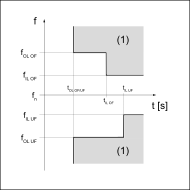
Graphic explaining the limits
| IL | Inner Limit - Inner limit value |
| OL | Outer Limit - Outer limit value |
| (1) | Trigger range |
| OF | Overfrequency |
| UF | Underfrequency |
In backup power mode, the inverter itself determines the frequency and the frequency limit values are therefore not active.
Inner Limits
Parameter | Description |
|---|---|
Underfrequency f< | Setting value for underfrequency protection f< in [Hz] |
Underfrequency Time f< | Time setting value for underfrequency protection f< in [s] |
Overfrequency f> | Setting value for overfrequency protection f> in [Hz] |
Overfrequency Time f> | Time setting value for overfrequency protection f> in [s] |
Outer Limits
Parameter | Description |
|---|---|
Frequency Outer Limits | Activation / deactivation of the outer frequency limit values on / off |
Underfrequency f<< | Setting value for underfrequency protection f<< in [Hz] |
Underfrequency Time f<< | Time setting value for underfrequency protection f<< in [s] |
Overfrequency f>> | Setting value for overfrequency protection f>> in [Hz] |
Overfrequency Time f>> | Time setting value for overfrequency protection f>> in [s] |
Alternative Limits
There is an additional second parameter set for the inner frequency limit values, which is only relevant for Italy. To activate the second parameter set, the alternative frequency limit value must be set to On on the user interface of the inverter and activated/deactivated via an external signal as follows:
- Activation: http://<IP>/status/SetSignaleEsterno
- Deactivation: http://<IP>/status/ClearSignaleEsterno
Each time the inverter is restarted, the Frequency Alternative Limit does not need to be set to On again, but the external activation signal must be sent again. If it is not sent, the inner frequency limit value will be used.
Parameter | Description |
|---|---|
Frequency Alternative Limits | Activation / deactivation of alternative frequency limit values on / off |
Underfrequency f< | Setting value for alternative underfrequency protection f< in [Hz] |
Underfrequency Time f< | Time setting value for alternative underfrequency protection f< in [s] |
Overfrequency f> | Setting value for alternative overfrequency protection f> in [Hz] |
Overfrequency Time f> | Time setting value for alternative overfrequency protection f> in [s] |
Startup and Reconnection
Before the inverter can be connected, the connection conditions for voltage and frequency must be met for a certain period of time.
A distinction is made between:
- Startup: Connecting the inverter during a normal startup process (e.g., at sunrise); and
- Reconnection: Reconnecting the inverter after a grid error (see Grid Error table) (e.g., if a fault occurs in the AC grid during the day that causes the inverter to shut down).
The limit values used to check the connection conditions depend on whether a grid error has occurred and which mode is defined. The mode only influences the limit values and not the monitoring time. The monitoring time is determined by the parameters described in General / Startup and Reconnection. The monitoring time used depends on whether a Startup or "Reconnection" is taking place and applies equally to frequency and voltage limit values. After grid monitoring has ended, the aforementioned "Interface Protection" values are active. In backup power mode, these "Startup and Reconnection" parameters are not active.
Parameter | Description |
|---|---|
"Mode" | The following modes are available:
|
Startup Minimum Frequency | Lower value of the mains frequency for the normal startup process in [Hz] |
Startup Maximum Frequency | Upper value of the mains frequency for the normal startup process in [Hz] |
Reconnection Minimum Frequency | Lower value of the mains frequency for reconnection in [Hz] |
Reconnection Maximum Frequency | Upper value of the mains frequency for reconnection in [Hz] |
Tripping time for frequency limit violation | Tripping time when the frequency limit value is exceeded in [s] |
The following faults are defined as grid errors by the inverter for this functionality: | |
Designation | Description | StateCode Name | StateCode Number |
|---|---|---|---|
Overvoltage | Mains voltage exceeds an overvoltage limit (Inner, Middle, or Outer Limit Overvoltage). | AC voltage too high | 1114 |
Undervoltage | Mains voltage falls below an undervoltage limit (Inner, Middle, or Outer Limit Undervoltage). | AC voltage too low | 1119 |
Overfrequency | Mains frequency exceeds an overfrequency limit (Inner, Outer, or Alternative Limit Overfrequency). | AC frequency too high | 1035 |
Underfrequency | Mains frequency falls below an underfrequency limit (Inner, Outer, or Alternative Limit Underfrequency). | AC frequency too low | 1037 |
Fast Overvoltage Disconnect | Triggering of the fast surge protection device (> 135%). | Grid voltage too high (fast overvoltage cut-out) | 1115, 1116 |
Long Time Average Overvoltage Limit | Mains voltage exceeds the long-term overvoltage limit (Long Time Average Limit). | Long-term mains voltage limit exceeded | 1117 |
Unintentional Islanding Detection | Unintentional islanding has been detected. | Islanding detected | 1004 |
Rate of Change of Frequency (RoCoF) Protection
This function is used to activate and adjust the RoCoF (Rate of Change of Frequency) detection and shutdown. If the frequency changes by more than a set value and lasts longer than the set time, the inverter will shut down. RoCoF detection is a passive islanding detection method.
IMPORTANT!
RoCoF detection is a protective function that specifically detects critical frequency changes and, if necessary, shuts down the inverter. It is not a function that can be used to carry out rapid frequency changes without shutdown (RoCoF robustness). RoCoF robustness is an intrinsic capability of an inverter and cannot be activated or deactivated.
Parameter | Value Range | Default Value | Description |
|---|---|---|---|
Rate of Change of Frequency (RoCoF) Protection | On / off | Off | Activation and deactivation of the RoCoF protection. |
RoCoF Limit | 0.05 - 99 Hz/s | 2.5 Hz/s | Limit value for the frequency change that causes a shutdown when ROCOF detection is activated. |
RoCoF Detection Measurement Window Time | 0.04 - 10 s | 0.5 s | Measurement window length for calculating the RoCoF value |
RoCoF Trip Time | 0.05 - 16 s | 0.3 s | Setting value for the ROCOF protection shutdown time. |
Export Limit Protection
Export Limit Protection (PAV,E) monitors compliance with the feed-in limit agreed with the utility. If the limit values have been exceeded or the control is too slow, all inverters in the system are switched off.
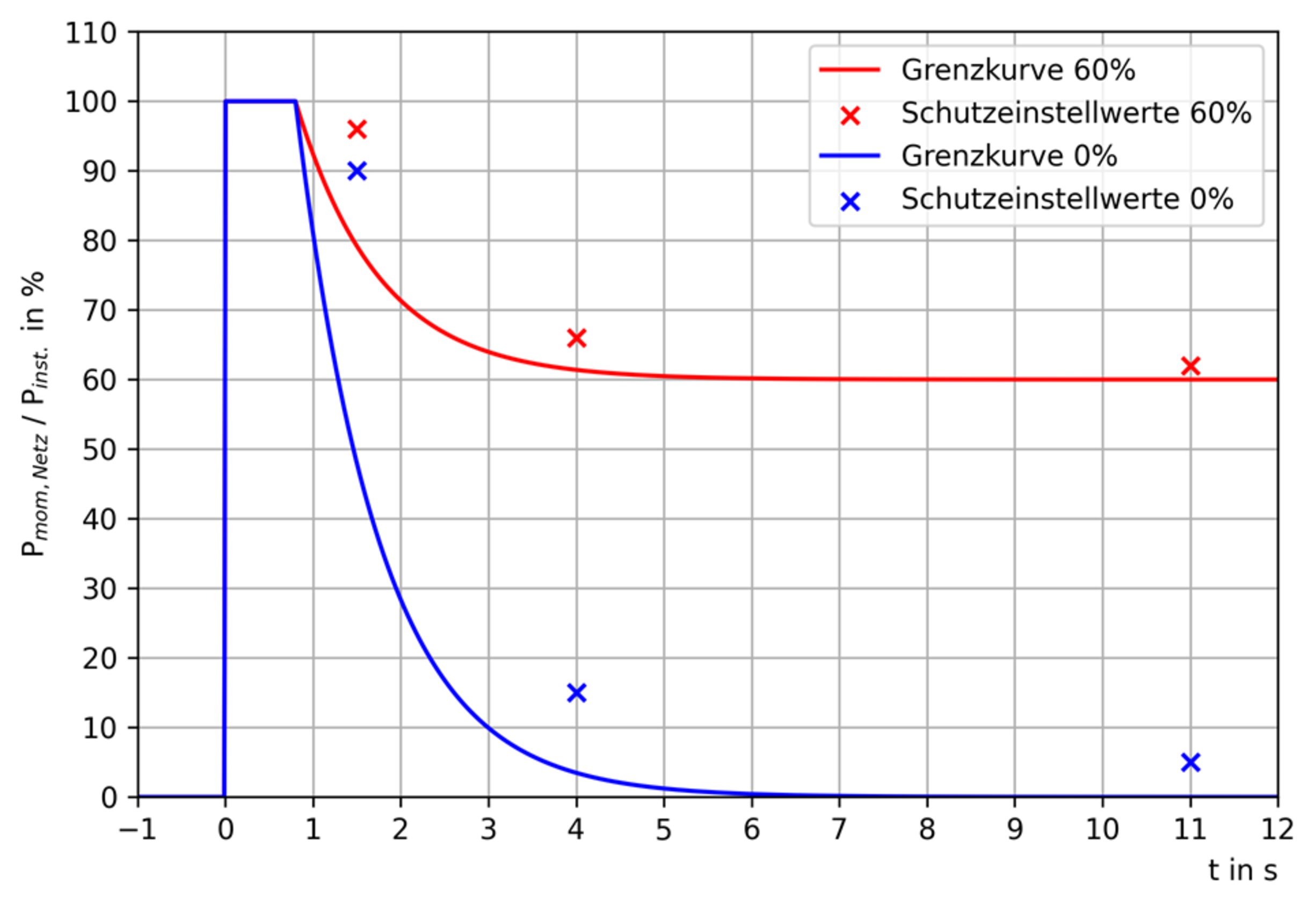
Pmom, grid | measured, current power of feeding in | |
Pinst | Total installed AC generator power (Pinst) - installed active power of all operated producers in the system | |
PAV,E | Max. feed-in power (PAV,E) - agreed feed-in limit | |
PAV,E protection setting values | ||
|---|---|---|
Parameter | Explanation | Switch-off value* |
Time P>>> | x-coordinate point 1 | 1.6 s |
Factor P>>> | y-coordinate point 1 | 90% |
Time P>> | x-coordinate point 2 | 4 s |
Factor P>> | y-coordinate point 2 | 15% |
Time P> | x-coordinate point 3 | 11 s |
Factor P> | y-coordinate point 3 | 5% |
DC injection
DC injection means the injection of an AC current into the public grid that is unintentionally contaminated with a DC component. This DC component causes a shift of the pure AC current on the Y-axis (offset).
Due to the way the inverter works, no DC injection takes place in normal operation. However, in order to be protected against faults or inaccuracies, many connection rules require monitoring of the DC injection and shutdown if limit values are exceeded.
Inner and outer limits can be defined for the limit values. Inner limits have tighter limits and longer protection times by default, outer limits have broader limits and shorter protection times, so that shutdown occurs more quickly with higher DC components. For both limit values there is a protection time which defines the maximum overshoot duration.
Inner Limit
Parameter | Range of values | Description |
|---|---|---|
Mode | Off | Monitoring of the inner limit is deactivated. |
Absolute | DC component monitoring with an absolute current limit in [A]. | |
Relative | DC component monitoring with a relative current limit expressed as a percentage [%] of the nominal current of the inverter. | |
DC Current Absolute Value | 0.0 A ‑ 10.0 A | Absolute DC current limit in [A] - If the DC component of the injected AC current exceeds this limit for the duration defined with DC Injection Time, grid power feed operation is interrupted with status code 1052. |
DC Current Relative Value | 0.0 % ‑ 10.0 % | Relative DC current limit expressed as a percentage of the nominal current of the inverter - If the relative DC component of the injected AC current exceeds this limit for the duration defined with DC Injection Time, grid power feed operation is interrupted with status code 1052. |
DC Injection Time | 0.0 s ‑ 10.0 s | Protection time for the inner limit - Shutdown occurs after the respective limit value has been exceeded for this time. |
Outer Limit
Parameter | Range of values | Description |
|---|---|---|
Mode | Off | Monitoring of the outer limit is deactivated. |
Absolute | DC component monitoring with an absolute current limit in [A]. | |
Relative | DC component monitoring with a relative current limit expressed as a percentage [%] of the nominal current of the inverter. | |
DC Current Absolute Value | 0.0 A ‑ 10.0 A | Absolute DC current limit in [A] - If the DC component of the injected AC current exceeds this limit for the duration defined with DC Injection Time, grid power feed operation is interrupted with status code 1052. |
DC Current Relative Value | 0.0 % ‑ 10.0 % | Relative DC current limit expressed as a percentage of the nominal current of the inverter - If the relative DC component of the injected AC current exceeds this limit for the duration defined with DC Injection Time, grid power feed operation is interrupted with status code 1052. |
DC Injection Time | 0.0 s ‑ 10.0 s | Protection time for the outer limit - Shutdown occurs after the respective limit value has been exceeded for this time. |
Grid support functions
Voltage fault ride through (VFRT)
In the event of faults in the grid, there is a risk of a large number of generation plants being shut down unintentionally and thus a risk of network collapse. Mains voltage disturbances (Voltage Fault, Gridvoltage-Disturbance) are short-term voltage dips or surges in the grid. These voltage changes go beyond the normal range of the operating voltage (e.g., nominal voltage +/- 10 %). However, the duration of the voltage changes is short, so that the normal operating voltage is reached again before the system is shut down (due to Interface Protection). Voltage fault ride through means that the inverter can ride through such a mains voltage fault without shutting down prematurely. If the shutdown conditions of the protection settings (Grid and system protection or Interface Protection) are reached (time and value), the inverter always shuts down, thus terminating VFRT operation. The requirements for the exact behavior of the inverters during the fault depend on the respective grid connection rules. The following parameters determine this behavior.
Classification into regions
The voltage fault detection of the inverter detects severe or rapid mains voltage fluctuations and classifies them into so-called regions according to the level of the fault voltage (voltage level during the fault). Each region is assigned a specific mains voltage value range. Three individual regions (R1, R2, R3) can be configured. Each individual region has an adjustable detection threshold and several parameters that determine the behavior of the inverter within that region. The detection limit is a relative voltage level and is specified as a percentage of the AC nominal voltage. A value above 100 % means that the associated region describes an overvoltage disturbance (High Voltage Ride Through, HVRT). A value less than 100 % means that the associated region describes an undervoltage fault (Low Voltage Ride Through, LVRT). Figure 1 shows an example of a typical arrangement of the three regions (shown here with horizontal bars) by selective choice of detection thresholds: R1 threshold 110 %, R2 threshold 90 %, R3 threshold 40 %. The voltage range between the limits of Region1 and Region2 (white bar) comprises the voltage range for normal operation (here: 90 to 110 % of the nominal voltage). Region 1 comprises overvoltage disturbances, Region 2 consists of slight undervoltage disturbances (from 90 to 40 %). Region 3 consists of severe undervoltage disturbances (below 40 %).
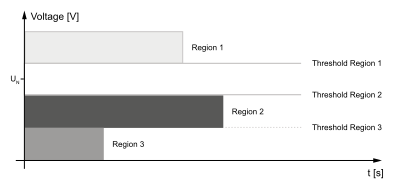
Division of the grid voltage range into three fault regions by selecting the detection thresholds.
IMPORTANT!
The length of the bars represents trip times for overvoltage and undervoltage detection of the Interface Protection function group. This has no significance for the VFRT functionality.
- The R1 threshold must be higher than the R2 threshold, and so on.
- The use of identical thresholds for multiple regions is prohibited.
- Using the threshold value 0 % is allowed.
To deactivate a specific region, its threshold can be used:
An HV region (R1) is deactivated by adjusting the threshold to 200 %. An unused LV region (usually R3) is deactivated by adjusting the threshold to 0 %.
General VFRT settings
The following setting values apply equally to all regions.
Parameter | Value range | Standard value | Description |
|---|---|---|---|
Mode | On |
| VFRT function is active according to the set parameter values. |
Off | Off | If no special behavior is required during grid disturbances, the inverter will behave according to the default values in this table with this setting. Any parameter settings made are ignored. | |
Reactive Current Limit for Overexcited Operation. | 0 ‑ 110 | 100 % | Limitation of the reactive current during a mains voltage fault and overexcited operation - as a percentage of the nominal current lN. |
Reactive Current Limit for Underexcited Operation. | 0 ‑ 110 | 100 % | Limitation of the reactive current during a mains voltage fault and underexcited operation - as a percentage of the nominal current lN. |
Sudden Voltage Change Detection | On |
| The detection of sudden voltage changes within the normal voltage range is active. |
Off | Off | No detection of sudden voltage changes within the normal voltage range. | |
Insensitivity Range | 0 ‑ 100 | 5 % | Limit value that must be exceeded by a sudden change in voltage (change in the positive sequence voltage or negative sequence voltage) for a mains voltage fault to be detected. Reference value for the calculation of this limit value is the moving average value of the mains voltage over 1 second (1s‑Avg). |
Deactivation Time | 0 ‑ 100 [s] | 5 s | Time duration of grid fault handling for sudden voltage changes. After this time has elapsed, the grid fault handling is automatically terminated if no static voltage limits (see parameter Threshold Static under Region 1, 2, 3) have been violated. |
Region 1
These setting values define how the inverter behaves within Region 1. The choice of setting has no effect on regions 2 and 3.
Parameter | Value range | Standard value | Description |
|---|---|---|---|
Static Threshold | 0 ‑ 200 | 125 % | Static voltage threshold (in % of nominal voltage) that must be exceeded or fallen below to activate VFRT Region 1 and its associated current inrush mode.
Setting condition: Default value 125 % means that the inverter is in normal current feed-in operation up to 125 % of the nominal voltage. VFRT becomes active above 125 % with the selected current inrush mode (default mode for Region 1: Zero Current). |
Static Detection Mode |
|
| Voltage system used for static threshold detection of VFRT Region 1. |
L-N Voltage | L-N Voltage | The phase-to-neutral (line-to-neutral) voltage system is used for static threshold detection of VFRT Region 1. | |
L-L Voltage |
| The phase-to-phase (line-to-line) voltage system is used for static threshold detection of VFRT Region 1. | |
L-L and L-N Voltage |
| Both voltage systems (line-to-neutral and line-to-line) are used for static threshold detection of VFRT Region 1. | |
Current Calc Mode
|
|
| Current inrush mode for Region 1. |
Passive |
| The pre-fault behavior is maintained as far as possible during the fault. | |
Zero Current | Zero Current | The alternating current is adjusted to zero. There is no effective or reactive power feed-in during the fault. | |
Active Symmetric Current |
| A symmetrical reactive current (positive-sequence system reactive current) is fed into the grid. The additional reactive current value results from the k-factor Positive Sequence multiplied by the amount of the voltage dip. No active current is fed in. | |
Active Asymmetric Current |
| An additional reactive current is fed into the grid. At the same time, active current is fed in (whereby the reactive current has priority). The additional reactive current value results from the k-factors multiplied by the voltage dip value. If the k-factor Negative Sequence is set to 0, the feed is symmetrical. Otherwise, asymmetrical faults are responded to with an asymmetrical current infeed. | |
k-factor Positive Sequence | 0 ‑ 10 | 2.0 | Multiplication factor (k-factor) for the positive-sequence system reactive current in Region 1. |
k-factor Negative Sequence | 0 ‑ 10 | 2.0 | Multiplication factor (k-factor) for the negative-sequence system reactive current in Region 1. |
Region 2
These setting values define how the inverter behaves within Region 2. The choice of setting has no effect on regions 1 and 3.
Parameter | Value range | Standard value | Description |
|---|---|---|---|
Static Threshold | 0 ‑ 200 | 40 % | Static voltage threshold (in % of nominal voltage) that must be exceeded or fallen below to activate VFRT Region 2 and its associated current inrush mode.
Setting condition: Default value 40 % means that the inverter is in normal current feed-in operation up to 40 % of the nominal voltage. VFRT becomes active above 40 % with the selected current inrush mode (default mode for Region 2: Zero Current). |
Static Detection Mode |
|
| Voltage system used for static threshold detection of VFRT Region 2. |
L-N Voltage | L-N Voltage | The phase-to-neutral (line-to-neutral) voltage system is used for static threshold detection of VFRT Region 2. | |
L-L Voltage |
| The phase-to-phase (line-to-line) voltage system is used for static threshold detection of VFRT Region 2. | |
L-L and L-N Voltage |
| Both voltage systems (line-to-neutral and line-to-line) are used for static threshold detection of VFRT Region 2. | |
Current Calc Mode
|
|
| Current inrush mode for Region 2. |
Passive |
| The pre-fault active current and reactive current is maintained for as long as the fault persists. | |
Zero Current | Zero Current | The alternating current is adjusted to zero. There is no effective or reactive power feed-in during the fault. | |
Active Symmetric Current |
| A symmetrical reactive current (positive-sequence system reactive current) is fed into the grid. The additional reactive current value results from the k-factor Positive Sequence multiplied by the amount of the voltage dip. No active current is fed in. | |
Active Asymmetric Current |
| An additional reactive current is fed into the grid. At the same time, active current is fed in (whereby the reactive current has priority). The additional reactive current value results from the k-factors multiplied by the voltage dip value. If the k-factor Negative Sequence is set to 0, the feed is symmetrical. Otherwise, asymmetrical faults are responded to with an asymmetrical current infeed. | |
k-factor Positive Sequence | 0 ‑ 10 | 2.0 | Multiplication factor (k-factor) for the positive-sequence system reactive current in Region 2. |
k-factor Negative Sequence | 0 ‑ 10 | 2.0 | Multiplication factor (k-factor) for the negative-sequence system reactive current in Region 2. |
Region 3
These setting values define how the inverter behaves within Region 3. The choice of setting has no effect on regions 1 and 2.
Parameter | Value range | Standard value | Description |
|---|---|---|---|
Static Threshold | 0 ‑ 200 | 0 % | Static voltage threshold (in % of nominal voltage) that must be exceeded or fallen below to activate VFRT Region 3 and its associated current inrush mode.
Setting condition: Default value 0 % means that Region 3 is disabled/inactive. |
Static Detection Mode |
|
| Voltage system used for static threshold detection of VFRT Region 3. |
L-N Voltage | L-N Voltage | The phase-to-neutral (line-to-neutral) voltage system is used for static threshold detection of VFRT Region 3. | |
L-L Voltage |
| The phase-to-phase (line-to-line) voltage system is used for static threshold detection of VFRT Region 3. | |
L-L and L-N Voltage |
| Both voltage systems (line-to-neutral and line-to-line) are used for static threshold detection of VFRT Region 3. | |
Current Calc Mode
|
|
| Current inrush mode for Region 3. |
Passive |
| The pre-fault active current and reactive current is maintained for as long as the fault persists. | |
Zero Current | Zero Current | The alternating current is adjusted to zero. There is no effective or reactive power feed-in during the fault. | |
Active Symmetric Current |
| A symmetrical reactive current (positive-sequence system reactive current) is fed into the grid. The additional reactive current value results from the k-factor Positive Sequence multiplied by the amount of the voltage dip. No active current is fed in. | |
Active Asymmetric Current |
| An additional reactive current is fed into the grid. At the same time, active current is fed in (whereby the reactive current has priority). The additional reactive current value results from the k-factors multiplied by the voltage dip value. If the k-factor Negative Sequence is set to 0, the feed is symmetrical. Otherwise, asymmetrical faults are responded to with an asymmetrical current infeed. | |
k-factor Positive Sequence | 0 ‑ 10 | 2.0 | Multiplication factor (k-factor) for the positive-sequence system reactive current in Region 3. |
k-factor Negative Sequence | 0 ‑ 10 | 2.0 | Multiplication factor (k-factor) for the negative-sequence system reactive current in Region 3. |
Voltage fault ride through (VFRT)
In the event of faults in the grid, there is a risk of a large number of generation plants being shut down unintentionally and thus a risk of network collapse. Mains voltage disturbances (Voltage Fault, Gridvoltage-Disturbance) are short-term voltage dips or surges in the grid. These voltage changes go beyond the normal range of the operating voltage (e.g., nominal voltage +/- 10 %). However, the duration of the voltage changes is short, so that the normal operating voltage is reached again before the system is shut down (due to Interface Protection). Voltage fault ride through means that the inverter can ride through such a mains voltage fault without shutting down prematurely. If the shutdown conditions of the protection settings (Grid and system protection or Interface Protection) are reached (time and value), the inverter always shuts down, thus terminating VFRT operation. The requirements for the exact behavior of the inverters during the fault depend on the respective grid connection rules. The following parameters determine this behavior.
Classification into regions
The voltage fault detection of the inverter detects severe or rapid mains voltage fluctuations and classifies them into so-called regions according to the level of the fault voltage (voltage level during the fault). Each region is assigned a specific mains voltage value range. Three individual regions (R1, R2, R3) can be configured. Each individual region has an adjustable detection threshold and several parameters that determine the behavior of the inverter within that region. The detection limit is a relative voltage level and is specified as a percentage of the AC nominal voltage. A value above 100 % means that the associated region describes an overvoltage disturbance (High Voltage Ride Through, HVRT). A value less than 100 % means that the associated region describes an undervoltage fault (Low Voltage Ride Through, LVRT). Figure 1 shows an example of a typical arrangement of the three regions (shown here with horizontal bars) by selective choice of detection thresholds: R1 threshold 110 %, R2 threshold 90 %, R3 threshold 40 %. The voltage range between the limits of Region1 and Region2 (white bar) comprises the voltage range for normal operation (here: 90 to 110 % of the nominal voltage). Region 1 comprises overvoltage disturbances, Region 2 consists of slight undervoltage disturbances (from 90 to 40 %). Region 3 consists of severe undervoltage disturbances (below 40 %).
Division of the grid voltage range into three fault regions by selecting the detection thresholds.
IMPORTANT!
The length of the bars represents trip times for overvoltage and undervoltage detection of the Interface Protection function group. This has no significance for the VFRT functionality.
- The R1 threshold must be higher than the R2 threshold, and so on.
- The use of identical thresholds for multiple regions is prohibited.
- Using the threshold value 0 % is allowed.
To deactivate a specific region, its threshold can be used:
An HV region (R1) is deactivated by adjusting the threshold to 200 %. An unused LV region (usually R3) is deactivated by adjusting the threshold to 0 %.
General VFRT settings
The following setting values apply equally to all regions.
Parameter | Value range | Standard value | Description |
|---|---|---|---|
Mode | On |
| VFRT function is active according to the set parameter values. |
Off | Off | If no special behavior is required during grid disturbances, the inverter will behave according to the default values in this table with this setting. Any parameter settings made are ignored. | |
Reactive Current Limit for Overexcited Operation. | 0 ‑ 110 | 100 % | Limitation of the reactive current during a mains voltage fault and overexcited operation - as a percentage of the nominal current lN. |
Reactive Current Limit for Underexcited Operation. | 0 ‑ 110 | 100 % | Limitation of the reactive current during a mains voltage fault and underexcited operation - as a percentage of the nominal current lN. |
Sudden Voltage Change Detection | On |
| The detection of sudden voltage changes within the normal voltage range is active. |
Off | Off | No detection of sudden voltage changes within the normal voltage range. | |
Insensitivity Range | 0 ‑ 100 | 5 % | Limit value that must be exceeded by a sudden change in voltage (change in the positive sequence voltage or negative sequence voltage) for a mains voltage fault to be detected. Reference value for the calculation of this limit value is the moving average value of the mains voltage over 1 second (1s‑Avg). |
Deactivation Time | 0 ‑ 100 [s] | 5 s | Time duration of grid fault handling for sudden voltage changes. After this time has elapsed, the grid fault handling is automatically terminated if no static voltage limits (see parameter Threshold Static under Region 1, 2, 3) have been violated. |
Region 1
These setting values define how the inverter behaves within Region 1. The choice of setting has no effect on regions 2 and 3.
Parameter | Value range | Standard value | Description |
|---|---|---|---|
Static Threshold | 0 ‑ 200 | 125 % | Static voltage threshold (in % of nominal voltage) that must be exceeded or fallen below to activate VFRT Region 1 and its associated current inrush mode.
Setting condition: Default value 125 % means that the inverter is in normal current feed-in operation up to 125 % of the nominal voltage. VFRT becomes active above 125 % with the selected current inrush mode (default mode for Region 1: Zero Current). |
Static Detection Mode |
|
| Voltage system used for static threshold detection of VFRT Region 1. |
L-N Voltage | L-N Voltage | The phase-to-neutral (line-to-neutral) voltage system is used for static threshold detection of VFRT Region 1. | |
L-L Voltage |
| The phase-to-phase (line-to-line) voltage system is used for static threshold detection of VFRT Region 1. | |
L-L and L-N Voltage |
| Both voltage systems (line-to-neutral and line-to-line) are used for static threshold detection of VFRT Region 1. | |
Current Calc Mode
|
|
| Current inrush mode for Region 1. |
Passive |
| The pre-fault behavior is maintained as far as possible during the fault. | |
Zero Current | Zero Current | The alternating current is adjusted to zero. There is no effective or reactive power feed-in during the fault. | |
Active Symmetric Current |
| A symmetrical reactive current (positive-sequence system reactive current) is fed into the grid. The additional reactive current value results from the k-factor Positive Sequence multiplied by the amount of the voltage dip. No active current is fed in. | |
Active Asymmetric Current |
| An additional reactive current is fed into the grid. At the same time, active current is fed in (whereby the reactive current has priority). The additional reactive current value results from the k-factors multiplied by the voltage dip value. If the k-factor Negative Sequence is set to 0, the feed is symmetrical. Otherwise, asymmetrical faults are responded to with an asymmetrical current infeed. | |
k-factor Positive Sequence | 0 ‑ 10 | 2.0 | Multiplication factor (k-factor) for the positive-sequence system reactive current in Region 1. |
k-factor Negative Sequence | 0 ‑ 10 | 2.0 | Multiplication factor (k-factor) for the negative-sequence system reactive current in Region 1. |
Region 2
These setting values define how the inverter behaves within Region 2. The choice of setting has no effect on regions 1 and 3.
Parameter | Value range | Standard value | Description |
|---|---|---|---|
Static Threshold | 0 ‑ 200 | 40 % | Static voltage threshold (in % of nominal voltage) that must be exceeded or fallen below to activate VFRT Region 2 and its associated current inrush mode.
Setting condition: Default value 40 % means that the inverter is in normal current feed-in operation up to 40 % of the nominal voltage. VFRT becomes active above 40 % with the selected current inrush mode (default mode for Region 2: Zero Current). |
Static Detection Mode |
|
| Voltage system used for static threshold detection of VFRT Region 2. |
L-N Voltage | L-N Voltage | The phase-to-neutral (line-to-neutral) voltage system is used for static threshold detection of VFRT Region 2. | |
L-L Voltage |
| The phase-to-phase (line-to-line) voltage system is used for static threshold detection of VFRT Region 2. | |
L-L and L-N Voltage |
| Both voltage systems (line-to-neutral and line-to-line) are used for static threshold detection of VFRT Region 2. | |
Current Calc Mode
|
|
| Current inrush mode for Region 2. |
Passive |
| The pre-fault active current and reactive current is maintained for as long as the fault persists. | |
Zero Current | Zero Current | The alternating current is adjusted to zero. There is no effective or reactive power feed-in during the fault. | |
Active Symmetric Current |
| A symmetrical reactive current (positive-sequence system reactive current) is fed into the grid. The additional reactive current value results from the k-factor Positive Sequence multiplied by the amount of the voltage dip. No active current is fed in. | |
Active Asymmetric Current |
| An additional reactive current is fed into the grid. At the same time, active current is fed in (whereby the reactive current has priority). The additional reactive current value results from the k-factors multiplied by the voltage dip value. If the k-factor Negative Sequence is set to 0, the feed is symmetrical. Otherwise, asymmetrical faults are responded to with an asymmetrical current infeed. | |
k-factor Positive Sequence | 0 ‑ 10 | 2.0 | Multiplication factor (k-factor) for the positive-sequence system reactive current in Region 2. |
k-factor Negative Sequence | 0 ‑ 10 | 2.0 | Multiplication factor (k-factor) for the negative-sequence system reactive current in Region 2. |
Region 3
These setting values define how the inverter behaves within Region 3. The choice of setting has no effect on regions 1 and 2.
Parameter | Value range | Standard value | Description |
|---|---|---|---|
Static Threshold | 0 ‑ 200 | 0 % | Static voltage threshold (in % of nominal voltage) that must be exceeded or fallen below to activate VFRT Region 3 and its associated current inrush mode.
Setting condition: Default value 0 % means that Region 3 is disabled/inactive. |
Static Detection Mode |
|
| Voltage system used for static threshold detection of VFRT Region 3. |
L-N Voltage | L-N Voltage | The phase-to-neutral (line-to-neutral) voltage system is used for static threshold detection of VFRT Region 3. | |
L-L Voltage |
| The phase-to-phase (line-to-line) voltage system is used for static threshold detection of VFRT Region 3. | |
L-L and L-N Voltage |
| Both voltage systems (line-to-neutral and line-to-line) are used for static threshold detection of VFRT Region 3. | |
Current Calc Mode
|
|
| Current inrush mode for Region 3. |
Passive |
| The pre-fault active current and reactive current is maintained for as long as the fault persists. | |
Zero Current | Zero Current | The alternating current is adjusted to zero. There is no effective or reactive power feed-in during the fault. | |
Active Symmetric Current |
| A symmetrical reactive current (positive-sequence system reactive current) is fed into the grid. The additional reactive current value results from the k-factor Positive Sequence multiplied by the amount of the voltage dip. No active current is fed in. | |
Active Asymmetric Current |
| An additional reactive current is fed into the grid. At the same time, active current is fed in (whereby the reactive current has priority). The additional reactive current value results from the k-factors multiplied by the voltage dip value. If the k-factor Negative Sequence is set to 0, the feed is symmetrical. Otherwise, asymmetrical faults are responded to with an asymmetrical current infeed. | |
k-factor Positive Sequence | 0 ‑ 10 | 2.0 | Multiplication factor (k-factor) for the positive-sequence system reactive current in Region 3. |
k-factor Negative Sequence | 0 ‑ 10 | 2.0 | Multiplication factor (k-factor) for the negative-sequence system reactive current in Region 3. |
Active Power
Voltage-dependent Power Control
or also called Volt/Watt function or P(U) function, causes a change in effective power depending on the mains voltage. By reducing the effective power at high mains voltage (or increasing the effective power at low mains voltage), an unintentional switch-off of the inverter due to the overvoltage or undervoltage limits can be avoided. This makes the yield losses less than they would be if the inverter was switched off.
- is reduced according to a defined gradient if the mains voltage is too high (see example System without storage - red characteristic curve)
- is increased according to a defined gradient if the mains voltage is too low (only possible with hybrid inverters, see example System with storage - green characteristic curve).
- If the output power has already been reduced to 0 W when the voltage is too high and the voltage continues to rise, additional energy can be taken from the national grid (the battery is thus charged, see System with storage and active grid support enabled - blue characteristic curve in the lower Power Input area).
- If the charging power (drawn from the national grid) has been reduced to 0 W when the voltage is too low and the voltage continues to drop, additional energy can be drawn from the battery to increase the output power (see example System with storage and active grid support enabled - blue characteristic curve in the upper Power Output area).
Examples of active grid support:
System without storage | Description of the parameter | ||||||
|---|---|---|---|---|---|---|---|
|
|
System with storage and active grid support disabled | Description of the parameter | ||||||||||
|---|---|---|---|---|---|---|---|---|---|---|---|
|
|
System with storage and active grid support enabled | Description of the parameter | ||||||||||
|---|---|---|---|---|---|---|---|---|---|---|---|
|
|
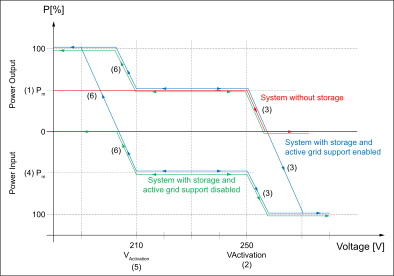
General power curve depending on mains voltage.
- Battery SoC Lower Limit - The battery will not be further discharged when the lower limit is reached.
- Battery SoC Upper Limit - The battery will not be further charged when the upper limit is reached.
Parameter | Value range | Description | Availability |
|---|---|---|---|
Mode | Off | The function is deactivated. |
|
On (without Hysteresis) | The function is activated. |
| |
Activation Threshold Overvoltage | 208 ‑ 311 [V] | Mains voltage limit value above which the power reduction takes place. |
|
Gradient Overvoltage | 0.01 ‑ 100 [%/V] | Gradient by which the effective power is reduced. |
|
Calculation Mode | Pmax = | Indicates the reference power for calculating the power limit in the event of overvoltage or undervoltage. Reference power:
|
|
Active Grid Support | Off | Deactivates extended active grid support for devices with a battery. | Has no influence on the following setups:
|
On | Activates extended active grid support for devices with a battery. | ||
Activation Threshold Undervoltage | 0 ‑ 311 [V] | Mains voltage limit value above which the power increase takes place. |
|
Gradient Undervoltage | 0 ‑ 100 [%/V] | Gradient by which the effective power increases. |
|
Time Constant (τ) | 0 ‑ 600 [s] | Time constant (1 Tau) in seconds [s]. Whenever the set value is changed, this new set value is not triggered abruptly, but smoothly in accordance with a PT1 response. The time constant describes how quickly the new set value is reached. (After three time constants the final value 95 % is reached) |
|
Stop Voltage at Overvoltage | 0 ‑ 311 [V] | Mains voltage limit value up to which the power reduction takes place. The gradient is automatically calculated from the parameters Activation Threshold Overvoltage and Power at Stop Voltage at Overvoltage. The parameters Gradient Overvoltage and Calculation Mode have no function. | Used exclusively in the following setups:
|
Power at Stop Voltage - Overvoltage | 0 ‑ 100 [%] | Reference power when the set mains voltage limit value is reached. |
Example: Setups AUS/NSZ 2020 | Description of the parameter | ||||||
|---|---|---|---|---|---|---|---|
|
|
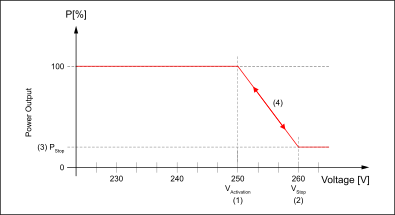
Power curve when Activation Threshold Overvoltage is exceeded.
Parameter | Value range | Description | Availability |
|---|---|---|---|
Stop Voltage at Undervoltage | 200 ‑ 311 [V] | Mains voltage limit value up to which the charging power of the battery is reduced. The gradient is calculated automatically from the parameters Activation Threshold Undervoltage and Power at Stop Voltage at Undervoltage. The parameters Gradient Undervoltage and Calculation Mode have no function. | Used exclusively in the following setups:
|
Power at Stop Voltage - Undervoltage | 0 ‑ 100 [%] | Reference power when the set mains voltage limit value is reached. Only for devices with battery in charging mode. |
Example: Setups AUS/NSZ 2020 | Description of the parameter | ||||||
|---|---|---|---|---|---|---|---|
|
|
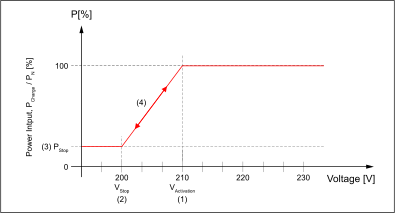
Charge power limitation when Activation Threshold Undervoltage is exceeded.
Frequency-dependent Power Control
, also called frequency/watt function or P(f) function, causes a change in effective power depending on the mains frequency.
A distinction is made between:
- Overfrequency
- Underfrequency
- is reduced according to a defined gradient in the event of an overfrequency (in the case of an inverter with an energy storage device, discharge of the storage device is stopped first before the power of the PV generator is reduced).
- is increased in the event of underfrequency in accordance with a defined gradient (in the case of an inverter without an energy storage device or with active grid support deactivated, only possible in conjunction with a manual power reduction and corresponding priority).
- Gradient: The gradient is given in %/Hz in relation to the device nominal output or the momentary power when entering the function (see example 1).
- Stop Frequency: With this method, the gradient always results from the current power at entry into the function to the stop frequency set in the setup and power at stop frequency (see example 2).
- If the output power has already been reduced to 0 W at overfrequency and the frequency continues to rise, additional energy can be drawn from the grid (the battery is thus charged).
- If the charging power (drawn from the grid) is reduced to 0 W at underfrequency and the frequency continues to drop, additional energy can be drawn from the battery to increase the output power.
- Battery SoC Lower Limit - The battery will not be further discharged when the lower limit is reached.
- Battery SoC Upper Limit - The battery will not be further charged when the upper limit is reached.
- Mode: On (without Hysteresis)
The inverter increases the power from the current reduced value to the original value in accordance with the same gradient used for power reduction. - Mode: On (with Hysteresis)
The inverter will not increase the power to the original value until the frequency is back in the target value range for a specific length of time.
Example 1 | Description of the parameter | ||||||||||
|---|---|---|---|---|---|---|---|---|---|---|---|
|
|
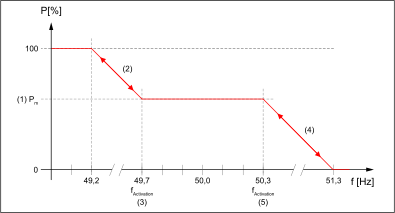
General power curve with overfrequency and underfrequency without hysteresis with gradients.
Example 2 | Description of the parameter | ||||||||||||||
|---|---|---|---|---|---|---|---|---|---|---|---|---|---|---|---|
|
|
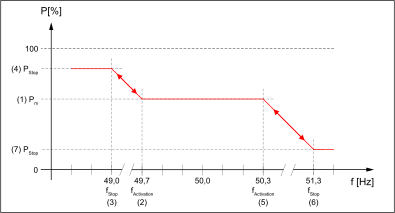
General power curve with overfrequency and underfrequency without hysteresis with stop frequency.
Example 3 | Description of the parameter | ||||||||||||||||||||
|---|---|---|---|---|---|---|---|---|---|---|---|---|---|---|---|---|---|---|---|---|---|
|
|
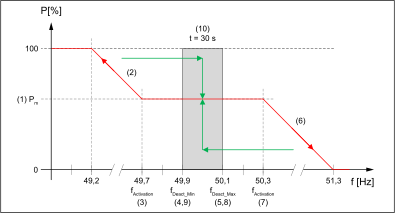
General power curve with overfrequency and underfrequency with hysteresis with gradients.
Parameter | Value range | Description | Availability |
|---|---|---|---|
Mode
| Off | The function is deactivated. | |
On (with Hysteresis) | Function is activated with hysteresis. | ||
On (without Hysteresis) | Function is activated without hysteresis. | In the following setups On (without Hysteresis) is not possible:
| |
Configuration Method | Gradient | For calculating the power limitation depending on the parameters Gradient Overfrequency or Gradient Underfrequency. |
|
Stop - Frequency | The gradient is calculated automatically using the parameters Stop Frequency - Overfrequency and Power at Stop Frequency - Overfrequency as well as Stop Frequency - Underfrequency and Power at Stop Frequency - Underfrequency. |
| |
Active Grid Support | Off | Deactivates extended active grid support for devices with a battery. | Has no influence on the following setups:
|
On | Activates extended active grid support for devices with a battery. |
Overfrequency
Parameter | Value range | Description | Availability |
|---|---|---|---|
Calculation Mode Overfrequency
| Pmax = | Indicates the reference power for calculating the power limit in the event of overfrequency. Reference power
|
|
Pmax = | |||
Pmax = | |||
Activation Threshold Overfrequency | 45 ‑ 66 [Hz] | Frequency limit value above which the power reduction takes place. |
|
Gradient Overfrequency | 0.01 ‑ 300 [%/Hz] | Gradient by which the effective power is reduced. |
|
Stop Frequency - Overfrequency | 45 ‑ 66 [Hz] | Frequency value at which the power reduction ends. |
|
Power at Stop Frequency - Overfrequency | -100 ‑ 0 [%] | Power when the set frequency limit value Stop Frequency - Overfrequency is reached. Adjustable between 0 % and full charging power (-100 %). | |
Upper Deactivation Threshold Overfrequency | 45 ‑ 66 [Hz] | Used if Mode is set to On (with Hysteresis). |
|
Lower Deactivation Threshold Overfrequency | 45 ‑ 66 [Hz] | Used if Mode is set to On (with Hysteresis). |
|
Transition Frequency at Overfrequency | 45 ‑ 66 [Hz] | Frequency at which the device with active battery reaches an output power of 0 W. If the mains frequency continues to rise, energy is drawn from the national grid and thus the battery is charged. If there is no battery in the system or it is not active, this parameter has no function (behavior as in example 3 - overfrequency). | Used exclusively in the following setups:
|
Example 4: Setups AUS/NSZ 2020 | Description of the parameter | ||||||||||||||||||
|---|---|---|---|---|---|---|---|---|---|---|---|---|---|---|---|---|---|---|---|
|
|
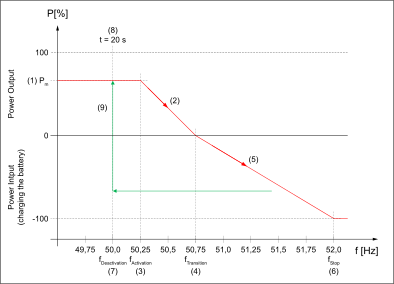
Power curve at overfrequency with hysteresis.
Underfrequency
Parameter | Value range | Description | Availability |
|---|---|---|---|
Calculation Mode Underfrequency
| Pmax = | Indicates the reference power for calculating the power limit in the event of underfrequency. Reference power
|
|
Pmax = | |||
Pmax = | |||
Activation Threshold Underfrequency | 45 ‑ 66 [Hz] | Frequency limit value above which the power increase takes place. |
|
Gradient Underfrequency | 0 ‑ 100 [%/Hz] | Gradient by which the effective power increases. |
|
Stop Frequency - Underfrequency | 45 ‑ 66 [Hz] | Frequency value at which the power increase ends. |
|
Power at Stop Frequency - Underfrequency | 0 ‑ 100 [%] | Power when the set frequency limit value Stop Frequency - Underfrequency is reached. Adjustable between 0 % and full feed-in power (100 %). | |
Upper Deactivation Threshold Underfrequency | 45 ‑ 66 [Hz] | Used when Mode is set to On (with Hysteresis). |
|
Lower Deactivation Threshold Underfrequency | 45 ‑ 66 [Hz] | In use when Mode - On (with Hysteresis) is set. |
|
Transition Frequency at Underfrequency | 45 ‑ 66 [Hz] | Frequency at which the device with active battery reaches an output power of 0 W (charging power is reduced). If the mains frequency continues to drop, additional energy is released into the grid. This energy can come from the PV generator or from the battery. If there is no battery in the system or it is not active, this parameter has no function (behavior as in example 3 - underfrequency). | Used exclusively in the following setups:
|
Example 5: Setups AUS/NSZ 2020 | Description of the parameter | ||||||||||||||||||
|---|---|---|---|---|---|---|---|---|---|---|---|---|---|---|---|---|---|---|---|
|
|
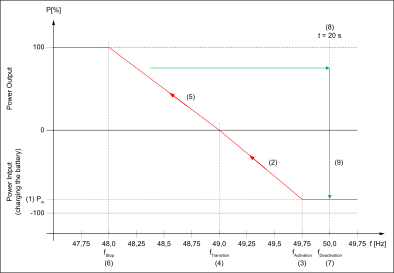
Power curve at underfrequency with hysteresis.
General - Frequency-dependent Power Control
Parameter | Value range | Description | Availability |
|---|---|---|---|
Return Gradient 1
| 0.01 ‑ 100 [%/s] | Rate of change at which the inverter increases the effective power after the limitation has ended. | |
Return Gradient 1 Alternative | 0.01 ‑ 100 [%/s] | Rate of change at which the inverter increases the effective power after the limitation has ended. This is activated if the difference between the rated power and the current reduced power is greater than the Return Gradient 1 Alternative Threshold. |
|
Return Gradient 1 Alternative Threshold | 0 ‑ 100 [W%] | Threshold value from which Return Gradient 1 or Return Gradient 1 Alternative is applied. |
|
Example 6 | Description of the parameter | ||||||||||||||||||
|---|---|---|---|---|---|---|---|---|---|---|---|---|---|---|---|---|---|---|---|
The mains frequency returns to the permissible range at Pred. |
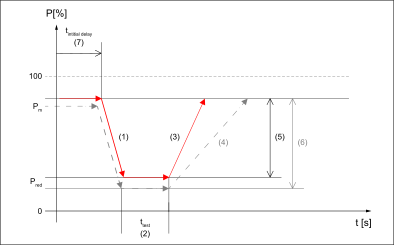
Application example with Return Gradient 1 Alternative and Return Gradient 1 Alternative Threshold.
Parameter | Value range | Description | Availability |
|---|---|---|---|
Return Gradient 2 Mode | Off | Deactivates the use of Return Gradient 2. Raising the effective power from the reduced value to the device rated output takes place according to Return Gradient 1. | |
On | Activates a different rate of change at which the inverter increases the effective power from the original value to the device nominal output. Raising the effective power from the original value to the device rated output takes place according to Return Gradient 2. |
| |
Return Gradient 2 | 0.01 ‑ 100 [%/s] | Rate of change at which the inverter increases the effective power from the original value to the device nominal output. |
|
Example 7 | Description of the parameter | ||||||||||||||
|---|---|---|---|---|---|---|---|---|---|---|---|---|---|---|---|
|
At Pred the mains frequency returns to the permissible range. After the end of the waiting time (2), the power is increased to the initial value Pm with Return Gradient 1. The power is then increased to the device nominal output Pn with Return Gradient 2 (4). |
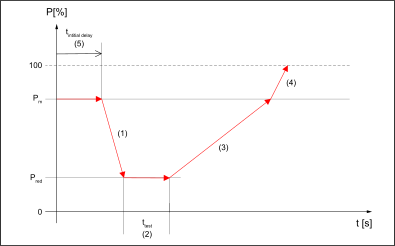
Application example with Return Gradient 2 Mode.
Parameter | Value range | Description | Availability |
|---|---|---|---|
Deactivation Time | 0 ‑ 600 [s] | Used when Mode is set to On (with Hysteresis). | |
Intentional Delay | 0.5 ‑ 60 [s] | Delays the start of the frequency-dependent power control after exceeding the respective Activation Threshold. |
|
Time Constant (τ) | 0 ‑ 60 [s] | Time constant (1 Tau) in seconds [s]. Whenever the set value is changed, this new set value is not triggered abruptly, but smoothly in accordance with a PT1 response. The time constant describes how quickly the new set value is reached. (After three time constants the final value 95 % is reached) |
|
Battery SoC Limitation for Grid Support
Parameter | Value range | Description | Availability |
|---|---|---|---|
Mode | Off | Deactivated SoC limitation | |
On | Activated SoC limitation | ||
Battery SoC Lower Limit | 0 ‑ 100 % | The battery is not further discharged when the lower limit is reached. |
|
Battery SoC Upper Limit | 0 ‑ 100 % | The battery is no longer charged when the upper limit is reached. |
|
General - Active Power
Parameter | Value range | Description | Availability |
|---|---|---|---|
Priority at Underfrequency | Priority on Manual Power Limitation | With Priority on Manual Power Limitation the power is not increased above the set limit in case of underfrequency. | |
Priority on Frequency-dependent Power Limitation | With Priority on Frequency-dependent Power Limitation the manual power limitation is ignored in case of underfrequency and the output power is increased depending on the frequency. The prerequisite is that sufficient energy is available from the PV generator or the battery. |
Reactive power
The voltage in the national grid can be influenced by the controlled use of reactive power by the inverter. When using reactive power control, the effective power generated at the same time is not affected or is only affected to a small extent.
IMPORTANT!
The exchange of reactive power (in addition to the feed-in of effective power) increases the current by the factor 1/cos φ.
- In over-excited mode or capacitive mode, reactive power is supplied to the national grid. This increases the mains voltage.
- In under-excited mode or inductive mode, reactive power is taken from the inverter. The mains voltage is lowered as a result.
Reactive power mode is restricted by the maximum apparent power Sn (and the maximum output current) as well as by the operational reactive power limits of the inverter:
- Primo GEN24: Qmax = 60 % of Sn (or cos φ = 0.80 at Sn)
- Symo GEN24: Qmax = 71 % of Sn (or cos φ = 0.70 at Sn)
- Tauro: Qmax = 100 % of Sn (or cos φ = 0.00)
- Verto: Qmax = 100 % of Sn (or cos φ = 0.00)
The value range specified for the following parameters may be additionally limited by the selected country-specific settings.
The following figure shows the possible operating range of the inverter. All valid operating points defined by effective power P and reactive power Q are within the grey area.
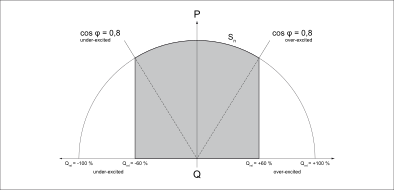
Example: Primo GEN24
General settings
Parameter | Range of values | Description |
|---|---|---|
Mode
|
| Reactive power mode selection option. The following modes are described in the subchapters. |
Off | No reactive power is fed in. | |
Cos φ - Constant Power Factor | Constant Cos φ. | |
Q Absolute - Constant Reactive Power | Constant reactive power in [Var]. | |
Q Relative - Constant Reactive Power | Constant reactive power in percent [%] of Sn. | |
Cos φ(P) - Power dependent Power Factor Characteristic | Effective power-dependent Cos φ control. | |
Q(P) - Power dependent Reactive Power Characteristic | Effective power-dependent reactive power control. | |
Q(U) - Voltage dependent Reactive Power Characteristic | Mains voltage dependent reactive power control. | |
P/Q Priority
| Q Priority | When the maximum apparent power is reached, the setting Q Priority leads to a reduction of the effective power in favor of reaching the reactive power specification. |
P Priority | The setting P Priority leads to a reduction of the reactive power in favor of reaching the available effective power when the maximum apparent power is reached. | |
Cos φ Minimum | 0 ‑ 1 | Minimum cos φ, which together with the maximum apparent power forms an additional limitation of the reactive power at low effective power. |
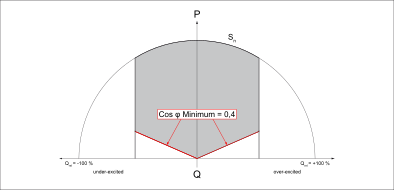
Depending on the selected mode, only the setting options in the respective subchapter and these general settings have an effect.
const cos φ
Reactive power default defined by a constant cos φ. The function is limited by the maximum apparent power and Cos φ minimum, the P/Q priority has no effect.
Parameter | Range of values | Description |
|---|---|---|
cos φ - Power Factor | 0 ‑ 1 | Set value of Cos φ |
Direction / Excitation
|
| The current direction corresponds to the generator counter arrow system. |
Over-Excited | Over-excited operation = capacitive operation = reactive power is supplied = reactive current is fed-in lagging the active current. | |
Under-Excited | Under-excited operation = inductive operation = reactive power is drawn = reactive current is fed-in ahead of the active current. | |
Time Constant (τ) | 0.01 s ‑ 60 s | Time constant (1 Tau) in seconds [s]. Whenever the set value is changed, this new set value is not triggered abruptly, but smoothly in accordance with a PT1 response. The time constant describes how quickly the new set value is reached. (After three time constants the final value 95 % is reached) |
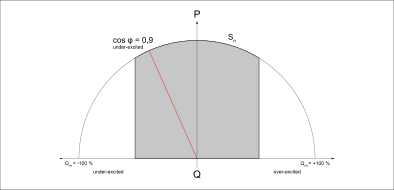
Q Absolute - Constant Reactive Power
Reactive power specification defined by a constant value [Var]. The function is limited by the maximum apparent power and by Cos φ Minimum
Parameter | Range of values | Description |
|---|---|---|
Q - Reactive Power (Var) | -200,000 Var - 200,000 Var | Reactive power setting value in [Var] (set value) |
Time Constant (τ) | 0.01 s ‑ 60 s | Time constant (1 Tau) in seconds [s]. Whenever the set value is changed, this new set value is not triggered abruptly, but smoothly in accordance with a PT1 response. The time constant describes how quickly the new set value is reached. (After three time constants the final value 95 % is reached) |
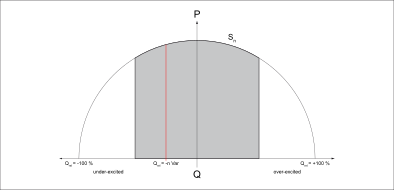
Q Relative - Constant Reactive Power
Reactive power specification defined by a constant value in percent [%], related to the nominal apparent power (Sn) of the inverter. The function is limited by the maximum apparent power and by Cos φ Minimum.
Parameter | Range of values | Description |
|---|---|---|
Q - Reactive Power (% of Nominal Apparent Power) | -100 % - 100 % | Reactive power setting as a percentage [%] of the nominal apparent power (set value) |
Time Constant (τ) | 0.01 s ‑ 60 s | Time constant (1 Tau) in seconds [s]. Whenever the set value is changed, this new set value is not triggered abruptly, but smoothly in accordance with a PT1 response. The time constant describes how quickly the new set value is reached. (After three time constants the final value 95 % is reached) |
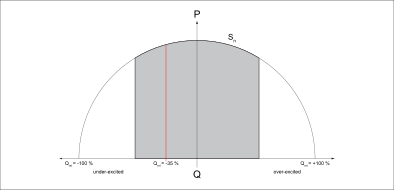
Cos φ(P) - Power dependent Power Factor Characteristic
This function controls the cos φ depending on the momentary effective power according to a characteristic curve. The characteristic curve is defined by four data points (1‑2‑3‑4). If fewer data points are required, the identical parameters can be set for two points. The function is limited by the maximum apparent power and by Cos φ Minimum. For the characteristic curves, the data points must be entered in the X‑axis (effective power) and in the Y‑axis (Cos φ).
Point | Parameter | Range of values | Description |
|---|---|---|---|
1
| Active Power (% of Nominal Apparent Power) | 0 % ‑ 100 % | Effective power as a percentage of the nominal apparent power Sn. |
cos φ - Power Factor | 0 ‑ 1 | Set value of Cos φ. | |
Direction / Excitation |
| The current direction corresponds to the generator counter arrow system. | |
| Under-Excited | Under-excited operation = inductive operation = reactive power is drawn = reactive current is fed-in ahead of the active current. | |
Over-Excited | Over-excited operation = capacitive operation = reactive power is supplied = reactive current is fed-in lagging the active current. | ||
2
| Active Power (% of Nominal Apparent Power) | 0 % ‑ 100 % | Effective power as a percentage of the nominal apparent power SN. |
cos φ - Power Factor | 0 ‑ 1 | Set value of Cos φ. | |
Direction / Excitation |
| The current direction corresponds to the generator counter arrow system. | |
| Under-Excited | Under-excited operation = inductive operation = reactive power is drawn = reactive current is fed-in ahead of the active current. | |
| Over-Excited | Over-excited operation = capacitive operation = reactive power is supplied = reactive current is fed-in lagging the active current. | |
3
| Active Power (% of Nominal Apparent Power) | 0 % ‑ 100 % | Effective power as a percentage of the nominal apparent power SN. |
cos φ - Power Factor | 0 ‑ 1 | Set value of Cos φ. | |
Direction / Excitation |
| The current direction corresponds to the generator counter arrow system. | |
Under-Excited | Under-excited operation = inductive operation = reactive power is drawn = reactive current is fed-in ahead of the active current. | ||
Over-Excited | Over-excited operation = capacitive operation = reactive power is supplied = reactive current is fed-in lagging the active current. | ||
4
| Active Power (% of Nominal Apparent Power) | 0 % ‑ 100 % | Effective power as a percentage of the nominal apparent power SN. |
cos φ - Power Factor | 0 ‑ 1 | Set value of Cos φ. | |
Direction / Excitation |
| The current direction corresponds to the generator counter arrow system. | |
| Under-Excited | Under-excited operation = inductive operation = reactive power is drawn = reactive current is fed-in ahead of the active current. | |
| Over-Excited | Over-excited operation = capacitive operation = reactive power is supplied = reactive current is fed-in lagging the active current. |
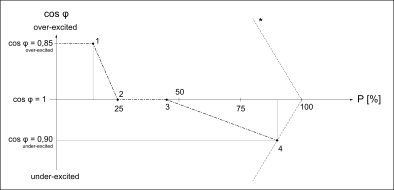
Example: Curve defined by four data points.
| 1 | P = 15 %, cos φ = 0.85 - Over-Excited |
| 2 | P = 25 %, cos φ = 1 - Over-Excited |
| 3 | P = 45 %, cos φ = 1 - Over-Excited |
| 4 | P = 90 %, cos φ = 0.9 - Under-Excited |
General
In addition to the four points, the following parameters also come into play:
Parameter | Range of values | Description | Supplementary description |
|---|---|---|---|
Lock-In Voltage-Dependent (% of Nominal Voltage) | 0 % ‑ 120 % | AC voltage as a percentage of the nominal voltage. If this value is exceeded, the Cos φ(P) characteristic is activated. | With the voltage-dependent Lock-In/Lock-Out values it can be set that the Cos φ(P) control is deactivated at low voltages. |
Lock-Out Voltage-Dependent (% of Nominal Voltage) | 0 % ‑ 120 % | AC voltage as a percentage of the nominal voltage. If this value is undershot, the Cos φ(P) characteristic is deactivated. The lock-out limit has priority over the lock-in limit. | |
Lock-Out P-Dependent (% of Nominal Apparent Power) | 0 % ‑ 100 % | Effective power as a percentage of the nominal apparent power SN. If this value is undershot, the Cos φ(P) characteristic is deactivated. | With the effective power-dependent lock-out values, it can be set that the cos φ(P) control is deactivated for small effective powers. |
Time Constant (τ) | 0.01 s ‑ 60 s | Time constant (1 Tau) in seconds [s]. Whenever the set value is changed, this new set value is not triggered abruptly, but smoothly in accordance with a PT1 response. The time constant describes how quickly the new set value is reached. (After three time constants the final value 95 % is reached) |
Q(P) - Power dependent Reactive Power Characteristic
This function controls the reactive power depending on the momentary effective power according to a characteristic curve. The characteristic curve is defined by four data points (1‑2‑3‑4). If fewer data points are required, the identical parameters can be set for two points. The function is limited by the maximum apparent power and by Cos φ Minimum. For the characteristic curves, the data points in the X‑axis (effective power) and in the Y‑axis (reactive power) must be entered.
Point | Parameter | Range of values | Description |
|---|---|---|---|
1
| Active Power (% of Nominal Apparent Power) | 0 % ‑ 100 % | Effective power as a percentage of the nominal apparent power Sn (X‑axis). |
Reactive Power (% of Nominal Apparent Power) | -100 % ‑ 100 % | Reactive power as a percentage of the nominal apparent power Sn (Y‑axis). | |
2
| Active Power (% of Nominal Apparent Power) | 0 % ‑ 100 % | Effective power as a percentage of the nominal apparent power Sn (X‑axis). |
Reactive Power (% of Nominal Apparent Power) | -100 % ‑ 100 % | Reactive power as a percentage of the nominal apparent power Sn (Y‑axis). | |
3
| Active Power (% of Nominal Apparent Power) | 0 % ‑ 100 % | Effective power as a percentage of the nominal apparent power Sn. |
Reactive Power (% of Nominal Apparent Power) | -100 % ‑ 100 % | Reactive power as a percentage of the nominal apparent power Sn (Y‑axis). | |
4
| Active Power (% of Nominal Apparent Power) | 0 % ‑ 100 % | Effective power as a percentage of the nominal apparent power Sn (X‑axis). |
Reactive Power (% of Nominal Apparent Power) | -100 % ‑ 100 % | Reactive power as a percentage of the nominal apparent power Sn (Y‑axis). |
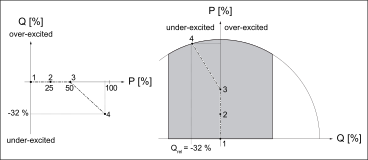
Example: Curve defined by four data points.
| 1 | P = 0 %, Q = 0 % |
| 2 | P = 25 %, Q = 0 % |
| 3 | P = 50 %, Q = 0 % |
| 4 | P = 95 %, Q = -32 % |
In addition to the four points, the following parameters also come into play:
Parameter | Range of values | Description | Supplementary description |
|---|---|---|---|
Lock-In Voltage-Dependent (% of Nominal Voltage) | 0 % ‑ 120 % | AC voltage as a percentage of the nominal voltage. If this value is exceeded, the Q(P) characteristic is activated. | With the voltage-dependent Lock-In/Lock-Out values, it can be set that the Q(P) control is deactivated at low voltages. |
Lock-Out Voltage-Dependent (% of Nominal Voltage) | 0 % ‑ 120 % | AC voltage as a percentage of the nominal voltage. If this value is undershot, the Q(P) characteristic is deactivated. The lock-out limit has priority over the lock-in limit. | |
Lock-Out P-Dependent (% of Nominal Apparent Power) | 0 % ‑ 100 % | Effective power as a percentage of the nominal apparent power SN. If this value is undershot, the Q(P) characteristic is deactivated. | With the effective power-dependent lock-out values, it can be set that the Q(P) control is deactivated at low active powers. |
Time Constant (τ) | 0.01 s ‑ 60 s | Time constant (1 Tau) in seconds [s]. Whenever the set value is changed, this new set value is not triggered abruptly, but smoothly in accordance with a PT1 response. The time constant describes how quickly the new set value is reached. (After three time constants the final value 95 % is reached) |
Q(U) - Voltage-dependent Reactive Power Characteristic
This function controls the reactive power as a function of the momentary mains voltage according to a characteristic curve. The characteristic curve is defined by four data points (1‑2‑3‑4). If fewer data points are required, the identical parameters can be set for two points. The function is limited by the maximum apparent power and by Cos φ Minimum. For the characteristic curves, the data points in the X‑axis (voltage) and in the Y‑axis (reactive power) must be entered.
Point | Parameter | Range of values | Description |
|---|---|---|---|
1 | Voltage (% of Nominal Voltage) | 50 % ‑ 150 % | AC voltage as a percentage of the nominal voltage (X‑axis). |
Reactive Power (% of Nominal Apparent Power) | -100 % ‑ 100 % | Reactive power as a percentage of the nominal apparent power Sn (Y‑axis). | |
2
| Voltage (% of Nominal Voltage) | 50 % ‑ 150 % | AC voltage as a percentage of the nominal voltage (X‑axis). |
Reactive Power (% of Nominal Apparent Power) | -100 % ‑ 100 % | Reactive power as a percentage of the nominal apparent power Sn (Y‑axis). | |
3
| Voltage (% of Nominal Voltage) | 50 % ‑ 150 % | AC voltage as a percentage of the nominal voltage (X‑axis). |
Reactive Power (% of Nominal Apparent Power) | -100 % ‑ 100 % | Reactive power as a percentage of the nominal apparent power Sn (Y‑axis). | |
4
| Voltage (% of Nominal Voltage) | 50 % ‑ 150 % | AC voltage as a percentage of the nominal voltage (X‑axis). |
Reactive Power (% of Nominal Apparent Power) | -100 % ‑ 100 % | Reactive power as a percentage of the nominal apparent power Sn (Y‑axis). |
General
In addition to the four points, the following parameters also come into play:
Parameter | Range of values | Description | Supplementary description |
|---|---|---|---|
Offset Factor | -1 ‑ 1 | Shift of the Q(U) characteristic on the Y‑axis (Q‑axis) via an offset factor. The offset factor is related to the reactive power set in point 1 or point 4, by which the characteristic curve continues to be limited. |
|
Initial Delay Time | 0 s ‑ 60 s | Start-up delay in seconds [s] - Delays the start of the Q(U) control when leaving the voltage range between the data point 2 and the data point 3. | |
Lock-In P-Dependent (% of Nominal Apparent Power) | 0 % ‑ 120 % | Effective power as a percentage of the nominal apparent power Sn. If this value is exceeded, the Q(P) characteristic is activated. | With the power-dependent Lock-In/Lock-Out values, it can be set that the Q(U) control is deactivated at low powers.
|
Lock-Out P-Dependent (% of Nominal Apparent Power) | 0 % ‑ 100% | Effective power as a percentage of the nominal apparent power SN. If this value is undershot, the Q(P) characteristic is deactivated. The lock-out limit has priority over the lock-in limit. | |
Time Constant (τ) | 0.01 s ‑ 60 s | Time constant (1 Tau) in seconds [s]. Whenever the set value is changed, this new set value is not triggered abruptly, but smoothly in accordance with a PT1 response. The time constant describes how quickly the new set value is reached. (After three time constants the final value 95 % is reached) |
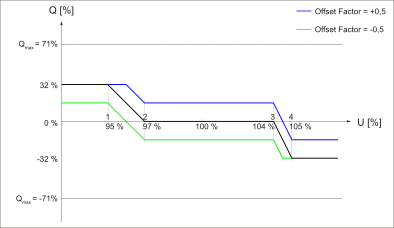
Shift of the Q(U) characteristic on the Y-axis (Q-axis) via an offset factor.
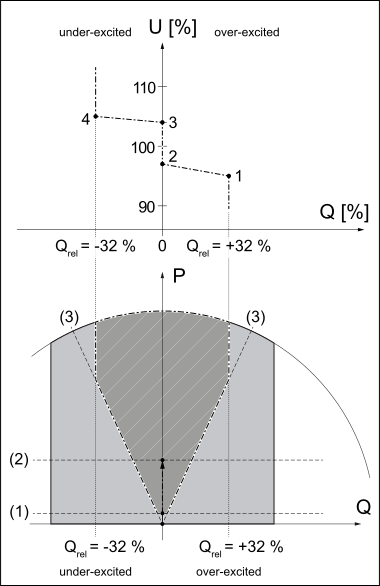
Example: Curve defined by four data points.
| 1 | U = 95 %, Q = 32 % |
| 2 | U = 97 %, Q = 0 % |
| 3 | U = 104 %, Q = 0 % |
| 4 | U = 105 %, Q = -32 % |
| (1) | Lock-Out P-Dependent (% of Nominal Apparent Power) = 5 % |
| (2) | Lock-In P-Dependent (% of Nominal Apparent Power) = 30 % |
| (3) | Cos φ minimum = 0.9 |