Introduction
Introduction
Message Queuing Telemetry Transport (MQTT) is a publish-subscribing-based messaging protocol based on ISO/IEC PRF 20922 standard. It works on top of the TCP/IP protocol. It is a lightweight protocol designed for connections with remote locations and limited network bandwidth. The publish/subscribe messaging pattern requires a message broker. It does not represent any real-time communication.
This document describes the implementation of the MQTT publisher with FRONIUS TPS/i, iWave and WeldCube Connector.
Introduction
Message Queuing Telemetry Transport (MQTT) is a publish-subscribing-based messaging protocol based on ISO/IEC PRF 20922 standard. It works on top of the TCP/IP protocol. It is a lightweight protocol designed for connections with remote locations and limited network bandwidth. The publish/subscribe messaging pattern requires a message broker. It does not represent any real-time communication.
This document describes the implementation of the MQTT publisher with FRONIUS TPS/i, iWave and WeldCube Connector.
What is MQTT and what is it used for
MQTT is one of the most used protocols in the IoT world. It is designed as a lightweight messaging protocol that uses publish/subscribe operations to exchange data between clients and the server. Small size, low power usage, minimized data packets and ease of implementation make the protocol idea for machine-to-machine communications.
Compared to other protocols MQTT has unique features:- Lightweight protocol
- It is easy to implement in software
- Fast in data transmission
- Based on messaging techniques
- Low network usage by minimized data packets
Like any other internet protocol, MQTT is based on clients and server. The server is responsible for handling the client’s requests of receiving or sending data between each other.
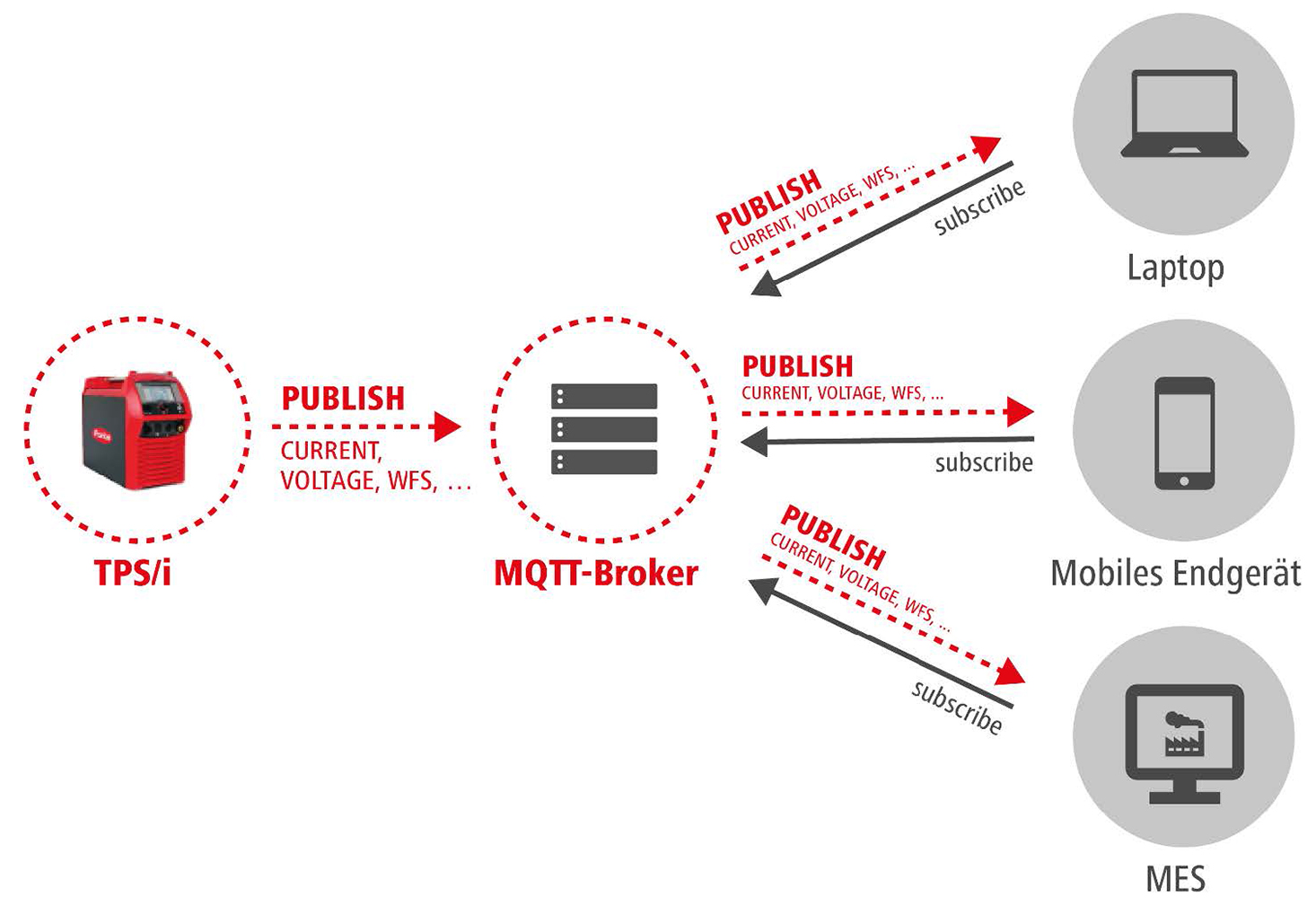
Terminology and description:- Publish: a client (e.g. welding machine) sends data to the broker
- Subscribe: a client (e.g. MES connector) receives data from the broker
- Topic: the target a device wants to publish or subscribe messages to or from
- Message: data that a device sends (publish) or receives (subscribe) to or from a topic
- Retain: a broker stores the last retained message and the corresponding QoS for that topic
- Last will: a message that is published by the broker if clients disconnect ungracefully
MQTT Server (Broker)
The MQTT Server is called a broker and the clients are the connected devices. It handles the publish/subscribe actions to the target topics between the clients. There are several broker available on the market.
A description and download about the open source message broker “mosquitto” can be found here: https://mosquitto.org/
The number of connected devices to the broker depends on the broker service provider. By design it is nearly limitless but depends on the amount of data, usage and server capacities.
MQTT Client ID
The MQTT client identifier is an up to 23 byte long string that identifies a MQTT client. Each identifier connected to a broker must be unique. The identifier on FRONIUS welding machines is based on the word “FRONIUS” and the serial number (e.g. “FRONIUS30112419”). This identifier is unique and can’t be changed.
Quality of Service (QoS)
Each connection between a client and the broker can specify a “quality of service” (QoS) measure.
These are classified in increasing order of overhead:- At most once: a message is sent only once and the client and broker without acknowledgment
- At least once: a message is re-tried by the sender multiple times until acknowledgment is received
- Exactly once: a two-level handshake between sender and receiver to ensure only one copy of a message is received
NOTE: QoS within MQTT is only used by sender and receiver and doesn’t affect handling of the underlying TCP data transmission.
FRONIUS welding machines currently publish all topics with QoS 0 (at most once).
Schematic Overview
The following schematic overview shows how MQTT works.
Disclamer
Although MQTT is know as reliable and depending on the implementation as fast, the use of MQTT with FRONIUS welding machines is only for documentation, visualization and informative purposes.
It is not allowed to use any status information provided by this communication for safety implementations.
Description of Topics
Description of Topics
MQTT is organized in hierarchically structured topics. All topics are cases sensitive. To make your subscriptions run properly, ensure the proper character typing of the designated topics. All main topics on FRONIUS welding machines are defined are upper case.
Examples:
FRONIUS/MYDEVICE_001/SYSTEM/ONLINE
The MQTT topics hierarchy structure on FRONIUS welding machines is organized in corresponding group. The following head line topics are available (details see below):
The MQTT topics hierarchy structure on FRONIUS welding machines is organized in corresponding group. The following head line topics are available (details see below):- FRONIUS/MYDEVICE_001/ACTUAL
- FRONIUS/MYDEVICE_001/PROCESS
- FRONIUS/MYDEVICE_001/JOB
- FRONIUS/MYDEVICE_001/SETTINGS
- FRONIUS/MYDEVICE_001/TRACE
- FRONIUS/MYDEVICE_001/SYSTEM
NOTE: MYDEVICE_001 represents the device topics as configured in the MQTT settings on the welding machine.
The following objects and nodes are available from firmware version or higher:
TPS/i and iWave | 4.3.0 |
iWave 190/230i | 2.2.0 |
WeldCube Connector | 1.3.0 |
Description of Topics
MQTT is organized in hierarchically structured topics. All topics are cases sensitive. To make your subscriptions run properly, ensure the proper character typing of the designated topics. All main topics on FRONIUS welding machines are defined are upper case.
Examples:
FRONIUS/MYDEVICE_001/SYSTEM/ONLINE
The MQTT topics hierarchy structure on FRONIUS welding machines is organized in corresponding group. The following head line topics are available (details see below):
The MQTT topics hierarchy structure on FRONIUS welding machines is organized in corresponding group. The following head line topics are available (details see below):- FRONIUS/MYDEVICE_001/ACTUAL
- FRONIUS/MYDEVICE_001/PROCESS
- FRONIUS/MYDEVICE_001/JOB
- FRONIUS/MYDEVICE_001/SETTINGS
- FRONIUS/MYDEVICE_001/TRACE
- FRONIUS/MYDEVICE_001/SYSTEM
NOTE: MYDEVICE_001 represents the device topics as configured in the MQTT settings on the welding machine.
The following objects and nodes are available from firmware version or higher:
TPS/i and iWave | 4.3.0 |
iWave 190/230i | 2.2.0 |
WeldCube Connector | 1.3.0 |
Values and Format
To ensure an easy implementation and debugging and due to the reason that some topics have multiple types, the values of all topics are published as strings.
To ensure proper type interpretation the following convention needs to be considered:
Decimal Point | ASCII Code 46 (“.”) |
Boolean | “TRUE” and “FALSE” |
Enumeration | See topic details below |
JSON | See topic details below |
Subscriptions
Once the FRONIUS welding machine (TPS/i, iWave190i/230i or WeldCube Connector) is configured and MQTT is activated the device sends a control message with the data to the connected broker. The broker then distributes the information to any clients that have subscribed to one or more topics published by the welding machine.
The publisher does not need to have any data on the number or locations of subscribers and subscribers in turn do not have to be configured with any data about the publishers (welding machines).
To identify the messages from a specific welding machine you can use the device topic as described in chapter Device Topic (Name) can be used.
If a broker receives a topic for which there are no current subscribers, it will discard the topic unless the publisher indicates that the topic is to be retained. This allows new subscribers to a topic to receive the most current valve rather than waiting for the next update from a publisher.
Root and Device Topic
The root topic of each FRONIUS welding machine starts with the fixed word “FRONIUS” followed by the device topic:
Example:
FRONIUS/MYDEVICE_001/
The device topic can be configured in the MQTT settings located in the SmartManager (website) of the welding machine.
NOTE: Ensure that you have unique device topics within your network infrastructure to avoid wrong message identification.
Single and Multilevel Wildcards
MQTT accept special characters as wildcards in subscriptions to a broker.
The single-level wildcard character “+” ASCII Code 43 matches only one topic level. The single-level wildcard can be used at any level in the topic tree and in conjunction with the multi-level wildcard. The single-level wildcard must be specified next to the topic level separator, except when it is specified on its own.
Example (single-level wildcard on device topic):
FRONIUS/+/SYSTEM/ONLINE
- FRONIUS/MYDEVICE/SYSTEM/ONLINE TRUE
- FRONIUS/YOURDEVICE/SYSTEM/ONLINE FALSE
- FRONIUS/SOMEOTHERDEVICE/SYSTEM/ONLINE TRUE
- FRONIUS/...
The multi-level wildcard character “#” ASCII Code 35 is used to match any number of levels within a topic. This wildcard can represent zero or more levels. The multilevel wildcard is only effective when specified on its own or next to the topic level separator character.
Example (single-level wildcard on device topic):
FRONIUS/MYDEVICE_001/SYSTEM/#
- FRONIUS/MYDEVICE_001/SYSTEM/COOLER_MODE AUTO
- FRONIUS/MYDEVICE_001/SYSTEM/TOTAL_CURRENTFLOW 0.0
- FRONIUS/MYDEVICE_001/SYSTEM/TOTAL_POWERON 673.3
- FRONIUS/MYDEVICE_001/SYSTEM/COOLER_TEMP invalid
- FRONIUS/MYDEVICE_001/SYSTEM/COOLER_FLOW invalid
- FRONIUS/MYDEVICE_001/SYSTEM/TOTAL_WIRELENGTH 1650
- FRONIUS/MYDEVICE_001/SYSTEM/TOTAL_SHIELDING_GAS 570
- FRONIUS/MYDEVICE_001/SYSTEM/SERIALNUMBER 30112419
- FRONIUS/MYDEVICE_001/SYSTEM/APIVERSION 1.0
- FRONIUS/MYDEVICE_001/SYSTEM/ONLINE TRUE
The syntax for the topic-based wildcard scheme has no escape characters. Whether “#” and “+” are treated as wildcards or not depends on their context.
Topics for TPS/i and iWave
ACTUAL
The following topics are published during the welding process with the defined sampling rate (0.1 ... 100 seconds). The values can be used to record the weld process data.
Topic | Type | Unit | Description |
|---|---|---|---|
ACTUAL_CURRENT | Float [-5000.0 ... 5000.0] | [A] | Current |
ACTUAL_VOLTAGE | Float [-500.0 ... 500.0] | [V] | Voltage |
ACTUAL_WFS | Float [-99.9 ... 99.9] | [m/min] | Wire feed speed |
ACTUAL_POWER | Float [-0.000 ... 1000000.000] | [W] | Power |
ACTUAL_WELDINGTIME | Float [0.0 ... 1000000.0] | [s] | Welding time |
ACTUAL_ GASFLOW | Float [0.0 ... 100.0] | [l/min] | Gasflow |
WIREBUFFER_VALUE | Float [-100 ... 100] | [%] | Status of wire buffer Full: 100% |
The following topics can be used for external displays and other visualization. The values for current, voltage, wire feed speed, power and energy are automatically set to the state of the welding process.
Topic | Type | Unit | Description |
|---|---|---|---|
DISPLAY_STATUS | Enumeration (String) | N/A | Status of weld |
DISPLAY_CURRENT | Float [-5000.0 ... 5000.0] | [A] | Current |
DISPLAY_VOLTAGE | Float [-500.0 ... 500.0] | [V] | Voltage |
DISPLAY_WFS | Float [-99.9 ... 99.9] | [m/min] | Wire feed speed |
DISPLAY_POWER | Float [0.000 ... 1000000.000] | [kW] | Power |
DISPLAY_ENERGY | Float [0.000 ... 0.999] | [kJ] | Energy |
The Telemetry Topic includes values which are time synchronous and can be used for data documentation. A new Telemetry Topic will be sent when at least one value changes.
Topic | Type | Unit | Description |
|---|---|---|---|
TELEMETRY | JSON | N/A | Time synchronous data: |
ACTUAL
The following topics are published during the welding process with the defined sampling rate (0.1 ... 100 seconds). The values can be used to record the weld process data.
Topic | Type | Unit | Description |
|---|---|---|---|
ACTUAL_CURRENT | Float [-5000.0 ... 5000.0] | [A] | Current |
ACTUAL_VOLTAGE | Float [-500.0 ... 500.0] | [V] | Voltage |
ACTUAL_WFS | Float [-99.9 ... 99.9] | [m/min] | Wire feed speed |
ACTUAL_POWER | Float [-0.000 ... 1000000.000] | [W] | Power |
ACTUAL_WELDINGTIME | Float [0.0 ... 1000000.0] | [s] | Welding time |
ACTUAL_ GASFLOW | Float [0.0 ... 100.0] | [l/min] | Gasflow |
WIREBUFFER_VALUE | Float [-100 ... 100] | [%] | Status of wire buffer Full: 100% |
The following topics can be used for external displays and other visualization. The values for current, voltage, wire feed speed, power and energy are automatically set to the state of the welding process.
Topic | Type | Unit | Description |
|---|---|---|---|
DISPLAY_STATUS | Enumeration (String) | N/A | Status of weld |
DISPLAY_CURRENT | Float [-5000.0 ... 5000.0] | [A] | Current |
DISPLAY_VOLTAGE | Float [-500.0 ... 500.0] | [V] | Voltage |
DISPLAY_WFS | Float [-99.9 ... 99.9] | [m/min] | Wire feed speed |
DISPLAY_POWER | Float [0.000 ... 1000000.000] | [kW] | Power |
DISPLAY_ENERGY | Float [0.000 ... 0.999] | [kJ] | Energy |
The Telemetry Topic includes values which are time synchronous and can be used for data documentation. A new Telemetry Topic will be sent when at least one value changes.
Topic | Type | Unit | Description |
|---|---|---|---|
TELEMETRY | JSON | N/A | Time synchronous data: |
PROCESS
The PROCESS topics represent the status of the actual process.
Topic | Type | Unit | Description |
|---|---|---|---|
PROCESS_ACTIVE | Boolean | N/A | Process active |
PROCESS_MAINPHASE | Boolean | N/A | Process main phase |
CURRENTFLOW | Boolean | N/A | Current flow |
ARCSTABLE | Boolean | N/A | Arc stable |
ERROR 1) | UInt16 [0 ... 65535] | N/A | Welding error |
SAFETYSTATUS | Enumeration (String) | N/A | Safety Status |
PENETRATION_STABILIZER_STATUS | Enumeration (String) | N/A | Status of penetration stabilizer |
ARC_LENGTH_STABILIZER_STATUS | Enumeration (String) | N/A | Status of arc length stabilizer |
WIREEND_VALUE | Enumeration (String) | N/A | Wire end status |
WIRE_END_VALUE_DRUM | Enumeration (String) | N/A | Wire end status of drum sensor |
WIRE_END_VALUE_RINGSENSOR | Enumeration (String) | N/A | Wire end status of ring sensor |
SELECTED_PROCESSLINE | UInt16 [0 ... 3] | N/A | 0 = TIG |
1) The signal shows the current error number of the welding device. The meaning of the error is described in the file Errorlist_TPSi_Vx.x.x and sent with each firmware release bundle PW_FW_ReleaseBundle_Official_TPSi_iWave_Vx.x.x.
JOB
The JOB topics are related to jobs and represent the actual state and number. For details on the specific settings of the selected job refer to SETTINGS in Topics for TPS/i.
Topic | Type | Unit | Description |
|---|---|---|---|
JOBNUMBER | UInt16 [1 ... 1000] | N/A | Job number |
JOBMODE | Boolean | N/A | Job mode |
JOBREVISION | UInt16 [0 ... 65535] | N/A | Job revision |
JOBSLOPE | Float [0.0 ... 10.0] | [s] | Job slope |
JOBNAME | String [30] | N/A | Job name |
NOTE: If “JOBMODE” is “FALSE” the “JOBNUMBER” is not representative.
SETTINGS
The SETTINGS topics represent the actual welding parameter settings including welding mode and trigger mode.
Topic | Type | Unit | Description |
|---|---|---|---|
WELDING_MODE | Enumeration (String) | N/A | Welding mode |
TRIGGER_MODE | Enumeration (String) | N/A | Trigger mode |
CURRENT_RECOMMVALUE | Float [-5000 ... 5000] | [A] | Current recommend value |
VOLTAGE_RECOMMVALUE | Float [-500.0 ... 500.0] | [V] | Voltage recommend value |
WFS_COMMANDVALUE | Float [0.0 ... 100.0] | [m/min] | Wire feed speed command value |
START_ARCLENGTH_CORRECTION | Float [-10.0 ... 10.0] / | N/A | Start arc length correction |
END_ARCLENGTH_CORRECTION | Float [-10.0 ... 10.0] / | N/A | End arc length correction |
START_CURRENT_TIME | Float [0.0 ... 10.0] / String [OFF] | [s] | Start current time |
END_CURRENT_TIME | Float [0.0 ... 10.0] / String [OFF] | [s] | End current time |
START_CURRENT | UInt16 [0. .200] | [%] | Start current |
END_CURRENT | UInt16 [0. .200] | [%] | End current |
GASPREFLOW | Float [0.0 ... 9.9] | [s] | Gas preflow |
GASPOSTFLOW | Float [0.0 ... 60.0] | [s] | Gas postflow |
ARCLENGTH_CORRECTION | Float [-10.0 ... 10.0] | N/A | Arc length correction |
PULSEDYNAMIC_CORRECTION | Float [-10.0 ... 10.0] | N/A | Pulse dynamic correction |
PENETRATION_STABILIZER | Float [-10.0 ... 10.0] | [m/min] | Penetration stabilizer |
ARC_LENGTH_STABILIZER | Float [0.0 ... 5.0] | N/A | Arc length stabilizer |
SLOPE_1 | Float [0.0 ... 9.9] | [s] | Slope 1 |
SLOPE_2 | Float [0.0 ... 9.9] | [s] | Slope 2 |
GASVALUE | Float [0.5 ... 30.0] | [l/min] | Gas command value (or “AUTO”) |
GASFACTOR | Float [0.90 ... 20.0] / String [AUTO] | N/A | Gas factor |
SFI | Boolean | N/A | SFI |
SFI_HOTSTART | Float [0.00 ... 2.00] / [OFF] | [s] | SFI hot start |
SYNCHROPULSE_ENABLE | Boolean | N/A | Synchropulse: Enable |
SYNCHROPULSE_FREQUENCY | Float [0.5 ... 10.0] | [Hz] | Synchropulse: Frequency |
SYNCHROPULSE_DELTA_FEEDER | Float [0.1 ... 6.0] | [m/min] | Synchropulse: Delta feeder |
SYNCHROPULSE_DUTYCYCLE | Float [10 ... 90] | [%] | Synchropulse: Duty cycle |
SYNCHROPULSE_ARCLENGTH_ | Float [-10.0 ... 10.0] | N/A | Synchropulse: Arc length correction high |
SYNCHROPULSE_ARCLENGTH_ | Float [-10.0 ... 10.0] | N/A | Synchropulse: Arc length correction low |
CW_CURRENT_COMMANDVALUE | Float [0 ... 500] | [A] | Coldwire current command value |
CW_FEEDER_COMMANDVALUE | Float [0.0 ... 100.0] | [m/min] | Coldwire wire feed speed command value |
CYCLETIG_ENABLE | Boolean | N/A | CycleTIG enable |
CYCLETIG_INTERVAL_CYCLES | UInt16 [0 ... 2000] / | N/A | Number of cycles until process ends |
CYCLETIG_INTERVAL_PAUSETIME | Float [0.02 ... 2.0] | [s] | Pause between impulse |
CYCLETIG_INTERVAL_TIME | Float [0.02 ... 2.0] | [s] | Duration of impulse |
TIG_AC_CURRENT_OFFSET | Float [-70 ... 70] | [%] | TIG AC current offset |
TIG_AC_FREQUENCY | UInt16 [40 ...250] / | [Hz] | TIG AC frequency |
TIG_AC_WAVEFORM_NEGATIVE | Enumeration (String) | N/A | TIG AC waveform of negative curve |
TIG_AC_WAVEFORM_POSITIVE | Enumeration (String) | N/A | TIG AC waveform of positive curve |
TIG_BALANCE | Float [15.0 ... 50.0] | [%] | Balance in TIG AC mode |
TIG_CALOTTE_MODE | Enumeration (String) | N/A | TIG AC calotte mode |
TIG_DOWN_SLOPE | Float [0.01 ... 30.0] / | [s] | TIG down slope time |
TIG_DROP_CURRENT_SLOPE1 | Float [0.01 ... 30.0] / | [s] | Slope time from main current to drop current |
TIG_DROP_CURRENT_SLOPE2 | Float [0.01 ... 30.0] / | [s] | Slope time from drop current to main current |
TIG_ELECTRODE_DIAMETER | Float [1.0 ... 6.4] / | [mm] | TIG electrode diameter |
TIG_END_CURRENT | UInt16 [0 ... 100] | [%] | End current in % of main current |
TIG_END_CURRENT_TIME | Float [0.01 ... 30.0] / | [s] | Duration of end phase |
TIG_EXT_CSS | Float [0.1 ... 10.0] / | [V] | TIG extended comfort stop |
TIG_EXT_UCUTOFF | Float [6.0 ... 90.0] / | [V] | TIG extended cut off voltage |
TIG_GASPREFLOW | Float [0.0 ... 9.9] | [s] | TIG gas preflow time |
TIG_HF_IGNITION | Enumeration (String) | N/A | High frequency start |
TIG_HF_IGNITION_DELAY | Float [0.1 ... 5.0] | [s] | Delay of HF impulse |
TIG_I1 | Float [0 ... 5000] | [A] | TIG main current |
TIG_IGNITION_TIMEOUT | Float [0.1 ... 9.9] | [s] | Ignition timeout |
TIG_POLARITY | Enumeration (String) | N/A | TIG polarity |
TIG_PULSE_BACKROUND_CURRENT | Float [0 ... 100] | [%] | Base current in % of main current at TIG pulse |
TIG_PULSE_DUTY_CYCLE | Float [10 ... 90] | [%] | Pulse pause ratio |
TIG_PULSE_FREQUENCY | Float [0.2 ... 1000.0] / | [Hz] | Pulse frequency TIG DC |
TIG_RPI | Enumeration (String) | N/A | Reserve polarity ignition |
TIG_SHIELDING_1_GASFACTOR | Float [0.9 ... 20.0] / | N/A | Shielding gas 1 factor |
TIG_SHIELDING_1_GASVALUE | Float [0.5 ... 30.0] | [l/min] | Shielding gas 1 |
TIG_SPOT_TIME | Float [0.02 ... 120] | [s] | Main phase time in spot trigger mode |
TIG_START_CURRENT | Float [0 ... 200] | [%] | Start current in % of main current |
TIG_START_CURRENT_TIME | Float [0.01 ... 30.0] / | [s] | Duration of starting phase |
TIG_TAC | Float [0.1 ... 9.9] / | [s] | TAC time or OFF/ON |
TIG_TRIGGER_MODE | Enumeration (String) | N/A | TIG trigger mode |
TIG_UP_SLOPE | Float [0.01 ... 30.0] / | [s] | UP slope time |
TIG_WAVEFORM_BACKGROUND | Enumeration (String) | N/A | TIG DC waveform of base current |
TIG_WAVEFORM_PULSE | Enumeration (String) | N/A | TIG DC waveform of pulse |
TIG_WIRE_CORRECTION | Float [-10.0 ... 10.0] | N/A | Wire correction in TIG-Dynamic Wire Mode |
TIG_WORKING_2_GASFACTOR | Float [0.9 ... 20.0] / | N/A | Working gas 2 factor |
TIG_WORKING_2_GASVALUE | Float [0.5 ... 30.0] | [l/min] | Working gas 2 |
TRACE
The TRACE topics represent the traceability parameters for the actual or next weld.
Topic | Type | Unit | Description |
|---|---|---|---|
PARTITEMNUMBER | String [100] | N/A | Item/Article number of part |
PARTSERIALNUMBER | String [100] | N/A | Serial number of part |
SEAMNUMBER | UInt16 [0 ... 65535] | N/A | Seam number (or processing step) |
PARVERSION | String [100] | N/A | Version of part |
NOTE: To set the traceability parameter use the FRONIUS Data Channel (TCP) and/or robot interface.
SYSTEM
The SYSTEM topics represent the actual system state of welding machine including machine serial number, hour meters and information on the cooler if there is one installed. The values are published on change or update.
Topic | Type | Unit | Description |
|---|---|---|---|
SERIALNUMBER | String [100] | N/A | Machine serial number |
APIVERSION | String [100] | N/A | MQTT API version |
ONLINE | Boolean | N/A | Online state (last will)* |
FIRMWAREVERSION | String [100] | N/A | Firmware version of welding machine |
TOTAL_CURRENTFLOWTIME | Float [0.0 ... 1000000.0] | [h] | Hour-meter current flow time |
TOTAL_POWERONTIME | Float [0.0 ... 1000000.0] | [h] | Hour-meter power on time of machine |
TOTAL_WIRELENGTH | Float [0.0 ... 1000000.0] | [m] | Total wire length consumption |
TOTAL_SHIELDING_GAS | Float [0.0 ... 1000000.0] | [l] | Total shielding gas consumption |
COOLER_MODE | Enumeration (String) | N/A | Cooler mode |
COOLER_TEMP | Float [-200.0 ... 200.0] | [°C] | Cooler temperature |
COOLER_FLOW | Float [-100.00 ... 100.00] / | [l/min] | Cooling circuit flow rate |
MOTOR_FORCE_M1 | Float [0 ... 999] / | [N] | Motor Force (Motor 1) |
MOTOR_FORCE_M2 | Float [0 ... 999] / | [N] | Motor Force (Motor 2) |
MOTOR_FORCE_M3 | Float [0 ... 999] / | [N] | Motor Force (Motor 3) |
* The online state is defined as “last will”. The broker will send “false” if the machine disconnects ungracefully.
Topics for iWave 190i/230i
ACTUAL
The following topics are published during the welding process with the defined sampling rate (0.1 ... 100 seconds). The values can be used to record the weld process data.
Topic | Type | Unit | Description |
|---|---|---|---|
ACTUAL_CURRENT | Float [-5000.0 ... 5000.0] | [A] | Current |
ACTUAL_VOLTAGE | Float [-500.0 ... 500.0] | [V] | Voltage |
ACTUAL_WFS | Float [-99.9 ... 99.9] | [m/min] | Wire feed speed |
ACTUAL_POWER | Float [-0.000 ... 1000000.000] | [W] | Power |
ACTUAL_WELDINGTIME | Float [0.0 ... 1000000.0] | [s] | Welding time |
ACTUAL_ GASFLOW | Float [0.0 ... 100.0] / | [l/min] | Gasflow |
The following topics can be used for external displays and other visualization. The values for current, voltage, wire feed speed, power and energy are automatically set to the state of the welding process.
Topic | Type | Unit | Description |
|---|---|---|---|
DISPLAY_STATUS | Enumeration (String) | N/A | Status of weld |
DISPLAY_CURRENT | Float [-5000.0 ... 5000.0] | [A] | Current |
DISPLAY_VOLTAGE | Float [-500.0 ... 500.0] | [V] | Voltage |
DISPLAY_POWER | Float [0.000 ... 1000000.000] | [kW] | Power |
DISPLAY_ENERGY | Float [0.000 ... 0.999] | [kJ] | Energy |
The Telemetry Topic includes values which are time synchronous and can be used for data documentation. A new Telemetry Topic will be sent when at least one value changes.
Topic | Type | Unit | Description |
|---|---|---|---|
TELEMETRY | JSON | N/A | Time synchronous data: |
ACTUAL
The following topics are published during the welding process with the defined sampling rate (0.1 ... 100 seconds). The values can be used to record the weld process data.
Topic | Type | Unit | Description |
|---|---|---|---|
ACTUAL_CURRENT | Float [-5000.0 ... 5000.0] | [A] | Current |
ACTUAL_VOLTAGE | Float [-500.0 ... 500.0] | [V] | Voltage |
ACTUAL_WFS | Float [-99.9 ... 99.9] | [m/min] | Wire feed speed |
ACTUAL_POWER | Float [-0.000 ... 1000000.000] | [W] | Power |
ACTUAL_WELDINGTIME | Float [0.0 ... 1000000.0] | [s] | Welding time |
ACTUAL_ GASFLOW | Float [0.0 ... 100.0] / | [l/min] | Gasflow |
The following topics can be used for external displays and other visualization. The values for current, voltage, wire feed speed, power and energy are automatically set to the state of the welding process.
Topic | Type | Unit | Description |
|---|---|---|---|
DISPLAY_STATUS | Enumeration (String) | N/A | Status of weld |
DISPLAY_CURRENT | Float [-5000.0 ... 5000.0] | [A] | Current |
DISPLAY_VOLTAGE | Float [-500.0 ... 500.0] | [V] | Voltage |
DISPLAY_POWER | Float [0.000 ... 1000000.000] | [kW] | Power |
DISPLAY_ENERGY | Float [0.000 ... 0.999] | [kJ] | Energy |
The Telemetry Topic includes values which are time synchronous and can be used for data documentation. A new Telemetry Topic will be sent when at least one value changes.
Topic | Type | Unit | Description |
|---|---|---|---|
TELEMETRY | JSON | N/A | Time synchronous data: |
PROCESS
The PROCESS topics represent the status of the actual process.
Topic | Type | Unit | Description |
|---|---|---|---|
PROCESS_ACTIVE | Boolean | N/A | Process active |
PROCESS_MAINPHASE | Boolean | N/A | Process main phase |
CURRENTFLOW | Boolean | N/A | Current flow |
ARCSTABLE | Boolean | N/A | Arc stable |
ERROR 1) | UInt16 [0 ... 65535] | N/A | Welding error |
1) The signal shows the current error number of the welding device. The meaning of the error is described in the file Errorlist_TPSi_Vx.x.x and sent with each firmware release bundle PW_FW_ReleaseBundle_Official_TPSi_iWave_Vx.x.x.
JOB
The JOB topics are related to jobs and represent the actual state and number. For details on the specific settings of the selected job refer to SETTINGS in Topics for iWave 190i/230i.
Topic | Type | Unit | Description |
|---|---|---|---|
JOBNUMBER | UInt16 [1 ... 1000] | N/A | Job number |
JOBMODE | Boolean | N/A | Job mode |
JOBREVISION | UInt16 [0 ... 65535] | N/A | Job revision |
JOBSLOPE | Float [0.0 ... 10.0] | [s] | Job slope |
JOBNAME | String [30] | N/A | Job name |
NOTE: If “JOBMODE” is “FALSE” the “JOBNUMBER” is not representative.
SETTINGS
The SETTINGS topics represent the actual welding parameter settings including welding mode and trigger mode.
Topic | Type | Unit | Description |
|---|---|---|---|
WELDING_MODE | Enumeration | N/A | Welding mode |
TIG_TRIGGER_MODE | Enumeration | N/A | Trigger mode |
TIG_I1 | Float [0 ... 5000] | [A] | TIG main current |
TIG_START_CURRENT | UInt16 [0 ... 200] | [%] | Start current in % of main current |
TIG_UP_SLOPE | Float [0.01 ... 30.0] | [s] | Up slope time |
TIG_DOWN_SLOPE | Float [0.01 ... 30.0] | [s] | Down slope time |
TIG_END_CURRENT | UInt16 [0 ... 100] | [%] | End current in % of main current |
TIG_ELECTRODE_DIAMETER | Float [1.0 ... 6.4] / | [mm] | TIG electrode diameter |
TIG_BALANCE | Float [15.0 ... 50.0] | [%] | Balance in TIG AC mode |
TIG_TAC | Float [0.1 ... 9.9] / | [s] | Tac time of ON OFF |
TIG_START_CURRENT_TIME | Float [0.01 ... 30.0] / | [s] | Duration of starting phase |
TIG_END_CURRENT_TIME | Float [0.01 ... 30.0] / | [s] | Duration of end phase |
TIG_PULSE_FREQUENCY | Float [0.2 ... 1000.0] / | [Hz] | Pulse frequency TIG DC |
TIG_PULSE_BACKGROUND_CURRENT | UInt16 [0 ... 100] | [%] | Base current in % of main current at TIG pulse |
TIG_PULSE_DUTY_CYCLE | UInt16 [10 ... 90] | [%] | Pulse pause ratio |
TIG_AC_FREQUENCY | UInt16 [40 ... 250] / | [Hz] | TIG AC frequency |
TIG_AC_CURRENT_OFFSET | Float [-70 ... 70] | [%] | TIG AC current offset |
TIG_CALOTTE_MODE | Enumeration (String) | N/A | TIG AC calotte mode |
TIG_AC_WAVEFORM_POSITIVE | Enumeration (String) | N/A | TIG AC waveform of positive curve |
TIG_AC_WAVEFORM_NEGATIVE | Enumeration (String) | N/A | TIG AC waveform of negative curve |
TIG_HF_IGNITION | Enumeration (String) | N/A | High frequency start |
TIG_IGNITION_TIMEOUT | Float [0.1 ... 9.9] | [s] | Ignition timeout |
TIG_POLARITY | Enumeration (String) | N/A | TIG polarity |
TIG_SPOT_TIME | Float [0.02 ... 120] | [s] | Main phase time in spot trigger mode |
TIG_RPI | Enumeration (String) | N/A | Ignition in different polarity |
TIG_GASPREFLOW | Float [0.0 ... 9.9] | [s] | Gas preflow time |
TIG_GASPOSTFLOW | Float [0.0 ... 60.0] | [s] | Gas postflow time |
TIG_WAVEFORM_PULSE | Enumeration (String) | N/A | TIG DC waveform of pulse |
TIG_WAVEFORM_BACKGROUND | Enumeration (String) | N/A | TIG DC waveform of base current |
TIG_DROP_CURRENT_SLOPE1 | Float [0.01 ... 30.0] / | [s] | Slope time from main current to drop current |
TIG_DROP_CURRENT_SLOPE2 | Float [0.01 ... 30.0] / | [s] | Slope time from drop current to main current |
TIG_HF_IGNITION_DELAY | Float [0.1 ... 5.0] | [s] | Delay of HF impulse |
TIG_EXT_UCUTOFF | Float [6.0 ... 90.0] | [V] | TIG extended cut off current |
TIG_EXT_CSS | Float [0.1 ... 10.0] | [V] | TIG extended comfort stop |
CYCLETIG_INTERVAL_TIME | Float [0.02 ... 2.0] | [s] | Cycle TIG duration of impulse |
CYCLETIG_INTERVAL_PAUSETIME | Float [0.02 ... 2.0] | [s] | Cycle TIG pause time |
CYCLETIG_INTERVAL_CYCLES | Float [1 ... 2000] / | N/A | Amount of cycles |
CYCLETIG_ENABLED | Enumeration (String) | N/A | Cycle TIG enabled |
TIG_SHIELDING_1_GASVALUE | Float [0.5 ... 30.0] | [l/min] | Shielding gas 1 |
TIG_SHIELDING_1_GASFACTOR | Float [0.9 ... 20.0] / | N/A | Shielding gas 1 factor |
TIG_WORKING_2_GASVALUE | Float [0.5 ... 30.0] | [l/min] | Working gas 2 |
TIG_WORKING_2_GASFACTOR | Float [0.9 ... 20.0] / | N/A | Working gas 2 factor |
ARCBREAKTIME | Float [0.00 ... 2.00] | [s] | Arc break watchdog |
ARCBREAKREACTION | Enumeration (String) | N/A | Arc break watchdog reaction |
TRACE
The TRACE topics represent the traceability parameters for the actual or next weld.
Topic | Type | Unit | Description |
|---|---|---|---|
PARTITEMNUMBER | String [100] | N/A | Item/Article number of part |
PARTSERIALNUMBER | String [100] | N/A | Serial number of part |
SEAMNUMBER | UInt16 [0 ... 65535] | N/A | Seam number (or processing step) |
PARVERSION | String [100] | N/A | Version of part |
NOTE: To set the traceability parameter use the FRONIUS Data Channel (TCP) and/or robot interface.
SYSTEM
The SYSTEM topics represent the actual system state of welding machine including machine serial number, hour meters and information on the cooler if there is one installed. The values are published on change or update.
Topic | Type | Unit | Description |
|---|---|---|---|
SERIALNUMBER | String [100] | N/A | Machine serial number |
APIVERSION | String [100] | N/A | MQTT API version |
ONLINE | Boolean | N/A | Online state (last will)* |
FIRMWAREVERSION | String [100] | N/A | Firmware version of welding machine |
TOTAL_CURRENTFLOWTIME | Float [0.0 ... 1000000.0] | [h] | Hour-meter current flow time |
TOTAL_POWERONTIME | Float [0.0 ... 1000000.0] | [h] | Hour-meter power on time of machine |
TOTAL_SHIELDING_GAS | Float [0.0 ... 1000000.0] | [l] | Total shielding gas consumption |
COOLER_MODE | Enumeration (String) | N/A | Cooler mode |
COOLER_TEMP | Float [-200.0 ... 200.0] | [°C] | Cooler temperature |
COOLER_FLOW | Float [-100.00 ... 100.00] | [l/min] | Cooling circuit flow rate |
*) The online state is defined as “last will”. The broker will send “false” if the machine disconnects ungracefully.
Topics for WeldCube Connector
ACTUAL
The following topics are published during the welding process with the defined sampling rate (0.1 ... 100 seconds). The values can be used to record the weld process data. Wire feed speed is only available for WeldCube Connector U/I/WFS.
Topic | Type | Unit | Description |
|---|---|---|---|
ACTUAL_CURRENT | Float [-5000.0 ... 5000.0] | [A] | Current |
ACTUAL_VOLTAGE | Float [-500.0 ... 500.0] | [V] | Voltage |
ACTUAL_WFS | Float [-99.9 ... 99.9] | [m/min] | Wire feed speed |
ACTUAL_POWER | Float [-0.000 ... 1000000.000] | [W] | Power |
ACTUAL_WELDINGTIME | Float [0.0 ... 1000000.0] | [s] | Welding time |
The Telemetry Topic includes values which are time synchronous and can be used for data documentation. A new Telemetry Topic will be sent when at least one value changes.
Topic | Type | Unit | Description |
|---|---|---|---|
TELEMETRY | JSON | N/A | Time synchronous data: |
ACTUAL
The following topics are published during the welding process with the defined sampling rate (0.1 ... 100 seconds). The values can be used to record the weld process data. Wire feed speed is only available for WeldCube Connector U/I/WFS.
Topic | Type | Unit | Description |
|---|---|---|---|
ACTUAL_CURRENT | Float [-5000.0 ... 5000.0] | [A] | Current |
ACTUAL_VOLTAGE | Float [-500.0 ... 500.0] | [V] | Voltage |
ACTUAL_WFS | Float [-99.9 ... 99.9] | [m/min] | Wire feed speed |
ACTUAL_POWER | Float [-0.000 ... 1000000.000] | [W] | Power |
ACTUAL_WELDINGTIME | Float [0.0 ... 1000000.0] | [s] | Welding time |
The Telemetry Topic includes values which are time synchronous and can be used for data documentation. A new Telemetry Topic will be sent when at least one value changes.
Topic | Type | Unit | Description |
|---|---|---|---|
TELEMETRY | JSON | N/A | Time synchronous data: |
PROCESS
The PROCESS topics represent the status of the actual process.
Topic | Type | Unit | Description |
|---|---|---|---|
PROCESS_ACTIVE | Boolean | N/A | Process active |
CURRENTFLOW | Boolean | N/A | Current flow |
ERROR 1) | UInt16 [0 ... 65535] | N/A | Welding error |
1) The signal shows the current error number of the welding device. The meaning of the error is described in the file Errorlist_TPSi_Vx.x.x and sent with each firmware release bundle PW_FW_ReleaseBundle_Official_TPSi_iWave_Vx.x.x.
TRACE
The TRACE topics represent the traceability parameters for the actual or next weld.
Topic | Type | Unit | Description |
|---|---|---|---|
PARTITEMNUMBER | String [100] | N/A | Item/Article number of part |
PARTSERIALNUMBER | String [100] | N/A | Serial number of part |
SEAMNUMBER | UInt16 [0 ... 65535] | N/A | Seam number (or processing step) |
PARVERSION | String [100] | N/A | Version of part |
NOTE: To set the traceability parameter use the FRONIUS Data Channel (TCP) and/or robot interface.
SYSTEM
The SYSTEM topics represent the actual system state of welding machine including machine serial number, hour meters and information on the cooler if there is one installed. The values are published on change or update. TOTAL_WIRELENGTH is only available for WeldCube Connector U/I/WFS.
Topic | Type | Unit | Description |
|---|---|---|---|
SERIALNUMBER | String [100] | N/A | Machine serial number |
APIVERSION | String [100] | N/A | MQTT API version |
ONLINE | Boolean | N/A | Online state (last will)* |
FIRMWAREVERSION | String [100] | N/A | Firmware version of welding machine |
TOTAL_CURRENTFLOWTIME | Float [0.0 ... 1000000.0] | [h] | Hour-meter current flow time |
TOTAL_POWERONTIME | Float [0.0 ... 1000000.0] | [h] | Hour-meter power on time of machine |
TOTAL_WIRELENGTH | Float [0.0 ... 1000000.0] | [l] | Total wire length consumption |
*) The online state is defined as “last will”. The broker will send “false” if the machine disconnects ungracefully.
Setup and Installation
Setup and Installation
The configuration page for MQTT setup is located in the SmartManager (welding system website) under the topic “Power Source Settings”.
NOTE: The settings for MQTT are not affected on backup and restore of FRONIUS welding machines.
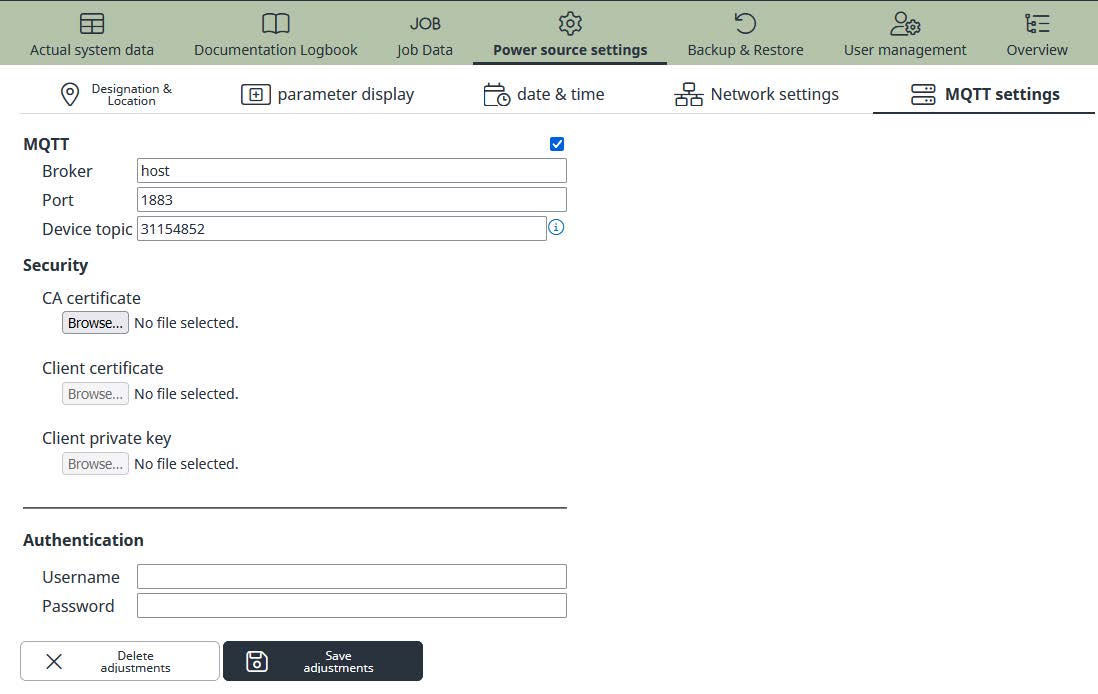
- Enable/Disable: Enable or disable MQTT communication
- Broker: Host name or IP address of MQTT broker
- Port: Port used by MQTT broker
- Device topic: Device name used in the root topic
- CA certificate: CA root certificate
- Client certificate: Client certificate
- Client private key: Client private key
- Username: Username for authentication
- Password: Password for authentication
Setup and Installation
The configuration page for MQTT setup is located in the SmartManager (welding system website) under the topic “Power Source Settings”.
NOTE: The settings for MQTT are not affected on backup and restore of FRONIUS welding machines.
- Enable/Disable: Enable or disable MQTT communication
- Broker: Host name or IP address of MQTT broker
- Port: Port used by MQTT broker
- Device topic: Device name used in the root topic
- CA certificate: CA root certificate
- Client certificate: Client certificate
- Client private key: Client private key
- Username: Username for authentication
- Password: Password for authentication
Enable/Disable MQTT Communications
By using the enable/disable flag of the checkbox the MQTT communication for the welding machine can be enable or disable in general.
Disable the communication will also inform the broker to set the online status of the device to “false”.
Broker Settings
To connect to the designated MQTT broker in your network you have to fill in the host name or IP address and the used TCP port. Please check in advance the network settings of the welding machine and the firewall configuration (in and out) of your network infrastructure to ensure proper function.
MQTT uses by default the TCP port 1883. If using SSL/TLS it is recommended to use port 8883 as defined in the standard. Any other port can be used if needed.
Device Topic (Name)
The device topics is part of the root topic and identifies the message for any subscriber. If this field is blank, the serial number of welding machine will be used by default.
The following characters are allowed: “A-Z”, “a-z”, “0-9”, “_”
In addition the use of “/” is possible to extend the root topic.
Security Settings
Without any authentication and SSL/TLS certificated MQTT will work in anonymous mode. By using username and password the access on the published topics can be restricted. To encrypt the communication between broker and client you can use certificates and private keys.
It is not recommended to use authentication by username and password without encryption.
Sampling Rate
For actual values for current, voltage, wire feeder speed (wfs) and power it is possible to setup the sampling rate for publishing. The sampling rate can be set from 0.1 to 100 seconds.
NOTE: If you use Job-Mode for welding, the sampling rate defined in the selected job is used for publishing the values. Ensure that the required sampling rate is set correctly in each job upon your needs.
Network Settings
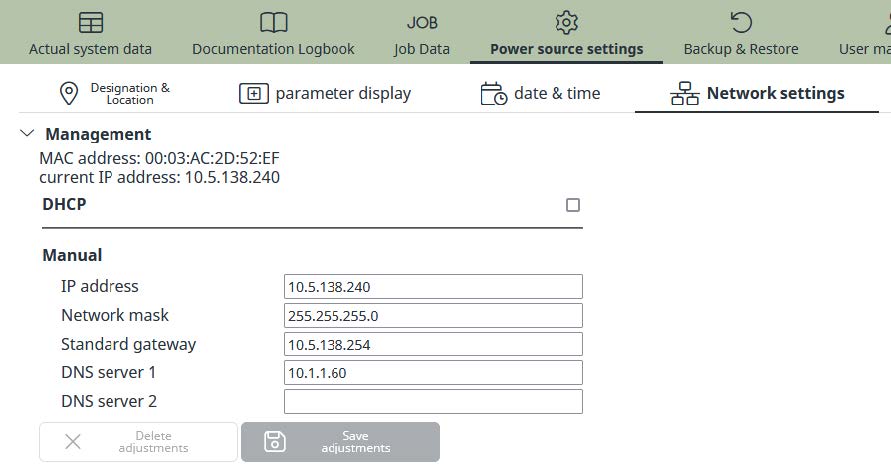
To ensure proper function of MQTT communication it is necessary to setup the TCP/IP parameters according to your network policy. When using a host name instead of the IP address for the MQTT broker a DNS server is required.
Time Server Settings (NTP)
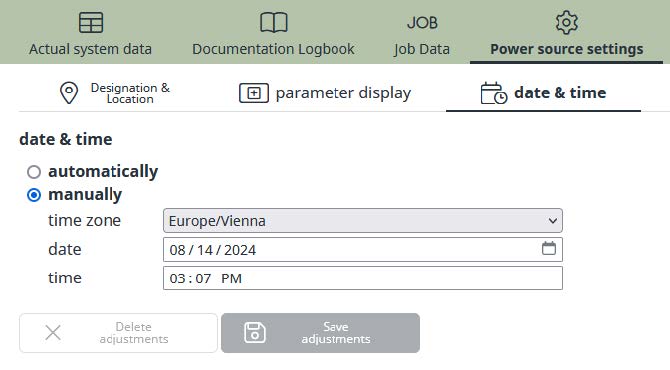
For all documentation purposes within the FRONIUS welding data product family it is recommended to synchronize date and time with a local or global time server.
Examples and Best Practice
Examples and Best Practice
This chapter includes and examples and best practice information on using MQTT with FRONIUS welding machines.
Examples and Best Practice
This chapter includes and examples and best practice information on using MQTT with FRONIUS welding machines.
Getting started with Mosquitto
The easiest way to start with MQTT on FRONIUS welding machines is to use the Mosquitto broker and subscriber.
The following instruction will guide you through the first steps by using Microsoft Windows® and default settings in anonymous mode.
STEP 1- Download the Mosquitto from https://mosquitto.org/
- Install the software on your computer (e.g. C:\mosquitto)
- Setup your firewall to allow TCP port 1883 for incoming and outgoing traffic
- Enable MQTT on your FRONIUS welding machine by using the SmartManager
- Setup your computer’s host name or IP address as MQTT broker and setup the port 1883
- Configure your device topic (e.g. MYDEVICE_001). Leave blank for using the machine serial number instead
- Open a command line prompt window (cmd.exe)
- Change to the directory where Mosquitto is installed (e.g. C:\mosquitto)
- Start the Mosquitto broker
- Use the “-v” option to display log information (optional):
C:\mosquitto\mosquitto.exe -v - The welding device will connect automatically to the broker within seconds and publish initial retained messages
- Open another command line prompt window (cmd.exe)
- Change to the directory where Mosquitto is installed (e.g. C:\mosquitto)
- Start the Mosquitto subscriber
- Use the “-v” option to display log information (optional):
C:\mosquitto\mosquitto_sub.exe -h localhost -v -t “FRONIUS/+/SYSTEM/#” - The above command will subscribe to all SYSTEM topics of all connected FRONIUS welding devices using wildcards
- Information published by the broker (example):
FRONIUS/MYDEVICE_001/SYSTEM/COOLER_MODE AUTO
FRONIUS/MYDEVICE_001/SYSTEM/TOTAL_CURRENTFLOW 0.0
FRONIUS/MYDEVICE_001/SYSTEM/TOTAL_POWERON 673.3
FRONIUS/MYDEVICE_001/SYSTEM/COOLER_TEMP invalid
FRONIUS/MYDEVICE_001/SYSTEM/COOLER_FLOW invalid
FRONIUS/MYDEVICE_001/SYSTEM/TOTAL_WIRELENGTH 1650
FRONIUS/MYDEVICE_001/SYSTEM/TOTAL_SHIELDING_GAS 570
FRONIUS/MYDEVICE_001/SYSTEM/SERIALNUMBER 30112419
FRONIUS/MYDEVICE_001/SYSTEM/APIVERSION 1.0
FRONIUS/MYDEVICE_001/SYSTEM/ONLINE TRUE
Frequently asked Questions
How and when exactly does the FRONIUS welding system publish messages to the broker?
During initialization of the MQTT connection between broker and FRONIUS machine, the machine is publishing all topics to the broker to be retained. This happens e.g. when activating the MQTT function, switching on the welding machine with MQTT active or when restarting the broker.
If the connection is up and running MQTT topics get published reliable only on change of the topic value. All publications are flagged as retain and with QoS Level: At most once (Fire and Forget)
Can parameters of specific jobs be collected which are stored in the welding system and can I use this as comparison of Jobs?
If Job mode is active, some parameters of the Topic SETTINGS represent information of the currently selected Job. But nevertheless, it is not usable to compare different Jobs or build a Job change history. For such purposes we recommend to use the FRONIUS Software WeldCube Premium.