General
General
The "Service menus" are setup menus for installers and service engineers. The "Service menus" are located at a separate menu level that can only be opened by entering an access code.
The access code is provided by Fronius.
The following "Service menus" are described in these instructions:
- Service Basic menu
- Service Error Counter menu
- Service Pro menu
General
The "Service menus" are setup menus for installers and service engineers. The "Service menus" are located at a separate menu level that can only be opened by entering an access code.
The access code is provided by Fronius.
The following "Service menus" are described in these instructions:
- Service Basic menu
- Service Error Counter menu
- Service Pro menu
Safety
CAUTION!
Incorrect settings can cause malfunctions and failures on the inverter.
Settings may only be made by trained and qualified personnel. Incorrect or omitted settings will result in non-conformance with the standard.
IMPORTANT! If a status code is shown on the inverter display during the startup phase, the "Service menus" can be opened by pressing the "Menu" button five times and then entering the relevant access code.
Refer to the safety rules in the inverter Operating Instructions.
Firmware version
- SnapINverter ROW: fro29390.upd and higher
- SnapINverter US: fro29390.upd and higher
Opening a Service menu
Opening a Service menu
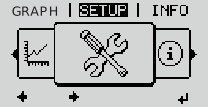
1Press the "Menu" key  until the screen on the left appearsThe menu level appears
until the screen on the left appearsThe menu level appears2Press the unassigned "Menu / Esc" key 5 times
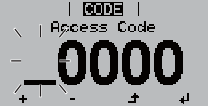
"Access Code" is displayed in the "CODE" menu; the first digit starts flashing
3Enter the access code for the Service menu required: Use keys  to select a value for the first digit of the code
to select a value for the first digit of the code4Press "Enter" 
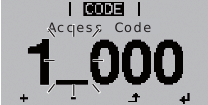
The second digit flashes
5Repeat steps 3 and 4 for the second, third, fourth and fifth digits of the access code until...
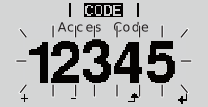
... the selected code starts flashing.
6Press "Enter" 12345 ... Example codeThe first parameter of the required Service menu is displayed
12345 ... Example codeThe first parameter of the required Service menu is displayedOpening a Service menu
1Press the "Menu" key until the screen on the left appearsThe menu level appears
until the screen on the left appearsThe menu level appears2Press the unassigned "Menu / Esc" key 5 times
"Access Code" is displayed in the "CODE" menu; the first digit starts flashing
3Enter the access code for the Service menu required: Use keys to select a value for the first digit of the code
to select a value for the first digit of the code4Press "Enter"
The second digit flashes
5Repeat steps 3 and 4 for the second, third, fourth and fifth digits of the access code until...
... the selected code starts flashing.
6Press "Enter" 12345 ... Example codeThe first parameter of the required Service menu is displayed
12345 ... Example codeThe first parameter of the required Service menu is displayedSetting menu entries, general
1Open the desired menu
2Use the 'Up' or 'Down' keys to select the desired menu item 
3Press "Enter"
The available settings are displayed: |
| The first digit of a value to be set flashes: |
4Use the 'Up' or 'Down' buttons to select the desired setting 5Press the 'Enter' key to save and apply the setting. To discard the setting, press the 'Esc' key. | 4Use the 'Up' or 'Down' keys to select a value for the first digit 5Press "Enter" The second digit of the value flashes. 6Repeat steps 4 and 5 until ... the whole value to be set flashes. | |
| 7Press "Enter" 8Repeat steps 4 - 6 as required for units or other values that are to be set until the appropriate unit or the value flashes. 9Press the 'Enter' key to save and apply the changes. To discard the changes, press the 'Esc' key. | |
The currently selected menu item is displayed. |
| The currently selected menu item is displayed. |
Service Basic menu
Access code for the Service Basic menu
2 2 7 4 2
Access code for the Service Basic menu
2 2 7 4 2
Overview of menu items in the Service Basic menu
| 1) | The value is applied |
| 2) | The function is deactivated |
| 3) | Apply the function settings as described in the inverter Operating Instructions |
| 4) | Max. and min. voltage values and max. power of feeding in are reset to zero in the TOTAL display mode |
a | Fronius Galvo | h | Fronius Eco |
b | Fronius Symo 3.0 - 4.5 S | i | Fronius Symo 10.0 - 12.0 208-240 |
c | Fronius Symo 3.0 - 8.2 M | j | Fronius Symo 10.0 - 24.0 480 |
d | Fronius Symo 10.0 - 20.0 M | k | Fronius Symo 15.0 208 |
e | Fronius Symo Hybrid | l | Fronius Primo 3.8 - 8.2 (UL version) |
f | Fronius Primo 3.0 - 8.2 | m | Fronius Symo Advanced 10.0 - 12.0 208-240 |
g | Fronius Primo 10.0 - 15.0 (UL version) | n | Fronius Symo Advanced 15.0 - 24.0 480 |
| MPP Tracker 1 | DC operating mode | MPP AUTO | |
|
| FIX | | |
|
| MPP USER | | |
|
| Dyn. Peak Manager b,c,d,e,f,g,h,i,j,k,l | ON |
|
| Fixed voltage | 80 - 800 V f,g,l | 1) | |
| MPPT1 start voltage | 80 - 800 V f,g,l | 1) | |
| MPP Tracker 2 | MPP Tracker 2 | ON |
|
| DC operating mode | MPP AUTO | | |
|
| FIX | | |
|
| MPP USER | | |
| Dyn. Peak Manager | ON |
| |
| Fixed voltage | 80 - 800 V f,g,l | 1) | |
| MPPT2 start voltage | 80 - 800 V f,g,l | 1) | |
| USB logbook | ON |
| |
|
| OFF |
| 2) |
|
| Auto |
| 2) |
| Input signal
| Mode of operation | Ext Sig. |
|
| Triggering method | Ext. Stop | | |
| Connection type | N/C | | |
| Grid power limit | 0 - Device rated power | 1) | |
| Impulse rate | 100 - 20000 | 1) | |
| SMS / relay | Event delay | 900 - 86,400 s | 1) |
| Event counter | 10 - 255 | 1) | |
| Grounding setting | Grounding mode | OFF | 2) |
| Earth current watchdog | Warning | | |
| Switch-off delay | 0 - 9999 hrs | 1) | |
| Insulation mode b,c, | Insulation warning | ON |
|
| Threshold warning | 0.1 - 10 MOhm b,c,d,e,h | 1) | |
| Threshold error | 600 kOhm - 10,000 kOhm | 1) | |
| TOTAL reset | CONFIRM | 4) |
The display of menu items depends on the respective country setup.
MPP Tracker 1
Setting the operating mode of MPP Tracker 1
| Selection options | DC operating mode / Dyn. Peak Manager / Fixed voltage / MPPT1 start voltage |
| DC operating mode | |
Selection options | MPP AUTO / FIX / MPP USER | |
MPP AUTO | normal operating status; | |
FIX | for entering a fixed DC voltage at which the inverter will operate | |
MPP USER | for entering the start voltage, at which the MPP tracker starts searching for the optimal operating point. | |
| Dyn. Peak Manager | |
Selection options | ON / OFF | |
| Fixed voltage | |
Unit | V | |
Setting range | 80 - 800 f,g,l | |
| MPPT1 start voltage | |
Unit | V | |
Setting range | 80 - 800 f,g,l | |
MPP Tracker 2
Setting the operating mode of the MPP Tracker 2
| Selection options | MPP Tracker 2 / DC operating mode / Dyn. Peak Manager / Fixed voltage / MPPT2 start voltage |
| MPP Tracker 2 | |
Setting range | OFF/ ON | |
| DC operating mode | |
Selection options | MPP AUTO / FIX / MPP USER | |
MPP AUTO | normal operating status; | |
FIX | for entering a fixed DC voltage at which the inverter will operate | |
MPP USER | for entering the MPP voltage above which the inverter will search for its ideal operating point | |
| Dyn. Peak Manager | |
Selection options | ON / OFF | |
| Fixed voltage | |
Unit | V | |
Setting range | Fronius Primo: 80 - 800 | |
| MPPT2 start voltage | |
Unit | V | |
Setting range | 80 - 800 | |
USB Eventlog
Activates or deactivates the function for saving to the USB flash drive all occurring status codes, as well as all inverter data, in 5 second values. This data will be saved on the USB flash drive in the EVENT.csv file.
| Selection options | ON / OFF / Auto |
The "Auto" setting is reserved for future USB modifications and currently has a similar function to the "OFF" setting.
Input signal
Activation and setting of the Input signal at the multifunction current interface
| Selection options | How it works / Triggering method / Connection type / Grid feed-in limit / Pulses per kWh |
| How it works | |
Ext Sig. | Signal input (e.g. signal contact for the surge protection device) | |
S0-Meter | Counting the pulses of an external S0 meter (input) | |
OFF | Mode of operation deactivated | |
| Triggering method | |
Ext. Stop | In the event of a signal error, an external stop appears on the display (State 668 - interruption of feed-in). | |
Warning | In the event of a signal error, a warning appears on the display at regular intervals (State 568 - multifunction current interface warning, no interruption of feed-in). | |
| Connection type | |
N/C | Normally-closed function (n.c. = normally closed) | |
N/O | Normally-open function (n.o. = normally open) | |
| Grid feed-in limit | |
Field for entering the maximum amount of energy to be fed into the grid in W. If this value is exceeded, the inverter regulates down to the set value within the time required by national standards and regulations. | ||
Setting range | 0 - Device rated power | |
| Pulses per kWh | |
Field for entering the pulses per kWh of the S0 meter. | ||
Setting range | 100 - 20,000 | |
SMS / relay
| Selection options | Event delay / Event counter |
| Event delay | |
Unit | s | |
Setting range | 900 - 86400 | |
| Event counter | |
Unit | - | |
Setting range | 10 - 255 | |
Grounding setting (only Fronius Galvo)
Activation and setting of the solar module ground
| Selection options | Grounding mode / Earth current watchdog(1) / Switch off delay(2) | ||||
|
| |||||
| Grounding mode | |||||
| Selection options | Off / Positive / Negative | ||||
| Earth current watchdog | |||||
Selection options | Off / Warning / Error / Warn Err | |||||
Warning | If there is a grounding fault, a warning that there is no longer a grounding connection appears on the display at regular intervals (no interruption of feed-in). State 502 will subsequently be displayed. | |||||
Error | The inverter produces an error message if there is a grounding fault with immediate shutdown of the inverter (State 475). | |||||
Warn Err | If there is a grounding fault, a warning that there is no longer a grounding connection first appears on the display at regular intervals (no interruption of feed-in). | |||||
| Switch off delay | |||||
Unit | h | |||||
Setting range | 0 - 9999 | |||||
IMPORTANT! If the solar module manufacturer has specified that grounding of the solar modules is required, the relevant solar module ground setting must be applied to the inverter. Instructions from the solar module manufacturer on polarity and the required solar module grounding method, as well as national regulations, must be observed.
The solar module can be grounded to the negative pole in the inverter itself. In this case use of a ground fuse (1 A) is mandatory.
IMPORTANT! The fuse in the inverter is not used for grounding the solar modules to the positive pole; this has to take place outside the inverter.
Insulation Settings
Activation and setting of the insulation settings
| Selection options | Warning mode / Warning threshold / Error threshold |
| Warning mode | |
Selection options | ON / OFF | |
| Warning threshold | |
Setting range | 0.1 - 10 b,c,d,e,h | |
Unit | MOhm | |
Error threshold | ||
Setting range | 600 - 10000 | |
Unit | kOhm | |
TOTAL reset
In the LOG menu item, resets the max. and min. voltage values and the max. power of feeding in to zero.
NOTE!
Once values have been reset, this action cannot be undone.
Service Error Counter menu
Access code for the Service Error Counter menu
3 7 7 6 7
Access code for the Service Error Counter menu
3 7 7 6 7
Overview of menu items in the Service Error Counter menu
State Counter 0-999 |
State Ranking TODAY |
State Ranking L.Day (L.Day = Last Day) |
State Ranking ALL |
Counter Reset |
Service Pro menu
General
Preconfigured network parameters depend on the country setup. The parameters have been selected to ensure that the inverter is compliant with currently applicable standards.
In special cases, a qualified electrician or Fronius Service Partner (FSP) can adapt preconfigured country-specific limit values to local grid conditions in the Service Pro menu.
The modified limit values are permanently saved by the inverter.
NOTE!
Modifying the monitoring parameters will immediately result in non-conformance of the inverter with the standards and, for this reason, may only be carried out after consulting the responsible grid operator.
To reinstate the original settings on the inverter, select the country setup again (Country Setup Menu - access code = 73887), as described in the User Information.
General
Preconfigured network parameters depend on the country setup. The parameters have been selected to ensure that the inverter is compliant with currently applicable standards.
In special cases, a qualified electrician or Fronius Service Partner (FSP) can adapt preconfigured country-specific limit values to local grid conditions in the Service Pro menu.
The modified limit values are permanently saved by the inverter.
NOTE!
Modifying the monitoring parameters will immediately result in non-conformance of the inverter with the standards and, for this reason, may only be carried out after consulting the responsible grid operator.
To reinstate the original settings on the inverter, select the country setup again (Country Setup Menu - access code = 73887), as described in the User Information.
Access code for the Service Pro menu
The access code for the Service Pro menu is only provided to Fronius upon written request.
The relevant request form can be obtained from the national Technical Support team.
Overview of menu items in the Service Pro menu
The display of menu items depends on the respective country setup.
| n | Value, dependent on local grid and also partly on country setup |
| 1) | The function is activated |
| 2) | The value is applied |
| 3) | The function is deactivated |
| 6) | A characteristic is entered with 4 X points and 4 Y points |
a | Fronius Galvo | i | Fronius Symo 10.0 - 12.0 208-240 |
b | Fronius Symo 3.0 - 4.5 S | j | Fronius Symo 10.0 - 24.0 480 |
c | Fronius Symo 3.0 - 8.2 M | k | Fronius Symo 15.0 208 |
d | Fronius Symo 10.0 - 20.0 M | l | Fronius Primo 3.8 - 8.2 (UL version) |
e | Fronius Symo Hybrid | m | Fronius Symo Advanced 10.0 - 12.0 208-240 |
f | Fronius Primo 3.0 - 8.2 | n | Fronius Symo Advanced 15.0 - 24.0 480 |
g | Fronius Primo 10.0 - 15.0 (UL version) | o | Fronius Galvo (UL version) |
h | Fronius Eco | p | Fronius Symo Advanced 10.0 - 20.0 |
| U Inner Limit Max | n [V] |
| 2) |
| U IL Max TripTime | n [cyl] |
| 2) |
| U Inner Limit Min | n [V] |
| 2) |
| U IL Min TripTime | n [cyl] |
| 2) |
| U Middle Limit Mode |
|
| 2) |
| U Middle Limit Max | n [V] |
| 2) |
| U ML Max TripTime | n [cyl] |
| 2) |
| U Middle Limit Min | n [V] |
| 2) |
| U ML Min TripTime | n [cyl] |
| 2) |
| U Outer Limit Max | n [V] |
| 2) |
| U OL Max TripTime | n [cyl] |
| 2) |
| U Outer Limit Min | n [V] |
| 2) |
| U OL Min TripTime | n [cyl] |
| 2) |
| U Reconnect max | n [V] |
| 2) |
| U Reconnect min | n [V] |
| 2) |
| U Recon. IL max | n [V] |
| 2) |
| U Recon. IL min | n [V] |
| 2) |
| U Longtime Limit | n [V] |
| 2) |
| U Fast Supervisory | ON | ||
| Freq. Inner Limit Max | n [Hz] |
| 2) |
| Freq IL Max TripTime | n [cyl] |
| 2) |
| Freq. Inner Limit Min | n [Hz] |
| 2) |
| Freq IL Min TripTime | n [cyl] |
| 2) |
| Alt Freq Mode | ON | 1) | |
|
| OFF |
| 3) |
| Alt Freq IL Max | n [Hz] |
| 2) |
| Alt Freq IL Max TT | n [cyl] |
| 2) |
| Alt Freq IL Min | n [Hz] |
| 2) |
| Alt Freq IL Min TT | n [cyl] |
| 2) |
| Freq Outer Limit Max | n [Hz] |
| 2) |
| Freq OL Max TripTime | n [cyl] |
| 2) |
| Freq Outer Limit Min | n [Hz] |
| 2) |
| Freq OL Min TripTime | n [cyl] |
| 2) |
| Redundant FAC Check | ON | ||
| Redundant UAC Check | ON | ||
| NL-MONitor | NL-MONitor On/Off | ON |
|
| NL Uouter Limit Min | n [Hz] | 2) | |
| NL U OL Min TripTime | n [cyl] | 2) | |
| NL UMiddle Limit Min | n [Hz] | 2) | |
| NL U ML Min TripTime | n [cyl] | 2) | |
| NL Uinner Limit Min | n [Hz] | 2) | |
| NL U IL Min TripTime | n [cyl] | 2) | |
| NL Uinner Limit Max | n [Hz] | 2) | |
| NL U IL Max TripTime | n [cyl] | 2) | |
| NL UMiddle Limit Max | n [Hz] | 2) | |
| NL U ML Max TripTime | n [cyl] | 2) | |
| NL Uouter Limit Max | n [Hz] | 2) | |
| NL U OL Max TripTime | n [cyl] | 2) | |
| Freq Reconnect max | n [Hz] | 2) | |
| Freq Reconnect min | n [Hz] |
| 2) |
| Freq Recon. IL max | n [Hz] | 2) | |
| Freq Recon. IL min | n [Hz] |
| 2) |
| Trip Time Delay | n [cyl] | 2) | |
| Reactive Power Mode | React. P. Mode | Cos φ / P |
|
| Grid Power Priority | Reactive |
| |
| Const. Cos φ |
| 2) | |
| Const. Cos φ TimeC. |
| 2) | |
| Const. Q Rel |
| 2) | |
| Const. Q Rel TimeC. |
| 2) | |
| Const. Q Abs |
| 2) | |
| Const. Q Abs TimeC. |
| 2) | |
| Ch Cos φ (P) 0-0 |
| 6) | |
| Ch Cos φ (P) 0-1 |
| 6) | |
| Ch Cos φ (P) 1-0 |
| 6) | |
| Ch Cos φ (P) 1-1 |
| 6) | |
| Ch Cos φ (P) 2-0 |
| 6) | |
| Ch Cos φ (P) 2-1 |
| 6) | |
| Ch Cos φ (P) 3-0 |
| 6) | |
| Ch Cos φ (P) 3-1 |
| 6) | |
| Ch Cos φ (P) TimeC. |
| 2) | |
| Ch Cos φ (P) U-LockIn |
| 2) | |
| Ch Cos φ (P) U-LockOut |
| 2) | |
| Ch Cos φ (P) P-LockOut |
| 2) | |
| Ch Q (U) 0-0 |
| 6) | |
| Ch Q (U) 0-1 |
| 6) | |
| Ch Q (U) 1-0 |
| 6) | |
| Ch Q (U) 1-1 |
| 6) | |
| Ch Q (U) 2-0 |
| 6) | |
| Ch Q (U) 2-1 |
| 6) | |
| Ch Q (U) 3-0 |
| 6) | |
| Ch Q (U) 3-1 |
| 6) | |
| Ch Q (U) Init Delay |
| 2) | |
| Ch Q (U) Offset Factor |
| 2) | |
| Ch Q (U) TimeC. |
| 2) | |
| Ch Q (U) P-LockIn |
| 2) | |
| Ch Q (U) P-LockOut |
| 2) | |
| Ch Q (U) Cos φ Min. |
| 2) | |
| Ch Q (P) 0-0 |
| 6) | |
| Ch Q (P) 0-1 |
| 6) | |
| Ch Q (P) 1-0 |
| 6) | |
| Ch Q (P) 1-1 |
| 6) | |
| Ch Q (P) 2-0 |
| 6) | |
| Ch Q (P) 2-1 |
| 6) | |
| Ch Q (P) 3-0 |
| 6) | |
| Ch Q (P) 3-1 |
| 6) | |
| Ch Q (P) TimeC. |
| 2) | |
| Ch Q (P) U-LockIn |
| 2) | |
| Ch Q (P) U-LockOut |
| 2) | |
| Ch Q (P) P-LockOut |
| 2) | |
| Freq dep. Power Red | GFDPR ON/OFF | Off |
|
| P-Reduct. Reference | Pn-Pn*k*x |
| |
| P-Increa. Reference | Pn-Pn*k*x |
| |
Enable Limit | 50 - 52 Hz | 2) | ||
| Enable Limit Under F.e) | 49,7 - 49,9 Hz | 2) | |
Intentional Delay | 0 - 60 s | 2) | ||
Derating Gradient | 0,01 - 100%/Hz | 2) | ||
| Derating Gradient U.F.e) | 0,01 - 100%/Hz | 2) | |
| Stop Frequency | 100 - 0 % |
| |
| Stop Frequency U.F.e) | 0 - 100 % |
| |
Change Time Constant | 0 - 60 s | 2) | ||
Frequency Test Time | 0 - 600 s | 2) | ||
Disable Limit Min. | 50 - 52 Hz | 2) | ||
Disable Limit Max. | 50 - 52 Hz | 2) | ||
Alt. Ret. Grad Thr. | 0,01 - 100 % | 2) | ||
Return Gradient 1 | 0,01 - 100 %/s | 2) | ||
Alt. Return Grad. 1 | 0,01 - 100 %/s | 2) | ||
Use Return Grad. 2 | OFF |
| ||
Return Gradient 2 | 0,01 - 100 %/s | 2) | ||
P(f) f transition Of**** | Hz | 2) | ||
P(f) f transition Uf**** | Hz | 2) | ||
| Volt. dep. Power Red | GVDPR On/Off | Off |
|
| P-Reduct. Reference | Pn-Pn*k*x |
| |
Enable Limit | 208 - 300 V | 2) | ||
Derating Gradient | 0.01 - 100 %/V | 2) | ||
| Enable Limit UnderV. | 200 - 250 V | 2) | |
| Derating Gr. UnderV. | 0.01 - 100 %/V | 2) | |
|
| Change Time Constant | 0.01 - 600 s | 2) |
|
| Event Message | OFF |
|
P(U) Stop Voltage OV*** | 0 -311 V (default: 270 V) | 2) | ||
P(U) Stop Power OV**** | 0 -100 % (default: 0 %) | 2) | ||
| P(U) Stop Voltage UV*** | 200 -311 V (default: 270 V) | 2) | |
| P(U) Stop Power UV**** | 0 -100 % (default: 0 %) | 2) | |
| Softstart | Softstart On/Off | Off |
|
|
| Softstart Gradient | 0.01 - 100 %/s | 2) |
| Manual Power Reduct. |
| 2) | |
| Voltage Ride Through c,d,e,f,g,h,i,j,k,l | VRT Mode | OFF |
|
| R1/R2 /R3 Calculation Mode | Nomin. B. |
| |
| R1/R2 /R3 Detection Mode (Norm 50549) | LN-Volt. |
| |
| R1/R2 /R3 Static Threshold | 0 - 200 % | 2) | |
| R1/R2 /R3 k-Factor positive-sequence system | 0 - 10,000 | 2) | |
| R1/R2 /R3 k-Factor positive-sequence system | 0 - 10,000 | 2) | |
|
| IacReactLim Overexc | 0 - 110 % | 2) |
|
| IacReactLim Underexc | 0 - 110 % | 2) |
|
| Sudden Voltage Change | OFF |
|
|
| Insensitivity Range | 0 - 100 % |
|
|
| Deactivation Time | 0 - 1000 s |
|
| DC-Injection | DC-I. InnerLimit M. | OFF |
|
| DC-I. I.L. Absolute | 0 - 10 A | 2) | |
| DC-I. I.L. Relative | 0 - 10 % | 2) | |
| DC-I. I.L. TripTime | 0 - 10 s | 2) | |
| DC-I. OuterLimit M. | OFF |
| |
| DC-I. O.L. Absolute | 0 - 10 A | 2) | |
| DC-I. O.L. Relative | 0 - 10 % | 2) | |
| DC-I. O.L. TripTime | 0 - 10 s | 2) | |
| Ripple Control | Ripple Ctrl. Mode | OFF |
|
| Ripple Signal Frequency |
| 2) | |
| Ripple Grid Inductance |
| 2) | |
| IΔF | IΔF Comp. Mode | OFF |
|
| ΔUdc Link Voltage | 0 - 200 V | 2) | |
| Anti Islanding | Sym Asym |
| 2) |
| Grid Quality Factor | 0.1-10 |
| 2) |
RateOfChangeOfFreq | ROCOF On / Off | On |
| |
| ROCOF Limit |
|
| |
| ROCOF TripTime |
|
| |
Power Ramp Rate (only in Country Setup AU) | Power-Ramp-Up-Mode | On |
| |
Power-Ramp-Up | 0.00 -100 %/s |
| ||
Power-Ramp-Down-Mode | On |
| ||
Power-Ramp-Down | 0.05 -75 %/s |
| ||
| Fail-Safe | DM FailSafe Mode | Off |
|
| ||||
| ||||
DM FailSafe Behaviou | Disconn. | 1) | ||
| Initial Start Time | 1 - 900 s | 2) | |
| Reconnect Time | 1 - 900 s | 2) | |
| Powerline Comm. | Powerline COM Mode | Off | 2) |
| Arc Fault Protection | AFPE Mode | On |
|
|
| Automatic Reconnect | -1 to 4 |
|
The display of menu items depends on the respective country setup.
Voltage limit values
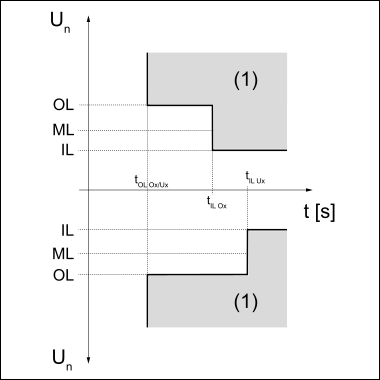
Graphic illustrating the limits
| IL | "Inner Limit" - inner limit value |
| ML | "Middle Limit" - middle limit value |
| OL | "Outer Limit" - outer limit value |
| (1) | Trip range |
U Inner Limit Max |
U IL Max TripTime |
U Inner Limit Min |
U IL Min Trip Time |
U Middle Limit Mode |
U Middle Limit Max |
U ML Max Trip Time |
U Middle Limit Min |
U ML Min Trip Time |
U Outer Limit Max |
U OL Max TripTime |
U Outer Limit Min |
U OL Min Trip Time |
U Reconnect max |
U Reconnect min |
U Recon. IL max |
U Recon. IL min |
U Longtime Limit |
U Fast Supervisory |
|
| A) | Different trip times can be assigned to the inner limit value IL and outer limit value OL. For example: short trip time for a deviation from the outer limit value long trip time for a deviation from the inner limit value |
| b) | cyl = grid periods (cycles); 1 cyl corresponds to 20 ms at 50 Hz or 16.66 ms at 60 Hz |
Frequency limit values
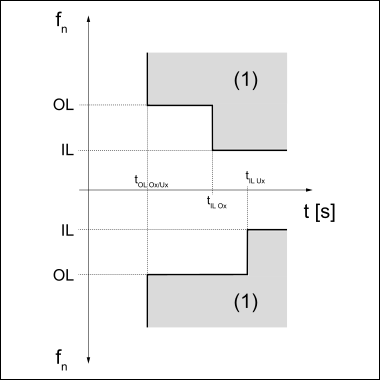
Graphic illustrating the limits
| IL | "Inner Limit" - inner limit value |
| OL | "Outer Limit" - outer limit value |
| (1) | Trip range |
Freq. Inner Limit Max |
Freq IL Max TripTime |
Freq. Inner Limit Min |
Freq IL Min TripTime |
Alt Freq Mode |
Alt Freq IL Max |
Alt Freq IL Max TT |
Alt Freq IL Min |
Alt Freq IL Min TT |
Freq Outer Limit Max |
Freq OL Max TripTime |
Freq Outer Limit Min |
Freq OL Min TripTime |
Redundant FAC Check |
Redundant UAC Check |
Freq Reconnect Max |
Freq Reconnect Min |
Freq Recon. IL Max |
Freq Recon. IL Min |
|
| A) | Different trip times can be assigned to the inner limit value IL and outer limit value OL. For example: short trip time for a deviation from the outer limit value long trip time for a deviation from the inner limit value |
| b) | cyl = grid periods (cycles); 1 cyl corresponds to 20 ms at 50 Hz or 16.66 ms at 60 Hz |
NL-MONitor
For setting the NL-MON (neutral conductor phase monitoring) switch-off values |
Selection options | NL-MONitor On/Off / NL Uouter Limit Min / NL U OL Min TripTime / NL UMiddle Limit Min / NL U ML Min TripTime / NL Uinner Limit Min / NL U IL Min TripTime / NL Uinner Limit Max / NL U IL Max TripTime / NL UMiddle Limit Max / NL U ML Max TripTime / NL Uouter Limit Max / NL U OL Max TripTime |
NL-MONitor On/Off | Selection options: ON / OFF / Stinger |
NL Uouter Limit Min | Specification of the minimum external switch-off value |
NL U OL Min TripTime | Specification of the operating time of the minimum external switch-off value |
NL UMiddle Limit Min | Specification of the minimum middle switch-off value |
NL U ML Min TripTime | Specification of the minimum middle switch-off value |
NL Uinner Limit Min | Specification of the minimum internal switch-off value |
NL U IL Min TripTime | Specification of the operating time of the minimum internal switch-off value |
NL Uinner Limit Max | Specification of the maximum internal switch-off value |
NL U IL Max TripTime | Specification of the operating time of the maximum internal switch-off value |
NL UMiddle Limit Max | Specification of the maximum middle switch-off value |
NL U ML Max TripTime | Specification of the operating time of the maximum middle switch-off value |
NL Uouter Limit Max | Specification of the maximum external switch-off value |
NL U OL Max TripTime | Specification of the operating time of the maximum external switch-off value |
Trip Time Delay
additional configurable switch off delay;
relates to all trip times and increases the trip times by the specified value
0 - 255 [cyl]
Reactive Power Mode
for setting special reactive power parameters
The parameters in this menu item enable the feed-in method of the inverter to be modified.
IMPORTANT! A detailed explanation of the settings can be found in the "Advanced Grid Features" section under: Reactive Power Mode.
Selection options | React. P. Mode / Const. Cosφ / Const. Cosφ TimeC. / Const. Q Rel. / Const. Q Rel. TimeC. / Const. Q Abs. / Const. Q Abs. TimeC. / Ch Cosφ (P) *-* / Ch Cosφ (P) TimeC. / Ch Cosφ (P) U-LockIn / Ch Cosφ (P) U-LockOut / Ch Cosφ (P) P-LockOut / Ch Q (U) *-* / Ch Q (U) Initial Delay / Ch Q (U) Offset Factor / Ch Q (U) TimeC. / Ch Q (U) P-LockIn / Ch Q (U) P-LockOut / Ch Q (U) Cosφ Min. / Ch Q (P) *-* / Ch Q (P) TimeC. / Ch Q (P) U-LockIn / Ch Q (P) U-LockOut / Ch Q (P) P-LockOut
| ||
React. P. Mode | |||
Selection options | Grid Power Priority / C. cosφ / C. Qrel / C. Qabs / cosφ/P / Q/U / Q/P / OFF | ||
Grid Power Priority | For setting whether effective power (Active) or reactive power (Reactive) has priority | ||
C. cosφ | Constant cos phi specification | ||
C. Qrel | Constant specification of the relative reactive power in % | ||
C. Qabs | Constant specification of absolute reactive power in VAr | ||
cosφ/P | Cos phi specification depending on effective power | ||
Q/U | Relative reactive power specification depending on current grid voltage | ||
Q/P | Relative reactive power specification depending on effective power | ||
OFF | Reactive power mode deactivated | ||
| |||
The reactive power modes: | |||
Const. Cosφ | Constant cos phi specification Once "Enter" has been pressed, the value for the cos φ power factor can be set: | ||
Const. Cosφ TimeC. | Time constant at which a new set value of the power factor cos φ is activated | ||
Const. Q Rel. | Constant specification of the relative reactive power in % Once "Enter" has been pressed, the value for the reactive power relative to the nominal apparent power can be set. | ||
Const. Q Rel. TimeC. | Time constant at which a new set value of the relative reactive power is activated | ||
Const. Q Abs. | Constant specification of absolute reactive power in VAr Once "Enter" has been pressed, the value for absolute reactive power can be set from 0 to the max. device output (inductive/capacitive) in VAr. | ||
Const. Q Abs. TimeC. | Time constant at which a new set value of the absolute reactive power is activated | ||
Ch Cosφ (P) *-* | Cosφ (P) characteristic: | ||
Ch Cosφ (P) TimeC. | Time constant at which a new set value of the (respective) control is compensated for. | ||
Ch Cosφ (P) U-LockIn | Input of a voltage value; when this voltage value is exceeded the Cosφ (P) characteristic is activated. | ||
Ch Cosφ (P) U-LockOut | Input of a voltage value; when this voltage value is undershot the Cosφ (P) characteristic is deactivated. | ||
Ch Cosφ (P) P-LockOut | Input of a power value; when this power value is undershot the Cosφ (P) characteristic is deactivated. | ||
Ch Q (U) *-* | Q (U) characteristic: | ||
Ch Q (U) Initial Delay | Delays the application of the Q (U) control after the values Ch Q (U) 1 - x or 2 - x are undershot/exceeded | ||
Ch Q (U) Offset Factor | Moves the Q (U) characteristic along the Q axis by a factor of -1 to +1 | ||
Ch Q (U) TimeC. | Time constant at which a new set value of the (respective) control is compensated for. | ||
Ch Q (U) P-LockIn | Input of a power value; when this power value is exceeded the Q (U) characteristic is activated. | ||
Ch Q (U) P-LockOut | Input of a power value; when this power value is undershot the Q (U) characteristic is deactivated. | ||
Ch Q (U) Cos. φ Min. | Input of a minimum cos phi value at which the inverter may feed in power. | ||
Ch Q (P) *-* | Q (P) characteristic: | ||
Ch Q (P) TimeC. | Time constant at which a new set value of the (respective) control is compensated for. | ||
Ch Q (P) U-LockIn | Input of a voltage value; when this voltage value is exceeded the Q (P) characteristic is activated. | ||
Ch Q (P) U-LockOut | Input of a voltage value; when this voltage value is undershot the Q (P) characteristic is deactivated. | ||
Ch Q (P) P-LockOut | Input of a power value; when this power value is undershot the Q (P) characteristic is deactivated. | ||
| *-* | 0-0 / 0-1 / 1-0 / 1-1 / 2-0 / 2-1 / 3-0 / 3-1 respectively 4 characteristic points 0 / 1 / 2 / 3 with the coordinates 0 (x) and 1 (y) |
Freq dep. Power Red
Frequency Dependent Power Reduction When the GFDPR function is enabled and the specified grid frequency limit value is exceeded, the effective power is reduced according to a defined gradient. |
IMPORTANT! A detailed explanation of the settings can be found in the "Advanced Grid Features" section under: GFDPR - Grid frequency-dependent power reduction P(f).
Selection options | GFDPR On/Off / P-Reduct. Reference /P-Increa. Reference / Enable Limit / Enable Limit Under F. / Intentional Delay / Derating Gradient / Derating Gradient U.F. / Stop Frequency / Stop Frequency U.F. / Change Time Constant / Frequency Test Time / Disable Limit Min. / Disable Limit Max. / Alt. Ret. Grad Thr. / Return Gradient 1 / alt. Return Grad. 1 / Use Return Grad. 2 / Return Gradient 2 / P(f) f transition Of**** / P(f) f transition Uf**** |
GFDPR On/Off | |
Selection options | Off / On DisHyst / On |
Off | Function deactivated |
On DisHyst | Function activated, no hysteresis |
On | Function activated, with hysteresis |
P-Reduct. Reference | |
Selection options | Pn-Pn*k*x / Pm-Pn*k*x / Pm-Pm*k*x / act. Pwr. / nom. Pwr. |
Pm | Actual capacity during entry |
Pn | Nominal output of the device |
k | Derating Gradient |
x | Current frequency |
act. Pwr. | Actual power at the time of entering into over frequency |
nom. Pwr. | Nominal device output |
P-Increa. Reference | |
Selection options | Pn-Pn*k*x / Pm-Pn*k*x / Pm-Pm*k*x |
Pm | Actual capacity during entry |
Pn | Nominal output of the device |
k | Derating Gradient |
x | Current frequency |
Enable Limit | |
Enable Limit Under F. (only on hybrid inverters) | |
Intentional Delay | |
Derating Gradient | |
Reference variable | current power at the start of power reduction |
Derating Gradient U.F. (only on hybrid inverters) | |
Reference variable | current power at the start of power increase |
Stop Frequency | |
Stop Frequency U.F. (only on hybrid inverters) | |
Change Time Constant | |
Frequency Test Time | |
Disable Limit Min. / Disable Limit Max. | |
Alt. Ret. Grad Thr. e.g.: | |
Return Gradient 1 | |
Reference variable | Device rated power |
alt. Return Grad. 1 | |
Reference variable | Difference between the output at the start of power reduction and the current output |
Use Return Grad. 2 | |
Selection options | OFF / ON |
OFF | raising the effective power from the original value to the device rated power takes place according to "Return Gradient 1" |
ON | raising the effective power from the original value to the device rated power takes place according to "Return Gradient 2" |
Return Gradient 2 | |
Reference variable | Device rated power |
P(f) f transition Of**** | |
P(f) f transition Uf**** | |
Volt. dep. Power Red
Voltage Dependent Power Reduction When the GVDPR function is activated and the specified grid voltage limit value is exceeded, the maximum effective power is reduced. |
IMPORTANT! A detailed explanation of the settings can be found in the "Advanced Grid Features" section under: GVDPR - Grid voltage-dependent power reduction P(U).
Selection options | GVDPR On/Off / P-Reduct. Reference / Enable Limit / Derating Gradient / Enable Limit UnderV. / Derating Gradient UnderV. / Change Time Constant / Event Message / P(U) Stop Voltage OV*** / P(U) Stop Power OV**** / P(U) Stop Voltage UV*** / P(U) Stop Power UV**** |
GVDPR On/Off | |
Selection options | Off / On |
Off | Function deactivated |
On | Function activated |
P-Reduct. Reference | |
Selection options | Pn-Pn*k*x / Pm-Pn*k*x / Pm-Pm*k*x / act. Pwr. / nom. Pwr. |
Pm | Actual capacity during entry |
Pn | Nominal output of the device |
k | Derating Gradient |
x | Current frequency |
act. Pwr. | Actual power when entering into the surge range |
nom. Pwr. | Nominal device output |
Enable Limit | |
Derating Gradient | |
Enable Limit UnderV. | |
Derating Gr. UnderV. | |
Change Time Constant | |
Event Message | |
Selection options | OFF / ON |
P(U) Stop Voltage OV**** | |
P(U) Stop Power OV*** | |
P(U) Stop Voltage UV**** | |
P(U) Stop Power UV*** | |
Manual Power Reduction
for manual specification of a max. output power value |
Setting range | 150 - max. W (kW) |
Softstart
Activation and deactivation of the Softstart function, setting the gradient for the startup ramp
Selection options | Softstart On/Off / Softstart Gradient |
Softstart On/Off | |
Off | Function deactivated |
On acFlt | Function activated; |
On | Function activated; |
Softstart Gradient | |
Voltage Fault Ride Through
„Voltage Fault Ride Through“ |
IMPORTANT! A detailed explanation of the settings can be found in the "Advanced Grid Features" section under: LVFRT - Dynamic grid backup during temporary drops in grid voltage.
VRT Mode | VRT Mode universally switches on or off |
R1/2/3 Calculation Mode | Off: Behaviour is equivalent to Passive Mode. |
R1/2/3 Detection Mode (only up to firmware version fro33430.upd) | Mode like an FRT is identified |
R1/2/3 Detection Mode (Standard 50549) | Determines which voltage system is used to detect a grid fault (voltage drop or voltage surge) |
R1/2/3 Static Threshold | Static boundary to identify a LVRT or HVRT. Specification in % derived from nominal voltage. |
R1/2/3 Dynamic Limit (only up to firmware version fro33430.upd) | Dynamic boundary to identify a LVRT or HVRT. Calculated based on the 1min floating average value of the grid voltage. Specification in % derived from nominal voltage. |
R1/2/3 k-Factor positive-sequence system | Multiplication factor for calculating the compensation reactive current (positive-sequence system) during the grid fault. Only effective when Mode Active Nominal Based or Active UnbalancedCompensationCurrent (Act. UBCC) is set. |
R1/2/3 k-Factor negative-sequence system | Multiplication factor for calculating the compensation reactive current (negative-sequence system) during the grid fault. Only effective when CalculationMode Active UnbalancedCompensationCurrent (Act. UBCC) is set. |
FRT Limit Compensation Current overexcited | Relative limit of the dynamic additional reactive current during Voltage Ride Through for overexcited operation. |
FRT Limit Compensation Current underexcited | Relative limit of the dynamic additional reactive current during Voltage Ride Through for underexcited operation. |
FRT Sudden Voltage Change Mode | Activates / deactivates the detection of sudden voltage changes. |
FRT Sudden Voltage Change Insensitivity Range | Percentage value that a sudden voltage jump must exceed or fall below in order to activate FRT mode. |
FRT Sudden Voltage Change Deactivation Time | Timeout after detecting a sudden voltage jump, after which the inverter no longer runs in FRT mode and switches back to normal operation. |
DC-Injection
DC-I. InnerLimit Mode
deactivates/activates the lower set limit values for DC Injection
Selection options: | OFF / ABSOLUTE / RELATIVE |
DC-I I.L. Absolute: | Inner absolute DC Injection limit value |
DC-I I.L. Relative: | Inner relative DC Injection limit value based on the device nominal current |
DC-I I.L. TripTime: | Trip time in seconds for violation events when the inner absolute and relative limit value is exceeded |
DC-I. OuterLimit Mode
deactivates/activates the lower set limit values for DC Injection
Selection options: | OFF / ABSOLUTE / RELATIVE |
DC-I O.L. Absolute: | Outer absolute DC Injection limit value |
DC-I O.L. Relative: | Outer relative DC Injection limit value based on the device nominal current |
DC-I O.L. TripTime: | Trip time in seconds for violation events when the outer absolute and relative limit value is exceeded |
Ripple Control
In some cases, the inverter may have an unpermissable influence (attenuation, amplification) on ripple control signals. Ripple Control can counteract this behaviour.
Selection options: | Mode / Signal Frequency / Grid Inductance |
Mode: | On / Off |
Signal Frequency: | Frequency with which the ripple control signal is sent |
Grid Inductance: | Inductance of the connection point |
I(delta gr.)F
Compensation
Selection options: | Mode / Udc Link Voltage |
Mode: | Using Mode the intermediate circuit voltage can be increased to reduce unavoidable leakage currents in the event of high module capacities to ground |
Udc Link Voltage: | The intermediate circuit voltage increase is configured to a default value and can be adjusted when necessary using this value |
Anti Islanding
This function activates the stand-alone power system detection. If an undesirable stand-alone operation state is detected, the inverter is shut down.
Selection options | OFF / Sym_Asym / Sym |
|
|
OFF: | no active stand-alone operation detection |
Sym_Asym: | all types of stand-alone operation are detected; on three-phase devices also stand-alone operation on any individual phase. |
Sym: | only symmetrical stand-alone operation states are detected; on three-phase devices only stand-alone operation on all three phases at the same time. |
On single-phase devices, there is no difference between the settings Sym_Asym and Sym.
Grid Quality Factor
The preset value corresponds to the quality of the oscillating test circuit required by the relevant standard. The lower the value, the fewer disturbances to the grid. The higher the value, the greater the influence on the grid. |
Setting range | 0 - 10 |
Rate of change of frequency
This function allows the ROCOF (Rate of Change of Frequency) detection and switch-off to be activated and adjusted. In the event of frequency changes that are above a set limit and last longer than the set trip time, the inverter is shut down. ROCOF detection can be used as a passive stand-alone operation detection method.
Selection options | ROCOF On/off / ROCOF Limit / ROCOF TripTime |
ROCOF On/off | for activating and deactivating the ROCOF functionality. |
ROCOF TripTime | Operating time within which the device switches off in case of a too rapid change in frequency |
ROCOF Limit | Limit value for change in frequency that triggers a switch-off if ROCOF is activated. |
Ramp Rate
The ramp rates limit the maximum rate of change of the effective power that is triggered by external inputs (e.g. Modbus, DRM, PSC editor). If slower ramp rates are defined by the characteristic mode (e.g. P(U), P(F) or start-up), the lowest rate of change is used.
The value 0 corresponds to the maximum rate of change.
Fail-Safe
When starting up the system, the Datamanager and inverter control (ReCerbo PC board) should be synchronised so that both control components are fully ready for use. This allows many problems caused by different system statuses to be avoided. |
Selection options | DM FailSafe Mode / DM FailSafe Behaviour |
DM FailSafe Mode | Off / Permanent |
DM FailSafe Behaviour | Disconn. |
Initial Start Time, Reconnect Time
Initial Start Time | ||
Reconnect Time |
Powerline Communication (Fronius Symo Advanced UL version)
For switching on / off the Powerline Communication (PLC) signal (Keep Alive Signal) according to the SunSpec standard "Communication Signal for Rapid Shutdown".
Selection options: | Powerline COM Mode |
Powerline COM Mode | SunSpec / Off |
DC Arc Fault Protection
These parameters can be used to set the behaviour of the Arc Fault Circuit Interrupter at the DC terminals of the inverter. The DC Arc Fault Protection function protects against arcing faults and contact faults. Faults that occur in the current and voltage curve are continuously evaluated and the circuit is switched off when a contact fault is detected. This prevents overheating on faulty contacts and possible fires.
Parameter | Range of values | Description |
|---|---|---|
"Arc Fault Protection Equipment (AFPE)"
|
| For activating and deactivating the Arc Fault Circuit Interrupter. The parameter "Automatic reconnects" is only considered when the "Arc Fault Detection (AFD)" is activated. |
Off | Arcs are not detected. | |
On | The Arc Fault Circuit Interrupter is active. | |
"Automatic Reconnects" |
| If more arcs have been detected within 24 hours than are defined in "Automatic Reconnects", the inverter will not make any further attempt to start feeding energy into the grid. |
-1 | The 24-hour counter is deactivated. The inverter restarts feeding energy into the grid 5 minutes after each arc detected. | |
0 - No Reconnection | After an arc has been detected, no further attempt is made to start feeding energy into the grid and status code 240 is displayed. | |
1 ‑ 4 | After a shutdown due to an arc, 1, 2, 3 or 4 attempts are made within 24 hours to restart feeding energy into the grid. After this number of attempts, no further attempt is made to start feeding energy into the grid and status code 240 is displayed. |
"Advanced Grid Features": Reactive Power Mode
General information about reactive power mode
The country setup entered on the inverter ensures that the relevant operating modes and settings for local standards and guidelines are specified.
However, in some situations it may be worthwhile to adapt the preset country-specific operating modes and settings to the local grid situation.
This will help to ensure more reliable operation of the inverter in the grid, while enabling the inverter to actively support the public grid. For this purpose, the grid voltage and grid frequency must be within defined limits.
The voltage and frequency stability can be actively influenced via the inverter by monitoring the feeding of effective power and reactive power into the grid.
Simply decreasing the effective power in order to reduce high grid voltage levels can reduce the energy generated by the photovoltaic system.
One alternative is to switch the reactive power between the inverter and the grid. Even though the reactive power is not consumed or converted into effective power and simply oscillates between the inverter and the grid, the current fed in will increase.
Regardless of the active power and therefore regardless of the energy yield, switching the reactive power can cause the voltage to both rise and to fall:
- In over-excited mode or capacitive mode, reactive power is supplied to the grid. The grid voltage rises.
- In under-excited mode or inductive mode, reactive power is taken from the inverter. The grid voltage falls.
Capacitive mode is shown on the inverter display by a positive sign +.
Inductive mode is shown on the inverter display by a negative sign -.
General information about reactive power mode
The country setup entered on the inverter ensures that the relevant operating modes and settings for local standards and guidelines are specified.
However, in some situations it may be worthwhile to adapt the preset country-specific operating modes and settings to the local grid situation.
This will help to ensure more reliable operation of the inverter in the grid, while enabling the inverter to actively support the public grid. For this purpose, the grid voltage and grid frequency must be within defined limits.
The voltage and frequency stability can be actively influenced via the inverter by monitoring the feeding of effective power and reactive power into the grid.
Simply decreasing the effective power in order to reduce high grid voltage levels can reduce the energy generated by the photovoltaic system.
One alternative is to switch the reactive power between the inverter and the grid. Even though the reactive power is not consumed or converted into effective power and simply oscillates between the inverter and the grid, the current fed in will increase.
Regardless of the active power and therefore regardless of the energy yield, switching the reactive power can cause the voltage to both rise and to fall:
- In over-excited mode or capacitive mode, reactive power is supplied to the grid. The grid voltage rises.
- In under-excited mode or inductive mode, reactive power is taken from the inverter. The grid voltage falls.
Capacitive mode is shown on the inverter display by a positive sign +.
Inductive mode is shown on the inverter display by a negative sign -.
Potential operating range of the inverter in conjunction with reactive power
Reactive power mode is restricted by the maximum output current (maximum apparent power) as well as by the operational reactive power limits of the inverter:
- cos phi = 0.85, Qrel = 53 % (Galvo)
- cos phi = 0.70, Qrel = 71 % (Symo S, Symo M -8k2, Symo Hybrid, Primo -8k2, Primo US -8k2)
- cos phi = 0.00, Qrel = 100 % (Symo M -20, Primo US -15, Eco, Symo US -24, Symo US (Eco)
The figure below shows the potential operating range of the inverter. All valid operating points defined by effective power P and reactive power Q are within the grey area.
under-excited (inductive) | over-excited (capacitive) | ||
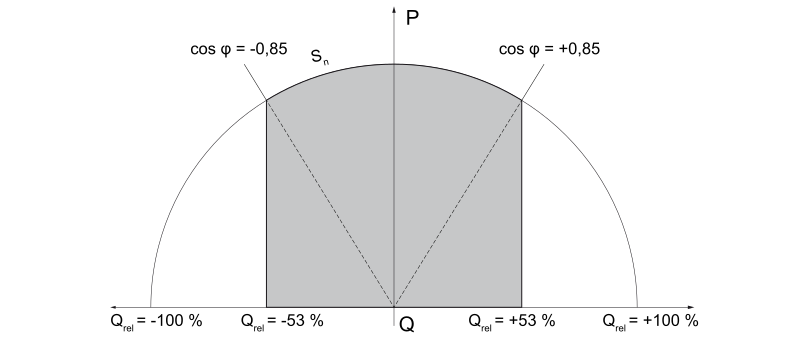 | |||
Q = Reactive power [VAr] | |||
For example, fixed values or curves can be specified within the operating range that define the reactive power response of the inverter. Reactive power operation is only possible when a DC supply is present.
Overview of reactive power control options
The following options for switching reactive power and for controlling the inverter are available:
- Const. Cos φ
- Const. Q Rel
- Const. Q Abs
- Ch Cos φ(P)
- Ch Q (U)
- Ch Q (P)
Only one reactive power mode can be used at any one time to control the inverter.
Const. Cos φ
Constant specification of power factor cos φ
Setting range:
- -0.85 - +0.85 (Galvo)
- -0.70 - +0.70 (Symo S, Symo M -8k2, Symo Hybrid, Primo -8k2, Primo US -8k2)
- -0.00 - +0.00 (Symo M -20, Primo US -15, Eco, Symo US -24, Symo US (Eco)
Example:
cos φ = -0.9
under-excited (inductive) | over-excited (capacitive) | ||
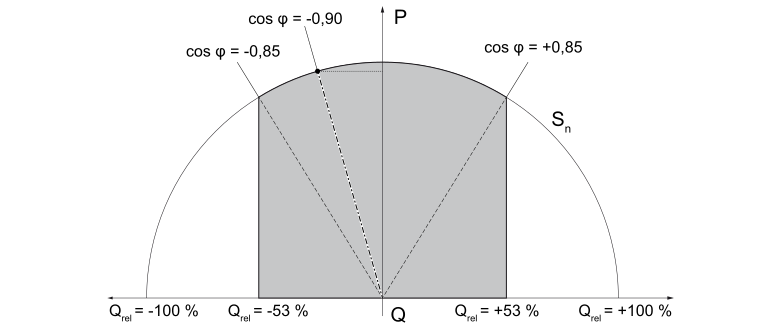 | |||
Q = Reactive power [VAr] | |||
Const. Q Rel
Constant specification for relative reactive power in % in relation to the nominal apparent power of the inverter
Setting range:
- -53 - 0 - +53 (Galvo)
- -71 - 0 - +71 (Symo S, Symo M -8k2, Symo Hybrid, Primo -8k2, Primo US -8k2)
- -100 - 0 - +100 (Symo M -20, Primo US -15, Eco, Symo US -24, Symo US (Eco)
Example:
Qrel = -32 %
under-excited (inductive) | over-excited (capacitive) | ||
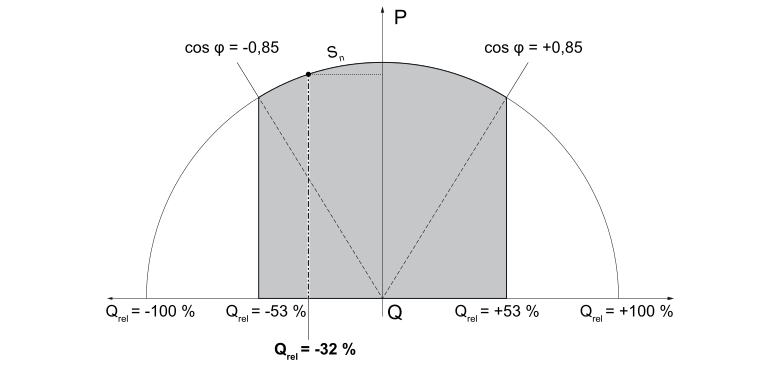 | |||
Q = Reactive power [VAr] | |||
Const. Q Abs
Constant specification of absolute reactive power in VAr
Setting range: -n - 0 - +n [VAr]
n = maximum reactive power that can be set depending on the respective inverter
Example:
Qrel = -n1 VAr
under-excited (inductive) | over-excited (capacitive) | ||
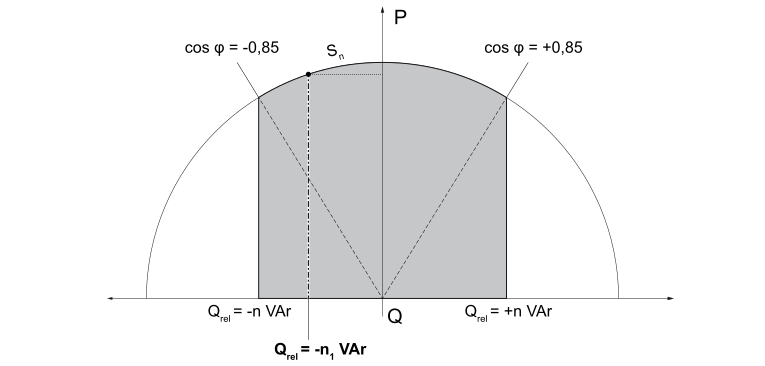 | |||
Q = Reactive power [VAr] | |||
Ch Cos φ (P)
Specification of the power factor cos φ depending on effective power P
The characteristic is defined by max. 4 characteristic points 0 - 1 - 2 - 3.
The coordinates must be entered for the characteristic points on the 0 (x) axis and on the 1 (y) axis.
- -0,85 - 1 - +0,85 a
- -0,70 - 1 - +0,70 b,c,e,f,l
- -0,00 - 1 - +0,00 d,g,h,i,j,k
Characteristic point | Coordinates | Setting range |
0 | 0-0 (x) | P: 0 - 100 % |
| 0-1 (y) | cos φ (see table) |
1 | 1-0 (x) | P: 0 - 100 % |
| 1-1 (y) | cos φ (see table) |
2 | 2-0 (x) | P: 0 - 100 % |
| 2-1 (y) | cos φ (see table) |
3 | 3-0 (x) | P: 0 - 100 % |
| 3-1 (y) | cos φ (see table) |
 |
| |
Axis | ||
Characteristic point |
Example:
Curve defined by 4 characteristic points
0: P = 15 %, cos φ = +0.85
1: P = 25 %, cos φ = 1
2: P = 45 %, cos φ = 1
3: P = 90 %, cos φ = -0.90
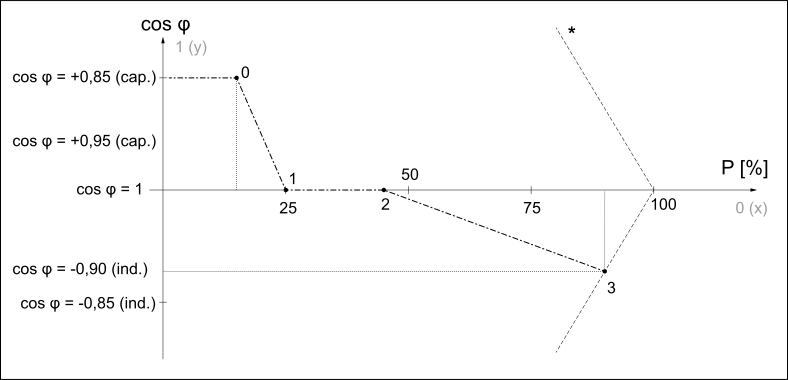
Example for Fronius Galvo
| * | Apparent power limit |
Ch Q (U)
Specification of relative reactive power depending on grid voltage
The characteristic is defined by max. four characteristic points 0 - 1 - 2 - 3.
The coordinates must be entered for the characteristic points on the 0 (x) axis and on the 1 (y) axis.
- -53 - 0 - +53 a
- -71 - 0 - +71 b,c,e,f,l
- -100 - 0 - +100 d,g,h,i,j,k
Characteristic point | Coordinates | Setting range |
0 | 0-0 (x) | U: 80 -120% |
| 0-1 (y) | Q (see table) |
1 | 1-0 (x) | U: 80 -120% |
| 1-1 (y) | Q (see table) |
2 | 2-0 (x) | U: 80 -120% |
| 2-1 (y) | Q (see table) |
3 | 3-0 (x) | U: 80 -120% |
| 3-1 (y) | Q (see table) |
|
| |
Axis | ||
Characteristic point |
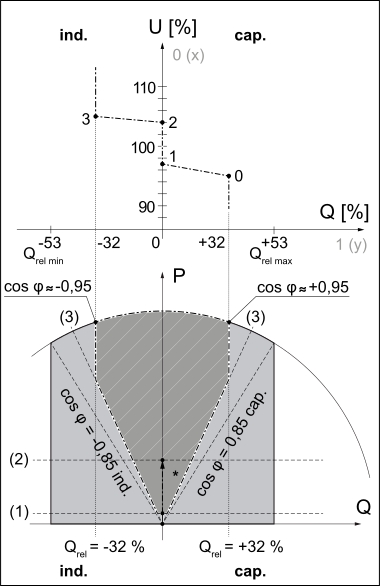 Example for Fronius Galvo |
| Example:
* Detail: |
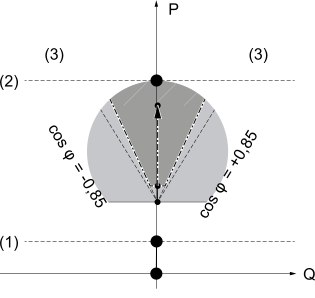
Ch Q (P)
Specification of relative reactive power depending on effective power
The characteristic is defined by max. 4 characteristic points 0 - 1 - 2 - 3.
The coordinates must be entered for the characteristic points on the 0 (x) axis and on the 1 (y) axis.
- -53 - 0 - +53 a
- -71 - 0 - +71 b,c,e,f,l
- -100 - 0 - +100 d,g,h,i,j,k
Characteristic point | Coordinates | Setting range |
0 | 0-0 (x) | P: 0 -100 % |
| 0-1 (y) | Q (see table) |
1 | 1-0 (x) | P: 0 -100 % |
| 1-1 (y) | Q (see table) |
2 | 2-0 (x) | P: 0 -100 % |
| 2-1 (y) | Q (see table) |
3 | 3-0 (x) | P: 0 -100 % |
| 3-1 (y) | Q (see table) |
|
| |
Axis | ||
Characteristic point |
Example:
Characteristic defined by 4 characteristic points
0: P = 0 %, Q = 0 %
1: P = 25 %, Q = 0 %
2: P = 50 %, Q = 0 %
3: P = 95 %, Q = -32 %
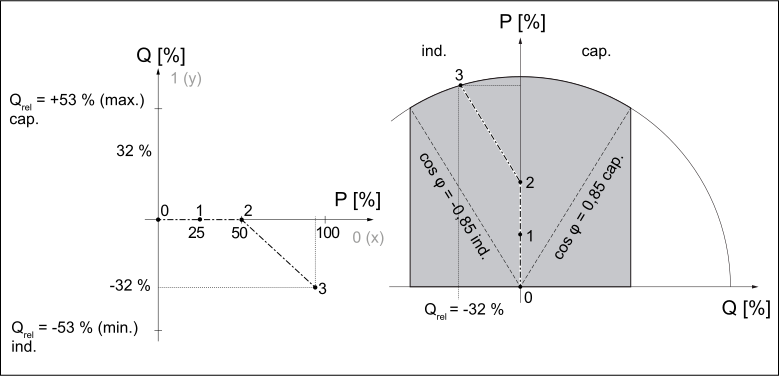
Example for Fronius Galvo
Lock-In / Lock-Out for characteristic operating mode
The characteristic operating mode for switching reactive power can also be enabled or disabled using the Lock-In / Lock-Out parameters.
If a defined starting threshold is exceeded (Lock-In), the characteristic operating mode is enabled and the inverter feeds in reactive power according to the relevant characteristic.
If a defined starting threshold is undershot (Lock-Out), the characteristic operating mode is disabled regardless of whether another parameter has exceeded or is about to exceed the Lock-In threshold. Lock-Out takes priority over Lock-In.
When the characteristic operating mode is disabled, reactive power is no longer fed into the grid.
"Advanced Grid Features": GFDPR - Grid frequency-dependent power reduction P(f)
GFDPR - Function description
GFDPR = Grid Frequency Dependent Power Reduction |
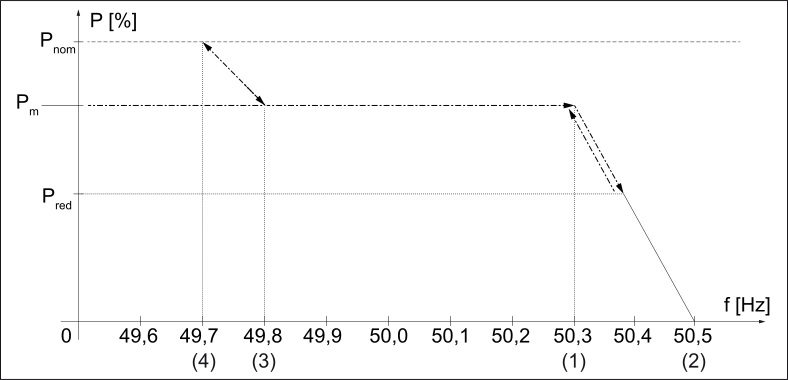
When the GFDPR function is enabled and the defined grid frequency limit value is exceeded, the effective power is reduced according to a defined gradient.
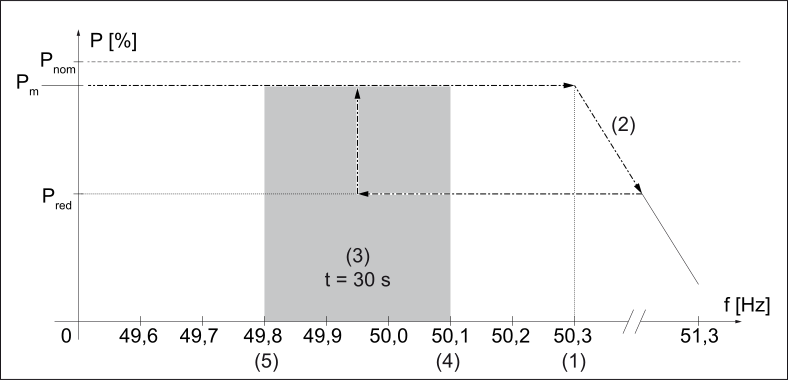
Once the grid frequency falls within the permitted frequency range again following successful power reduction, return to full power takes place depending on the country setup as follows:
- GFDPR ON DisHyst mode
The inverter increases the power from the current reduced value to the original value in accordance with the same gradient used for power reduction. - GFDPR ON mode
The inverter will not increase the power to the original value until the frequency is in the command value range for a specific length of time.
GFDPR - Function description
GFDPR = Grid Frequency Dependent Power Reduction |
When the GFDPR function is enabled and the defined grid frequency limit value is exceeded, the effective power is reduced according to a defined gradient.
Once the grid frequency falls within the permitted frequency range again following successful power reduction, return to full power takes place depending on the country setup as follows:
- GFDPR ON DisHyst mode
The inverter increases the power from the current reduced value to the original value in accordance with the same gradient used for power reduction. - GFDPR ON mode
The inverter will not increase the power to the original value until the frequency is in the command value range for a specific length of time.
GFDPR - Application example On DisHyst
GFDPR ON/OFF = On DisHyst
with Derating Gradient |
|
| ||||||||||||||
|
|
|
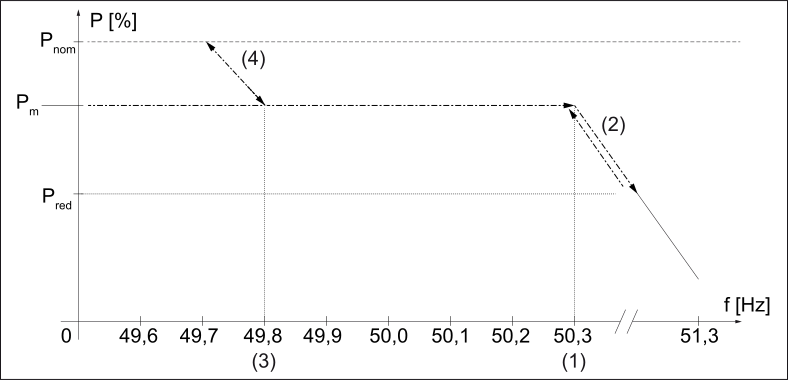
with Stop Frequency |
|
| ||||||||||||||
|
|
| ||||||||||||||
 | ||||||||||||||||
GFDPR - Application example On
GFDPR ON/OFF = On
|
|
|
Voltage Fault Ride Through - application example
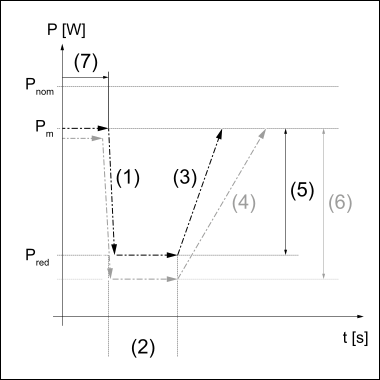
GFDPR - Application example with "alt. Return Grad. 1” and “Alt. Ret. Grad Thr.”
Example:
Alt. Ret. Grad Thr. = 25 %
 |
|
|
At Pred the grid frequency returns to the permissible range.
After the end of the delay time (2) specified by the standard, the power is increased by one of the following gradients to the output value Pm:
Curve 1 - black
The difference between the current power Pm and the reduced power Pred is less than or equal to the value entered for "Alt. Ret. Grad Thr." of 25 % (5).
This increases the power by the nominal output related gradient "Return Gradient 1" (3) to the output value Pm.
Curve 2 - grey
The difference between the current power Pm and the reduced power Pred is greater than the value entered for "Alt. Ret. Grad Thr." of 25 % (5).
This increases the power by the alternative difference power related gradient "alt. Return Grad. 1" (4) to the output value Pm.
GFDPR - Application example with "Return Gradient 2"
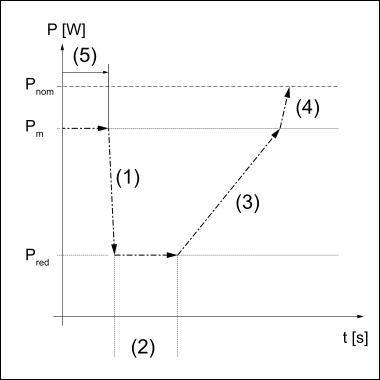 |
|
Settings: n ... value |
At Pred the grid frequency returns to the permissible range.
After the end of the delay time (2) specified by the standard, the power is increased by a nominal output related gradient (3) to the output value Pm.
The power is then increased by one of the other nominal output related gradients (4) to the device nominal output Pnom.
"Advanced Grid Features": GVDPR Grid voltage-dependent power reduction P(U)
GVDPR - Function description
GVDPR = Gradual Voltage Dependent Power Reduction
(power reduction dependent on the grid voltage)
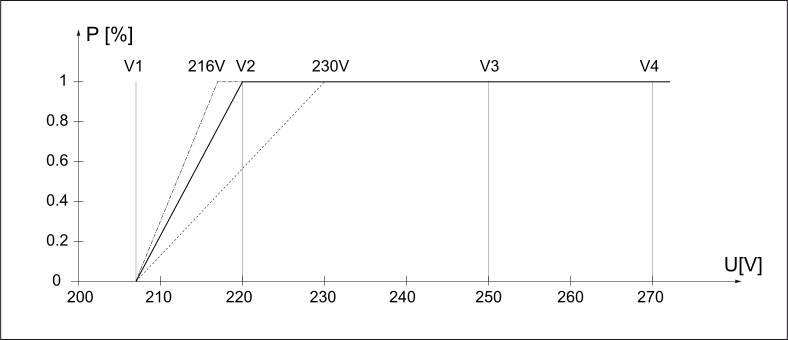
To largely prevent the inverter being switched off when the grid voltage is too high due to the requirements of various standards and directives, the GVDPR function can be used to slightly reduce the power of feeding in, in accordance with the highest phase voltage.
This makes the yield losses less than they would be if the inverter was completely switched off.
|
|
|
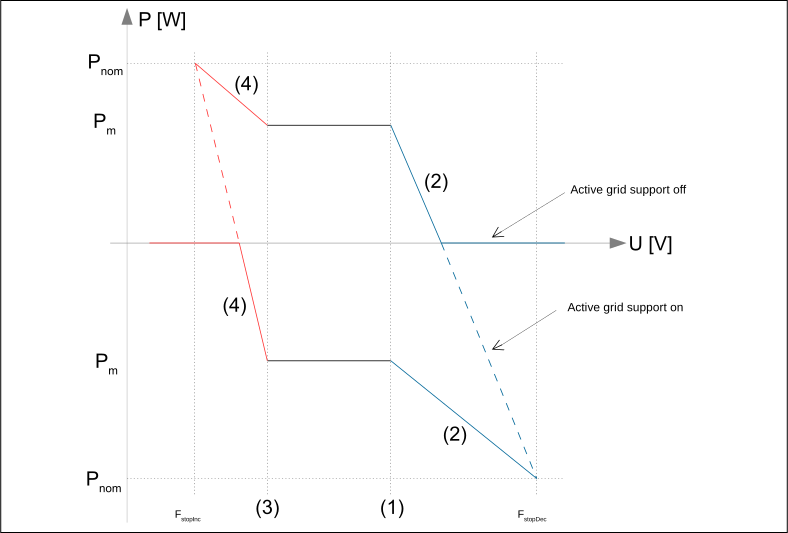
Power waveshape depending on grid voltage
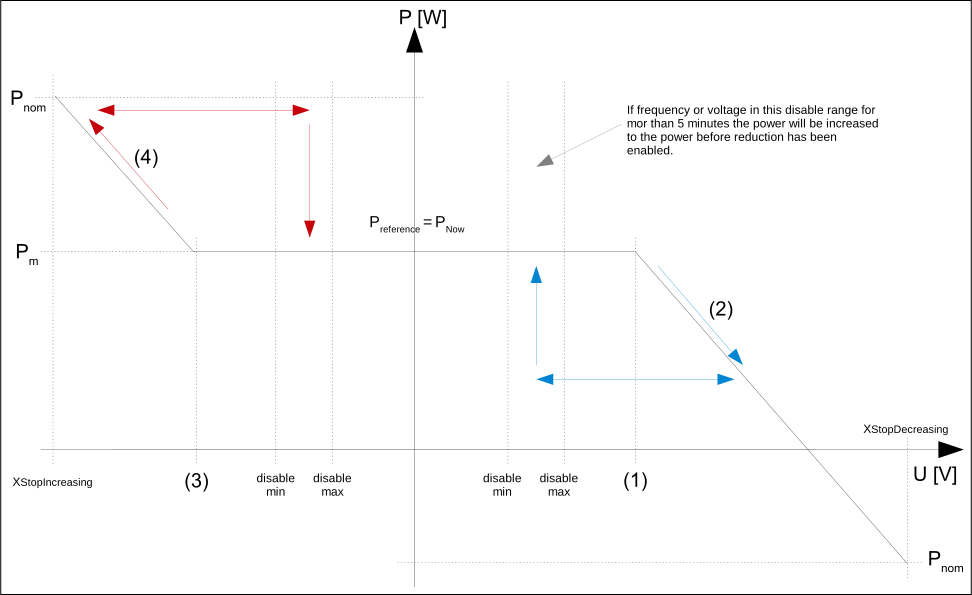
Power waveshape depending on grid voltage
GVDPR - Function description
GVDPR = Gradual Voltage Dependent Power Reduction
(power reduction dependent on the grid voltage)
To largely prevent the inverter being switched off when the grid voltage is too high due to the requirements of various standards and directives, the GVDPR function can be used to slightly reduce the power of feeding in, in accordance with the highest phase voltage.
This makes the yield losses less than they would be if the inverter was completely switched off.
|
|
|
Power waveshape depending on grid voltage
Power waveshape depending on grid voltage
"Advanced Grid Features": VFRT - Dynamic grid backup during temporary drops in grid voltage
VFRT - Function description
VFRT = Voltage Fault Ride Through
Function for dynamic grid backup during grid faults (voltage drops or rises) in the grid in order to prevent an undesirable shutdown of the feed-in power and the collapse of the system. There are a range of selection options for the function (type of error detection, adjusting the fault limits, optional feeding in of additional compensation reactive currents, etc.).
Inverters with the VFRT function activated are not disconnected from the grid during grid faults (the duration of such grid faults can, depending on the grid voltage change, last between a few 100 milliseconds and a few minutes) and can therefore immediately feed the full power into the grid when the fault is resolved, without having to wait for the restart time.
If required by the electricity retailer (or by a country-specific standard), by adjusting the VFRT function accordingly, the inverter can feed an additional compensation reactive current into the grid during the grid fault for targeted grid backup.
- Zero Current: during the grid fault the fed-in alternating current is adjusted to zero.
- Passive: during the grid fault the alternating current is adjusted to the value before the fault (pre-fault current).
Example of a possible VFRT specification:
Voltage drop up to 0% Uc lasting up to 150 ms
(2) = Time at which failure occurs
Uc = Nominal voltage
U = voltage measured at the terminals of the inverter
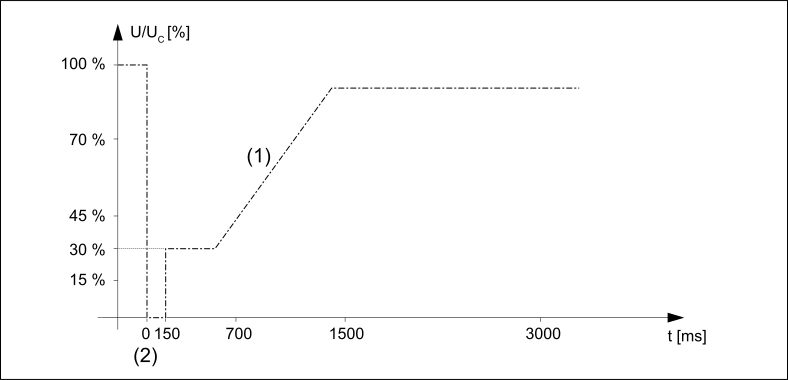
Example of VFRT - Voltage waveshape limiting curves
- If the voltage is above the limit line (1), the inverter must not switch off.
Any feeding in of an additional compensation current during the grid fault must be agreed with the grid operator. - If the measured voltage is below the limit line (1), the inverter can be disconnected from the grid. The inverter is safely disconnected from the grid according to the set operating times for the inner and outer voltage limit values.
When the VFRT function is disabled, the inverter does not feed in any dynamic reactive current if the voltage drops rapidly.
VFRT - Function description
VFRT = Voltage Fault Ride Through
Function for dynamic grid backup during grid faults (voltage drops or rises) in the grid in order to prevent an undesirable shutdown of the feed-in power and the collapse of the system. There are a range of selection options for the function (type of error detection, adjusting the fault limits, optional feeding in of additional compensation reactive currents, etc.).
Inverters with the VFRT function activated are not disconnected from the grid during grid faults (the duration of such grid faults can, depending on the grid voltage change, last between a few 100 milliseconds and a few minutes) and can therefore immediately feed the full power into the grid when the fault is resolved, without having to wait for the restart time.
If required by the electricity retailer (or by a country-specific standard), by adjusting the VFRT function accordingly, the inverter can feed an additional compensation reactive current into the grid during the grid fault for targeted grid backup.
- Zero Current: during the grid fault the fed-in alternating current is adjusted to zero.
- Passive: during the grid fault the alternating current is adjusted to the value before the fault (pre-fault current).
Example of a possible VFRT specification:
Voltage drop up to 0% Uc lasting up to 150 ms
(2) = Time at which failure occurs
Uc = Nominal voltage
U = voltage measured at the terminals of the inverter
Example of VFRT - Voltage waveshape limiting curves
- If the voltage is above the limit line (1), the inverter must not switch off.
Any feeding in of an additional compensation current during the grid fault must be agreed with the grid operator. - If the measured voltage is below the limit line (1), the inverter can be disconnected from the grid. The inverter is safely disconnected from the grid according to the set operating times for the inner and outer voltage limit values.
When the VFRT function is disabled, the inverter does not feed in any dynamic reactive current if the voltage drops rapidly.
VFRT - Regions
A number of countries differentiate between different grid fault regions, such as the USA and Germany. This means, depending on the extent of the voltage change, a different alternating current calculation method must be used.
This can be achieved by setting what are known as the VFRT regions accordingly. Three individual regions can be configured. A detection limit, a fault detection mode and a current calculation mode can be selected for each region.
The detection limit for a region is a relative voltage level and is specified in percent derived from the AC nominal voltage. Values greater than 100% are handled as HVRT (High Voltage Ride Through), values lower than 100% are handled as LVRT (Low Voltage Ride Through).
The following settings can be made for each region- FRT-Mode (0=off, 1=passive, 2 = zero current, 3 = active nominal based, 4 = active boundary based, 5 = Active Unbalanced Compensation Current)
- Detection Mode (0 = static, 1 = dynamic, 2 = Uac Pos Norm)
- Static Limit (voltage in % derived from nominal voltage)
- Dynamic Limit (voltage in % derived from the nominal voltage)
- k factor positive sequence for active mode
- k factor negative sequence for active mode
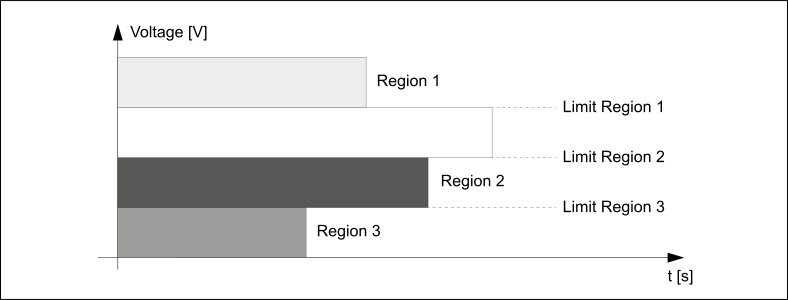
If the measured grid voltage is within one of the marked areas (regions), the respective current calculation mode is activated.
VFRT - K-Factor
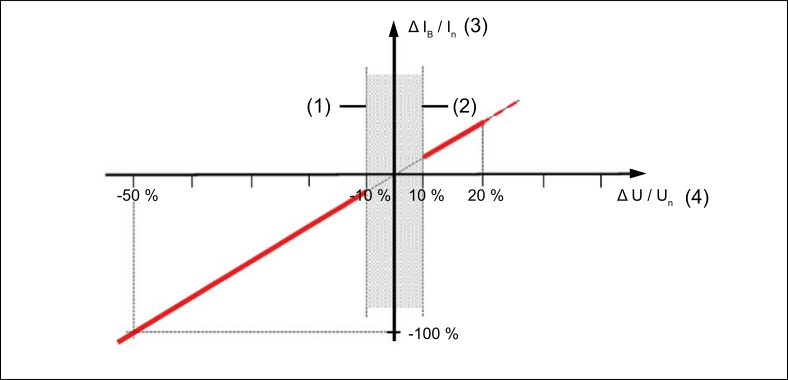
The graph describes the characteristic of how an additional compensation reactive current is fed into the grid depending on the measured grid voltage.
The upper voltage limit at +10% is the detection limit for VFRT-Region1 (HVRT), the lower voltage limit at -10% is the detection limit for VFRT-Region2 (LVRT1).
Between these two limits (normal voltage range) no grid fault is detected and therefore no additional compensation reactive current is fed into the grid. If the measured grid voltage is below or above the normal voltage range, a compensation reactive current depending on the K-Factor is fed into the grid.
If there is a voltage drop (LVRT), the inverter is overexcited and as a result supports the grid voltage. In the event of overvoltage (HVRT), the inverter is underexcited and as a result counters a voltage rise.
The graph and reactive current characteristic apply to compensation reactive currents in the positive-sequence system and negative-sequence system.
The K-Factor and the upper and lower voltage limits define the voltage level at which feeding in of reactive current is activated and also how high this current value should be.
When the K-Factor = 0, the inverter does not feed any additional reactive current into the grid in the event of a voltage drop.
The K-Factor can be determined from the following graph:
The following calculation rules apply both to positive-sequence system and negative-sequence system compensation reactive currents:
Δ U = U - U0 ; Δ IB = IB - I0
|
| Reactive current droop: | ||||||||||||||||||||||||
| k = | Δ IB / In |
| |||||||||||||||||||||||
| Δ U / Un | |||||||||||||||||||||||||
|
|
|
| |||||||||||||||||||||||
| Typical example of set values from the graph: | |||||||||||||||||||||||||
| ||||||||||||||||||||||||||
| ||||||||||||||||||||||||||
| ||||||||||||||||||||||||||
| ||||||||||||||||||||||||||
| ||||||||||||||||||||||||||