

Fronius Smart Meter 63A-3
download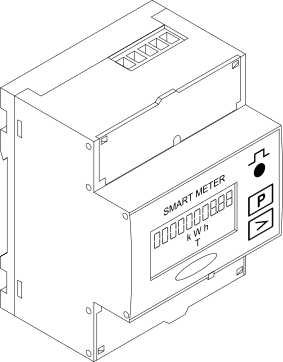
Warnings are intended to warn people of possible injuries and to avoid personal injury and damage to the product. They relate to individual actions with and on the product.
Indicates an immediately dangerous situation.
Serious injury or death will result if the danger is not avoided.
Action step to escape the situation.
Indicates a potentially dangerous situation.
Serious injury or death may result if the danger is not avoided.
Action step to escape the situation.
Indicates a potentially dangerous situation.
Minor or moderate injury may result if the danger is not avoided.
Action step to escape the situation.
Indicates a situation that may result in property damage.
If the situation is not avoided, impaired work results, material damage to the product or other property are the possible consequences.
Action step to avoid the situation.
Safety instructions are designed to ensure safe product use. They are preventive and help to inform users about the fundamental risks involved when dealing with the product. They do not refer specifically to individual actions with and on the product.
Warnings are intended to warn people of possible injuries and to avoid personal injury and damage to the product. They relate to individual actions with and on the product.
Indicates an immediately dangerous situation.
Serious injury or death will result if the danger is not avoided.
Action step to escape the situation.
Indicates a potentially dangerous situation.
Serious injury or death may result if the danger is not avoided.
Action step to escape the situation.
Indicates a potentially dangerous situation.
Minor or moderate injury may result if the danger is not avoided.
Action step to escape the situation.
Indicates a situation that may result in property damage.
If the situation is not avoided, impaired work results, material damage to the product or other property are the possible consequences.
Action step to avoid the situation.
Safety instructions are designed to ensure safe product use. They are preventive and help to inform users about the fundamental risks involved when dealing with the product. They do not refer specifically to individual actions with and on the product.
Warnings are intended to warn people of possible injuries and to avoid personal injury and damage to the product. They relate to individual actions with and on the product.
Indicates an immediately dangerous situation.
Serious injury or death will result if the danger is not avoided.
Action step to escape the situation.
Indicates a potentially dangerous situation.
Serious injury or death may result if the danger is not avoided.
Action step to escape the situation.
Indicates a potentially dangerous situation.
Minor or moderate injury may result if the danger is not avoided.
Action step to escape the situation.
Indicates a situation that may result in property damage.
If the situation is not avoided, impaired work results, material damage to the product or other property are the possible consequences.
Action step to avoid the situation.
Safety instructions are designed to ensure safe product use. They are preventive and help to inform users about the fundamental risks involved when dealing with the product. They do not refer specifically to individual actions with and on the product.
The device has been manufactured in line with the state of the art and according to recognized safety standards.
Incorrect operation or misuse
Serious to fatal injuries to the operator or third parties as well as damage to the device and other property of the operator may result.
All persons involved in the commissioning, maintenance, and servicing of the device must be appropriately qualified and have knowledge of working with electrical installations.
Read these operating instructions in full and follow them carefully and precisely.
The operating instructions must always be kept to hand wherever the device is being used.
IMPORTANT!
Labels, warning notices, and safety symbols are located on the device. A description can be found in these operating instructions.
Tampered-with and non-functioning protection devices
Serious to fatal injuries as well as damage to the device and other property of the operator may result.
Never bypass or disable protection devices.
Any protection devices that are not fully functional must be repaired by an authorized specialist before the device is switched on.
Loose, damaged, or under-dimensioned cables
An electric shock can be fatal.
Use undamaged, insulated, and adequately dimensioned cables.
Fasten the cables according to the specifications in the operating instructions.
Loose, damaged, or under-dimensioned cables must be repaired or replaced immediately by an authorized specialist.
Installations or modifications to the device
The device may be damaged
Do not carry out any alterations, installations, or modifications to the device without first obtaining the manufacturer's permission.
Damaged components must be replaced.
Only use original spare parts.
Operation or storage of the machine outside the stipulated area will be deemed as not in accordance with the intended purpose.
For exact information on permitted environmental conditions, please refer to the technical data.
The Fronius Smart Meter is a bidirectional electricity meter for optimizing self-consumption and recording a household's load characteristic curve. Together with a Fronius inverter or Fronius Datamanager 2.0 and a Fronius data interface, the Fronius Smart Meter allows you to view your own power consumption. The meter measures the energy flow to the loads or to the public grid and forwards the information to the Fronius inverter or Fronius Datamanager 2.0 via the Modbus RTU/RS485 interface.
Danger due to non-compliance with the safety instructions
Risk of injury and damage to the device as a result.
Follow all safety instructions.
Switch off the power supply before establishing the mains connection.
The Fronius Smart Meter is a bidirectional electricity meter for optimizing self-consumption and recording a household's load characteristic curve. Together with a Fronius inverter or Fronius Datamanager 2.0 and a Fronius data interface, the Fronius Smart Meter allows you to view your own power consumption. The meter measures the energy flow to the loads or to the public grid and forwards the information to the Fronius inverter or Fronius Datamanager 2.0 via the Modbus RTU/RS485 interface.
Danger due to non-compliance with the safety instructions
Risk of injury and damage to the device as a result.
Follow all safety instructions.
Switch off the power supply before establishing the mains connection.
Technical data, labels, and safety symbols are located on the Fronius Smart Meter. This information must be kept in a legible condition and must not be removed, covered, painted over, or concealed by stickers or labels. The notices and symbols warn against incorrect operation that may result in serious injury and damage.
Symbols on the rating plate: | |
 | CE label |
 | RCM (Regulatory Compliance Mark) |
 | WEEE label |
The conventions regarding how information is presented in the document, which are set out below, have been defined in order to increase the readability and comprehensibility of the document.
Application notes
IMPORTANT! Indicates application notes and other useful information. It does not indicate a harmful or dangerous situation.
Software
Software functions and elements of a graphical user interface (e.g., buttons, menu items) are highlighted in the text with this mark up.
Example: Click Save.
Instructions for action
This document provides detailed information and instructions to ensure that people can use the machine safely and efficiently.
The information is intended for the following groups of people:Regardless of any qualifications, only perform the activities listed in this document.
The definition of professional qualifications and their applicability are subject to national law.
Data security for network and Internet connection
Unsecured networks and a lack of safeguards can result in data loss and unauthorized access. Observe the following points for safe operation:
Operate inverters and system components on a private, secure network. A WiFi network is considered secure if security standard WPA 2 is satisfied as a minimum.
Keep the network devices (e.g., WiFi routers) up to date with the latest technology.
Keep the software and/or firmware updated.
Use a wired network to ensure a stable data connection.
For security reasons, do not make inverters and system components accessible from the Internet via port forwarding or Port Address Translation (PAT).
Use the solutions provided by Fronius for monitoring and remote configuration.
The optional communication protocol Modbus TCP/IP1) is an unsecured interface. Only use Modbus TCP/IP if no other secured data communication protocol (MQTT2)) is possible (e.g., compatibility with older Smart Meters).
1) TCP/IP - Transmission Control Protocol/Internet Protocol
2) MQTT - Message Queuing Telemetry Protocol
When you connect your device (and any associated devices) to the internet, the following device and operating data (device ID/identifier, device IP address, device time, configuration settings, hardware and software information, device status log files, serial number) is sent automatically to
Fronius International GmbH, Froniusstraße 1, 4643 Pettenbach, Austria, telephone +43(0) 7242241-0, email: contact@fronius.com (controller)
and stored.
The processing of this device and operating data is carried out for the purpose of ensuring the operational safety of the device (time synchronization, provision of updates). This processing is therefore necessary for the functionality of the device and thus for the fulfillment of the contract (Art. 6 (1) (b) GDPR).
If you do not wish to have such data processed, you must manually disable the device's internet connection.
In addition, the device and operating data is also processed for the purpose of providing services as part of a supplementary digital service for your device (such as solar.web or similar) as soon as you have registered your device with such a digital service (identification). This data is processed to provide the requested digital services and is therefore necessary for the fulfillment of the contract (Art. 6 (1) (b) GDPR).
Furthermore, this data processing is also carried out for maintenance and support purposes and for handling customer concerns as well as in warranty and guarantee cases (only in individual cases and given connection between device and internet). In this context, the device and operating data may also be passed on to our cooperation partners (third-party providers and suppliers). The processing of this data is necessary for maintenance and support purposes or for processing warranty and guarantee cases and thus for the fulfillment of the contract (Art. 6 (1) (b) GDPR).
Device and operating data are also processed for analysis and diagnostic purposes in order to gain insights into the functionality of the devices and improve them accordingly. This data processing is based on our legitimate interest (Art. 6 (1) (f) GDPR).
We store this data for as long as it is necessary to fulfill the existing contract with you. Any storage beyond this is carried out for legal reasons or if we have a legitimate interest in doing so. For more information on data processing for the solar.web-digital service, as well as our general privacy policy and your rights as a data subject, please visit https://www.fronius.com.
Fronius International GmbH retains the copyrights of these operating instructions.
Text, illustrations, and other media correspond to the technical state of the art at the time of publication. Fronius reserves the right to make changes. If you have any suggestions for improvement or have found a mistake in this document, we would be most grateful for your comments.
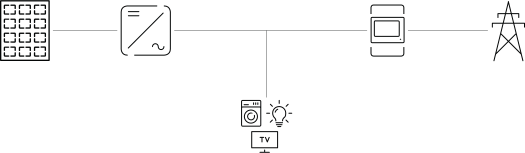
The Fronius Smart Meter can be installed at two possible locations in the system, at the feed-in point and at the consumption point.
Positioning at the feed-in point
The positioning of the Fronius Smart Meter at the feed-in point.
Positioning at the consumption point
The positioning of the Fronius Smart Meter at the consumption point.
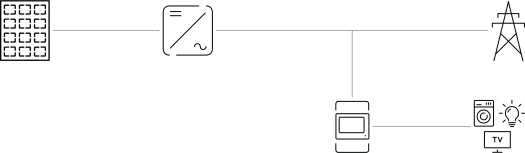
The Fronius Smart Meter can be installed at two possible locations in the system, at the feed-in point and at the consumption point.
Positioning at the feed-in point
The positioning of the Fronius Smart Meter at the feed-in point.
Positioning at the consumption point
The positioning of the Fronius Smart Meter at the consumption point.
The Fronius Smart Meter can be mounted on a 35 mm DIN rail. The housing comprises 4 DUs (division units, max. 72 mm).
The Fronius Smart Meter is a hard-wired device and requires a disconnecting device (circuit breaker, switch, or disconnector) and overcurrent protection (automatic circuit breaker).
The Fronius Smart Meter consumes 10 - 30 mA. The nominal capacity of the disconnecting devices and the overcurrent protection is determined by the wire thickness, the mains voltage, and the required breaking capacity.
Danger from mains voltage.
An electric shock can be fatal.
Switch off the power supply before connecting the mains voltage inputs to the Fronius Smart Meter.
IMPORTANT!
Do not install more than one cable per screw terminal. If necessary, use terminal blocks. Rate fuse according to the cross-section of the line.
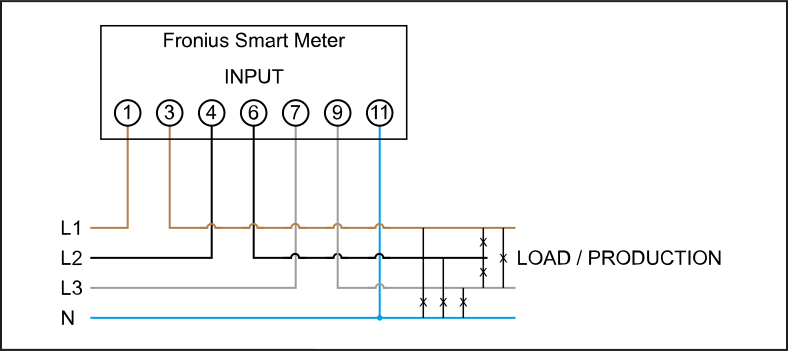
Connect each voltage cable to the terminal strip as shown in the graphic below.
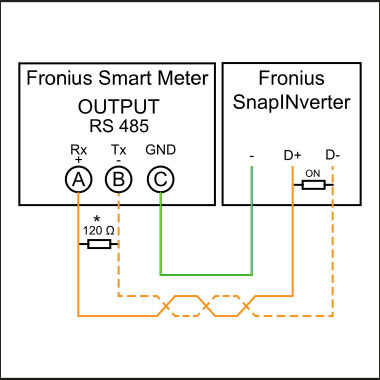
Fronius SnapINverter:
Connect the data communication connections of the Fronius Smart Meter to the Fronius system monitoring in the inverter. Several Smart Meters can be installed in the system, see chapter Multi meter system—Fronius SnapINverter on page (→).
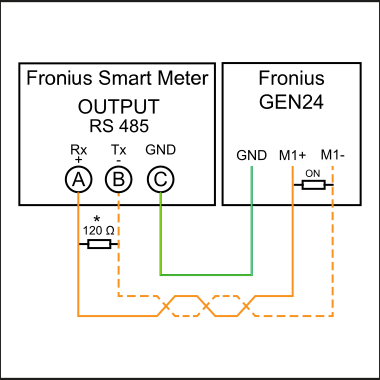
Fronius GEN24 inverter:
Connect the data communication connections of the Fronius Smart Meter to the Modbus interface of the Fronius GEN24 inverter. Several Smart Meters can be installed in the system, see chapter Multi meter system - Fronius GEN24 inverter on page (→).
More information on successful commissioning.
Note the following information about connecting the data communication cable to the inverter.
Use cables of type CAT5 or higher.
The maximum cable length between the Fronius inverter and Fronius Smart Meter is 300 meters.
Use a mutual twisted cable pair for data lines that belong together (D+, D- and M1+, M1-).
If the output cables are close to the grid cabling, use wires or cables that are designed for 300 V to 600 V (never less than the operating voltage).
Use double-insulated or sheathed output cables when they are close to bare conductors.
Use shielded twisted pair cables to avoid faults.
The outputs of the Fronius Smart Meter are electrically isolated from hazardous voltages.
 | Inverter in the system |
 | Meter - Fronius Smart Meter |
 | Fronius or third-party device, connection via Modbus RTU |
 | Terminating resistor |
Due to interference, the use of terminating resistors according to the following overview is recommended for flawless operation.
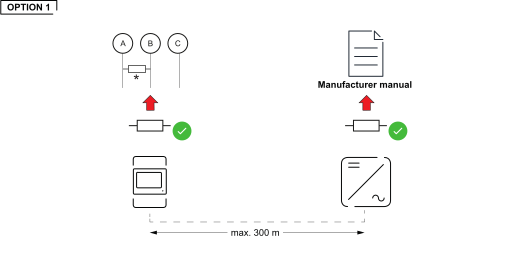
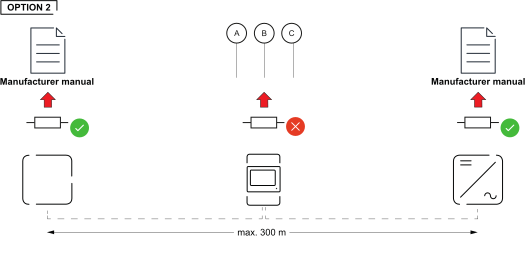
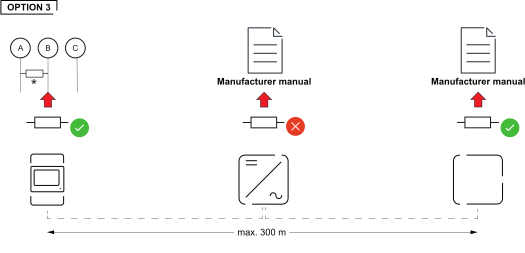
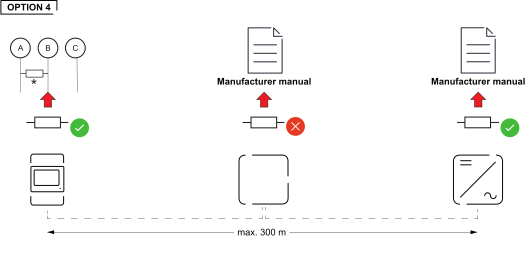
* The terminating resistor on the Fronius Smart Meter is installed between A and B. The terminating resistor R 120 Ohm is included with the Fronius Smart Meter.
 | Grid |
| Inverter in the system |
 | Fronius Smart Meter |
 | Primary meter |
 | Secondary meter |
| Modbus RTU, third-party device |
 | Loads in the system |
 | Additional loads in the system |
 | Additional producers in the system |
| Terminating resistor |
A maximum of 4 Modbus stations can be connected to the Modbus connection terminal.
IMPORTANT!
Only one primary meter, one battery and one Ohmpilot can be connected per inverter. Due to the high data transfer of the battery, the battery occupies 2 subscribers.
Example:
Input | Battery | Fronius | Number | Number |
|---|---|---|---|---|
Modbus |  | | 1 | 0 |
|  | 1 | 1 | |
| | 1 | 2 | |
| | 1 | 3 |
If several Fronius Smart Meters are installed, set a separate address for each Smart Meter. The primary meter always receives the address 1. Number all other meters consecutively in the address range from 2 to 14. Different Fronius Smart Meter power categories can be used together.
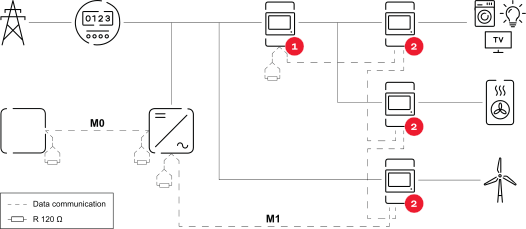
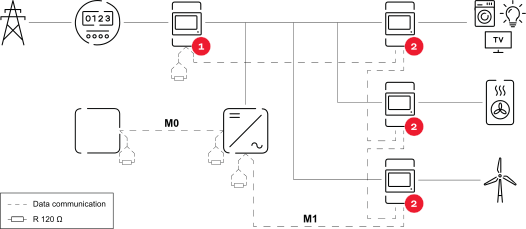
Multi meter system—Modbus RTU cabling
To avoid interference, install the terminating resistors as described in chapter Terminating resistors.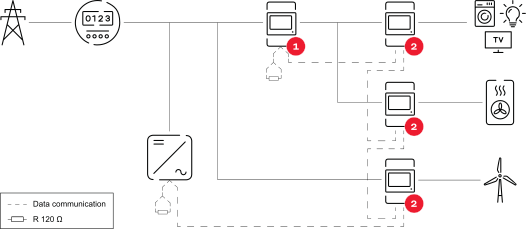
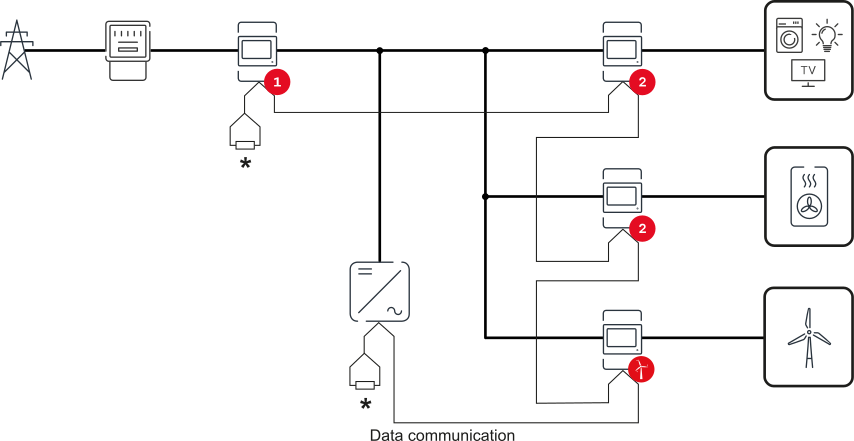
The inputs M0 and M1 can be freely selected. A maximum of 4 Modbus participants can be connected to the Modbus terminal on the inputs M0 and M1.
IMPORTANT!
Only one primary meter, one battery and one Ohmpilot can be connected per inverter. Due to the high data transfer of the battery, the battery occupies 2 subscribers.
Example 1:
Input | Battery | Fronius | Number | Number |
|---|---|---|---|---|
Modbus 0 | | | 0 | 4 |
| | 0 | 2 | |
| | 0 | 1 | |
Modbus 1 | | | 1 | 3 |
Example 2:
Input | Battery | Fronius | Number | Number |
|---|---|---|---|---|
Modbus 0 | | | 1 | 3 |
Modbus 1 | | | 0 | 4 |
| | 0 | 2 | |
| | 0 | 1 |
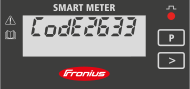
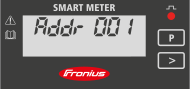
If several Fronius Smart Meters are installed, a separate address must be set for each one (see Setting the address of the Fronius Smart Meter on page (→)). The primary meter always receives the address 1. All other meters are numbered consecutively in the address range from 2 to 14. Different Fronius Smart Meter power categories can be used together.
IMPORTANT!
Use no more than Use 7 secondary meters in the system. To avoid interference, it is recommended to install the terminating resistors according to the chapter Terminating resistors on page (→).
A graphic view of the menu structure can be found in the User Information that is supplied as standard.
Symbol | Name | Event | Function |
|---|---|---|---|
 | Prog | 1 x | Increases the set value |
 | Page | 1 x | Moves the cursor |
 | Enter | 1 x | Confirms the entry |
Symbol | Name | Event | Function |
|---|---|---|---|
| Page | 1 x | Continue to the next screen |
| Page | 2 seconds | Reset value / change menu |
The following illustrations are symbolic representations. The values displayed vary for each individual unit.
Display | Description |
|---|---|
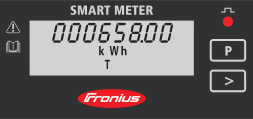 | Total active energy consumed |
 | Total reactive energy |
 | Total active energy feed-in |
 | Maximum effective power average value Press arrow key for 2 seconds to reset the value |
 | Effective power average value |
 | Voltage and current menu Press the arrow key and wait 2 seconds until the next display (current phase L1) appears. |
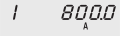 | Current phase L1 |
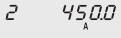 | Current phase L2 |
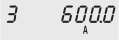 | Current phase L3 |
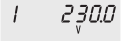 | Voltage phase L1 |
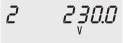 | Voltage phase L2 |
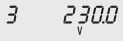 | Voltage phase L3 |
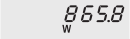 | Effective power |
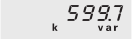 | Reactive power |
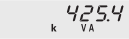 | Apparent power |
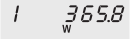 | Effective power phase L1 |
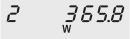 | Effective power phase L2 |
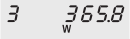 | Effective power phase L3 |
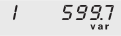 | Reactive power phase L1 |
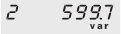 | Reactive power phase L2 |
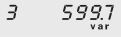 | Reactive power phase L3 |
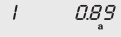 | Power factor phase L1 |
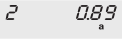 | Power factor phase L2 |
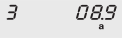 | Power factor phase L3 |
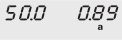 | Frequency / power factor |
IMPORTANT! Settings in the "Meter" menu item may only be entered by staff trained to do so!
The service password must be entered for the "Meter" menu item.
Three-phase or one-phase Fronius Smart Meters may be used. In both cases, selection is made via the "Fronius Smart Meter" item. The Fronius Datamanager automatically detects the meter type.
One primary meter and several secondary meters can be selected. The primary meter must be configured before a secondary meter can be chosen.
IMPORTANT! Settings in the "Meter" menu item may only be entered by staff trained to do so!
The service password must be entered for the "Meter" menu item.
Three-phase or one-phase Fronius Smart Meters may be used. In both cases, selection is made via the "Fronius Smart Meter" item. The Fronius Datamanager automatically detects the meter type.
One primary meter and several secondary meters can be selected. The primary meter must be configured before a secondary meter can be chosen.
IMPORTANT! Settings in the "Meter" menu item may only be entered by staff trained to do so!
The service password must be entered for the "Meter" menu item.
Three-phase or one-phase Fronius Smart Meters may be used. In both cases, selection is made via the "Fronius Smart Meter" item. The Fronius Datamanager automatically detects the meter type.
One primary meter and several secondary meters can be selected. The primary meter must be configured before a secondary meter can be chosen.
Access Point:
 key. key.
LAN:
 button to save the settings.
The Fronius Smart Meter is configured as a primary meter.
The "Current general view" menu area displays the power of the PV modules, self-consumption, the energy fed into the grid, and the battery charge (if available).
button to save the settings.The Fronius Smart Meter is configured as a secondary meter.
IMPORTANT! Settings in the "Device configuration" menu item may only be entered by staff trained to do so!
The service password must be entered for the "Device configuration" menu item.
Three-phase or one-phase Fronius Smart Meters may be used. In both cases, selection is made via the "Components" menu area. The meter type is determined automatically.
One primary meter and several secondary meters can be selected. The primary meter must be configured before a secondary meter can be chosen.
IMPORTANT! Settings in the "Device configuration" menu item may only be entered by staff trained to do so!
The service password must be entered for the "Device configuration" menu item.
Three-phase or one-phase Fronius Smart Meters may be used. In both cases, selection is made via the "Components" menu area. The meter type is determined automatically.
One primary meter and several secondary meters can be selected. The primary meter must be configured before a secondary meter can be chosen.
The network wizard and product setup can be performed independently. A network connection is required for the Fronius Solar.web installation wizard.
WiFi:
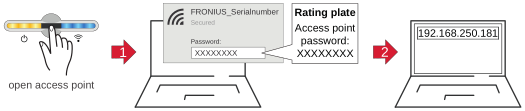
 .
. Ethernet:
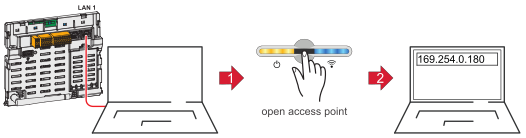 .
.The Fronius Smart Meter is configured as a primary meter.
The Fronius Smart Meter is configured as a secondary meter.
Modbus transmission speed: 9600 baud
Parity bit: none
Software version: Datamanager 3.7.2 / Energypackage 1.3.3
Input | |
|---|---|
Nominal voltage (4-conductor) | 230 - 400 V |
Power consumption in the voltage path (max. voltage) | 2.2 VA (1.5 W) three-phase |
Nominal frequency | 50 - 60 Hz |
Nominal current, lb | 10 A |
Maximum current, Imax | 63 A |
Starting current | 40 mA |
Short-time overload (EN/IEC 62053-21, EN/IEC 62053-23) | 20 lmax / 0.5 s |
Self-consumption - current path (max. current) | 1.5 W for phase |
Power factor | Active cosφ 0.5 ind to 0.8 cap, |
Current total harmonic distortion | In acc. with EN 50470 |
Output | |
|---|---|
RS485 communication | |
Standard | RS485 - 3 conductors |
Transmission | Serial, asynchronous |
Protocol | Compatible with Modbus RTU |
Addresses | 1 to 255 |
Number of bits | 8 |
Stop bit | 1 |
Parity bit | None - odd - even |
Baud rate | 4800 - 9600 - 19200 bit/s |
Response time | ≤ 200 ms |
Insulation (EN/IEC 62052-11, 62053-21) | |
|---|---|
Installation category | III |
Degree of pollution | 2 |
Insulation voltage | 300 V phase-neutral |
Electromagnetic compatibility | |
|---|---|
Emission test | In acc. with EN/IEC 62052-11, EN 50470 |
Immunity test | In acc. with EN/IEC 62052-11, EN 50470 |
Operating conditions | |
|---|---|
Reference temperature | 23°C (±2°C) |
Operating range | -25 to 55 °C |
Temperature limit for storage and transport | -40 to 70 °C |
Tropical model |
|
Max. power loss (for thermal dimensioning of the switch cabinet) | ≤ 6 W |
Mechanical environment | M1 |
Housing | |
|---|---|
Housing | 4 modules according to DIN 43880 |
Sealable front and terminal cover |
|
Connection | Screw connection |
Mounting | Can be snapped onto 35 mm DIN rail |
Housing material | Polycarbonate, self-extinguishing |
Degree of protection (EN 60529) | IP51 front, IP20 connections |
Weight | 260 grams |
Screw terminals | |
|---|---|
Measuring input | |
Wire (rigid) | min. 1 mm² / max. 16 mm² |
Wire (flexible) | min. 1 mm² / max. 10 mm² |
Recommended torque | 1.2 Nm / max. 1.4 Nm |
Output | |
Wire (rigid) | min. 0.05 mm² / max. 4 mm² |
Wire (flexible) | min. 0.05 mm² / max. 2.5 mm² |
Recommended torque | 0.5 Nm / max. 0.8 Nm |
Modbus transmission speed: 9600 baud
Parity bit: none
Software version: Datamanager 3.7.2 / Energypackage 1.3.3
Input | |
|---|---|
Nominal voltage (4-conductor) | 230 - 400 V |
Power consumption in the voltage path (max. voltage) | 2.2 VA (1.5 W) three-phase |
Nominal frequency | 50 - 60 Hz |
Nominal current, lb | 10 A |
Maximum current, Imax | 63 A |
Starting current | 40 mA |
Short-time overload (EN/IEC 62053-21, EN/IEC 62053-23) | 20 lmax / 0.5 s |
Self-consumption - current path (max. current) | 1.5 W for phase |
Power factor | Active cosφ 0.5 ind to 0.8 cap, |
Current total harmonic distortion | In acc. with EN 50470 |
Output | |
|---|---|
RS485 communication | |
Standard | RS485 - 3 conductors |
Transmission | Serial, asynchronous |
Protocol | Compatible with Modbus RTU |
Addresses | 1 to 255 |
Number of bits | 8 |
Stop bit | 1 |
Parity bit | None - odd - even |
Baud rate | 4800 - 9600 - 19200 bit/s |
Response time | ≤ 200 ms |
Insulation (EN/IEC 62052-11, 62053-21) | |
|---|---|
Installation category | III |
Degree of pollution | 2 |
Insulation voltage | 300 V phase-neutral |
Electromagnetic compatibility | |
|---|---|
Emission test | In acc. with EN/IEC 62052-11, EN 50470 |
Immunity test | In acc. with EN/IEC 62052-11, EN 50470 |
Operating conditions | |
|---|---|
Reference temperature | 23°C (±2°C) |
Operating range | -25 to 55 °C |
Temperature limit for storage and transport | -40 to 70 °C |
Tropical model |
|
Max. power loss (for thermal dimensioning of the switch cabinet) | ≤ 6 W |
Mechanical environment | M1 |
Housing | |
|---|---|
Housing | 4 modules according to DIN 43880 |
Sealable front and terminal cover |
|
Connection | Screw connection |
Mounting | Can be snapped onto 35 mm DIN rail |
Housing material | Polycarbonate, self-extinguishing |
Degree of protection (EN 60529) | IP51 front, IP20 connections |
Weight | 260 grams |
Screw terminals | |
|---|---|
Measuring input | |
Wire (rigid) | min. 1 mm² / max. 16 mm² |
Wire (flexible) | min. 1 mm² / max. 10 mm² |
Recommended torque | 1.2 Nm / max. 1.4 Nm |
Output | |
Wire (rigid) | min. 0.05 mm² / max. 4 mm² |
Wire (flexible) | min. 0.05 mm² / max. 2.5 mm² |
Recommended torque | 0.5 Nm / max. 0.8 Nm |
Detailed warranty conditions specific to your country can be found at https://www.fronius.com/en/download-center?searchword=Warranty+conditions .
If there is a warranty for the relevant product, register the product at https://warranty.fronius.com/ and activate or extend the warranty.