

Fronius Smart Meter IP 5kA-3
download
Warnings are intended to warn people of possible injuries and to avoid personal injury and damage to the product. They relate to individual actions with and on the product.
Indicates an immediately dangerous situation.
Serious injury or death will result if the danger is not avoided.
Action step to escape the situation.
Indicates a potentially dangerous situation.
Serious injury or death may result if the danger is not avoided.
Action step to escape the situation.
Indicates a potentially dangerous situation.
Minor or moderate injury may result if the danger is not avoided.
Action step to escape the situation.
Indicates a situation that may result in property damage.
If the situation is not avoided, impaired work results, material damage to the product or other property are the possible consequences.
Action step to avoid the situation.
Safety instructions are designed to ensure safe product use. They are preventive and help to inform users about the fundamental risks involved when dealing with the product. They do not refer specifically to individual actions with and on the product.
Warnings are intended to warn people of possible injuries and to avoid personal injury and damage to the product. They relate to individual actions with and on the product.
Indicates an immediately dangerous situation.
Serious injury or death will result if the danger is not avoided.
Action step to escape the situation.
Indicates a potentially dangerous situation.
Serious injury or death may result if the danger is not avoided.
Action step to escape the situation.
Indicates a potentially dangerous situation.
Minor or moderate injury may result if the danger is not avoided.
Action step to escape the situation.
Indicates a situation that may result in property damage.
If the situation is not avoided, impaired work results, material damage to the product or other property are the possible consequences.
Action step to avoid the situation.
Safety instructions are designed to ensure safe product use. They are preventive and help to inform users about the fundamental risks involved when dealing with the product. They do not refer specifically to individual actions with and on the product.
Warnings are intended to warn people of possible injuries and to avoid personal injury and damage to the product. They relate to individual actions with and on the product.
Indicates an immediately dangerous situation.
Serious injury or death will result if the danger is not avoided.
Action step to escape the situation.
Indicates a potentially dangerous situation.
Serious injury or death may result if the danger is not avoided.
Action step to escape the situation.
Indicates a potentially dangerous situation.
Minor or moderate injury may result if the danger is not avoided.
Action step to escape the situation.
Indicates a situation that may result in property damage.
If the situation is not avoided, impaired work results, material damage to the product or other property are the possible consequences.
Action step to avoid the situation.
Safety instructions are designed to ensure safe product use. They are preventive and help to inform users about the fundamental risks involved when dealing with the product. They do not refer specifically to individual actions with and on the product.
The device has been manufactured in line with the state of the art and according to recognized safety standards.
Incorrect operation or misuse
Serious to fatal injuries to the operator or third parties as well as damage to the device and other property of the operator may result.
All persons involved in the commissioning, maintenance, and servicing of the device must be appropriately qualified and have knowledge of working with electrical installations.
Read these operating instructions in full and follow them carefully and precisely.
The operating instructions must always be kept to hand wherever the device is being used.
IMPORTANT!
Labels, warning notices, and safety symbols are located on the device. A description can be found in these operating instructions.
Tampered-with and non-functioning protection devices
Serious to fatal injuries as well as damage to the device and other property of the operator may result.
Never bypass or disable protection devices.
Any protection devices that are not fully functional must be repaired by an authorized specialist before the device is switched on.
Loose, damaged, or under-dimensioned cables
An electric shock can be fatal.
Use undamaged, insulated, and adequately dimensioned cables.
Fasten the cables according to the specifications in the operating instructions.
Loose, damaged, or under-dimensioned cables must be repaired or replaced immediately by an authorized specialist.
Installations or modifications to the device
The device may be damaged
Do not carry out any alterations, installations, or modifications to the device without first obtaining the manufacturer's permission.
Damaged components must be replaced.
Only use original spare parts.
Operation or storage of the machine outside the stipulated area will be deemed as not in accordance with the intended purpose.
For exact information on permitted environmental conditions, please refer to the technical data.
During operation, due to the high electrical voltages and currents, local electromagnetic fields (EMF) are generated. These occur in the immediate vicinity of the inverter and the Fronius system components. Electromagnetic fields are also present in the area of the PV modules and their supply lines.
As long as the intended use and a minimum distance of 20 cm are observed, all limit values for human exposure are observed.
If the limit values are complied with, according to current scientific knowledge, no negative health effects from EMF exposure are to be expected. For persons with prostheses1) or active physical aids2), there is a possible health risk in the vicinity of photovoltaic system components. To avoid possible health risks, consult with the responsible doctor.
1) e.g., implants or metal parts
2) e.g., pacemaker, insulin pump, hearing aid, etc.
In certain cases, even though a device complies with the standard limit values for emissions, it may affect the application area for which it was designed (e.g., when there is equipment that is susceptible to interference at the same location or if the site where the device is installed is close to either radio or television receivers). If this is the case, the operator is obliged to take action to rectify the situation.
The conventions regarding how information is presented in the document, which are set out below, have been defined in order to increase the readability and comprehensibility of the document.
Application notes
IMPORTANT! Indicates application notes and other useful information. It does not indicate a harmful or dangerous situation.
Software
Software functions and elements of a graphical user interface (e.g., buttons, menu items) are highlighted in the text with this mark up.
Example: Click Save.
Instructions for action
The conventions regarding how information is presented in the document, which are set out below, have been defined in order to increase the readability and comprehensibility of the document.
Application notes
IMPORTANT! Indicates application notes and other useful information. It does not indicate a harmful or dangerous situation.
Software
Software functions and elements of a graphical user interface (e.g., buttons, menu items) are highlighted in the text with this mark up.
Example: Click Save.
Instructions for action
This document provides detailed information and instructions to ensure that people can use the machine safely and efficiently.
The information is intended for the following groups of people:Regardless of any qualifications, only perform the activities listed in this document.
The definition of professional qualifications and their applicability are subject to national law.
Data security for network and Internet connection
Unsecured networks and a lack of safeguards can result in data loss and unauthorized access. Observe the following points for safe operation:
Operate inverters and system components on a private, secure network. A WiFi network is considered secure if security standard WPA 2 is satisfied as a minimum.
Keep the network devices (e.g., WiFi routers) up to date with the latest technology.
Keep the software and/or firmware updated.
Use a wired network to ensure a stable data connection.
For security reasons, do not make inverters and system components accessible from the Internet via port forwarding or Port Address Translation (PAT).
Use the solutions provided by Fronius for monitoring and remote configuration.
The optional communication protocol Modbus TCP/IP1) is an unsecured interface. Only use Modbus TCP/IP if no other secured data communication protocol (MQTT2)) is possible (e.g., compatibility with older Smart Meters).
1) TCP/IP - Transmission Control Protocol/Internet Protocol
2) MQTT - Message Queuing Telemetry Protocol
When you connect your device (and any associated devices) to the internet, the following device and operating data (device ID/identifier, device IP address, device time, configuration settings, hardware and software information, device status log files, serial number) is sent automatically to
Fronius International GmbH, Froniusstraße 1, 4643 Pettenbach, Austria, telephone +43(0) 7242241-0, email: contact@fronius.com (controller)
and stored.
The processing of this device and operating data is carried out for the purpose of ensuring the operational safety of the device (time synchronization, provision of updates). This processing is therefore necessary for the functionality of the device and thus for the fulfillment of the contract (Art. 6 (1) (b) GDPR).
If you do not wish to have such data processed, you must manually disable the device's internet connection.
In addition, the device and operating data is also processed for the purpose of providing services as part of a supplementary digital service for your device (such as solar.web or similar) as soon as you have registered your device with such a digital service (identification). This data is processed to provide the requested digital services and is therefore necessary for the fulfillment of the contract (Art. 6 (1) (b) GDPR).
Furthermore, this data processing is also carried out for maintenance and support purposes and for handling customer concerns as well as in warranty and guarantee cases (only in individual cases and given connection between device and internet). In this context, the device and operating data may also be passed on to our cooperation partners (third-party providers and suppliers). The processing of this data is necessary for maintenance and support purposes or for processing warranty and guarantee cases and thus for the fulfillment of the contract (Art. 6 (1) (b) GDPR).
Device and operating data are also processed for analysis and diagnostic purposes in order to gain insights into the functionality of the devices and improve them accordingly. This data processing is based on our legitimate interest (Art. 6 (1) (f) GDPR).
We store this data for as long as it is necessary to fulfill the existing contract with you. Any storage beyond this is carried out for legal reasons or if we have a legitimate interest in doing so. For more information on data processing for the solar.web-digital service, as well as our general privacy policy and your rights as a data subject, please visit https://www.fronius.com.
The available documentation forms part of the product and must be read and observed. The documents belonging to the product must be kept in good condition and accessible at all times at the place of installation.
The documents do not replace state or provincial laws, regional, federal, or national laws, or regulations or standards that apply to the installation, electrical safety, and use of the product. Fronius International GmbH assumes no responsibility for compliance with or non-compliance with these laws or regulations in connection with the installation and use of the product.
Interventions in the product, such as modifications and alterations, are not permitted. Unauthorized interventions will void the warranty and warranty claims and void the user's authority to operate the equipment.
Fronius International GmbH retains the copyrights of these operating instructions.
Text, illustrations, and other media correspond to the technical state of the art at the time of publication. Fronius reserves the right to make changes. If you have any suggestions for improvement or have found a mistake in this document, we would be most grateful for your comments.
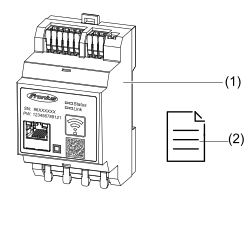
| (1) | Fronius Smart Meter IP 5kA-3 |
| (2) | Quick Start Guide |
| (1) | Fronius Smart Meter IP 5kA-3 |
| (2) | Quick Start Guide |
The Fronius Smart Meter IP 5kA-3 is a bidirectional electricity meter which optimizes self-consumption and records a household's load curve. The Fronius Smart Meter IP 5kA-3 provides an overview of a user's own power consumption in conjunction with a Fronius inverter or Fronius Datamanager 2.0 and a Fronius data interface.
The meter measures the energy flow to the loads or to the public grid and forwards the information via the Modbus RTU/RS485- or TCP interface (LAN/WLAN) to the Fronius inverter or the Fronius Datamanager 2.0.
The Fronius Smart Meter IP 5kA-3 is a fixed piece of equipment for public grids of TN/TT systems and may only be used to measure loads and self-consumption.
The Fronius Smart Meter IP 5kA-3 is required for systems with a battery storage system and/or a Fronius Ohmpilot installed for communication between the individual components.
The installation is carried out on an indoor DIN rail with corresponding back-up fuses, which are adapted to the cable cross-sections of the copper conductors and to the maximum current of the meter. The Fronius Smart Meter IP 5kA-3 must only be operated in accordance with the specifications in the enclosed documentation and in accordance with local laws, regulations, provisions, standards, and within the limits of technical possibilities. Any use of the product other than as described in the intended use shall be deemed to be not in accordance with the intended purpose.
The available documentation forms part of the product and must be read, observed, and kept in good condition. It must also be accessible at all times at the place of installation. Fronius International GmbH assumes no responsibility for compliance with or non-compliance with these laws or regulations in connection with the installation of the product.
The Fronius Smart Meter is not suitable for billing costs to subtenants.
Interventions in the Fronius Smart Meter, e.g., modifications and alterations, are not permitted. These will render the warranty invalid and void the user's authorization to operate the equipment.
Technical data, labels, and safety symbols are located on the Fronius Smart Meter IP 5kA-3. This information must be kept in a legible condition and must not be removed, covered, pasted over, or painted over. The notices and symbols warn against incorrect operation, which may result in serious injury and property damage.
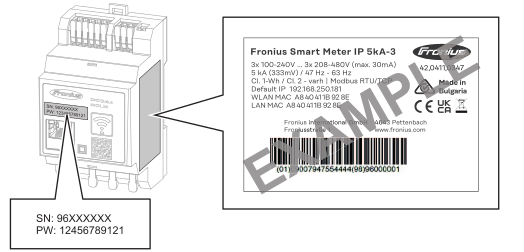
Symbols on the rating plate: | ||
 |
| CE label – confirms compliance with applicable EU directives and regulations. The product has been tested by a specific notified body. |
 |
| WEEE marking – waste electrical and electronic equipment must be collected separately and recycled in an environmentally sound manner in accordance with the European Directive and national law. |
 |
| UKCA marking – confirms compliance with applicable UK directives and regulations. |
 |
| RCM marking – tested according to the requirements of Australia and New Zealand. |
 |
| PV-Modul |
 |
| Fronius Hybrid Wechselrichter |
 |
| Fronius Backup Controller |
 |
| Wechselrichter im System |
 |
| Primärzähler |
 |
| Verrechnungszähler |
 |
| Stromnetz |
 |
| Batterie |
 |
| Verbraucher im System |
The Smart Meter can be installed in the following positions in the system:
Positioning at the feed-in point
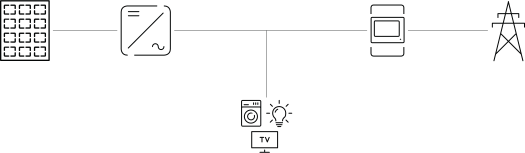
Positioning at the consumption point
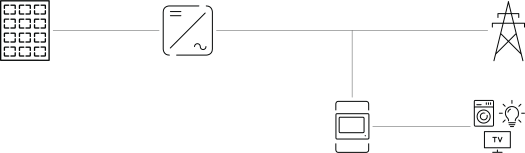
The Fronius Smart Meter IP 5kA-3 has accuracy class 1 when measuring active energy (EN IEC 62053-21) in the voltage ranges 208-480 VLL and 100-240 VLN. For further details see Technical data.
The Fronius Smart Meter can be used with Modbus RTU/TCP data cabling in backup power mode. In the case of Modbus TCP data cabling, it should be noted that reconnection to the public grid requires more time because the data network (e.g., network router/switch) is restarted. Fronius recommends a data connection via Modbus RTU.
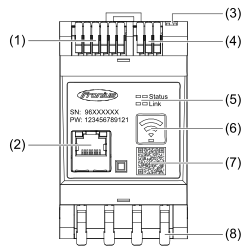
| (1) | Voltage transformer connection area |
| (2) | LAN port |
| (3) | DIP switch
|
| (4) | Modbus RTU connection area |
| (5) | LED indicators |
| (6) | WLAN access point and reset function button
|
| (7) | QR code to start the Setup wizard |
| (8) | AC connection area |
| (1) | Voltage transformer connection area |
| (2) | LAN port |
| (3) | DIP switch
|
| (4) | Modbus RTU connection area |
| (5) | LED indicators |
| (6) | WLAN access point and reset function button
|
| (7) | QR code to start the Setup wizard |
| (8) | AC connection area |
The LED status indicator shows the operating status and data connection of the Fronius Smart Meter IP 5kA-3.
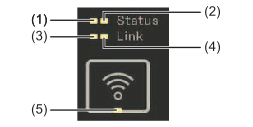 |
|
|
| (3) | Link LED 1 Illuminated green: Data connection to the network established |
| (4) | Link LED 2 Illuminated red: no data connection Flashing red: open WiFi access point |
| (5) | WiFi LED Flashing green: WiFi connection is being established Illuminated green: WiFi connection is active |
Please note the following criteria when choosing a location for the Smart Meter:
Only install on a solid, non-flammable surface.
When installing the Smart Meter in a switch cabinet or similar enclosure, make sure that it is of the appropriate safety class and that the hot air that develops will be dissipated by forced-air ventilation.
 | The Smart Meter is suitable for indoor installation. | |
 | The Smart Meter must not be installed or used at altitudes above 2,000 m. | |
Please note the following criteria when choosing a location for the Smart Meter:
Only install on a solid, non-flammable surface.
When installing the Smart Meter in a switch cabinet or similar enclosure, make sure that it is of the appropriate safety class and that the hot air that develops will be dissipated by forced-air ventilation.
| The Smart Meter is suitable for indoor installation. | |
| The Smart Meter must not be installed or used at altitudes above 2,000 m. | |
Please note the following criteria when choosing a location for the Smart Meter:
Only install on a solid, non-flammable surface.
When installing the Smart Meter in a switch cabinet or similar enclosure, make sure that it is of the appropriate safety class and that the hot air that develops will be dissipated by forced-air ventilation.
| The Smart Meter is suitable for indoor installation. | |
| The Smart Meter must not be installed or used at altitudes above 2,000 m. | |
Danger due to incorrect operation and work not carried out correctly.
This can result in serious injury and damage to property.
Installation and commissioning may only be carried out by a qualified technician and only within the scope of the technical regulations.
Maintenance and service work may only be carried out by service technicians trained by the manufacturer and only within the scope of the technical regulations.
Read the installation instructions and operating instructions from the respective manufacturer before installing and commissioning the equipment.
Danger from mains voltage and DC voltage of PV modules or batteries.
This can result in serious injury and damage to property.
All connection, maintenance, and service work must only be carried out when the AC and DC sides have been disconnected from the inverter and battery, and are de-energized.
Only a qualified technician is permitted to establish the fixed connection to the public grid.
Danger from damaged and/or contaminated terminals.
This can result in serious injury and damage to property.
Prior to connection work, check the terminals for damage and contamination.
Remove any contamination while the equipment is de-energized.
Have defective terminals repaired by an authorized specialist.
Danger due to incorrect operation and work not carried out correctly.
This can result in serious injury and damage to property.
Installation and commissioning may only be carried out by a qualified technician and only within the scope of the technical regulations.
Maintenance and service work may only be carried out by service technicians trained by the manufacturer and only within the scope of the technical regulations.
Read the installation instructions and operating instructions from the respective manufacturer before installing and commissioning the equipment.
Danger from mains voltage and DC voltage of PV modules or batteries.
This can result in serious injury and damage to property.
All connection, maintenance, and service work must only be carried out when the AC and DC sides have been disconnected from the inverter and battery, and are de-energized.
Only a qualified technician is permitted to establish the fixed connection to the public grid.
Danger from damaged and/or contaminated terminals.
This can result in serious injury and damage to property.
Prior to connection work, check the terminals for damage and contamination.
Remove any contamination while the equipment is de-energized.
Have defective terminals repaired by an authorized specialist.
The Fronius Smart Meter IP 5kA-3 is a hard-wired device and requires a disconnecting device (automatic circuit breaker).
The Fronius Smart Meter IP 5kA-3 consumes 30 mA, the nominal capacity of the disconnecting devices and the overcurrent protection is determined by the conductor cross-sections, the mains voltage, and the required breaking capacity.
Disconnecting device for the mains terminals
The automatic circuit breaker must protect the mains terminals marked L1, L2, and L3. In rare cases, the neutral conductor has a disconnecting device, which must interrupt both neutral and non-earthed cables concurrently.
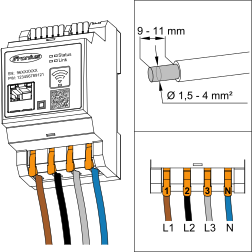
Connect round copper conductors to the mains terminals as described below. Select a sufficiently large conductor cross-section based on the actual connected power.
Permissible cable types for the mains terminals | ||||
|---|---|---|---|---|
Single-core | Multi-stranded | Fine-stranded | Fine-stranded with ferrule and collar | Fine-stranded with ferrule without collar |
 |  |  |  |  |
1.5-4 mm2 | 1.5-4 mm2 | 1.5-4 mm2 | 1.5-4 mm2 | 1.5-4 mm2 |
Stripping length: 9-11 mm | ||||
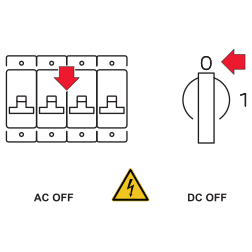
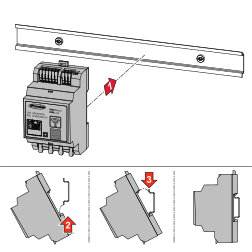
Mount the Fronius Smart Meter IP 5kA-3 on a 35-mm DIN rail.
Danger from live mains voltage inputs
An electric shock can be fatal.
Switch off the power supply before connecting the mains voltage inputs.
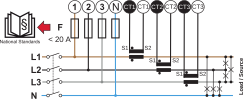
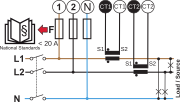
Each live conductor must be connected to the AC terminals as shown in the figures below.

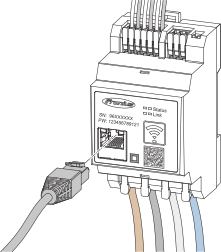
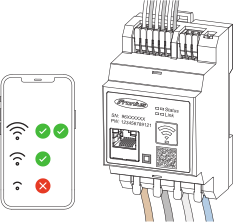
The Fronius Smart Meter described in this document supports the MQTT communication protocol (Message Queuing Telemetry Transport). The Fronius Smart Meter is found by inverters in the same network and can be configured via the user interface of the inverter. In order for this to work, the inverter needs to support MQTT.
This interface is only suitable for communication with Fronius products and not for third-party products.
Connect the data communication connections of the Fronius Smart Meter IP to the Modbus interface of the Fronius inverter using a CAT 5 STP (Shielded Twisted Pair) or higher data cable.
The Fronius Smart Meter IP can also be connected to the network (LAN / WLAN). This allows software updates to be carried out.
Standard Modbus address & TCP port: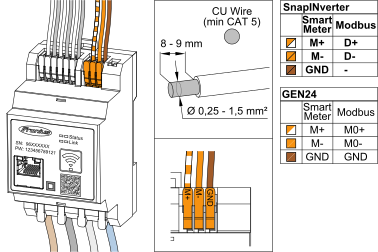
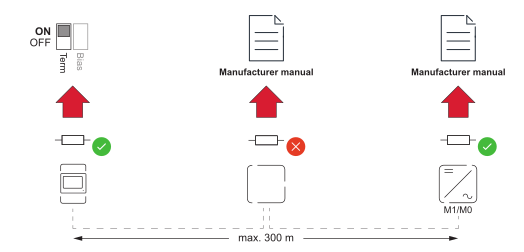
To avoid interference, the terminating resistor must be used (see chapter Setting the Modbus RTU terminating resistor on page (→)).
If a battery is installed in the system, the BIAS switch must be set (see chapter Set Modbus RTU BIAS on page (→)).
Further settings are necessary on the user interface of the inverter and the Fronius Smart Meter IP (see Advanced settings).
IMPORTANT!
A loose wire can disable an entire area of the network. The data communication connections of the Fronius Smart Meter IP are electrically isolated from hazardous voltages.
| Inverter in the system |
 | Meter – Fronius Smart Meter |
 | Fronius device or third-party device with connection via Modbus RTU |
 | Terminating resistor |
| Battery |
When a battery and the Fronius Smart Meter are connected to the same Modbus interface on the inverter (M0 or M1), set the BIAS switch to ON.
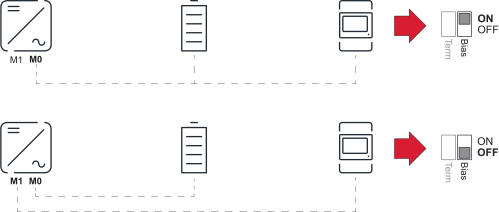
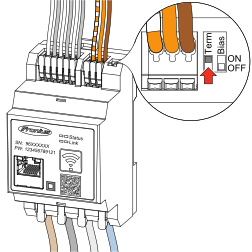
The terminating resistor is integrated in the Fronius Smart Meter IP and is set by a switch.
For information on whether the terminating resistor must be set or not, see chapter Terminating resistors on page (→).
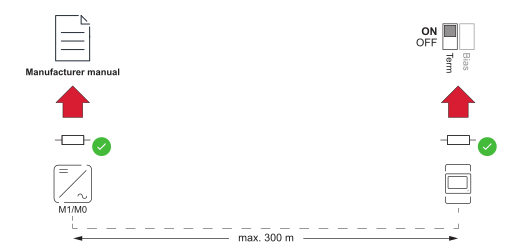
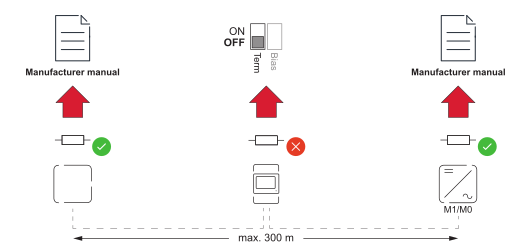
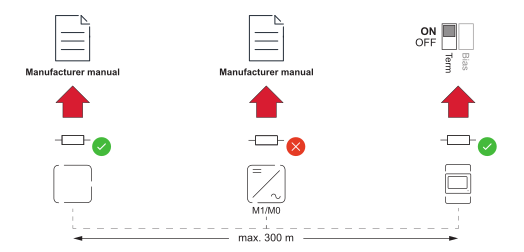
The use of terminating resistors according to the following overview is recommended in order to ensure flawless operation.
Option 1
Option 2
Option 3
Option 4
It is recommended to use Fronius CT current transformers (item numbers 41,0010,0104 / 41,0010,0105 / 41,0010,0232). In order to ensure problem-free operation of the Fronius Smart Meter IP 5kA-3 and accurate measurement results, all connected current transformers must meet these requirements:
Danger of electric shock due to unintentional opening of folding current transformers
This can result in severe injury and damage to property.
Switch off the power when working on the current transformers.
Attach plastic cable ties to the current transformer to prevent unintentional opening.
It is recommended to use Fronius CT current transformers (item numbers 41,0010,0104 / 41,0010,0105 / 41,0010,0232). In order to ensure problem-free operation of the Fronius Smart Meter IP 5kA-3 and accurate measurement results, all connected current transformers must meet these requirements:
Danger of electric shock due to unintentional opening of folding current transformers
This can result in severe injury and damage to property.
Switch off the power when working on the current transformers.
Attach plastic cable ties to the current transformer to prevent unintentional opening.

Observe direction information when installing the current transformers
Negative power values occur when the current transformers are connected incorrectly.
Observe the data sheet and the marking on the current transformer (arrow indicates the direction to the load or to the public grid)
Check the correct position of the black and white cable.
Danger from mains voltage
An electric shock can be fatal.
Switch off the power supply before disconnecting live conductors.
Cable length of the current transformers
Cables that are too long can have a negative effect on the measuring accuracy.
If a cable extension is necessary, use a shielded 0.34 to 1.5 mm2 (AWG 22-16) CAT 5 STP (Shielded Twisted Pair) cable rated for 300 V or 600 V (higher than the operating voltage).
Unusual measured values on unused phases
If unusual measured values occur on unused phases, bypass the unused current transformer inputs.
To do so, for each unused current transformer, connect the terminal marked with a white dot to the terminal marked with a black dot using a short cable.
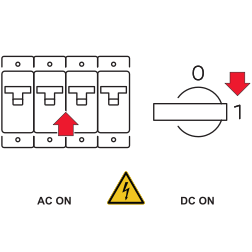
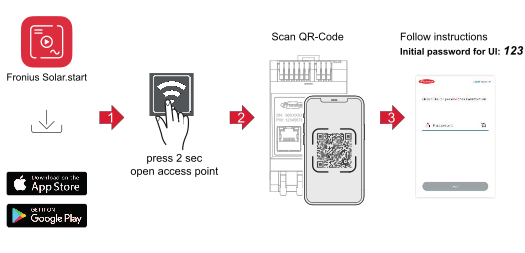
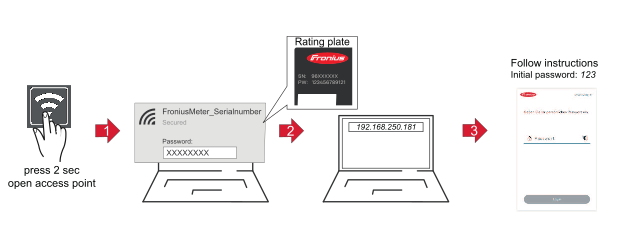
IMPORTANT! When used for the first time, the access point activates automatically as soon as the Fronius Smart Meter is supplied with power.
The access point deactivates after 60 minutes by default.
It is recommended to activate the Automatic Updates function during commissioning. The Fronius Smart Meter IP checks for available updates daily and automatically installs them between midnight and 6 am. A precise time can be set.
If this function is not activated, software updates can also be searched for and started manually on the user interface of the device.
The software of the Fronius Smart Meter IP is compatible with the following software versions of connected Fronius components:
Settings in the Meter menu item may only be entered by staff trained to do so.
IMPORTANT!
The service password must be entered to access the Meter menu item.
The meter is selected in the Fronius Smart Meter menu item. The Fronius Datamanager 2.0 automatically detects the meter type.
One primary meter and several secondary meters can be selected. The primary meter must be configured before a secondary meter can be chosen.
The Fronius Smart Meter can be connected to Modbus TCP/IP or Modbus RTU.
Settings in the Meter menu item may only be entered by staff trained to do so.
IMPORTANT!
The service password must be entered to access the Meter menu item.
The meter is selected in the Fronius Smart Meter menu item. The Fronius Datamanager 2.0 automatically detects the meter type.
One primary meter and several secondary meters can be selected. The primary meter must be configured before a secondary meter can be chosen.
The Fronius Smart Meter can be connected to Modbus TCP/IP or Modbus RTU.
Access Point:
 key. key.
LAN:
 to save the settings.
In the Current Total View menu area, the power of the PV modules, the self-consumption, the grid feed-in, and the battery charge (if present) are displayed.
button to save the settings.The Fronius Smart Meter IP is configured as a secondary meter.
Modbus RTU: A maximum of 4 Modbus stations can be connected to the Modbus terminal.
Modbus TCP: Fronius recommends using a maximum of 7 secondary meters in the system.
IMPORTANT!
Only one primary meter, one battery, and one Ohmpilot can be connected per inverter. Due to the high data transfer of the battery, the battery occupies two participants.
Example:
Input | Battery | Fronius | Number | Number |
|---|---|---|---|---|
Modbus |  | | 1 | 0 |
|  | 1 | 1 | |
| | 1 | 2 | |
| | 1 | 3 |
| Grid |
| Inverter in the system |
| Fronius Smart Meter |
| Primary meter |
 | Secondary meter |
| Modbus RTU, third-party device |
| Loads in the system |
 | Additional loads in the system |
 | Additional producers in the system |
| Terminating resistor |
If several Fronius Smart Meters are installed, set a separate address for each Smart Meter. The primary meter always receives the address 1. Number all other meters consecutively in the address range from 2 to 14. Different Fronius Smart Meter power categories can be used together.
Multi meter system—Modbus RTU cabling
To avoid interference, install the terminating resistors as described in chapter Terminating resistors.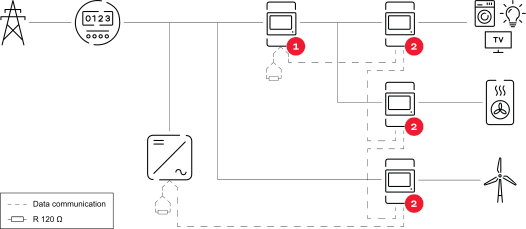
Only specialist technicians may change the settings in the Device Configuration menu item.
IMPORTANT!
The service password must be entered for the Device Configuration menu item.
The Fronius Smart Meter can be operated in one-, two-, or three-phase mode. Select the operating mode via the Components menu area. The meter type is determined automatically.
One primary meter and several secondary meters can be selected. The primary meter must be configured before a secondary meter can be chosen.
The Fronius Smart Meter can be connected to the inverter via a Modbus RTU interface, a Modbus TCP/IP interface, or via the secured MQTT interface.
Only specialist technicians may change the settings in the Device Configuration menu item.
IMPORTANT!
The service password must be entered for the Device Configuration menu item.
The Fronius Smart Meter can be operated in one-, two-, or three-phase mode. Select the operating mode via the Components menu area. The meter type is determined automatically.
One primary meter and several secondary meters can be selected. The primary meter must be configured before a secondary meter can be chosen.
The Fronius Smart Meter can be connected to the inverter via a Modbus RTU interface, a Modbus TCP/IP interface, or via the secured MQTT interface.
The network wizard and product setup can be performed independently. A network connection is required for the Fronius Solar.web installation wizard.
WiFi:
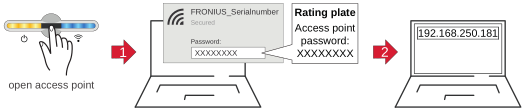
 .
. Ethernet:
 .
.The Fronius Smart Meter IP is configured as a secondary meter.
Modbus RTU:
The inputs M0 and M1 can be freely selected. A maximum of 4 Modbus participants can be connected to the Modbus terminal on the inputs M0 and M1.
Modbus TCP/Fronius Smart Meter MQTT:
Fronius recommends using a maximum of 7 secondary meters in the system.
IMPORTANT!
Only one primary meter, one battery, and one Ohmpilot can be connected per inverter. Due to the high data transfer of the battery, the battery occupies two participants.
Example 1:
Input | Battery | Fronius | Number | Number |
|---|---|---|---|---|
Modbus 0 | | | 0 | 4 |
| | 0 | 2 | |
| | 0 | 1 | |
Modbus 1 | | | 1 | 3 |
Example 2:
Input | Battery | Fronius | Number | Number |
|---|---|---|---|---|
Modbus 0 | | | 1 | 3 |
Modbus 1 | | | 0 | 4 |
| | 0 | 2 | |
| | 0 | 1 |
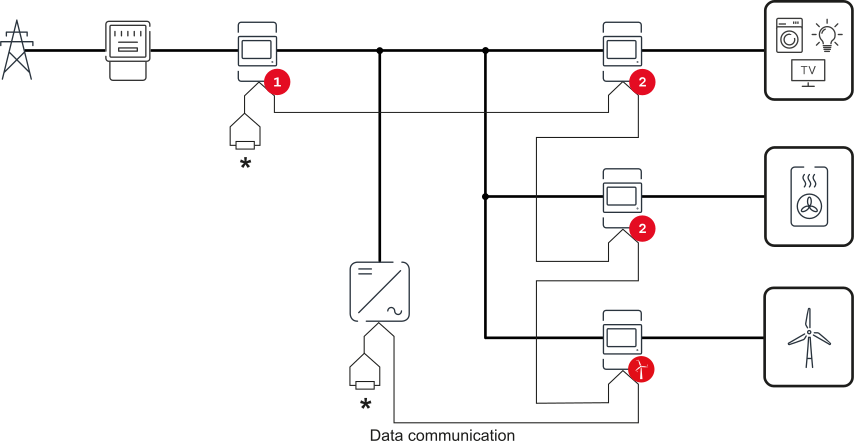
| Grid |
| Inverter in the system |
| Fronius Smart Meter |
| Primary meter |
| Secondary meter |
| Modbus RTU, third-party device |
| Loads in the system |
| Additional loads in the system |
| Additional producers in the system |
| Terminating resistor |
If several Fronius Smart Meters are installed, set a separate address for each Smart Meter. The primary meter always receives the address 1. Number all other meters consecutively in the address range from 2 to 14. Different Fronius Smart Meter power categories can be used together.
IMPORTANT! Use a maximum of seven secondary meters in a system. Data connection via RTU and TCP is possible. To avoid interference, install the terminating resistors as described in chapter Terminating resistors.
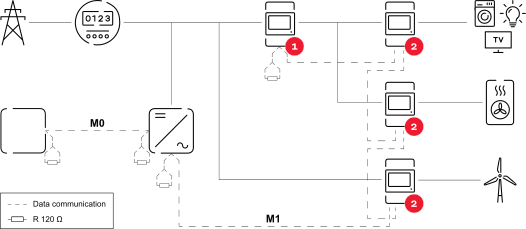
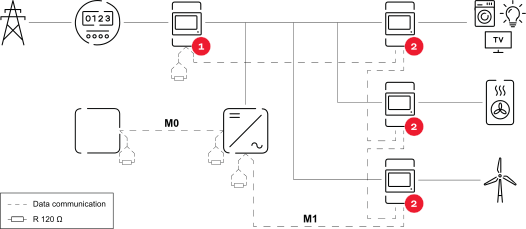
IMPORTANT! Settings in the Settings > Interfaces > Meter aggregation menu may only be made by trained and qualified personnel.
The meter aggregation function is suitable for use in the commercial sector only.
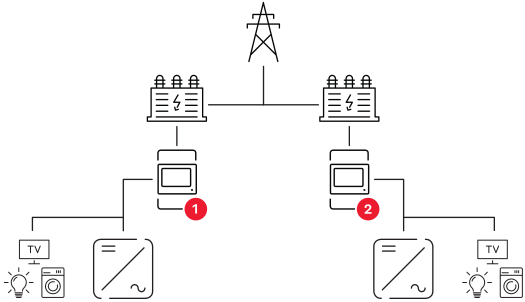
IMPORTANT! Settings in the Settings > Interfaces > Meter aggregation menu may only be made by trained and qualified personnel.
The meter aggregation function is suitable for use in the commercial sector only.
The meter aggregation function aggregates the measured values of a maximum of six Fronius Smart Meter IP 5kA-3. A higher-level Fronius Smart Meter IP 5kA-3 serves as the primary Smart Meter and recognizes the secondary Fronius Smart Meter IP 5kA-3.
The prerequisites for this are:The aggregation of the measured values does not take into account any power loss.
The user interface of the inverter displays the primary Smart Meter and the secondary Smart Meters. The data interfaces used display the measured values. The aggregated measured values are made available via:
The measured values of the primary Smart Meter are provided via either Modbus TCP port 502 or Modbus RTU ID 2.
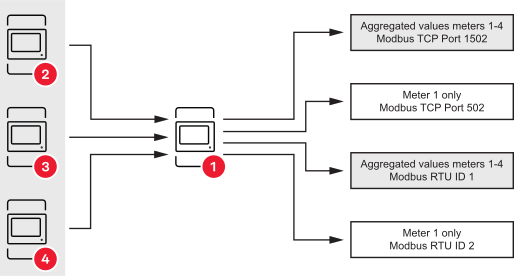
Software version
The meter aggregation function is available from software version 3.0.3-003. If the software is updated for a primary Smart Meter, all secondary Smart Meters will also receive an update notification.
A data connection via LAN is required for operation.
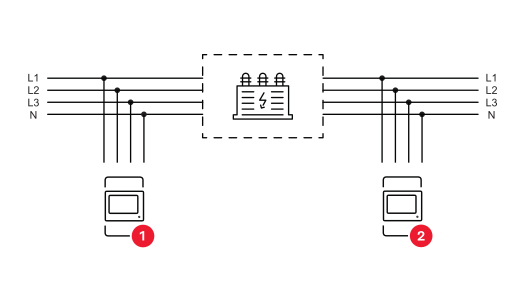
Phase assignment version 1:
Phase assignment version 2:
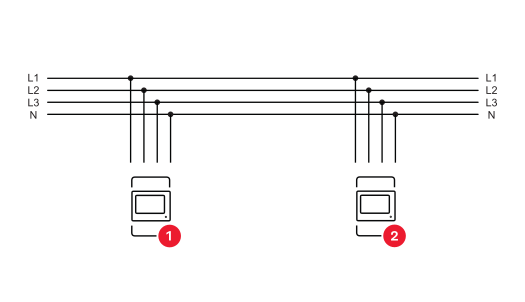
All Smart Meters used for meter aggregation are Fronius Smart Meter IP 5kA-3.
All Smart Meters used for meter aggregation have the same number of phases and the same phase assignment.
Smart meters with a different phase assignment are displayed but cannot be used for meter aggregation. A configuration error appears in the user interface in this case.All Smart Meters used for meter aggregation are installed and commissioned correctly.
All Smart Meters used for meter aggregation in the system are in the same network.
When Scan is selected, the primary Fronius Smart Meter IP 5kA-3 checks whether other secondary Smart Meters are available for the meter aggregation function in the network.
| Grid |
| Inverter in the system |
 | Transformer |
| Primary meter |
| Secondary meter |
| Loads in the system |
 |
| Measurement data and connections |
 |
| Language |
 |
| Change password Password guidelines
If the password has been forgotten, the Smart Meter must be reset (see chapter Restoring the factory settings on page (→). |
 |
| Advanced settings |
 |
| Info |
 |
| Logout |
|
| Measurement data and connections |
|
| Language |
|
| Change password Password guidelines
If the password has been forgotten, the Smart Meter must be reset (see chapter Restoring the factory settings on page (→). |
|
| Advanced settings |
|
| Info |
|
| Logout |
|
| Measurement data and connections |
|
| Language |
|
| Change password Password guidelines
If the password has been forgotten, the Smart Meter must be reset (see chapter Restoring the factory settings on page (→). |
|
| Advanced settings |
|
| Info |
|
| Logout |
Network The WLAN or LAN connection can be configured here. The use of a static IP address is recommended. | |
Meter values Here all values can be set to 0 or meter values can be corrected manually. The input current of the current transformers can be changed, see Changing the input current of the current transformers on page (→). | |
Software update Software update settings can be made here. It is possible to configure an automatic update. | |
Data interfaces Several data interfaces can be used simultaneously. Detailed views - Entering the login data is required.
| |
Single-phase/multiphase The connection type of the Fronius Smart Meter IP can be selected here. | |
Restart device Click on Restart device to restart the Fronius Smart Meter IP. |
Network The WLAN or LAN connection can be configured here. The use of a static IP address is recommended. | |
Meter values Here all values can be set to 0 or meter values can be corrected manually. The input current of the current transformers can be changed, see Changing the input current of the current transformers on page (→). | |
Software update Software update settings can be made here. It is possible to configure an automatic update. | |
Data interfaces Several data interfaces can be used simultaneously. Detailed views - Entering the login data is required.
| |
Single-phase/multiphase The connection type of the Fronius Smart Meter IP can be selected here. | |
Restart device Click on Restart device to restart the Fronius Smart Meter IP. |

Press and hold the WLAN access point and reset button for 20 seconds to reset the Fronius Smart Meter IP 5kA-3 to factory settings.
Maintenance and service work may only be carried out by a technical specialist.
Maintenance and service work may only be carried out by a technical specialist.
Maintenance and service work may only be carried out by a technical specialist.
Wipe the device, if necessary, with a damp cloth.
Do not use cleaning agents, scouring agents, solvents, or similar products to clean the device.
Used equipment and batteries must be returned to the distributor or an authorized local collection system. Do not dispose of batteries with domestic waste. Protect batteries from high temperatures, direct sunlight, moisture and corrosive environments.
Arrange for the safe collection and proper disposal of damaged, leaking or used batteries by a battery recycling company or the Fronius Service Partner.
In addition, it should be noted that batteries contain substances that, if disposed of improperly, can have a significant negative impact on the environment as well as on human health and the safety of persons, in particular due to the leakage of hazardous substances such as heavy metals or electrolytes, which can contaminate soil, water and air.
This ensures environmental protection and the sustainable use of natural resources.Packaging materialsDetailed warranty conditions specific to your country can be found at https://www.fronius.com/en/download-center?searchword=Warranty+conditions .
If there is a warranty for the relevant product, register the product at https://warranty.fronius.com/ and activate or extend the warranty.
Measurement input | |
|---|---|
Nominal voltage (3-phase) incl. tolerance | 208 - 480 V |
Nominal voltage (1-phase) incl. tolerance | 100 - 240 V |
Self-consumption | 30 mA |
Rated frequency | 50 - 60 Hz |
Maximum current, Imax | 5000 A |
Short-time overload (EN IEC 62053-21, EN IEC 62053-23) | 3x Imax/20 s |
Self-consumption | max. 5 W |
Current distortion factor | according to EN IEC 62053-21 |
Power factor | active cosφ 0.5 ind - 0.8 cap, |
Current transformer (kCT) | 1 - 5000 Only use Rogowski coils with integrators. Failure to use integrators will result in erroneous measurement results. |
Measurement category | CAT III 240 V |
Energy | |
|---|---|
Active energy accuracy | Class 1 |
Reactive energy accuracy | Class 2 |
Response time after switching on | < 5 s |
Output | |
|---|---|
RS485 communication | |
Standard | RS485 - 3 conductors |
Transfer | serial, asynchronous |
Protocol | Modbus RTU |
Addresses | 1 - 255 |
Bit count | 8 |
Stop bit | 1 |
Parity bit | none - even - odd |
Baud rate (Modbus transmission speed) | 9600 bit/s |
Response time | ≤ 200 ms |
WiFi | |
|---|---|
Frequency range | 2412 - 2472 MHz |
Channels used | Channel: 1-13 b,g,n HT20 |
Power | <18 dBm |
Modulation | 802.11b: DSSS (1 Mbps DBPSK, 2 Mbps DQPSK, 5.5/11 Mbps CCK) |
Insulation (EN IEC 62052-11, EN IEC 62053-21) | |
|---|---|
Installation category | II |
Pollution degree | PD2 |
Insulation voltage | 4 kV RMS |
Surge withstand capability | 4 kV 1.2/60 µs |
Test voltage | 2.5 kV RMS. 50 Hz/1 min |
Test voltage | 4 kV RMS. 50 Hz/1 min |
Electromagnetic compatibility | |
|---|---|
Test standard | Test according to EN IEC 62052-11 |
Environmental conditions | |
|---|---|
Reference temperature | 25 °C (±5 °C) |
Operating range | -25 to +55 °C |
Limit temperature for storage and transport | -30 to +80 °C |
Maximum humidity | 93% |
Maximum power loss (for thermal dimensioning of the switch cabinet) | ≤ 6 W |
Overvoltage category | III |
Housing | |
|---|---|
Housing | 3 modules according to DIN 43880 |
Connection | Spring-type terminals |
Mounting | 35 mm DIN rail |
Housing material | PA-765 UL |
Ingress protection rating (EN 60529) | IP20 housing, IP30 connections |
Weight | 132 grams |
Terminals | |
|---|---|
Voltage input | |
Wire | min. 1.5 mm²/max. 4 mm² |
Data output and current transformer input | |
Wire | min. 0.25 mm²/max. 2.5 mm² |
Measurement input | |
|---|---|
Nominal voltage (3-phase) incl. tolerance | 208 - 480 V |
Nominal voltage (1-phase) incl. tolerance | 100 - 240 V |
Self-consumption | 30 mA |
Rated frequency | 50 - 60 Hz |
Maximum current, Imax | 5000 A |
Short-time overload (EN IEC 62053-21, EN IEC 62053-23) | 3x Imax/20 s |
Self-consumption | max. 5 W |
Current distortion factor | according to EN IEC 62053-21 |
Power factor | active cosφ 0.5 ind - 0.8 cap, |
Current transformer (kCT) | 1 - 5000 Only use Rogowski coils with integrators. Failure to use integrators will result in erroneous measurement results. |
Measurement category | CAT III 240 V |
Energy | |
|---|---|
Active energy accuracy | Class 1 |
Reactive energy accuracy | Class 2 |
Response time after switching on | < 5 s |
Output | |
|---|---|
RS485 communication | |
Standard | RS485 - 3 conductors |
Transfer | serial, asynchronous |
Protocol | Modbus RTU |
Addresses | 1 - 255 |
Bit count | 8 |
Stop bit | 1 |
Parity bit | none - even - odd |
Baud rate (Modbus transmission speed) | 9600 bit/s |
Response time | ≤ 200 ms |
WiFi | |
|---|---|
Frequency range | 2412 - 2472 MHz |
Channels used | Channel: 1-13 b,g,n HT20 |
Power | <18 dBm |
Modulation | 802.11b: DSSS (1 Mbps DBPSK, 2 Mbps DQPSK, 5.5/11 Mbps CCK) |
Insulation (EN IEC 62052-11, EN IEC 62053-21) | |
|---|---|
Installation category | II |
Pollution degree | PD2 |
Insulation voltage | 4 kV RMS |
Surge withstand capability | 4 kV 1.2/60 µs |
Test voltage | 2.5 kV RMS. 50 Hz/1 min |
Test voltage | 4 kV RMS. 50 Hz/1 min |
Electromagnetic compatibility | |
|---|---|
Test standard | Test according to EN IEC 62052-11 |
Environmental conditions | |
|---|---|
Reference temperature | 25 °C (±5 °C) |
Operating range | -25 to +55 °C |
Limit temperature for storage and transport | -30 to +80 °C |
Maximum humidity | 93% |
Maximum power loss (for thermal dimensioning of the switch cabinet) | ≤ 6 W |
Overvoltage category | III |
Housing | |
|---|---|
Housing | 3 modules according to DIN 43880 |
Connection | Spring-type terminals |
Mounting | 35 mm DIN rail |
Housing material | PA-765 UL |
Ingress protection rating (EN 60529) | IP20 housing, IP30 connections |
Weight | 132 grams |
Terminals | |
|---|---|
Voltage input | |
Wire | min. 1.5 mm²/max. 4 mm² |
Data output and current transformer input | |
Wire | min. 0.25 mm²/max. 2.5 mm² |