

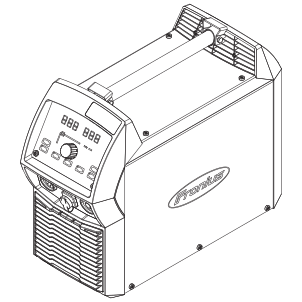
Ignis 250
downloadOperating controls, connections
Control panel
Setup parameters for manual metal arc welding
Setup parameters for TIG welding
Spare parts
Indicates an immediate danger.
Could result in major injury or death.
Avoid the described danger.
Indicates a dangerous situation.
Could result in serious injury or death.
Avoid the dangerous situation.
Indicates a harmful situation.
Could result in injury and damage to property.
Avoid the harmful situation.
Indicates the possibility of damage to property and adverse effects on work results, as well as necessary additional information, tips and tricks, recommendations, etc.
Indicates an immediate danger.
Could result in major injury or death.
Avoid the described danger.
Indicates a dangerous situation.
Could result in serious injury or death.
Avoid the dangerous situation.
Indicates a harmful situation.
Could result in injury and damage to property.
Avoid the harmful situation.
Indicates the possibility of damage to property and adverse effects on work results, as well as necessary additional information, tips and tricks, recommendations, etc.
The safety-conscious work of the personnel must be checked regularly.
Before leaving the workplace, ensure that no personal injury or property damage can occur in their absence.
The full text of the EU Declaration of Conformity is available at
https://www.fronius.com .
Devices bearing the CSA label satisfy the requirements of the relevant standards for Canada and the USA.
Fronius International GmbH retains the copyrights of these operating instructions.
Text, illustrations, and other media correspond to the technical state of the art at the time of publication. Fronius reserves the right to make changes. If you have any suggestions for improvement or have found a mistake in this document, we would be most grateful for your comments.
The device has been manufactured in line with the state of the art and according to recognized safety standards.
The welding machine is only intended for MMA and TIG welding in conjunction with Fronius components.
Any other use shall be deemed to be not in accordance with the intended use.
Intended use also meansThe device has been manufactured in line with the state of the art and according to recognized safety standards.
The welding machine is only intended for MMA and TIG welding in conjunction with Fronius components.
Any other use shall be deemed to be not in accordance with the intended use.
Intended use also meansIMPORTANT! Any use that does not comply with the intended use shall be deemed misuse.
Impermissible misuse includes the following: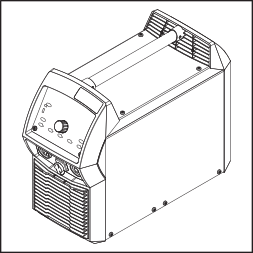
In conjunction with the digital resonance inverter, during welding an electronic controller adapts the welding machine characteristic to suit the welding electrode. This provides excellent ignition and weld properties in a device that is as lightweight and compact as possible.
Additionally, the welding machine offers a "Power Factor Correction", meaning the current consumption of the welding machine adapts to the sinusoidal mains voltage. This has many advantages for the user, such as:When using cellulose electrodes (CEL), a specially selectable operating mode ensures perfect welding results.
TIG welding with touchdown ignition greatly extends the range of applications.
In conjunction with the digital resonance inverter, during welding an electronic controller adapts the welding machine characteristic to suit the welding electrode. This provides excellent ignition and weld properties in a device that is as lightweight and compact as possible.
Additionally, the welding machine offers a "Power Factor Correction", meaning the current consumption of the welding machine adapts to the sinusoidal mains voltage. This has many advantages for the user, such as:When using cellulose electrodes (CEL), a specially selectable operating mode ensures perfect welding results.
TIG welding with touchdown ignition greatly extends the range of applications.
The central control unit of the welding system controls the entire welding process.
During the welding process, actual values are continually measured and the device immediately responds to any changes. Rule algorithms ensure that the desired target state is maintained.
The welding systems can be used in repair and maintenance for production and manufacturing tasks.
A rating plate and different safety symbols for the specific model are attached to the device.
The safety symbols indicate hazards during welding, which, if not observed, can lead to serious injury and damage to property.
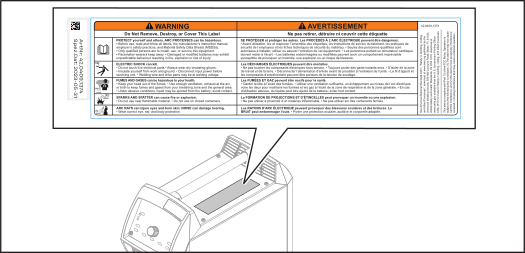
Safety symbols on the rating plate: | |
 | Welding is dangerous. The following basic requirements must be met:
|
 | Do not use the functions described here until you have fully read and understood the following documents:
|
The welding machines can be operated with various system components and options. This makes it possible to optimize procedures and to simplify machine handling and operation, depending on the field of application for the welding machine.
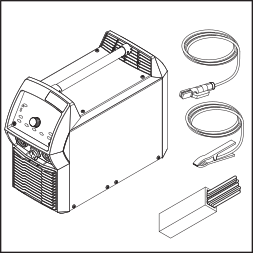
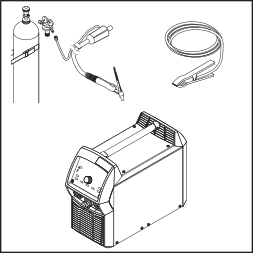
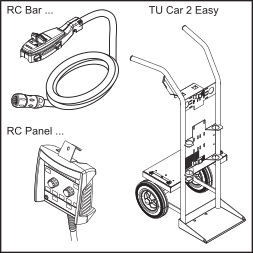
Not shown:
The welding machines can be operated with various system components and options. This makes it possible to optimize procedures and to simplify machine handling and operation, depending on the field of application for the welding machine.
Not shown:
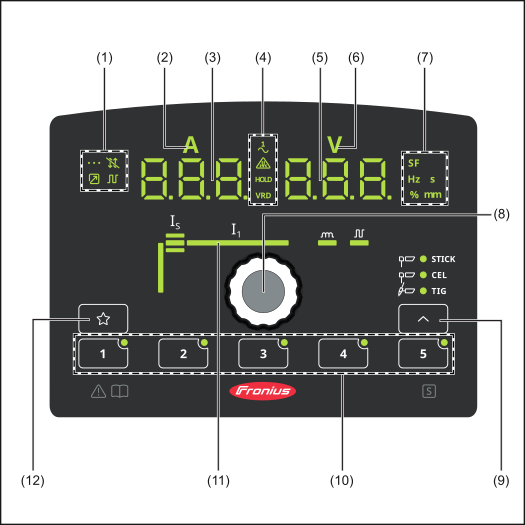
| Item | Name |
|---|---|
| (1) | Special indicators  Spot welding indicator Lights up when the "SPt" setup parameter has been set to a spot welding time  Trigger indicator Lights up when the "tri" setup parameter has been set to "off"  Remote control indicator Lights up when a remote control is connected  Pulsing indicator Lights up when a pulse frequency has been set in the welding parameters |
| (2) | Welding current indicator To display the welding current for the parameters:
Before the start of welding, the left digital display shows the set value. For IS, the right digital display also indicates the % amount of the welding current I1. After the start of welding, the left digital display shows the current actual value of the welding current. The relevant parameters in the welding process are shown by the illuminated segment in the welding parameter overview (11) |
| (3) | Left digital display |
| (4) | Special indicators  Single-phase power supply indicator Lights up when the welding machine has a single-phase power supply  Electrode overloaded indicator Lights up when the tungsten electrode is overloaded Further information related to the "Electrode overloaded" indicator can be found in the "TIG welding" section of the "Welding mode" chapter  HOLD indicator At the end of welding, the current actual values for the welding current and welding voltage are saved—the "HOLD" indicator lights up. The "HOLD" indicator relates to the last main current I1 to be reached. Any further interaction with the welding machine will cause the "HOLD" indicator to go out. IMPORTANT! No hold values are output if the main current phase has never been reached.  VRD indicator Lights up when the VRD safety function is active |
| (5) | Right digital display |
| (6) | Welding voltage indicator Lights up when parameter "I1" is selected. During welding, the current actual value of the welding voltage is shown on the right digital display. Before welding, the right digital display shows the current value of the open circuit voltage when operating modes for TIG welding are selected and when the "tri" setup parameter is set to "off", or when the manual metal arc welding operating mode is selected (after a delay of 3 seconds; 93 V is approximately the average value of the pulsed open circuit voltage). |
| (7) | Unit indicators  SF indicator Lights up when a special function is activated  Hz indicator Lights up when the "Pulse frequency" welding parameter has been selected  s indicator Lights up when the "tup" and "tdown" parameters have been selected, as well as the following setup parameters: tAC  % indicator Lights up when the "IS" and "HCU" parameters have been selected  mm indicator Lights up when the "ELd" setup parameter is set |
| (8) | Selection dial with rotary/push button function For selecting elements, setting values, and scrolling through lists |
| (9) | Welding process button For selecting the operating mode  Manual metal arc welding  CEL welding  TIG welding When an operating mode is selected, the corresponding LED lights up. |
| (10) | EasyJob buttons For saving and retrieving EasyJobs More information can be found from page (→) onwards. |
| (11) | Welding parameter overview The welding parameter overview contains the most important welding parameters for welding. The welding parameter sequence is depicted by a "washing line" structure. Navigation within the welding parameter overview is carried out by turning the selection dial. 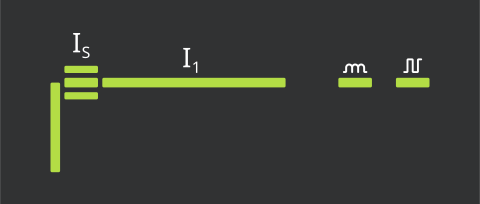 The welding parameter overview contains the following welding parameters: Starting current IS For manual metal arc welding Main current (welding current) I1
 Arc-force dynamic *) For influencing the short-circuiting dynamic at the instant of droplet transfer. 0-100 Factory setting: 20 Pulse frequency Pulse frequency for electrode and TIG pulsing |
| (12) | Favorite button For saving and retrieving preferred settings More information can be found from page (→) onwards. |
| Item | Name |
|---|---|
| (1) | Special indicators Spot welding indicator Lights up when the "SPt" setup parameter has been set to a spot welding time Trigger indicator Lights up when the "tri" setup parameter has been set to "off" Remote control indicator Lights up when a remote control is connected Pulsing indicator Lights up when a pulse frequency has been set in the welding parameters |
| (2) | Welding current indicator To display the welding current for the parameters:
Before the start of welding, the left digital display shows the set value. For IS, the right digital display also indicates the % amount of the welding current I1. After the start of welding, the left digital display shows the current actual value of the welding current. The relevant parameters in the welding process are shown by the illuminated segment in the welding parameter overview (11) |
| (3) | Left digital display |
| (4) | Special indicators Single-phase power supply indicator Lights up when the welding machine has a single-phase power supply Electrode overloaded indicator Lights up when the tungsten electrode is overloaded Further information related to the "Electrode overloaded" indicator can be found in the "TIG welding" section of the "Welding mode" chapter HOLD indicator At the end of welding, the current actual values for the welding current and welding voltage are saved—the "HOLD" indicator lights up. The "HOLD" indicator relates to the last main current I1 to be reached. Any further interaction with the welding machine will cause the "HOLD" indicator to go out. IMPORTANT! No hold values are output if the main current phase has never been reached. VRD indicator Lights up when the VRD safety function is active |
| (5) | Right digital display |
| (6) | Welding voltage indicator Lights up when parameter "I1" is selected. During welding, the current actual value of the welding voltage is shown on the right digital display. Before welding, the right digital display shows the current value of the open circuit voltage when operating modes for TIG welding are selected and when the "tri" setup parameter is set to "off", or when the manual metal arc welding operating mode is selected (after a delay of 3 seconds; 93 V is approximately the average value of the pulsed open circuit voltage). |
| (7) | Unit indicators SF indicator Lights up when a special function is activated Hz indicator Lights up when the "Pulse frequency" welding parameter has been selected s indicator Lights up when the "tup" and "tdown" parameters have been selected, as well as the following setup parameters: tAC % indicator Lights up when the "IS" and "HCU" parameters have been selected mm indicator Lights up when the "ELd" setup parameter is set |
| (8) | Selection dial with rotary/push button function For selecting elements, setting values, and scrolling through lists |
| (9) | Welding process button For selecting the operating mode Manual metal arc welding CEL welding TIG welding When an operating mode is selected, the corresponding LED lights up. |
| (10) | EasyJob buttons For saving and retrieving EasyJobs More information can be found from page (→) onwards. |
| (11) | Welding parameter overview The welding parameter overview contains the most important welding parameters for welding. The welding parameter sequence is depicted by a "washing line" structure. Navigation within the welding parameter overview is carried out by turning the selection dial. The welding parameter overview contains the following welding parameters: Starting current IS For manual metal arc welding Main current (welding current) I1
Arc-force dynamic *) For influencing the short-circuiting dynamic at the instant of droplet transfer. 0-100 Factory setting: 20 Pulse frequency Pulse frequency for electrode and TIG pulsing |
| (12) | Favorite button For saving and retrieving preferred settings More information can be found from page (→) onwards. |
A keylock can be selected to prevent the settings from being inadvertently changed on the control panel. As long as the keylock is active:
Activating the keylock:
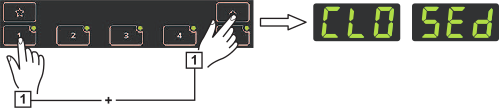
The keylock is activated, the welding machine is locked.
Deactivating the keylock:
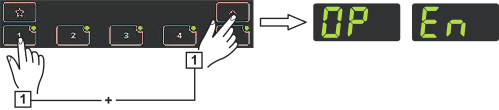
The keylock is deactivated.
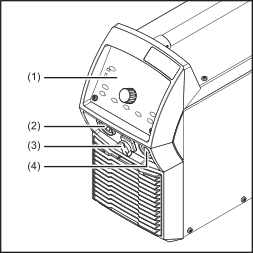
| (1) | Control panel |
| (2) | (-) Current socket with bayonet latch |
| (3) | TMC connection (TIG Multi Connector) for connecting a remote control After connecting a remote control to the welding machine
|
| (4) | (+) Current socket with bayonet latch |
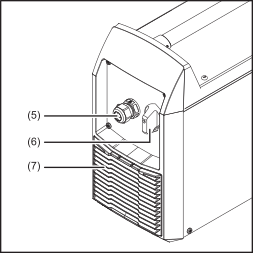
| (5) | Strain-relief device for mains cable connection For XT devices: mains cable to plug in (see "Connecting the mains cable to the welding machine" on page (→)) |
| (6) | Power switch |
| (7) | Air filter |
Danger due to incorrect operation and work not carried out correctly.
This may result in serious personal injury and damage to property.
All the work and functions described in this document must be carried out by technically trained and qualified personnel only.
Read and understand this document in full.
Read and understand all safety rules and user documentation for this equipment and all system components.
Danger due to incorrect operation and work not carried out correctly.
This may result in serious personal injury and damage to property.
All the work and functions described in this document must be carried out by technically trained and qualified personnel only.
Read and understand this document in full.
Read and understand all safety rules and user documentation for this equipment and all system components.
Danger from falling or falling devices.
Serious personal injury and property damage can be the result.
Place the device securely on a flat, solid surface.
After installation, check all screw connections for tightness.
Cooling air
The device must be set up so that cooling air can flow through the air vents on the front and back unhindered.
Dust
Ensure that any metallic dust is not sucked into the device fan during grinding work, for example.
Operation outdoors
The device can be installed and operated outdoors in accordance with degree of protection IP23. Avoid the effects of direct moisture (from rain, for example).
The welding machine is generator-compatible.
The maximum apparent power S1max of the welding machine must be known in order to select the correct generator output.
The maximum apparent power S1max of the welding machine is calculated as follows:
Three-phase devices: S1max = I1max x U1 x √3
Single-phase devices: S1max = I1max x U1
I1max and U1 according to the device rating plate and technical data
The generator apparent power SGEN needed is calculated using the following rule of thumb:
SGEN = S1max x 1.35
A smaller generator can be used when not welding at full power.
IMPORTANT! The generator apparent power SGEN must not be less than the maximum apparent power S1max of the welding machine!
When single-phase devices are being operated with a three-phase generator, note that the stated apparent power of the generator is often just the total that can be present across all three phases of the generator. If necessary, obtain further information about the single-phase power of the generator from the generator manufacturer.
The voltage delivered by the generator must never fall outside of the mains voltage tolerance range.
The mains voltage tolerance is specified in the "Technical data" section.
Danger due to incorrect operation and work not carried out correctly.
This may result in serious personal injury and damage to property.
All the work and functions described in this document must be carried out by technically trained and qualified personnel only.
Read and understand this document in full.
Read and understand all safety rules and user documentation for this equipment and all system components.
Danger due to incorrect operation and work not carried out correctly.
This may result in serious personal injury and damage to property.
All the work and functions described in this document must be carried out by technically trained and qualified personnel only.
Read and understand this document in full.
Read and understand all safety rules and user documentation for this equipment and all system components.
Danger of electric shock due to insufficient mains connection.
Could result in serious injury or death.
Only connect the device to a grid with a ground conductor.
Only connect the device to the grid via a plug-in system with a ground conductor contact.
If operating the device on a grid without a ground conductor and on a socket without a ground conductor contact, observe all national regulations for protection by electrical separation.
Danger due inadequately dimensioned electrical installations.
This can lead to serious damage
The grid lead and its fuse protection should be designed to suit the existing power supply.
The technical data on the rating plate should be followed.
Devices with a high output can influence the energy quality of the grid due to their current consumption.
Before connecting the device to the mains, check with the grid operator whether or not the device is allowed to be connected.
The maximum permissible grid impedance that is decisive for a mains connection is stated in the technical data.
IMPORTANT! Ensure secure grounding of the mains connection.
Due to local regulations and national guidelines, a residual-current circuit breaker may be required when connecting a device to the public grid. The residual-current circuit breaker recommended for the device can be found in the technical data.
In the case of /nc and /XT welding machines, no mains cable is connected when delivered.
Before commissioning, a mains cable corresponding to the connection voltage must be installed with a minimum cross-section according to the following table.
Welding machine | Mains cable |
|---|---|
Ignis 250 nc | 4G2.5 |
Ignis 250 XT/nc |
|
Ignis 250 /600 V /nc | 4x AWG12 (4G2.5) |
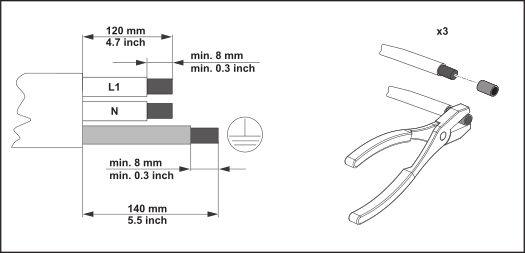
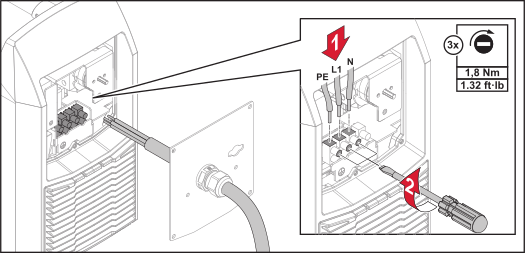
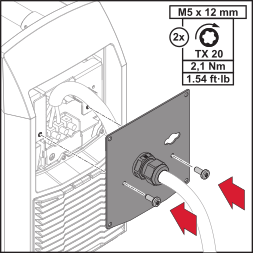
If a welding machine is delivered without a mains cable installed, a mains cable corresponding to the welding machine's connection voltage must be connected before commissioning.
IMPORTANT! The ground conductor should be approx. 20 - 25 mm (0.8 - 1 in.) longer than the phase conductors.
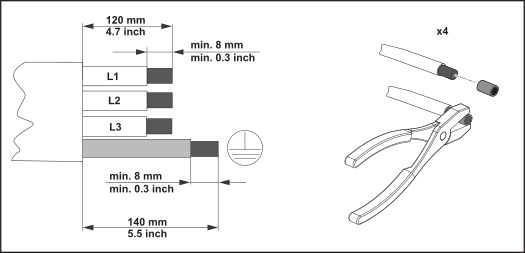
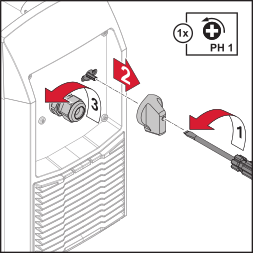
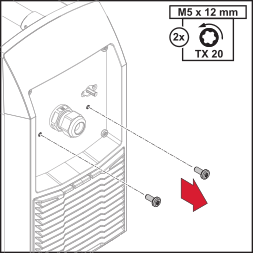
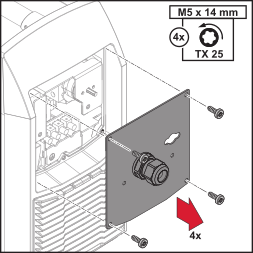
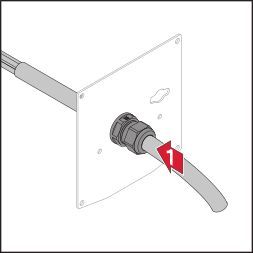
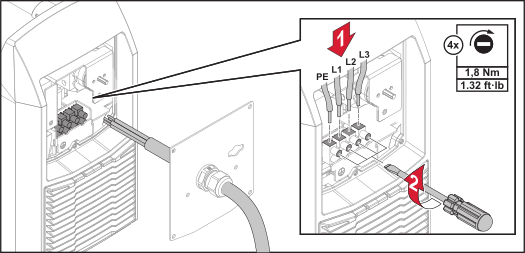
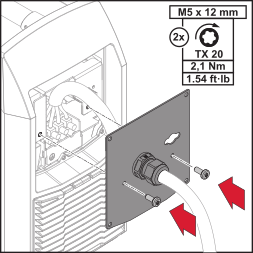
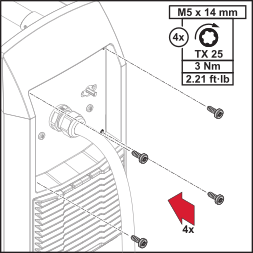
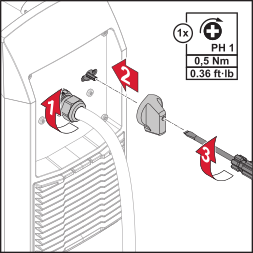
If a welding machine is delivered without a mains cable installed, a mains cable corresponding to the welding machine's connection voltage must be connected before commissioning.
IMPORTANT! The ground conductor should be approx. 20 - 25 mm (0.8 - 1 in.) longer than the phase conductors.
Danger from incorrect operation or misuse.
This can result in serious personal injury - including injury to third parties, damage to property, and impaired welding results.
All persons involved in the commissioning, operation, maintenance, and servicing of the device must be appropriately qualified and have knowledge of welding.
Read these operating instructions in full and follow them carefully and precisely.
The operating instructions must always be kept to hand wherever the device is being used.
Observe generally applicable and regional regulations regarding accident prevention and environmental protection.
Danger from incorrect operation or misuse.
This can result in serious personal injury - including injury to third parties, damage to property, and impaired welding results.
All persons involved in the commissioning, operation, maintenance, and servicing of the device must be appropriately qualified and have knowledge of welding.
Read these operating instructions in full and follow them carefully and precisely.
The operating instructions must always be kept to hand wherever the device is being used.
Observe generally applicable and regional regulations regarding accident prevention and environmental protection.
Danger of electric shock.
Could result in serious injury or death.
Do not touch voltage-carrying parts inside or outside the device.
Use a dry backing bar or cover with sufficient insulation against the ground potential.
The backing bar or cover must completely cover the entire area between the body and the ground potential.
Only use undamaged, insulated, and adequately dimensioned cables and leads.
Do not wrap cables or leads around your body or parts of the body.
Never touch the welding wire, tungsten electrode, or the stick electrode when the welding machine is switched on.
Ground the workpiece.
Switch off unused devices.
Before working on the device, switch off the device, remove the mains plug, and attach a clearly legible and understandable warning sign to prevent the mains plug from being connected and switched on again.
After opening the device, ensure that all components are disconnected from the power supply – especially all electrically charged components.
Danger due to electromagnetic fields.
This can result in damage to health and effects on the health of persons close by, e.g., those with pacemakers and hearing aids.
Keep distances between welding power-leads and the head/torso of the welder as great as possible.
Do not carry welding power-leads and hosepacks over your shoulder or wrap them around your body or body parts.
Persons with pacemakers must seek advice from their doctor before standing in the immediate vicinity of the device and the welding process.
Danger due to stray welding currents.
Overheating of components, fire, destruction of ground conductors, and damage to the device and other electrical equipment may result.
Ensure that the workpiece clamp is securely connected to the workpiece.
Secure the workpiece clamp as close to the spot to be welded as possible.
Position the device with sufficient insulation against electrically conductive environments, e.g., insulation against electrically conductive floors or electrically conductive mounts.
Ensure that the unused welding torch / electrode holder is adequately insulated when using power distribution boards, twin-head mounts, etc.
Electromagnetic compatibility (EMC) describes the unwanted mutual influence of electrical/electronic devices.
The EMC device classification is shown on the rating plate of the device or in the technical data.
Despite compliance with the standardized emission limit values, electrical devices can, in certain cases, influence each other in the intended application area.
Interference-prone equipment that could be affected by the device includes:Danger due to electromagnetic emissions.
Operational disruptions and malfunctions as well as resulting damage may result.
Use suitable grid filters.
Keep welding power-leads as short as possible, route them close together and far from other lines.
Perform equipotential bonding.
Ground the workpiece, e.g., using suitable capacitors.
Shield the entire welding system.
Shield other devices in the vicinity.
Danger from flying sparks.
Could result in fires and explosions.
Never undertake welding near flammable materials.
Flammable materials must be kept at least 11 meters (36 ft. 1.07 in.) from the arc or protected using a certified cover.
Keep suitable, certified fire extinguishers on hand.
Take appropriate measures to ensure that sparks and hot metal particles do not get into surrounding areas through small cracks and openings.
Only undertake welding in areas at risk of fire and explosion, or on sealed tanks, drums, or pipes, if these have been prepared in accordance with corresponding national and international standards.
Do not undertake welding on containers in which gases, fuels, mineral oils, etc. are/were stored.
Keep flammable vapors (such as solvent vapors) out of the arc radiation range.
Danger from flying sparks and flying hot metal particles.
Could result in injury.
Wear suitable protective clothing when working with the device.
The protective clothing must be flame retardant, insulating, dry, and undamaged, must cover the whole body, and the pants must be cuffless.
Wear rigid, wet-insulating footwear.
Wear appropriate, electrically insulating, and heat protective gloves.
Wear a safety helmet.
Danger from arc radiation, UV radiation, heat, and flying sparks that pose a risk of injury to the eyes and skin
Could result in injury.
Use a face guard with a regulation-compliant filter insert.
Wear regulation-compliant protective goggles with side protection behind the face guard.
Danger from welding operation (blinding hazard, flying sparks, harmful welding fume, noise, etc.)
Personal injury may result.
Keep unauthorized people away during the operation of the devices and during the welding process.
Inform people in the vicinity about all the dangers of the welding operation.
Provide suitable protective equipment.
Construct suitable protective walls and curtains.
Danger due to increased noise exposure.
Could result in hearing damage.
Use hearing protection during welding.
When idling and in the cooling phase following operation, the machine produces a maximum sound power level of <80 dB(A) (ref. 1 pW) corresponding to the maximum permitted operating point at standard loading in accordance with EN 60974-1.
A workplace-related sound emission value depends on various parameters, such as:A workplace-related sound level measurement is recommended.
Danger from toxic gases and vapors.
Fumes produced during welding contain substances that cause cancer, as stated in monograph 118 from the International Agency for Research on Cancer.
Use at-source extraction and a room extraction system.
If possible, use a welding torch with an integrated extraction device.
Keep your face out of the welding fume and gases produced.
Do not breathe in fume or harmful gases.
Ensure that there is a sufficient supply of fresh air.
A ventilation flow rate of at least 20 m³/h (11.77 cfm) must be provided at all times.
Use a welding helmet with air supply if there is insufficient ventilation.
Danger due to missing, defective or circumvented safety equipment.
This can result in serious personal injury - including injury to third parties, damage to property, and undesired welding results.
Only operate the device when all safety equipment is fully functional.
Any safety equipment that is not fully functional must be repaired by an authorized specialist before the device is switched on.
Never bypass or disable safety equipment.
Before switching on the device, ensure that no one can be put in danger.
Danger due to missing or opened covers.
Personal injury may result.
Before operation, ensure that all covers and side panels are present and have been correctly fitted.
Ensure that all covers and side panels are closed during operation.
Only open covers and side panels for the duration of assembly and maintenance activities.
Danger from pressurized shielding gas cylinders.
Serious personal injury and damage to property can result from explosions.
Protect pressurized shielding gas cylinders from high heat, mechanical impact, slag, open flames, sparks, and arcs.
Do not weld pressurized shielding gas cylinders.
Keep shielding gas cylinders away from welding or other circuits.
Do not hang the welding torch on a shielding gas cylinder.
Leave the protective cap on the valve of the shielding gas cylinder when the cylinder is not connected.
Mount shielding gas cylinders vertically and secure them from falling in accordance with the instructions.
Observe and follow the manufacturer's instructions and national and international provisions for shielding gas cylinders and accessories.
Remove the shielding gas cylinder before transporting a welding system with trolley by crane.
Observe the safety and maintenance information on the shielding gas cylinder or a central gas supply.
Danger from shielding gas escaping without notice.
Shielding gas is colorless and odorless and, in the event of leaks, may replace the oxygen in the ambient air.
Could result in serious injury or death due to suffocation.
Ensure that there is a sufficient supply of fresh air.
There must be a ventilation flow rate of at least 20 m³ per hour.
Close the valve of the shielding gas cylinder or a central gas supply when no welding is taking place.
Turn your face away from the outlet when a valve on a shielding gas cylinder is being opened.
Check the shielding gas cylinder or central gas supply for uncontrolled gas leakage before each start-up.
If an adapter is being used, use suitable Teflon tape to seal the thread of the shielding gas connection on the device side before installation.
Danger due to contaminated shielding gas.
This can result in damage to property and undesired weld results.
The quality of the shielding gas must meet the following specifications:
Solid particle size < 40 μm
Pressure condensation point < -20 °C
Max. oil content < 25mg/m³
Danger due to hot components, parts, and liquids.
Could result in burns and injury.
Do not touch the workpiece during and after welding.
Allow hot components, hot parts, and hot liquids to cool before touching (e.g., the welding torch).
If a cooling unit is being used, switch it off before disconnecting coolant hoses.
Danger due to slag flying off cooling workpieces.
Could result in burns and injury.
Also wear protective equipment when reworking workpieces and ensure that other persons are sufficiently protected.
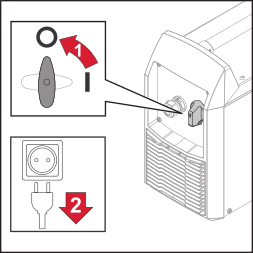
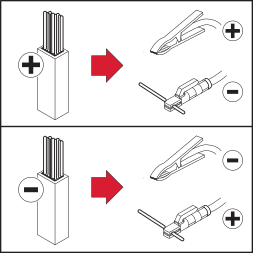
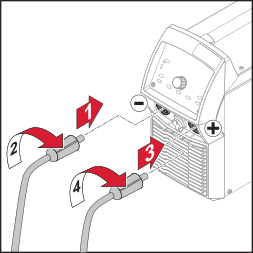
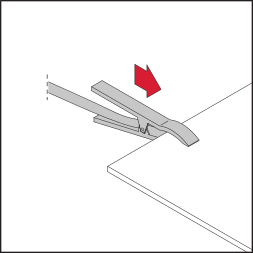
Danger from live stick electrode when welding machine is switched on.
Personal injury and damage to property may result.
Ensure that the stick electrode is not touching any people or electrically conductive or grounded parts (housing, etc.).
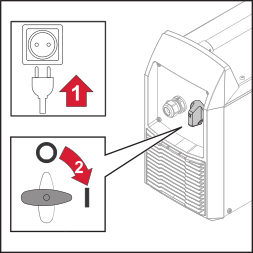
Danger from live stick electrode when welding machine is switched on.
Personal injury and damage to property may result.
Ensure that the stick electrode is not touching any people or electrically conductive or grounded parts (housing, etc.).


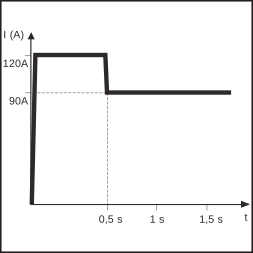
The welding current is reduced or increased at the start of the welding process depending on the setting.
The change is shown as a percentage of the set welding current.
IS > 100% ... HotStart
IS < 100% ... SoftStart
Setting range: 1-200%
The duration of the starting current can be changed in the Setup menu using the "Starting current duration" (Hti) parameter.
Setting the starting current IS:
Examples (set welding current = 100 A) | |
|---|---|
100% | = 100 A starting current = function deactivated |
80% | = 80 A starting current = SoftStart |
135% | = 135 A starting current = HotStart |
200% | = 200 A starting current = HotStart |
Electrode pulsing is manual metal arc welding with a pulsing welding current. It is used to weld steel pipes out-of-position or to weld thin sheet metal.
In these applications, the welding current set at the start of welding is not always optimum for the entire welding process:The welding machine controls the "Duty cycle dcY" and "Base current I-G" parameters according to the set welding current and pulse frequency.
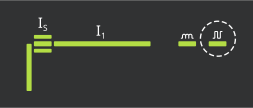
The pulse frequency is set on the control panel in the welding parameters.
Setting range: 0.2-990 Hz
Welding current progression curve
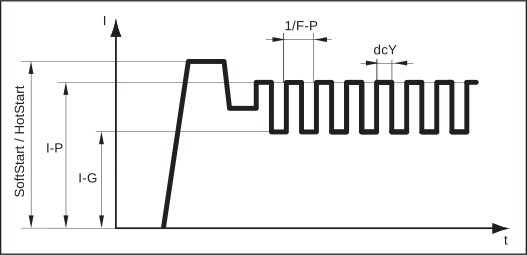
Setting electrode pulsing:
Do not use pure tungsten electrodes (color-coded green) if the TIG welding process has been selected.
Do not use pure tungsten electrodes (color-coded green) if the TIG welding process has been selected.
Danger from falling gas cylinders.
Serious personal injury and damage to property may result.
Place gas cylinders on a solid, level surface so that they remain stable. Secure gas cylinders to prevent them from falling over.
Observe the safety rules of the gas cylinder manufacturer.
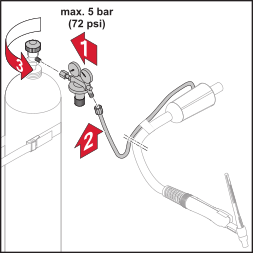
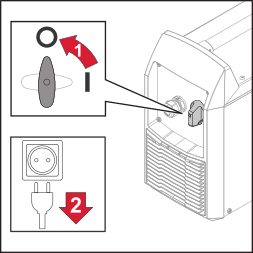
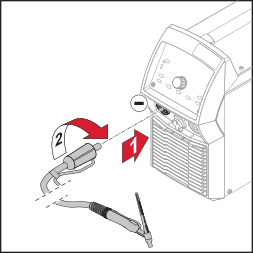
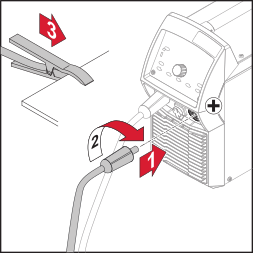
Danger of electric shock. As soon as the welding machine is switched on, the electrode in the welding torch is live.
Personal injury and damage to property may result.
Make sure the electrode does not touch any persons or electrically conducting or grounded parts (e.g., the housing, etc.).
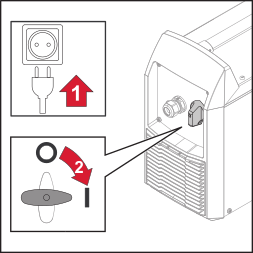
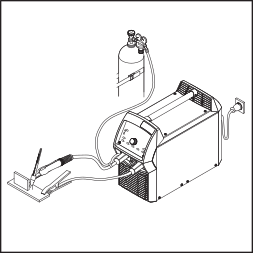
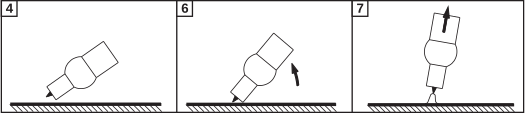
For details on how to activate and set the TIG Comfort Stop function, see the description Parameters for TIG welding from page (→) onwards.
How TIG Comfort Stop works and is used:
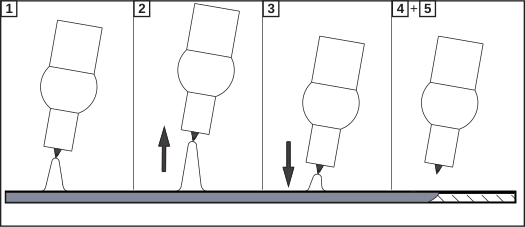
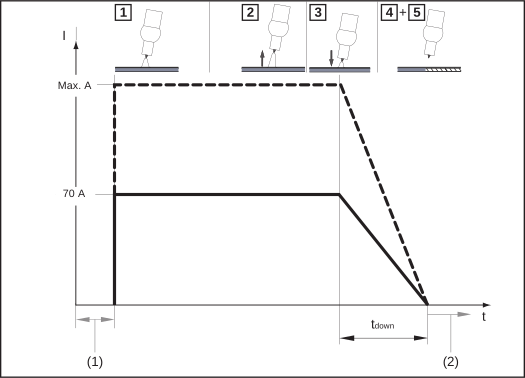
| (1) | Gas pre-flow |
| (2) | Gas post-flow |
DownSlope:
The DownSlope time tdown is 0.5 seconds and cannot be adjusted.
Gas post-flow:
The gas post-flow must be carried out manually.
TIG pulsing is TIG welding with a pulsing welding current. It is used to weld steel pipes out-of-position or to weld thin sheet metal.
In these applications, the welding current set at the start of welding is not always optimum for the entire welding process:The welding machine controls the "Duty cycle dcY" and "Base current I-G" parameters according to the set welding current and pulse frequency.
The pulse frequency is set on the control panel in the welding parameters.
Setting range: 0.2-990 Hz
Welding current progression curve
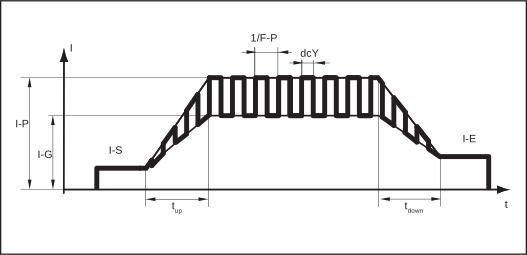
Setting the TIG pulses:
For details on how to activate and set the tacking function, see the description Parameters for manual metal arc welding from page (→) onwards.
Welding current progression curve
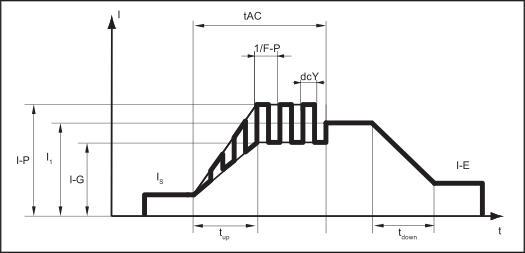
The welding machine regulates the "Pulse frequency F-P", "Pulse current I-P", Duty cycle dcY", and "Base current I-G" parameters according to the set "Main current I1".
The pulse current startsAfter the tAC time has elapsed, welding continues at a constant welding current, and any pulse parameters that may have been set are available.
The "EasyJob" buttons allow up to five EasyJob operating points to be saved. Each operating point corresponds to the settings made on the control panel.
EasyJobs can be stored for each welding process.
IMPORTANT! Setup parameters are not saved at this time.
The "EasyJob" buttons allow up to five EasyJob operating points to be saved. Each operating point corresponds to the settings made on the control panel.
EasyJobs can be stored for each welding process.
IMPORTANT! Setup parameters are not saved at this time.

After a short time, the left display switches to the original value
The EasyJob is saved and active, the LED on the "EasyJob" button lights up.

The saved settings are shown on the digital displays.
The EasyJob is active, the LED on the "EasyJob" button lights up.

The Favorites feature can be used to save and retrieve setup parameters directly on the control panel.
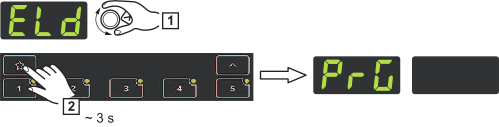
The setup parameter is saved and can be retrieved directly on the control panel by briefly pressing the "Favorite" button.
IMPORTANT! If a setup parameter is retrieved by pressing the "Favorite" button, its value can be changed immediately by turning the selection dial.
Finally, press the selection dial to apply the value change.
A parameter saved under the "Favorites" button cannot be deleted, but can only be overwritten by another parameter.
The Favorites feature can be used to save and retrieve setup parameters directly on the control panel.
The setup parameter is saved and can be retrieved directly on the control panel by briefly pressing the "Favorite" button.
IMPORTANT! If a setup parameter is retrieved by pressing the "Favorite" button, its value can be changed immediately by turning the selection dial.
Finally, press the selection dial to apply the value change.
A parameter saved under the "Favorites" button cannot be deleted, but can only be overwritten by another parameter.


Starting current duration
For the SoftStart / HotStart function
0.1-2.0 s
Factory setting: 0.5 s

Anti-stick
When the anti-stick function is active, the arc is extinguished after 1.5 seconds in the event of a short circuit (sticking of the electrode)
ON / OFF
Factory setting: ON (activated)

Start ramp
To activate / deactivate the start ramp
ON / OFF
Factory setting: ON (activated)

Break voltage
For setting a voltage value at which the welding process may be ended by a slight raise of the stick electrode.
25-90 V
Factory setting: 45 V
The arc length depends on the welding voltage. To end the welding process, a significant lifting of the stick electrode is usually required.
The break voltage parameter allows the welding voltage to be limited to a value that permits the welding process to be ended by only slightly lifting the stick electrode.
IMPORTANT! If the welding process regularly comes to an unintentional end, set the break voltage to a higher value.

Factory settings
Reset the welding machine to its factory settings
no / yES / ALL
| no | Cancel reset |
| yES | Reset the parameters for the set welding process to the factory settings |
| ALL | Reset the parameters for all welding processes to the factory settings |
Confirm selection by pressing the selection dial

2nd level setup menu
For setting general parameters
For details see the Setup Menu 2nd Level section from page (→) onwards

Comfort Stop Sensitivity
OFF / 0.6-3.5 V
Factory setting: 1.5 V
Factory setting: 35 V (for 2-step and 4-step mode and operation with a foot-operated remote control)
For details see the TIG Comfort Stop section from page (→) onwards

Break voltage
For setting a voltage value at which the welding process may be ended by a slight raise of the TIG welding torch.
10.0-45.0 V
Factory setting: 35 V (for 2-step and 4-step mode and operation with a foot-operated remote control)
Factory setting: 25 V (for trigger = oFF operation)

Tacking
Tacking function—duration of the pulsed welding current at the start of the tacking process
off / 0.1-9.9 s / on
Factory setting: off
on
The pulsed welding current remains present until the end of the tacking process
0.1-9.9 s
The selected time begins with the UpSlope phase. After the set time has elapsed, further welding is carried out at a constant welding current. Set pulse parameters are available if applicable.
off
Tacking function is switched off
The SF special indicator lights up on the control panel if a value has been set.
Factory settings
Reset the welding machine to its factory settings
no / yES / ALL
| no | Cancel reset |
| yES | Reset the parameters for the set welding process to the factory settings |
| ALL | Reset the parameters for all welding processes to the factory settings |
Confirm selection by pressing the selection dial
2nd level setup menu
For setting general parameters
For details see the Setup menu 2nd level parameters section from page (→) onwards

Welding duration
For displaying the welding duration
(only shows the time during which welding has taken place)
hh:mm:ss
The complete welding duration is divided across several displays and can be viewed by turning the selection dial

Operating duration
For displaying the operating duration
(count begins as soon as the device is switched on)
hh:mm:ss
The complete operating duration is divided across several displays and can be accessed by turning the selection dial.

Fuse
To display / set the fuse being used on XT devices
At 230 V: 10, 13, 16 A / off
Factory setting: off
If a fuse is set on the welding machine, the welding machine will limit the current drawn from the grid, which prevents an immediate tripping of the automatic circuit breaker.

Software version
The complete version number of the current firmware is divided across several displays and can be viewed by turning the selection dial.

Automatic shutdown
off / 5-60 s
Factory setting: OFF
If the device is not used or operated within a set period of time, it automatically switches into Standby mode.
Pressing a button on the control panel switches off Standby mode—the device is now ready for welding.
Welding duration
For displaying the welding duration
(only shows the time during which welding has taken place)
hh:mm:ss
The complete welding duration is divided across several displays and can be viewed by turning the selection dial
Operating duration
For displaying the operating duration
(count begins as soon as the device is switched on)
hh:mm:ss
The complete operating duration is divided across several displays and can be accessed by turning the selection dial.
Fuse
To display / set the fuse being used on XT devices
At 230 V: 10, 13, 16 A / off
Factory setting: off
If a fuse is set on the welding machine, the welding machine will limit the current drawn from the grid, which prevents an immediate tripping of the automatic circuit breaker.
Software version
The complete version number of the current firmware is divided across several displays and can be viewed by turning the selection dial.
Automatic shutdown
off / 5-60 s
Factory setting: OFF
If the device is not used or operated within a set period of time, it automatically switches into Standby mode.
Pressing a button on the control panel switches off Standby mode—the device is now ready for welding.
Danger due to incorrect operation and work not carried out correctly.
This may result in serious personal injury and damage to property.
All the work and functions described in this document must be carried out by technically trained and qualified personnel only.
Read and understand this document in full.
Read and understand all safety rules and user documentation for this equipment and all system components.
Danger from electrical current.
This may result in serious personal injury and damage to property.
Before starting any maintenance or servicing work, switch off all the devices and components involved and disconnect them from the grid.
Secure all these devices and components so they cannot be switched back on.
After opening the device, use a suitable measuring instrument to check that electrically charged components (such as capacitors) have been discharged.
Danger due to insufficient ground conductor connection.
This can result in personal injury and damage to property.
The housing screws provide a suitable ground conductor connection for grounding the housing.
The housing screws must not under any circumstances be replaced by other screws without a reliable ground conductor connection.
Danger due to incorrect operation and work not carried out correctly.
This may result in serious personal injury and damage to property.
All the work and functions described in this document must be carried out by technically trained and qualified personnel only.
Read and understand this document in full.
Read and understand all safety rules and user documentation for this equipment and all system components.
Danger from electrical current.
This may result in serious personal injury and damage to property.
Before starting any maintenance or servicing work, switch off all the devices and components involved and disconnect them from the grid.
Secure all these devices and components so they cannot be switched back on.
After opening the device, use a suitable measuring instrument to check that electrically charged components (such as capacitors) have been discharged.
Danger due to insufficient ground conductor connection.
This can result in personal injury and damage to property.
The housing screws provide a suitable ground conductor connection for grounding the housing.
The housing screws must not under any circumstances be replaced by other screws without a reliable ground conductor connection.
If "Err" and a two-digit error code appear on the display and the fault indicator lights up, this is an internal service code for the welding machine, e.g.:
Err | 002
Take note of all displayed error codes as well as the serial number and configuration of the welding machine, and then contact the service team with a detailed error description.
| Cause: | Power module error |
| Remedy: | Contact service team |
| Cause: | Open circuit voltage has not been reached: Electrode is in contact with the component/hardware defect |
| Remedy: | Remove the electrode support from the component. If the service code continues to be displayed, contact service team |
| Cause: | System start failure |
| Remedy: | Turn device off and on again. If this happens multiple times, inform service team |
| Cause: | Overvoltage at the current socket (> 113 VDC) |
| Remedy: | Contact service team |
| Cause: | Memory error |
| Remedy: | Press selection dial to acknowledge service message |
| OR: | Turn device off and on again. If this happens multiple times, inform service team |
| Cause: | Memory error / faulty firmware update |
| Remedy: | Perform firmware update. If this happens multiple times, inform service team |
| Cause: | Overtemperature or undertemperature |
| Remedy: | Operate device at permitted ambient temperature. For more information about environmental conditions see "Environmental conditions" in the "Safety rules" section |
| Cause: | Improper use of the device |
| Remedy: | Only use the device in accordance with the intended purpose |
| Cause: | Welding current set too high |
| Remedy: | Ensure that the welding machine is being operated at the correct mains voltage; ensure the correct fuse is set; set a lower welding current |
| Cause: | Mains voltage exceeds admissible limits |
| Remedy: | Immediately pull out the mains plug and ensure that the welding machine is being operated at the correct mains voltage |
| Cause: | Mains voltage is outside of the tolerance or mains output is insufficient for the connected device(s) |
| Remedy: | Ensure that the welding machine is being operated at the correct mains voltage; ensure the correct fuse is set |
| Cause: | Error in communicating with the display |
| Remedy: | Turn device off and on again / inform service team if this happens multiple times |

| Cause: | Operating temperature is too high |
| Remedy: | Leave the device to cool (Do not switch off the device - the fan will cool the device) |
| Cause: | Defective power switch |
| Remedy: | Inform service team |
| Cause: | Welding power-lead connections interrupted |
| Remedy: | Correctly establish welding power-lead connections |
| Cause: | Poor grounding or no grounding at all |
| Remedy: | Establish a connection with the workpiece |
| Cause: | Power cable in the welding torch or electrode holder interrupted |
| Remedy: | Replace welding torch or electrode holder |
| Cause: | Duty cycle exceeded - device overloaded - fan running |
| Remedy: | Observe duty cycle |
| Cause: | Thermal automatic circuit breaker has shut down the device |
| Remedy: | Wait for device to cool down (do not switch off the device - the fan will cool the device); the welding system will switch on again automatically after a short time |
| Cause: | Fan in the welding system defective |
| Remedy: | Contact After-Sales Service |
| Cause: | Cooling air supply is insufficient |
| Remedy: | Ensure there is a sufficient air supply |
| Cause: | Air filter is dirty |
| Remedy: | Clean air filter |
| Cause: | Power module error |
| Remedy: | Switch the device off and then on again If this error persists, inform service team |
| Cause: | The wrong process has been selected |
| Remedy: | Select "manual metal arc welding" or "manual metal arc welding with Cel electrodes" process |
| Cause: | Starting current too low; electrode remains stuck during ignition process |
| Remedy: | Increase starting current |
| Cause: | Starting current too high; electrode burns too quickly during ignition process or spatters strongly |
| Remedy: | Decrease starting current |
| Cause: | Break voltage (Uco) is set too low |
| Remedy: | Raise the break voltage (Uco) in the Setup menu |
| Cause: | Voltage of the electrode too high (e.g. grooved electrode) |
| Remedy: | Use alternative electrode if possible or use power source with higher welding power |
| Cause: | Value for dynamic parameter (manual metal arc welding) set too low |
| Remedy: | Set a higher value for dynamic parameter |
| Cause: | Incorrect polarity of the electrode |
| Remedy: | Reverse the polarity of the electrode (observe manufacturer guidelines) |
| Cause: | Poor ground earth connection |
| Remedy: | Attach earthing clamps directly to the workpiece |
| Cause: | Non-viable setup setting for the selected process |
| Remedy: | Optimize the setting for the selected process in the Setup menu |
| Cause: | Incorrect polarity of the tungsten electrode |
| Remedy: | Connect TIG welding torch to the (-) current socket |
| Cause: | Incorrect shielding gas, no shielding gas |
| Remedy: | Use inert shielding gas (argon) |
Danger due to incorrect operation and work not carried out correctly.
This may result in serious personal injury and damage to property.
All the work and functions described in this document must be carried out by technically trained and qualified personnel only.
Read and understand this document in full.
Read and understand all safety rules and user documentation for this equipment and all system components.
Danger from electrical current.
This may result in serious personal injury and damage to property.
Before starting any maintenance or servicing work, switch off all the devices and components involved and disconnect them from the grid.
Secure all these devices and components so they cannot be switched back on.
After opening the device, use a suitable measuring instrument to check that electrically charged components (such as capacitors) have been discharged.
Danger due to insufficient ground conductor connection.
This can result in personal injury and damage to property.
The housing screws provide a suitable ground conductor connection for grounding the housing.
The housing screws must not under any circumstances be replaced by other screws without a reliable ground conductor connection.
Danger due to incorrect operation and work not carried out correctly.
This may result in serious personal injury and damage to property.
All the work and functions described in this document must be carried out by technically trained and qualified personnel only.
Read and understand this document in full.
Read and understand all safety rules and user documentation for this equipment and all system components.
Danger from electrical current.
This may result in serious personal injury and damage to property.
Before starting any maintenance or servicing work, switch off all the devices and components involved and disconnect them from the grid.
Secure all these devices and components so they cannot be switched back on.
After opening the device, use a suitable measuring instrument to check that electrically charged components (such as capacitors) have been discharged.
Danger due to insufficient ground conductor connection.
This can result in personal injury and damage to property.
The housing screws provide a suitable ground conductor connection for grounding the housing.
The housing screws must not under any circumstances be replaced by other screws without a reliable ground conductor connection.
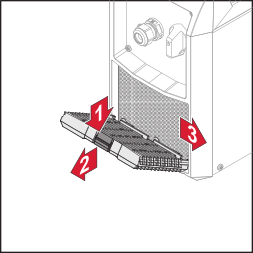
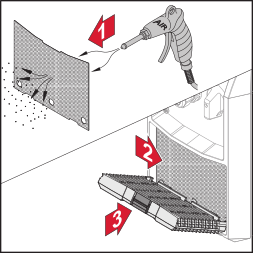
The device only requires a minimum of service and maintenance under normal operating conditions. However, several points must be observed in order for the device to remain operational for years to come.
Used equipment and batteries must be returned to the distributor or an authorized local collection system. Do not dispose of batteries with domestic waste. Protect batteries from high temperatures, direct sunlight, moisture and corrosive environments.
Arrange for the safe collection and proper disposal of damaged, leaking or used batteries by a battery recycling company or the Fronius Service Partner.
In addition, it should be noted that batteries contain substances that, if disposed of improperly, can have a significant negative impact on the environment as well as on human health and the safety of persons, in particular due to the leakage of hazardous substances such as heavy metals or electrolytes, which can contaminate soil, water and air.
This ensures environmental protection and the sustainable use of natural resources.Packaging materialsThe duty cycle (ED) is the period of a ten minute cycle in which the device may be operated at the stated power without overheating.
The ED values cited on the rating plate relate to an ambient temperature of 40 °C.
If the ambient temperature is higher, the ED or power must be lowered accordingly.
Example: Welding with 150 A at 60% ED
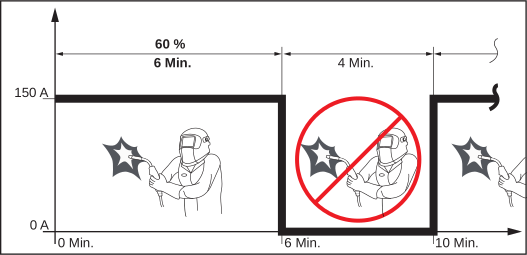
To use the device without interruptions:
The duty cycle (ED) is the period of a ten minute cycle in which the device may be operated at the stated power without overheating.
The ED values cited on the rating plate relate to an ambient temperature of 40 °C.
If the ambient temperature is higher, the ED or power must be lowered accordingly.
Example: Welding with 150 A at 60% ED
To use the device without interruptions:
Overview with critical raw materials:
An overview of which critical raw materials are contained in this device can be found at the following Internet address:
https://www.fronius.com/welding-technology/downloads
Find downloads: critical
Temperature range of ambient air: | |
|---|---|
During operation | -10 °C to + 40 °C |
During transport and storage | -20 °C to +55 °C |
Relative humidity of ambient air: | |
|---|---|
at 40 °C / 104 °F | max. 50% |
at 20 °C / 68 °F | max. 90% |
Mains voltage U1 | 3 x 400 V |
Max. effective primary current (I1eff) | 10.3 A |
Max. primary current (I1max) | 14.7 A |
Mains voltage tolerance | - 10% / +10% |
Mains frequency | 50/60 Hz |
Mains fuse | 16 A slow-blow |
Cos phi | 0.99 |
Max. permitted grid impedance Zmax | 127 mOhm |
Recommended residual-current circuit breaker | Type B |
Welding current range |
|
MMA | 10 - 250 A |
TIG | 10 - 300 A |
Welding current at 10 min / 40 °C (104 °F) |
|
MMA | 40% ED2) / 250 A |
| 60% ED 2) / 220 A |
| 100% ED 2) / 180 A |
TIG | 40% ED2) / 300 A |
| 60% ED 2) / 260 A |
| 100% ED 2) / 210 A |
Open circuit voltage (pulsed) |
|
MMA | 101 V |
TIG | 39 V |
Working voltage |
|
MMA | 20.4 - 30.0 V |
TIG | 10.3 - 22.0 V |
Protection class | IP 23 |
EMC emission class | A 3) |
Dimensions l x w x h | 488 x 210 x 369 mm |
Weight | 18.00 kg |
Noise emissions (LWA) | < 80 dB(A) |
Idle state power consumption at 400 V | 15 W |
Welding machine efficiency | 88% |
| 1) | Interface to the public grid (230/400 V and 50 Hz) |
| 2) | ED = duty cycle |
| 3) | A device in emission class A is not intended for use in residential areas in which the electrical power is supplied via a public low-voltage grid. The electromagnetic compatibility may be influenced by conducted or radiated radio frequencies. |
Mains voltage (U1) | 3 x 200/230/400/460/575 V |
Max. effective primary current (I1eff) |
|
3 x 200 V | 16.5 A |
3 x 230 V | 14.4 A |
3 x 400 V | 8.4 A |
3 x 460 V | 7.4 A |
3 x 575 V | 8.0 A |
1 x 230 V | 24.0 A |
Max. primary current (I1max) |
|
3 x 200 V | 25.5 A |
3 x 230 V | 22.1 A |
3 x 400 V | 12.6 A |
3 x 460 V | 11.1 A |
3 x 575 V | 11.6 A |
1 x 230 V | 37.5 A |
Mains voltage tolerance | - 10% / +10% |
Mains frequency | 50/60 Hz |
Mains fuse |
|
Cos phi | 0.99 |
Max. permitted grid impedance Zmax | 119 mOhm |
Recommended residual-current circuit breaker | Type B |
Welding current range |
|
MMA | 10 - 250 A |
TIG | 10 - 300 A |
Welding current |
|
MMA | 40% ED2) / 250 A |
| 60% ED2) / 220 A |
| 100% ED2) / 180 A |
TIG | 40% ED 2) / 300 A |
| 60% ED 2) / 260 A |
| 100% ED 2) / 230 A |
Open circuit voltage (pulsed) |
|
MMA | 101 V |
TIG | 39 V |
Working voltage |
|
MMA | 20.4 - 30.0 V |
TIG | 10.3 - 22.0 V |
Protection class | IP 23 |
EMC emission class | A 3) |
Dimensions l x w x h | 488 x 210 x 369 mm |
Weight | 16.0 kg |
Noise emissions (LWA) | < 80 dB(A) |
Idle state power consumption at 400 V | 17.3 W |
Welding machine efficiency | 90% |
| /XT | Extended (larger voltage range, single-phase usage, CEL welding) |
| /nc | Welding machine without mains cable |
| 1) | Interface to the public grid (230/400 V and 50 Hz) |
| 2) | ED = duty cycle |
| 3) | A device in emission class A is not intended for use in residential areas in which the electrical power is supplied via a public low-voltage grid. The electromagnetic compatibility may be influenced by conducted or radiated radio frequencies. |
Mains voltage (U1) | 3 x 575 V |
Max. effective primary current (I1eff) | 7.8 A |
Max. primary current (I1max) | 11.3 A |
Mains voltage tolerance | - 10% / +10% |
Mains frequency | 50/60 Hz |
Mains fuse | 16 A slow-blow |
Cos phi | 0.99 |
Recommended residual-current circuit breaker | Type B |
Welding current range |
|
MMA | 10 - 250 A |
TIG | 10 - 300 A |
Welding current |
|
MMA | 40% ED1) / 250 A |
| 60% ED1) / 220 A |
| 100% ED1) / 180 A |
TIG | 40% ED 1) / 300 A |
| 60% ED 1) / 260 A |
| 100% ED 1) / 210 A |
Open circuit voltage (pulsed) |
|
MMA | 101 V |
TIG | 39 V |
Working voltage |
|
MMA | 20.4 - 30.0 V |
TIG | 10.3 - 22.0 V |
Protection class | IP 23 |
EMC emission class | A 2) |
Dimensions l x w x h | 488 x 210 x 369 mm |
Weight | 16.0 kg |
Noise emissions (LWA) | < 80 dB(A) |
|
|
| 1) | ED = duty cycle |
| 2) | A device in emission class A is not intended for use in residential areas in which the electrical power is supplied via a public low-voltage grid. The electromagnetic compatibility may be influenced by conducted or radiated radio frequencies. |