
Fronius Reserva Pro 12.0 - 32.0 kWh
downloadInstallation
Electrical connection
Connecting the data communication cables
Commissioning
Technical data
Warnings are intended to warn people of possible injuries and to avoid personal injury and damage to the product. They relate to individual actions with and on the product.
Indicates an immediately dangerous situation.
Serious injury or death will result if the danger is not avoided.
Action step to escape the situation.
Indicates a potentially dangerous situation.
Serious injury or death may result if the danger is not avoided.
Action step to escape the situation.
Indicates a potentially dangerous situation.
Minor or moderate injury may result if the danger is not avoided.
Action step to escape the situation.
Indicates a situation that may result in property damage.
If the situation is not avoided, impaired work results, material damage to the product or other property are the possible consequences.
Action step to avoid the situation.
Safety instructions are designed to ensure safe product use. They are preventive and help to inform users about the fundamental risks involved when dealing with the product. They do not refer specifically to individual actions with and on the product.
Warnings are intended to warn people of possible injuries and to avoid personal injury and damage to the product. They relate to individual actions with and on the product.
Indicates an immediately dangerous situation.
Serious injury or death will result if the danger is not avoided.
Action step to escape the situation.
Indicates a potentially dangerous situation.
Serious injury or death may result if the danger is not avoided.
Action step to escape the situation.
Indicates a potentially dangerous situation.
Minor or moderate injury may result if the danger is not avoided.
Action step to escape the situation.
Indicates a situation that may result in property damage.
If the situation is not avoided, impaired work results, material damage to the product or other property are the possible consequences.
Action step to avoid the situation.
Safety instructions are designed to ensure safe product use. They are preventive and help to inform users about the fundamental risks involved when dealing with the product. They do not refer specifically to individual actions with and on the product.
Warnings are intended to warn people of possible injuries and to avoid personal injury and damage to the product. They relate to individual actions with and on the product.
Indicates an immediately dangerous situation.
Serious injury or death will result if the danger is not avoided.
Action step to escape the situation.
Indicates a potentially dangerous situation.
Serious injury or death may result if the danger is not avoided.
Action step to escape the situation.
Indicates a potentially dangerous situation.
Minor or moderate injury may result if the danger is not avoided.
Action step to escape the situation.
Indicates a situation that may result in property damage.
If the situation is not avoided, impaired work results, material damage to the product or other property are the possible consequences.
Action step to avoid the situation.
Safety instructions are designed to ensure safe product use. They are preventive and help to inform users about the fundamental risks involved when dealing with the product. They do not refer specifically to individual actions with and on the product.
The device has been manufactured in line with the state of the art and according to recognized safety standards.
Incorrect operation or misuse
Serious to fatal injuries to the operator or third parties as well as damage to the device and other property of the operator may result.
All persons involved in the commissioning, maintenance, and servicing of the device must be appropriately qualified and have knowledge of working with electrical installations.
Read these operating instructions in full and follow them carefully and precisely.
The operating instructions must always be kept to hand wherever the device is being used.
IMPORTANT!
Labels, warning notices, and safety symbols are located on the device. A description can be found in these operating instructions.
Tampered-with and non-functioning protection devices
Serious to fatal injuries as well as damage to the device and other property of the operator may result.
Never bypass or disable protection devices.
Any protection devices that are not fully functional must be repaired by an authorized specialist before the device is switched on.
Loose, damaged, or under-dimensioned cables
An electric shock can be fatal.
Use undamaged, insulated, and adequately dimensioned cables.
Fasten the cables according to the specifications in the operating instructions.
Loose, damaged, or under-dimensioned cables must be repaired or replaced immediately by an authorized specialist.
Installations or modifications to the device
The device may be damaged
Do not carry out any alterations, installations, or modifications to the device without first obtaining the manufacturer's permission.
Damaged components must be replaced.
Only use original spare parts.
In certain cases, even though a device complies with the standard limit values for emissions, it may affect the application area for which it was designed (e.g., when there is equipment that is susceptible to interference at the same location or if the site where the device is installed is close to either radio or television receivers). If this is the case, the operator is obliged to take action to rectify the situation.
During operation, due to the high electrical voltages and currents, local electromagnetic fields (EMF) are generated. These occur in the immediate vicinity of the inverter and the Fronius system components. Electromagnetic fields are also present in the area of the PV modules and their supply lines.
As long as the intended use and a minimum distance of 20 cm are observed, all limit values for human exposure are observed.
If the limit values are complied with, according to current scientific knowledge, no negative health effects from EMF exposure are to be expected. For persons with prostheses1) or active physical aids2), there is a possible health risk in the vicinity of photovoltaic system components. To avoid possible health risks, consult with the responsible doctor.
1) e.g., implants or metal parts
2) e.g., pacemaker, insulin pump, hearing aid, etc.
The connection of a defined point in the device, system, or installation to earth serves either to protect against electric shock in the event of a fault (protective earthing) or to ensure a defined electrical potential for operation (functional grounding).
When installing a battery system, a ground conductor connection is required depending on the safety class (see Technical data).
When connecting the ground conductor, ensure that it is secured against unintentional disconnection. All of the points listed in the chapter headed Connecting the ground conductor (PE) on page (→) must be observed. When using cable glands, make sure the ground conductor will be the last conductor subjected to mechanical stress in the event of a cable gland failure. The respective national standards and regulations and requirements for minimum cross-section must be observed when connecting the ground conductor.
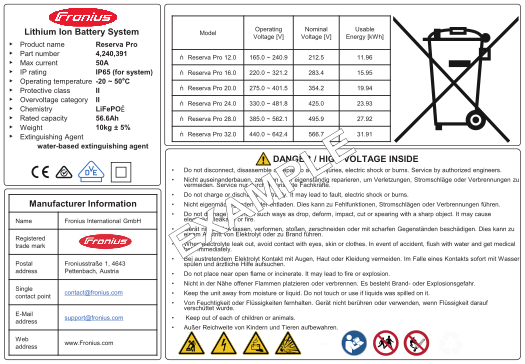
Technical data, markings, warnings, and safety symbols are applied to the battery. This information must be kept in a legible condition and must not be removed, covered, painted over, or concealed by stickers or labels. The information and symbols warn against incorrect operation, which may result in serious injury and property damage.
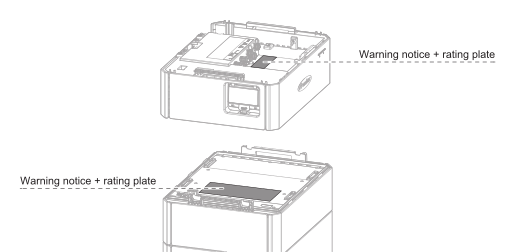
Rating plate / warning notice on the battery management system
Rating plate / warning notice on the battery module
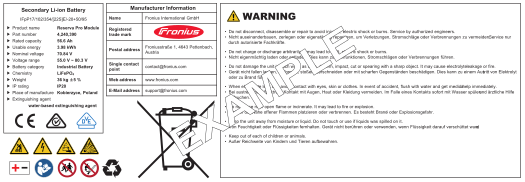
Explanation of symbols | |
|---|---|
 | CE label – confirms compliance with applicable EU directives and regulations. |
 | RCM marking – tested according to the requirements of Australia and New Zealand. |
 | VDE marking – tested according to the requirements of the Association of Electrical, Electronic and Information Technology (VDE). |
 | Safety class 2 marking – identifies electrical devices that belong to safety class 2 and have reinforced or double insulation. |
 | Separate collection – Battery Regulation 2023/1542/EU – batteries must be collected separately in accordance with the EU regulation and handed over to waste management for environmentally sound disposal or recycling. |
 | Recyclable – the product is recyclable or made from recycled materials. |
 | Do not reverse polarities |
 | General Warning Sign |
 | Warning: Electric voltage |
 | Warning: Heavy load |
 | Warning: Hazards due to the charging of batteries |
 | Warning: Explosive substances |
 | Follow the operating instructions |
 | Keep out of reach of children and animals |
 | No open flame; fire, open source of ignition, and smoking prohibited |
Battery code | Description |
|---|---|
IFpP | Type of battery (e.g., lithium iron phosphate) |
17/102/354 | Battery dimensions [mm] |
[1P22S] | Number of cells in series (22 cells in series) |
Technical data, markings, warnings, and safety symbols are applied to the battery. This information must be kept in a legible condition and must not be removed, covered, painted over, or concealed by stickers or labels. The information and symbols warn against incorrect operation, which may result in serious injury and property damage.
Rating plate / warning notice on the battery management system
Rating plate / warning notice on the battery module
Explanation of symbols | |
|---|---|
| CE label – confirms compliance with applicable EU directives and regulations. |
| RCM marking – tested according to the requirements of Australia and New Zealand. |
| VDE marking – tested according to the requirements of the Association of Electrical, Electronic and Information Technology (VDE). |
| Safety class 2 marking – identifies electrical devices that belong to safety class 2 and have reinforced or double insulation. |
| Separate collection – Battery Regulation 2023/1542/EU – batteries must be collected separately in accordance with the EU regulation and handed over to waste management for environmentally sound disposal or recycling. |
| Recyclable – the product is recyclable or made from recycled materials. |
| Do not reverse polarities |
| General Warning Sign |
| Warning: Electric voltage |
| Warning: Heavy load |
| Warning: Hazards due to the charging of batteries |
| Warning: Explosive substances |
| Follow the operating instructions |
| Keep out of reach of children and animals |
| No open flame; fire, open source of ignition, and smoking prohibited |
Battery code | Description |
|---|---|
IFpP | Type of battery (e.g., lithium iron phosphate) |
17/102/354 | Battery dimensions [mm] |
[1P22S] | Number of cells in series (22 cells in series) |
The conventions regarding how information is presented in the document, which are set out below, have been defined in order to increase the readability and comprehensibility of the document.
Application notes
IMPORTANT! Indicates application notes and other useful information. It does not indicate a harmful or dangerous situation.
Software
Software functions and elements of a graphical user interface (e.g., buttons, menu items) are highlighted in the text with this mark up.
Example: Click Save.
Instructions for action
This document provides detailed information and instructions to ensure that people can use the machine safely and efficiently.
The information is intended for the following groups of people:Regardless of any qualifications, only perform the activities listed in this document.
The definition of professional qualifications and their applicability are subject to national law.
Data security for network and Internet connection
Unsecured networks and a lack of safeguards can result in data loss and unauthorized access. Observe the following points for safe operation:
Operate inverters and system components on a private, secure network. A WiFi network is considered secure if security standard WPA 2 is satisfied as a minimum.
Keep the network devices (e.g., WiFi routers) up to date with the latest technology.
Keep the software and/or firmware updated.
Use a wired network to ensure a stable data connection.
For security reasons, do not make inverters and system components accessible from the Internet via port forwarding or Port Address Translation (PAT).
Use the solutions provided by Fronius for monitoring and remote configuration.
The optional communication protocol Modbus TCP/IP1) is an unsecured interface. Only use Modbus TCP/IP if no other secured data communication protocol (MQTT2)) is possible (e.g., compatibility with older Smart Meters).
1) TCP/IP - Transmission Control Protocol/Internet Protocol
2) MQTT - Message Queuing Telemetry Protocol
When you connect your device (and any associated devices) to the internet, the following device and operating data (device ID/identifier, device IP address, device time, configuration settings, hardware and software information, device status log files, serial number) is sent automatically to
Fronius International GmbH, Froniusstraße 1, 4643 Pettenbach, Austria, telephone +43(0) 7242241-0, email: contact@fronius.com (controller)
and stored.
The processing of this device and operating data is carried out for the purpose of ensuring the operational safety of the device (time synchronization, provision of updates). This processing is therefore necessary for the functionality of the device and thus for the fulfillment of the contract (Art. 6 (1) (b) GDPR).
If you do not wish to have such data processed, you must manually disable the device's internet connection.
In addition, the device and operating data is also processed for the purpose of providing services as part of a supplementary digital service for your device (such as solar.web or similar) as soon as you have registered your device with such a digital service (identification). This data is processed to provide the requested digital services and is therefore necessary for the fulfillment of the contract (Art. 6 (1) (b) GDPR).
Furthermore, this data processing is also carried out for maintenance and support purposes and for handling customer concerns as well as in warranty and guarantee cases (only in individual cases and given connection between device and internet). In this context, the device and operating data may also be passed on to our cooperation partners (third-party providers and suppliers). The processing of this data is necessary for maintenance and support purposes or for processing warranty and guarantee cases and thus for the fulfillment of the contract (Art. 6 (1) (b) GDPR).
Device and operating data are also processed for analysis and diagnostic purposes in order to gain insights into the functionality of the devices and improve them accordingly. This data processing is based on our legitimate interest (Art. 6 (1) (f) GDPR).
We store this data for as long as it is necessary to fulfill the existing contract with you. Any storage beyond this is carried out for legal reasons or if we have a legitimate interest in doing so. For more information on data processing for the solar.web-digital service, as well as our general privacy policy and your rights as a data subject, please visit https://www.fronius.com.
Fronius International GmbH retains the copyrights of these operating instructions.
Text, illustrations, and other media correspond to the technical state of the art at the time of publication. Fronius reserves the right to make changes. If you have any suggestions for improvement or have found a mistake in this document, we would be most grateful for your comments.
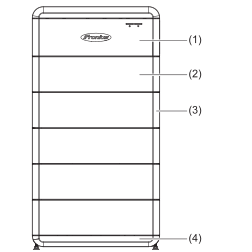
| (1) | Battery management system (BMS) |
| (2) | Battery module |
| (3) | Cover |
| (4) | Base plate |
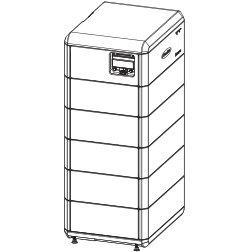
The Fronius Reserva Pro battery is a stackable battery system in which a maximum of 4 battery systems can be operated in parallel. Lithium iron phosphate (LFP) batteries are known for their high thermal and chemical stability. The multi-level safety design and intelligent safety monitoring systems ensure safe operation throughout the total life cycle of the batteries.
The Fronius Reserva Pro can be used as a backup power supply when used in combination with a Fronius inverter with backup power capability and backup power changeover with the appropriate configuration.
| (1) | Battery management system (BMS) |
| (2) | Battery module |
| (3) | Cover |
| (4) | Base plate |
The Fronius Reserva Pro battery is a stackable battery system in which a maximum of 4 battery systems can be operated in parallel. Lithium iron phosphate (LFP) batteries are known for their high thermal and chemical stability. The multi-level safety design and intelligent safety monitoring systems ensure safe operation throughout the total life cycle of the batteries.
The Fronius Reserva Pro can be used as a backup power supply when used in combination with a Fronius inverter with backup power capability and backup power changeover with the appropriate configuration.
Function | Description |
|---|---|
SoC calculation | The current state of charge (SoC) is calculated and displayed in Fronius Solar.web. SoC calibration is carried out every month to ensure the accuracy of the battery system's SoC calculation. |
Automatic SoC Balancing | The "Automatic SoC Balancing" function (2% per day) compensates for charge status deviations between Reserva Pro modules that can occur when Reserva modules are replaced/added. This function is disabled in normal operation. |
Safety | The battery monitors and protects itself against defective operating behavior:
|
Dark start | The battery supplies energy for the manual system start (dark start) and the inverter automatically starts backup power mode. |
Update | The battery firmware is updated via the inverter's user interface. |
Capacity | 3 ‑ 8 Reserva Pro modules per battery system and max. 4 battery systems with the same capacity in parallel operation. |
Monitoring | Operating data and status indicators are transmitted to the inverter for monitoring via the RS485 interface. |
Reserva Pro module
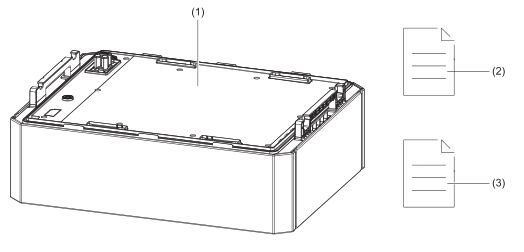
No. | Designation | Quantity |
|---|---|---|
(1) | Battery module | 1 |
(2) | User information | 1 |
(3) | Quick Start Guide | 1 |
Reserva Pro BMS
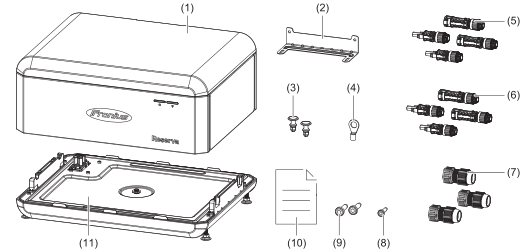
No. | Designation | Quantity |
|---|---|---|
(1) | Battery management system (BMS) | 1 |
(2) | L-shaped mounting bracket | 1 |
(3) | Fastening clip | 2 |
(4) | Cable lug | 1 |
(5) | Stäubli MC4 EVO STO 6 mm2 (+/-) | 4 |
(6) | Stäubli MC4 EVO STO 10 mm2 (+/-) | 4 |
(7) | RJ45 screw connection | 3 |
(8) | M4x10 TX 20 screw | 1 |
(9) | M5x10 TX 20 screw | 2 |
(10) | Quick Start Guide | 1 |
(11) | Base plate | 1 |
Max. storage period | Temperature range | Relative humidity | SoC* |
|---|---|---|---|
7 days | -30 °C to -20 °C | 5% ‑ 95% | 15% |
12 months | -20 °C to 45 °C | 5% ‑ 95% | 15% |
* State of charge at the time of storage. | |||
The Fronius Reserva Pro battery is designed for storing electrical energy from photovoltaic systems. It is used to store surplus energy and release this again as necessary, in order to optimize the energy supply and maximize the self-consumption of solar energy. The battery is designed for use in private households and for small to medium-sized commercial applications.
The Fronius Reserva Pro can be used as a backup power supply in combination with a Fronius inverter with backup power capability and backup power changeover.
System owners and installers can easily monitor and analyze the PV system using Fronius Solar.web or Fronius Solar.web Premium. With the appropriate configuration, the inverter transmits system component data such as power, yield, load, and energy balance to Fronius Solar.web. More detailed information can be found at Solar.web - Monitoring & analysis.
 | PV module | |
 | Fronius hybrid inverter | |
 | Battery | |
 | Primary meter | |
 | Loads in the system | |
 | Grid | |
| PV module | |
| Fronius hybrid inverter | |
| Battery | |
| Primary meter | |
| Loads in the system | |
| Grid | |
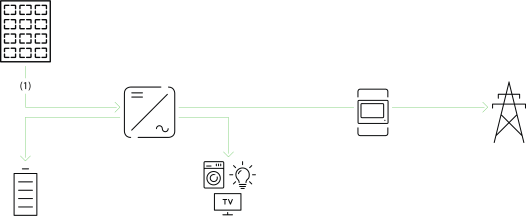
| (1) | The solar energy generated supplies the loads in the house, the battery is charged with solar energy and the surplus energy production is fed into the public grid. |
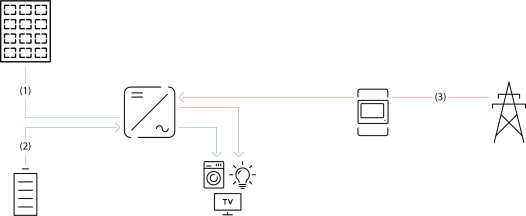
| (1) | There is no solar energy available from the PV modules. |
| (2) | The loads in the house are supplied with energy from the battery. |
| (3) | The loads in the house are supplied with energy from the public grid if the energy from the battery is insufficient. |
IMPORTANT!
Appropriate installation and configuration is a prerequisite for the backup power operating mode.
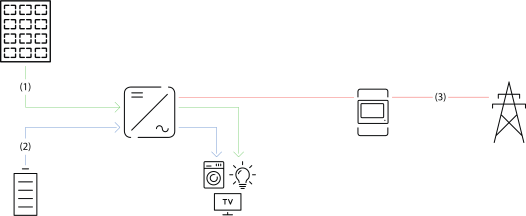
| (1) | The loads in the house are supplied with solar energy from the PV modules. |
| (2) | The loads in the house are supplied with energy from the battery if the solar energy from the PV modules is insufficient. |
| (3) | There is no energy available from the public grid. |
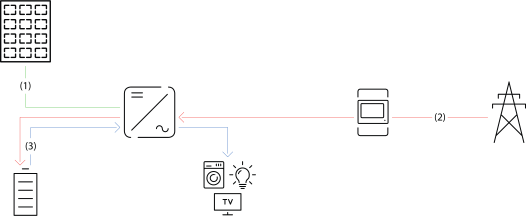
| (1) | There is no solar energy available from the PV modules. |
| (2) | The battery is charged using energy from the public grid at a low electricity price. |
| (3) | The loads in the house are supplied with energy from the battery. |
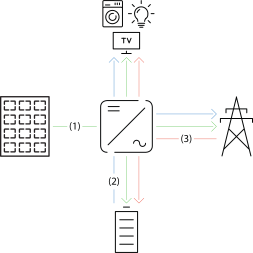
| (1) | PV module – inverter – load/grid/battery |
| (2) | Battery – inverter – load/grid* |
| (3) | Grid – inverter – load/battery* |
* Charging the battery from the grid depends on the settings, as well as the local standards and directives.
Battery systems distinguish between different operating states. In each case, the relevant current operating state is displayed on the user interface of the inverter or in Solar.web.
Operating state | Description |
|---|---|
Normal operation | Energy is stored or drawn, as required. |
Min. state of charge (SoC) reached | The battery has reached the minimum SoC specified by the manufacturer or the set minimum SoC. The battery cannot be further discharged. |
Energy saving mode (standby) | The system has been put into energy saving mode. Energy saving mode is automatically ended as soon as sufficient surplus power is available again. |
Start | The battery system starts from energy saving mode (standby). |
Forced re-charging | The inverter re-charges the battery, in order to maintain the minimum SoC specified by the manufacturer or the set minimum SoC (protection against deep discharge). |
Calibration charging | The battery system is charged to 100% SoC. After reaching 100% SoC, calibration charging is terminated and the battery switches to normal operation. |
Service mode | The battery system is charged or discharged to 15% SoC and 15% SoC is maintained until the end of service mode. |
Disabled | The battery is not active. Either it has been disabled or switched off, or communication between the battery and inverter has been interrupted. |
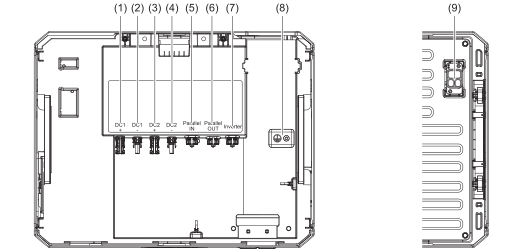
No. | Designation | Description |
|---|---|---|
(1) | DC1+ | Positive pole for the DC connection to the inverter |
(2) | DC1- | Negative pole for the DC connection to the inverter |
(3) | DC2+ | Positive pole for the DC connection to the battery in parallel operation |
(4) | DC2- | Negative pole for the DC connection to the battery in parallel operation |
(5) | Parallel IN | Data communication input between batteries in parallel operation |
(6) | Parallel OUT | Data communication output between batteries in parallel operation |
(7) | INVERTER | Data communication connection to the inverter |
(8) | | PE ground conductor connection |
(9) | HVB plug connector | High-voltage battery (HVB) and data communication plug connector |
No. | Designation | Description |
|---|---|---|
(1) | DC1+ | Positive pole for the DC connection to the inverter |
(2) | DC1- | Negative pole for the DC connection to the inverter |
(3) | DC2+ | Positive pole for the DC connection to the battery in parallel operation |
(4) | DC2- | Negative pole for the DC connection to the battery in parallel operation |
(5) | Parallel IN | Data communication input between batteries in parallel operation |
(6) | Parallel OUT | Data communication output between batteries in parallel operation |
(7) | INVERTER | Data communication connection to the inverter |
(8) | | PE ground conductor connection |
(9) | HVB plug connector | High-voltage battery (HVB) and data communication plug connector |
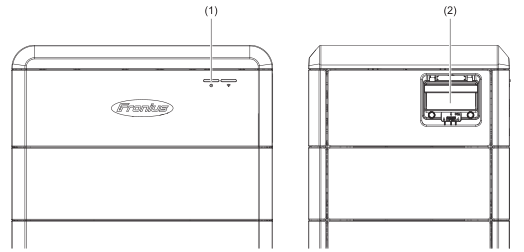
No. | Designation | Description |
|---|---|---|
(1) | LED status indicator | Displays the battery status. |
(2) | DC disconnector | Interrupts the current flow between the battery and inverter. A manual battery start (dark start) is performed automatically when the switch is set to "On". |
LED status indicator | ||
|---|---|---|
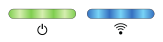 | The battery is starting up or a firmware update is underway. | |
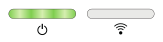 | The battery is checking the application mode (parallel or single application mode) or the battery is in standby mode. | |
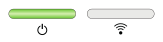 | The application mode check (parallel or single application mode) was performed successfully. | |
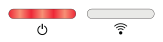 | The battery displays a non-critical status. | |
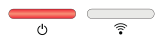 | The battery displays a critical status. | |
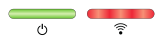 | The battery firmware update failed. | |
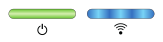 | The data connection to the inverter has been established. | |
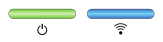 | The battery is working faultlessly and the data connection to the inverter is active. | |
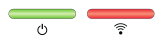 | The data connection to the inverter is interrupted. | |
All installed components in the PV system must be compatible with each other and have the necessary configuration options. The installed components must not restrict or negatively affect the functioning of the PV system.
Risk due to components in the PV system that are not and/or only partially compatible.
Incompatible components can restrict and/or negatively affect the operation and/or functioning of the PV system.
Only install components recommended by the manufacturer in the PV system.
Before installation, check the compatibility of components that have not been expressly recommended with the manufacturer.
All installed components in the PV system must be compatible with each other and have the necessary configuration options. The installed components must not restrict or negatively affect the functioning of the PV system.
Risk due to components in the PV system that are not and/or only partially compatible.
Incompatible components can restrict and/or negatively affect the operation and/or functioning of the PV system.
Only install components recommended by the manufacturer in the PV system.
Before installation, check the compatibility of components that have not been expressly recommended with the manufacturer.
All installed components in the PV system must be compatible with each other and have the necessary configuration options. The installed components must not restrict or negatively affect the functioning of the PV system.
Risk due to components in the PV system that are not and/or only partially compatible.
Incompatible components can restrict and/or negatively affect the operation and/or functioning of the PV system.
Only install components recommended by the manufacturer in the PV system.
Before installation, check the compatibility of components that have not been expressly recommended with the manufacturer.
IMPORTANT! The installation location must be chosen such that all operating controls are easily accessible and simple to operate. The battery must not be covered or installed in enclosures.
 | Maximum ambient temperature: -20 °C to +50 °C | |||
 | Relative humidity: 5 to 95% | |||
 | The battery must not be installed or operated at more than 2000 m above sea level. | |||
 | The battery is suitable for indoor installation. | |||
 | The battery is suitable for installation in protected outdoor areas (e.g., under an overhanging roof). | |||
 | The battery is not suitable for unprotected installation outdoors. The battery is not fully waterproof and must not be immersed in water.
| |||
 | ||||
 | ||||
 | Do not install the battery:
| |||
 | Do not install the battery in:
| |||
 | Do not install the battery in:
| |||
 | Do not install the battery close to sources of fire or near to flammable, explosive or chemical materials. Ensure a minimum distance of 2 meters from heat sources (max. 60 °C). | |||
IMPORTANT! The installation location must be chosen such that all operating controls are easily accessible and simple to operate. The battery must not be covered or installed in enclosures.
| Maximum ambient temperature: -20 °C to +50 °C | |||
| Relative humidity: 5 to 95% | |||
| The battery must not be installed or operated at more than 2000 m above sea level. | |||
| The battery is suitable for indoor installation. | |||
| The battery is suitable for installation in protected outdoor areas (e.g., under an overhanging roof). | |||
| The battery is not suitable for unprotected installation outdoors. The battery is not fully waterproof and must not be immersed in water.
| |||
| ||||
| ||||
| Do not install the battery:
| |||
| Do not install the battery in:
| |||
| Do not install the battery in:
| |||
| Do not install the battery close to sources of fire or near to flammable, explosive or chemical materials. Ensure a minimum distance of 2 meters from heat sources (max. 60 °C). | |||
IMPORTANT!
The battery system must be installed on a sufficiently load-bearing and non-combustible surface (e.g., brick or concrete wall). Installation sites for battery storage systems must be effectively ventilated to the outside if the indoor space does not guarantee sufficient ventilation.
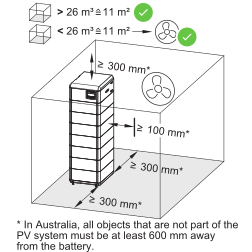
A minimum clearance of 300 mm is recommended on the left and right sides of the battery.
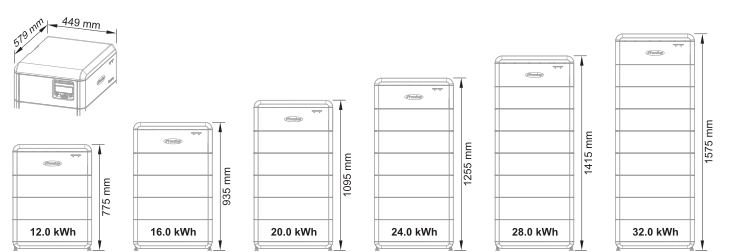
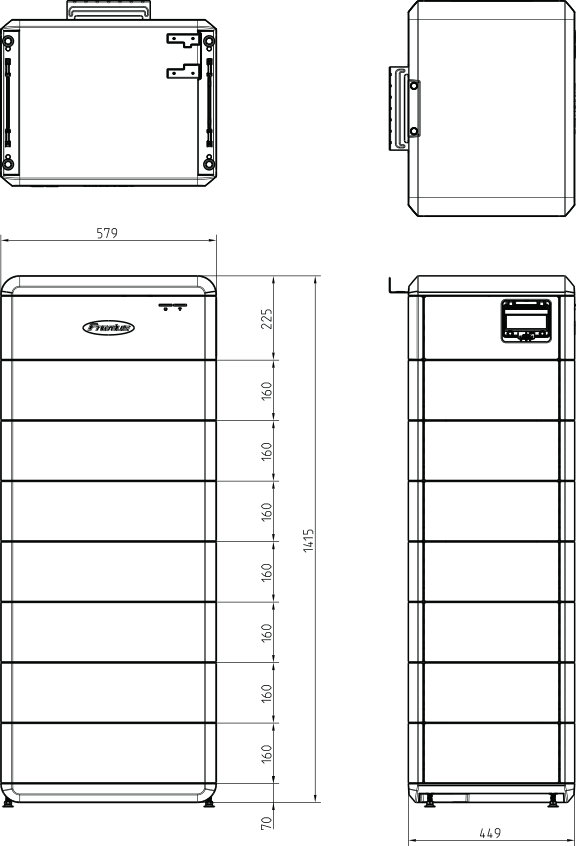
For detailed information regarding the battery dimensions, see chapter Dimensions on page (→).
Danger of electric shock from live HVB plug connectors.
This can result in severe personal injury and damage to property.
Use the integrated carrying handles for lifting the battery and setting it down.
Wear personal protective equipment.
Remove conductive objects such as watches, bracelets, and rings.
Danger due to soiled battery connections.
This can result in severe personal injury and damage to property.
Protect the battery connections from dirt.
Check the battery connections for soiling.
Always use personal protective equipment (insulated gloves, safety goggles, protective clothing) when cleaning soiled battery connections and remove soiling with a lint-free cloth without the use of cleaning agents.
Danger due to improper battery transportation or installation.
This can result in injuries.
Lifting and lowering should be performed by at least 2 people.
Use the integrated carrying handles.
When lowering the battery, make sure that limbs do not come between the battery and the fixtures.
Wear personal protective equipment.
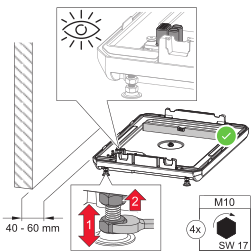
Position the base plate parallel to the wall at a distance of 40 ‑ 60 mm and align it horizontally by turning the adjustable feet with a flat spanner (17 mm).
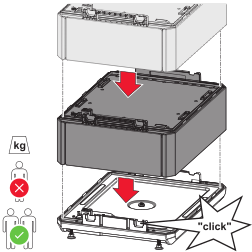
Arrange the Reserva Pro modules in parallel and press into place until the modules engage on both sides with an audible click.
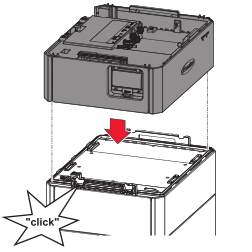
Arrange the Reserva Pro BMS in parallel on the last Reserva Pro module and press into place until the BMS engages on both sides with an audible click.
Danger of electric shock from live HVB plug connectors.
This can result in severe personal injury and damage to property.
Use the integrated carrying handles for lifting the battery and setting it down.
Wear personal protective equipment.
Remove conductive objects such as watches, bracelets, and rings.
Danger due to soiled battery connections.
This can result in severe personal injury and damage to property.
Protect the battery connections from dirt.
Check the battery connections for soiling.
Always use personal protective equipment (insulated gloves, safety goggles, protective clothing) when cleaning soiled battery connections and remove soiling with a lint-free cloth without the use of cleaning agents.
Danger due to improper battery transportation or installation.
This can result in injuries.
Lifting and lowering should be performed by at least 2 people.
Use the integrated carrying handles.
When lowering the battery, make sure that limbs do not come between the battery and the fixtures.
Wear personal protective equipment.
Position the base plate parallel to the wall at a distance of 40 ‑ 60 mm and align it horizontally by turning the adjustable feet with a flat spanner (17 mm).
Arrange the Reserva Pro modules in parallel and press into place until the modules engage on both sides with an audible click.
Arrange the Reserva Pro BMS in parallel on the last Reserva Pro module and press into place until the BMS engages on both sides with an audible click.
Solid | Multi-stranded | Fine-stranded |
|---|---|---|
 |  |  |
Solid | Multi-stranded | Fine-stranded |
|---|---|---|
| | |
IMPORTANT! The cables used must comply with the requirements of EN 50618 or IEC 62930. Cables that do not comply with EN 50618 or IEC 62930 have a lower current carrying capacity and the technical specialist is responsible for ensuring appropriate cable dimensions and cable lengths.
Round copper conductors can be connected to the terminals as described below:
DC connections | ||||
|---|---|---|---|---|
Manufacturer | Ø insulation layer | Stripping length | | |
Stäubli MC4 EVO STO | 4.7-6.4 mm | 7 mm | 6 mm2 | 6 mm2 |
Stäubli MC4 EVO STO | 6.4-8.5 mm | 7 mm | 10 mm2 | 10 mm2 |
PE ground conductor connection (ring cable lug) | |||||
|---|---|---|---|---|---|
Material | Ø bore | Torque | | | |
Copper with tin coating | 4 mm | 3 Nm | 2.5 - 6 mm2 | 2.5 - 6 mm2 | 2.5 - 6 mm2 |
RJ45 connection | |||
|---|---|---|---|
Cable recommendation | Max. cable length | | |
Min. CAT 5 STP (shielded twisted pair) | 30 m | 0.14 - 1.5 mm2 | 0.14 - 1.5 mm2 |
Danger due to incorrect operation and incorrectly performed work.
This can result in serious injury and damage to property.
Only a technical specialist is permitted to perform commissioning, maintenance, and service activities for inverters and batteries, and only within the scope of the technical regulations.
Read the installation instructions and operating instructions from the respective manufacturer before installing and commissioning the equipment.
Danger from mains voltage and DC voltage from the PV module that are exposed to light, as well as batteries.
This can result in serious injury and damage to property.
All connection, maintenance, and service work should only be carried out when the AC and DC sides have been disconnected from the inverter and battery, and are de-energized.
Only a technical specialist is permitted to connect this equipment to the public grid.
Danger from damaged and/or contaminated terminals.
This can result in serious injury and damage to property.
Prior to connection work, check the terminals for damage and contamination.
Remove any contamination while the equipment is de-energized.
Have defective terminals repaired by a technical specialist.
Danger due to incorrect operation and incorrectly performed work.
This can result in serious injury and damage to property.
Only a technical specialist is permitted to perform commissioning, maintenance, and service activities for inverters and batteries, and only within the scope of the technical regulations.
Read the installation instructions and operating instructions from the respective manufacturer before installing and commissioning the equipment.
Danger from mains voltage and DC voltage from the PV module that are exposed to light, as well as batteries.
This can result in serious injury and damage to property.
All connection, maintenance, and service work should only be carried out when the AC and DC sides have been disconnected from the inverter and battery, and are de-energized.
Only a technical specialist is permitted to connect this equipment to the public grid.
Danger from damaged and/or contaminated terminals.
This can result in serious injury and damage to property.
Prior to connection work, check the terminals for damage and contamination.
Remove any contamination while the equipment is de-energized.
Have defective terminals repaired by a technical specialist.
IMPORTANT! Allow the capacitors of the inverter to discharge.
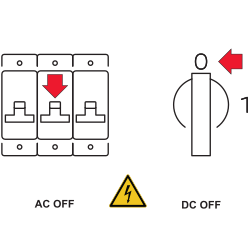
Turn off the automatic circuit breaker. Set the switch position of the inverter's DC disconnector to "Off".
IMPORTANT! The battery modules are connected to one another in the battery system via a common ground connection. This ensures equipotential bonding of the battery system. An additional ground connection to the individual battery modules is neither necessary nor permitted.
IMPORTANT! The technical specialist is responsible for selecting the cable lug and screw lock.
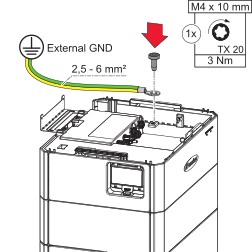
Fasten the ground conductor (PE) to the ground conductor connection using the M4x10 TX20 screw supplied and a torque of 3 Nm.
Danger from loose and/or incorrectly clamped single conductors.
This can result in severe personal injury and damage to property.
Check that the single conductors are secure in the crimp contacts.
Ensure that the single conductor is fully in the crimp contact and that no individual strands are protruding.
IMPORTANT!
The maximum cable length between the inverter and battery is 40 m.
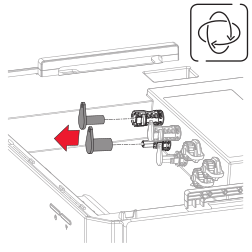
Remove the caps.
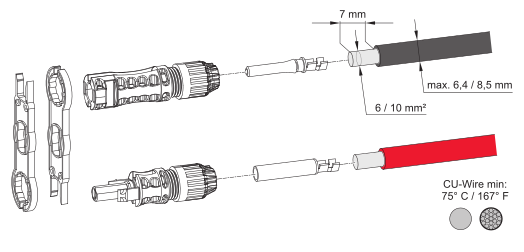
Select the cable cross-section according to the information in Permitted cables for the electrical connection on page (→). Strip 7 mm (0.27 inches) of insulation from the single conductors.
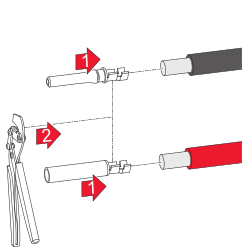
Attach the crimp contact to the individual conductors using a suitable crimping tool.
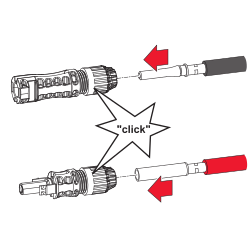
Push the crimp contact into the MC4 plug with an audible click.
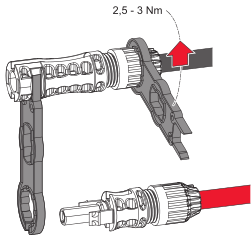
Tighten the cable glands with a torque of 2.5 Nm ‑ 3 Nm.
IMPORTANT!
Full selectivity of the overcurrent protection devices is only guaranteed if they are installed correctly.
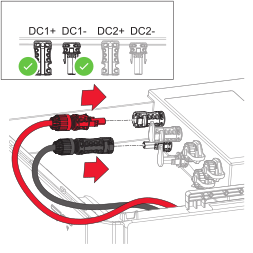
Push the MC4 plugs (+/-) into the DC1+/DC1- slots until they click into place.
Danger from loose and/or incorrectly clamped single conductors.
This can result in severe personal injury and damage to property.
Check that the single conductors are secure in the crimp contacts.
Ensure that the single conductor is fully in the crimp contact and that no individual strands are protruding.
IMPORTANT!
The maximum cable length between the inverter and the last battery system is 40 m and the maximum cable length between the battery systems is 7 m. The cable lengths between the battery systems should be as short as possible and identical cable lengths should be used in order to avoid current differences between the battery systems.
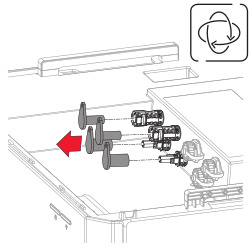
Remove the caps.
Select the cable cross-section according to the information in Permitted cables for the electrical connection on page (→). Strip 7 mm (0.27 inches) of insulation from the single conductors.
Attach the crimp contact to the individual conductors using a suitable crimping tool.
Push the crimp contact into the MC4 plug with an audible click.
Tighten the cable glands with a torque of 2.5 Nm ‑ 3 Nm.
IMPORTANT!
Full selectivity of the overcurrent protection devices is only guaranteed if they are installed correctly.
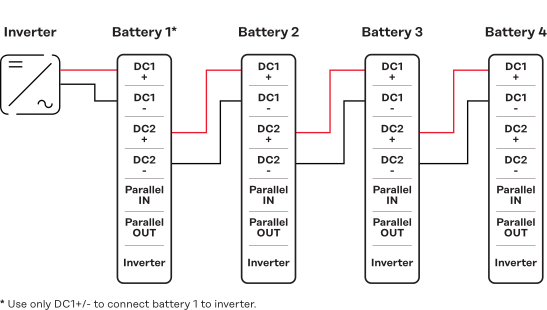
Push the MC4 plug (+/-) into the respective slot until it clicks into place.
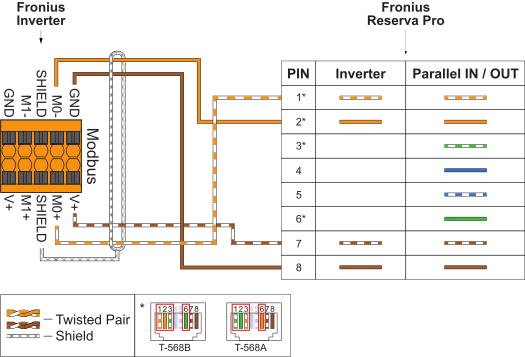
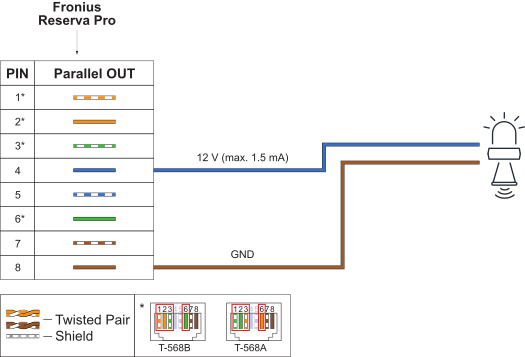
IMPORTANT!
It is not possible to guarantee effectiveness of the cable gland and IP65 protection class for the data communication connection if the connection is not established correctly.
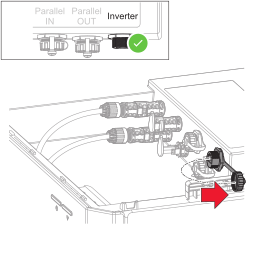
Unscrew the cap on the "Inverter" data communication connection.
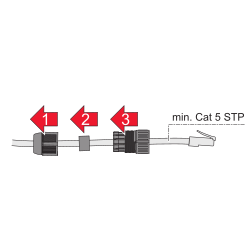
First feed the data cable through the union nut and then through the seal and cable gland.
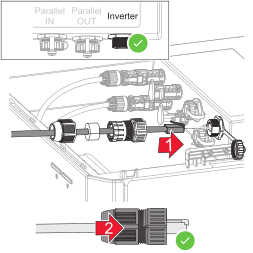
Connect the data cable to the "Inverter" data communication connection with an audible click. Fasten the union nut to the cable gland.
IMPORTANT!
The maximum cable length between the inverter and the battery is 30 m and the maximum cable length between the battery systems is 10 m.
IMPORTANT!
It is not possible to guarantee effectiveness of the cable gland and IP65 protection class for the data communication connection if the connection is not established correctly.
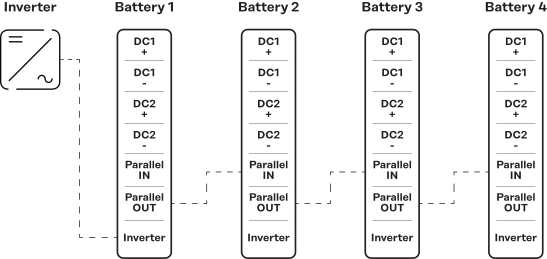
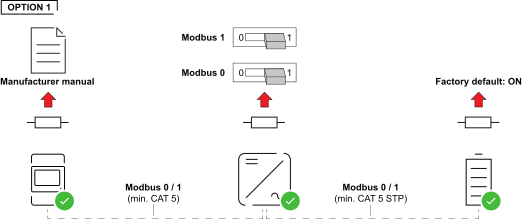
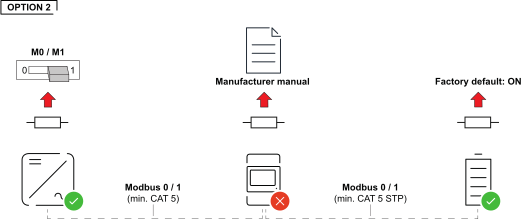
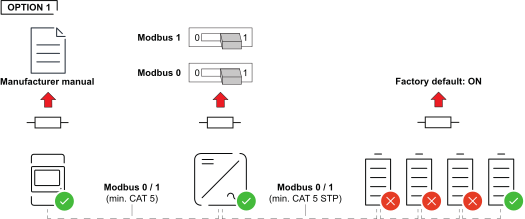
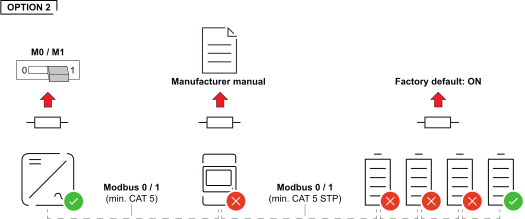
Overview
The terminating resistors are integrated in the Reserva Pro BMS. As such, no configuration or installation of terminating resistors on the battery is required.
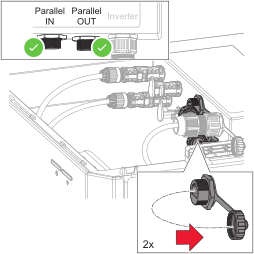
Unscrew the caps on the "Parallel IN" and "Parallel OUT" data communication connections.
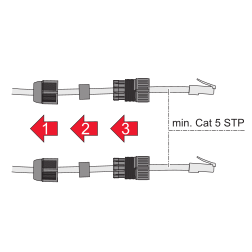
First feed the data cable through the union nut and then through the seal and cable gland.
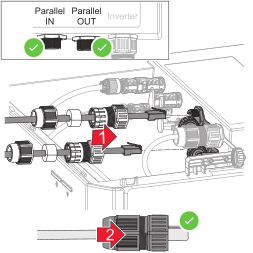
Connect the data cables to the "Parallel IN" and "Parallel OUT" data communication connections with an audible click. Fasten the union nuts to the cable glands.
Installation without terminating resistors can lead to interference during operation of the photovoltaic system. To ensure faultless functionality, install terminating resistors according to the following overview.
For permitted cables and maximum distances for the data communication area, see chapter Permitted cables for the data communication connection on page (→).
Installation without terminating resistors can lead to interference during operation of the photovoltaic system. To ensure faultless functionality, install terminating resistors according to the following overview.
For permitted cables and maximum distances for the data communication area, see chapter Permitted cables for the data communication connection on page (→).
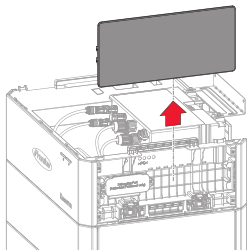
Slide the right-hand cover on the Reserva Pro BMS upwards and lift it off.
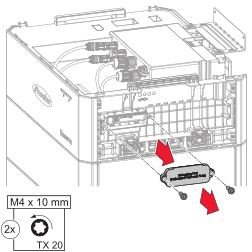
Loosen the 2 screws of the connection area cover with a screwdriver (TX20).
Remove the connection area cover from the device.
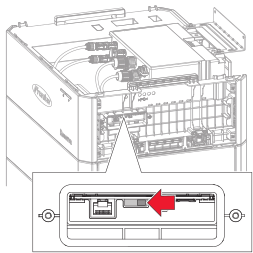
Set the "Terminal Resistor Switch" to the "OFF" position.
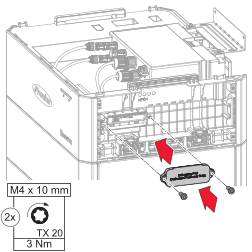
Place the cover on the connection area. Tighten the 2 screws with a screwdriver (TX20) and a torque of 3 Nm.
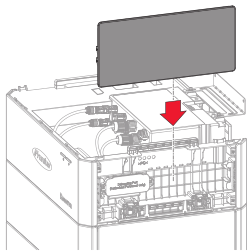
Push in the right-hand cover from above until the covers click into place.
Use appropriate mounting materials depending on the surface and pay attention to the recommendation for the screw dimensions for the L-shaped mounting bracket. A technical specialist is responsible for selecting appropriate mounting material.
Use appropriate mounting materials depending on the surface and pay attention to the recommendation for the screw dimensions for the L-shaped mounting bracket. A technical specialist is responsible for selecting appropriate mounting material.
Danger of battery systems toppling over if not installed correctly.
This can result in injuries and damage to property.
Secure the battery system against toppling over using the mounting bracket supplied.
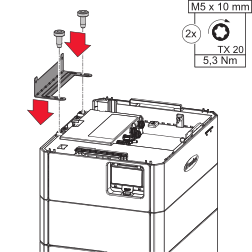
Fasten the mounting bracket to the BMS using the M5x10 TX20 screws supplied and a torque of 5.3 Nm.
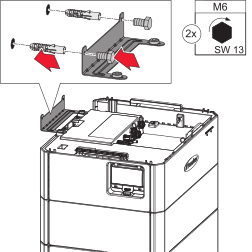
Attach the mounting bracket to the wall using suitable mounting material (see chapter Selecting the mounting material on page (→)).
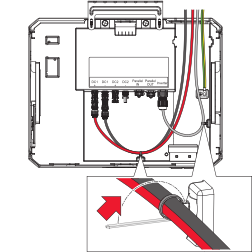
Lay the cables in the cable duct integrated in the connection area and secure them with the integrated cable ties.
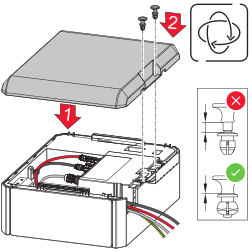
Place the (top) cover on the Reserva Pro BMS and secure it with the fastening clips supplied.
Danger due to soiled battery connections.
This can result in severe personal injury and damage to property.
Protect the battery connections from dirt.
Check the battery connections for soiling.
Always use personal protective equipment (insulated gloves, safety goggles, protective clothing) when cleaning soiled battery connections and remove soiling with a lint-free cloth without the use of cleaning agents.
Danger due to improper battery transportation or installation.
This can result in injuries.
Use the integrated carrying handles for lifting the battery and setting it down.
When lowering the battery, make sure that limbs do not come between the battery and the fixtures.
Wear personal protective equipment.
Danger due to soiled battery connections.
This can result in severe personal injury and damage to property.
Protect the battery connections from dirt.
Check the battery connections for soiling.
Always use personal protective equipment (insulated gloves, safety goggles, protective clothing) when cleaning soiled battery connections and remove soiling with a lint-free cloth without the use of cleaning agents.
Danger due to improper battery transportation or installation.
This can result in injuries.
Use the integrated carrying handles for lifting the battery and setting it down.
When lowering the battery, make sure that limbs do not come between the battery and the fixtures.
Wear personal protective equipment.
Restriction applies to expansion of the battery system after 2 years.
Expansion of the battery system is possible after 2 years, but with the restriction that the added battery module is operated with the lowest State of Health (SoH) in the battery system.
Example of expansion outside the manufacturer's recommended period | |
|---|---|
SoH of new Reserva Pro module | 100% |
SoH of installed Reserva Pro modules | 96% |
SoH of entire battery system | 96% |
To activate Service Mode, a connection to the user interface of the inverter is required, see chapter Commissioning with the app on page (→) or Commissioning with the browser on page (→).
IMPORTANT! Allow the capacitors of the inverter to discharge.
Turn off the automatic circuit breaker. Set the switch position of the inverter's DC disconnector to "Off".
IMPORTANT! Before starting work on the battery, all LEDs on the LED status indicator must be unlit.
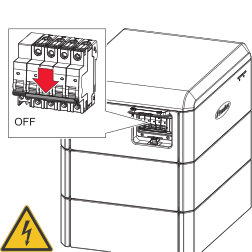
Set the switch position of the battery's DC disconnector to "Off".
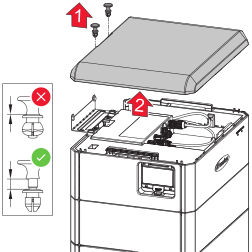
Remove the fastening clips from the top cover and lift off the cover.
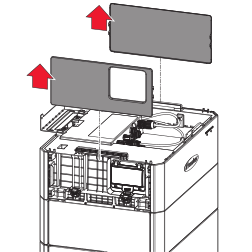
Slide the left and right-hand covers on the Reserva Pro BMS upwards and lift them off.
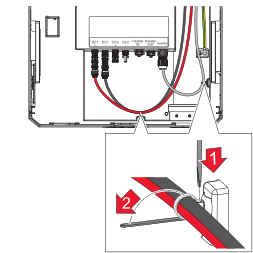
Detach the cables from the fastening clips.
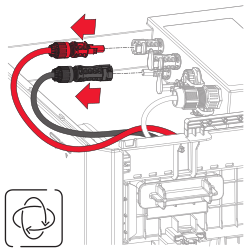
Release the MC4 plugs (+/-) using a suitable tool.
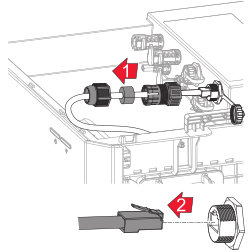
Unscrew the cable gland of the "INVERTER" data cable. Press the latch on the RJ45 plug and unplug the plug.
For batteries in parallel operation, also disconnect the "Parallel IN" and "Parallel OUT" data cables.
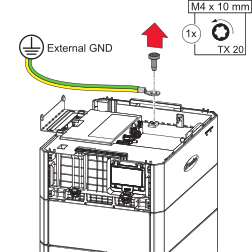
Using a screwdriver (TX20), loosen the ground conductor (PE).
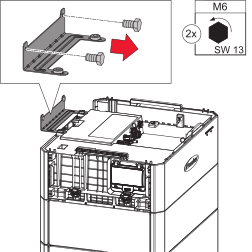
Release the L‑shaped mounting bracket.
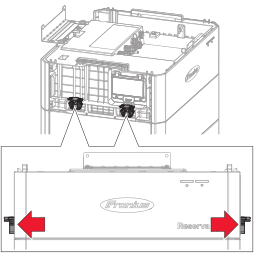
Pull out the 4 latches as far as they will go.
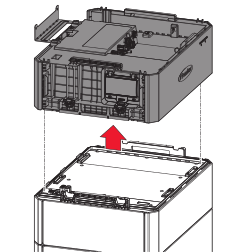
Lift the Reserva Pro BMS in parallel from the last Reserva Pro module.
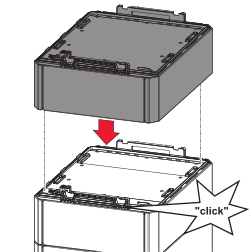
Arrange the new Reserva Pro module in parallel and press into place until the Reserva Pro module engages on both sides with an audible click.
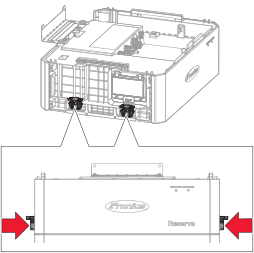
Press the 4 latches into their original position.
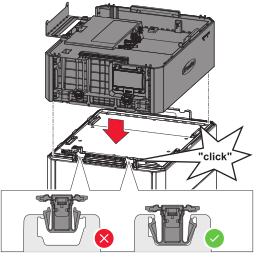
Arrange the Reserva Pro BMS in parallel on the last Reserva Pro module and press into place until the BMS engages on both sides with an audible click.
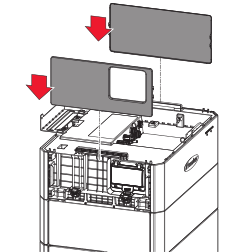
Push in the side covers from above until the covers click into place.
Fasten the ground conductor (PE) to the ground conductor connection using the M4x10 TX20 screw supplied and a torque of 3 Nm.
IMPORTANT!
Full selectivity of the overcurrent protection devices is only guaranteed if they are installed correctly.
Push the MC4 plugs (+/-) into the DC1+/DC1- slots until they click into place.
Connect the data cable to the "Inverter" data communication connection with an audible click. Fasten the union nut to the cable gland.
Lay the cables in the cable duct integrated in the connection area and secure them with the integrated cable ties.
Danger of battery systems toppling over if not installed correctly.
This can result in injuries and damage to property.
Secure the battery system against toppling over using the mounting bracket supplied.
Fasten the mounting bracket to the BMS using the M5x10 TX20 screws supplied and a torque of 5.3 Nm.
Attach the mounting bracket to the wall using suitable mounting material (see chapter Selecting the mounting material on page (→)).
Place the (top) cover on the Reserva Pro BMS and secure it with the fastening clips supplied.
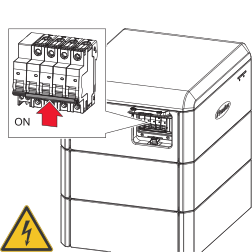
Set the switch position of the battery's DC disconnector to "On".
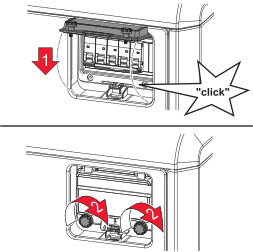
Close the cover on the DC disconnector with an audible click and secure it with the screws to prevent unauthorized opening.
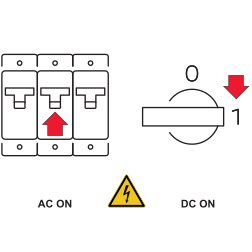
Turn on the automatic circuit breaker. Set the switch position of the inverter's DC disconnector to "On".
Set the switch position of the battery's DC disconnector to "On".
Close the cover on the DC disconnector with an audible click and secure it with the screws to prevent unauthorized opening.
Turn on the automatic circuit breaker. Set the switch position of the inverter's DC disconnector to "On".
Set the switch position of the battery's DC disconnector to "On".
Close the cover on the DC disconnector with an audible click and secure it with the screws to prevent unauthorized opening.
Turn on the automatic circuit breaker. Set the switch position of the inverter's DC disconnector to "On".
There is no energy available from the PV modules or from the public grid. If backup power operation or battery operation are not possible (e.g., deep discharge protection of the battery), the inverter and battery switch off.
There is no energy available from the PV modules or from the public grid. If backup power operation or battery operation are not possible (e.g., deep discharge protection of the battery), the inverter and battery switch off.
Status codes about the inactive state of the battery are displayed on the user interface of the inverter. A notification via e-mail can be activated in Fronius Solar.web.
As soon as energy is available again, the inverter and the battery will start operation automatically. If the battery has switched off to protect against deep discharge for example, the battery must be started manually (dark start), see chapter Switching on the photovoltaic system on page (→).
The inverter requires a supply of energy from the battery to start backup power mode. This is established manually on the battery as described below.
Set the switch position of the battery's DC disconnector to "On".
Close the cover on the DC disconnector with an audible click and secure it with the screws to prevent unauthorized opening.
IMPORTANT! Settings in the Device Configuration menu item may only be entered by staff trained to do so!
To access the Device Configuration menu item, you must log in with user “Technician” and the technician password.
IMPORTANT! Settings in the Device Configuration menu item may only be entered by staff trained to do so!
To access the Device Configuration menu item, you must log in with user “Technician” and the technician password.
The Fronius Solar.start app is required for commissioning. Depending on the mobile device used to perform the installation, the app is available on the relevant platform.
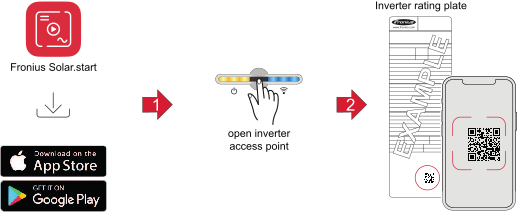
 .
.The network wizard and product setup can be performed independently. A network connection is required for the Fronius Solar.web installation wizard.
WiFi:
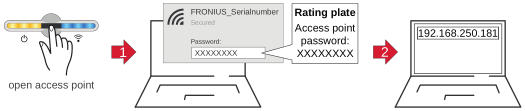 .
. The network wizard and product setup can be performed independently. A network connection is required for the Fronius Solar.web installation wizard.
Ethernet:
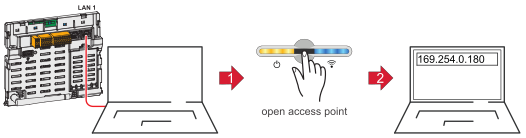 .
.The network wizard and product setup can be performed independently. A network connection is required for the Fronius Solar.web installation wizard.
Obsolete firmware/software versions may lead to incompatibilities between the inverter and the battery. In this case, the following steps are to be performed:
All available updates are provided on the product page and in the "Fronius Download Search" area at www.fronius.com .
IMPORTANT! Before starting work on the battery, all LEDs on the LED status indicator must be unlit.
Set the switch position of the battery's DC disconnector to "Off".
IMPORTANT! Before starting work on the battery, all LEDs on the LED status indicator must be unlit.
Set the switch position of the battery's DC disconnector to "Off".
Set the switch position of the battery's DC disconnector to "On".
Close the cover on the DC disconnector with an audible click and secure it with the screws to prevent unauthorized opening.
Wipe the device, if necessary, with a damp cloth.
Do not use cleaning agents, scouring agents, solvents, or similar products to clean the device.
Wipe the device, if necessary, with a damp cloth.
Do not use cleaning agents, scouring agents, solvents, or similar products to clean the device.
Wipe the device, if necessary, with a damp cloth.
Do not use cleaning agents, scouring agents, solvents, or similar products to clean the device.
The device is maintenance-free. Service work may only be carried out by qualified technical personnel.
Forced re-charging to protect against deep discharge takes place automatically using solar energy or energy from the grid if the battery's state of charge (SoC) falls below the minimum level and the requirements are met.
Danger of deep discharge of battery modules.
This can result in irreparable damage to the battery modules.
If the battery falls below the minimum state of charge (SoC), it must be recharged within 7 days to protect against deep discharge.
Start forced re-charging if the battery has switched off automatically to protect against deep discharge, see chapter Switching on the photovoltaic system on page (→).
Used equipment and batteries must be returned to the distributor or an authorized local collection system. Do not dispose of batteries with domestic waste. Protect batteries from high temperatures, direct sunlight, moisture and corrosive environments.
Arrange for the safe collection and proper disposal of damaged, leaking or used batteries by a battery recycling company or the Fronius Service Partner.
In addition, it should be noted that batteries contain substances that, if disposed of improperly, can have a significant negative impact on the environment as well as on human health and the safety of persons, in particular due to the leakage of hazardous substances such as heavy metals or electrolytes, which can contaminate soil, water and air.
This ensures environmental protection and the sustainable use of natural resources.Packaging materialsDetailed warranty conditions specific to your country can be found at https://www.fronius.com/en/download-center?searchword=Warranty+conditions .
If there is a warranty for the relevant product, register the product at https://warranty.fronius.com/ and activate or extend the warranty.
Detailed warranty conditions specific to your country can be found at https://www.fronius.com/en/download-center?searchword=Warranty+conditions .
If there is a warranty for the relevant product, register the product at https://warranty.fronius.com/ and activate or extend the warranty.
General data | |
|---|---|
Usable capacity 1) | 56.6 Ah |
Max. charging current |
|
Max. discharge current (A) |
|
Permitted ambient temperature | -20 °C to 50 °C |
Optimum operating temperature | 15 °C to 30 °C |
Permissible humidity | 5% to 95% |
Cooling | Convection cooling |
Altitude | ≤ 2000 m |
Reserva Pro module discharge rate | |
Number of battery modules | 3 |
Max. battery systems in parallel operation |
|
Data communication between inverter and battery |
|
Certifications | IEC 62619:2022 |
EMC standards | EN IEC 61000-6-2:2019 |
UN transport test standard | UN 38.3 |
Certifications for environmental protection | RoHS |
Protection class (when installed) | IP65 |
Corrosivity category | C3 |
Protective class | 2 |
Overvoltage category | 2 |
Pollution degree | 2 |
Dimensions incl. covers 2) |
|
Weight | 126 kg |
Battery code | IFpP17/102/354/[(22S)3S]E/-20+50/95 |
Electrical data | |
|---|---|
Number of modules | 3 |
Nominal energy | 12 kWh |
Usable energy | 11.9 kWh |
Rated voltage | 212.5 V |
Operating AC voltage range | 165 - 240 V |
Charging/discharging capacity | 11.8 kW |
Expected short circuit current | 1.89 kA |
General data | |
|---|---|
Usable capacity 1) | 56.6 Ah |
Max. charging current |
|
Max. discharge current (A) |
|
Permitted ambient temperature | -20 °C to 50 °C |
Optimum operating temperature | 15 °C to 30 °C |
Permissible humidity | 5% to 95% |
Cooling | Convection cooling |
Altitude | ≤ 2000 m |
Reserva Pro module discharge rate | |
Number of battery modules | 3 |
Max. battery systems in parallel operation |
|
Data communication between inverter and battery |
|
Certifications | IEC 62619:2022 |
EMC standards | EN IEC 61000-6-2:2019 |
UN transport test standard | UN 38.3 |
Certifications for environmental protection | RoHS |
Protection class (when installed) | IP65 |
Corrosivity category | C3 |
Protective class | 2 |
Overvoltage category | 2 |
Pollution degree | 2 |
Dimensions incl. covers 2) |
|
Weight | 126 kg |
Battery code | IFpP17/102/354/[(22S)3S]E/-20+50/95 |
Electrical data | |
|---|---|
Number of modules | 3 |
Nominal energy | 12 kWh |
Usable energy | 11.9 kWh |
Rated voltage | 212.5 V |
Operating AC voltage range | 165 - 240 V |
Charging/discharging capacity | 11.8 kW |
Expected short circuit current | 1.89 kA |
General data | |
|---|---|
Usable capacity 1) | 56.6 Ah |
Max. charging current |
|
Max. discharge current (A) |
|
Permitted ambient temperature | -20 °C to 50 °C |
Optimum operating temperature | 15 °C to 30 °C |
Permissible humidity | 5% to 95% |
Cooling | Convection cooling |
Altitude | ≤ 2000 m |
Reserva Pro module discharge rate |
|
Number of battery modules | 4 |
Max. battery systems in parallel operation |
|
Data communication between inverter and battery |
|
Certifications | IEC 62619:2022 |
EMC standards | EN IEC 61000-6-2:2019 |
UN transport test standard | UN 38.3 |
Certifications for environmental protection | RoHS |
Protection class (when installed) | IP65 |
Corrosivity category | C3 |
Protective class | 2 |
Overvoltage category | 2 |
Pollution degree | 2 |
Dimensions incl. covers 2) |
|
Weight | 162 kg |
Battery code | IFpP17/102/354/[(22S)4S]E/-20+50/95 |
Electrical data | |
|---|---|
Number of modules | 4 |
Nominal energy | 16 kWh |
Usable energy | 15.9 kWh |
Rated voltage | 283.3 V |
Operating AC voltage range | 220 - 321 V |
Charging/discharging capacity | 15.8 kW |
Expected short circuit current | 1.99 kA |
General data | |
|---|---|
Usable capacity 1) | 56.6 Ah |
Max. charging current |
|
Max. discharge current (A) |
|
Permitted ambient temperature | -20 °C to 50 °C |
Optimum operating temperature | 15 °C to 30 °C |
Permissible humidity | 5% to 95% |
Cooling | Convection cooling |
Altitude | ≤ 2000 m |
Reserva Pro module discharge rate |
|
Number of battery modules | 5 |
Max. battery systems in parallel operation |
|
Data communication between inverter and battery |
|
Certifications | IEC 62619:2022 |
EMC standards | EN IEC 61000-6-2:2019 |
UN transport test standard | UN 38.3 |
Certifications for environmental protection | RoHS |
Protection class (when installed) | IP65 |
Corrosivity category | C3 |
Protective class | 2 |
Overvoltage category | 2 |
Pollution degree | 2 |
Dimensions incl. covers 2) |
|
Weight | 198 kg |
Battery code | IFpP17/102/354/[(22S)5S]E/-20+50/95 |
Electrical data | |
|---|---|
Number of modules | 5 |
Nominal energy | 20 kWh |
Usable energy | 19.9 kWh |
Rated voltage | 354.2 V |
Operating AC voltage range | 275 - 401 V |
Charging/discharging capacity | 19.7 kW |
Expected short circuit current | 2.08 kA |
General data | |
|---|---|
Usable capacity 1) | 56.6 Ah |
Max. charging current |
|
Max. discharge current (A) |
|
Permitted ambient temperature | -20 °C to 50 °C |
Optimum operating temperature | 15 °C to 30 °C |
Permissible humidity | 5% to 95% |
Cooling | Convection cooling |
Altitude | ≤ 2000 m |
Reserva Pro module discharge rate |
|
Number of battery modules | 6 |
Max. battery systems in parallel operation |
|
Data communication between inverter and battery |
|
Certifications | IEC 62619:2022 |
EMC standards | EN IEC 61000-6-2:2019 |
UN transport test standard | UN 38.3 |
Certifications for environmental protection | RoHS |
Protection class (when installed) | IP65 |
Corrosivity category | C3 |
Protective class | 2 |
Overvoltage category | 2 |
Pollution degree | 2 |
Dimensions incl. covers 2) |
|
Weight | 234 kg |
Battery code | IFpP17/102/354/[(22S)6S]E/-20+50/95 |
Electrical data | |
|---|---|
Number of modules | 6 |
Nominal energy | 24 kWh |
Usable energy | 23.9 kWh |
Rated voltage | 425 V |
Operating AC voltage range | 330 - 481 V |
Charging/discharging capacity | 23.7 kW |
Expected short circuit current | 2.18 kA |
General data | |
|---|---|
Usable capacity 1) | 56.6 Ah |
Max. charging current |
|
Max. discharge current (A) |
|
Permitted ambient temperature | -20 °C to 50 °C |
Optimum operating temperature | 15 °C to 30 °C |
Permissible humidity | 5% to 95% |
Cooling | Convection cooling |
Altitude | ≤ 2000 m |
Reserva Pro module discharge rate |
|
Number of battery modules | 7 |
Max. battery systems in parallel operation |
|
Data communication between inverter and battery |
|
Certifications | IEC 62619:2022 |
EMC standards | EN IEC 61000-6-2:2019 |
UN transport test standard | UN 38.3 |
Certifications for environmental protection | RoHS |
Protection class (when installed) | IP65 |
Corrosivity category | C3 |
Protective class | 2 |
Overvoltage category | 2 |
Pollution degree | 2 |
Dimensions incl. covers 2) |
|
Weight | 270 kg |
Battery code | IFpP17/102/354/[(22S)7S]E/-20+50/95 |
Electrical data | |
|---|---|
Number of modules | 7 |
Nominal energy | 28 kWh |
Usable energy | 27.9 kWh |
Rated voltage | 495.8 V |
Operating AC voltage range | 385 - 562 V |
Charging/discharging capacity | 27.6 kW |
Expected short circuit current | 2.27 kA |
General data | |
|---|---|
Usable capacity 1) | 56.6 Ah |
Max. charging current |
|
Max. discharge current (A) |
|
Permitted ambient temperature | -20 °C to 50 °C |
Optimum operating temperature | 15 °C to 30 °C |
Permissible humidity | 5% to 95% |
Cooling | Convection cooling |
Altitude | ≤ 2000 m |
Reserva Pro module discharge rate |
|
Number of battery modules | 8 |
Max. battery systems in parallel operation |
|
Data communication between inverter and battery |
|
Certifications | IEC 62619:2022 |
EMC standards | EN IEC 61000-6-2:2019 |
UN transport test standard | UN 38.3 |
Certifications for environmental protection | RoHS |
Protection class (when installed) | IP65 |
Corrosivity category | C3 |
Protective class | 2 |
Overvoltage category | 2 |
Pollution degree | 2 |
Dimensions incl. covers 2) |
|
Weight | 306 kg |
Battery code | IFpP17/102/354/[(22S)8S]E/-20+50/95 |
Electrical data | |
|---|---|
Number of modules | 8 |
Nominal energy | 32 kWh |
Usable energy | 31.9 kWh |
Rated voltage | 566.7 V |
Operating AC voltage range | 440 - 642 V |
Charging/discharging capacity | 31.6 kW |
Expected short circuit current | 2.37 kA |
| 1) | 99.5% depth of discharge (DoD), 0.25 C charge and discharge rate at 25 °C. |
| 2) | The protrusion of the adjustable feet and mounting bracket was not taken into account in the dimensions. |